
Website page speed is how fast a page downloads and becomes usable in a visitor’s browser. Google measures it with three Core Web Vitals: loading, interactivity and visual stability. Slow website page speed raises bounce rates, lowers search rankings, and quietly costs sales before a visitor reads a single word of your content.
Key Takeaways
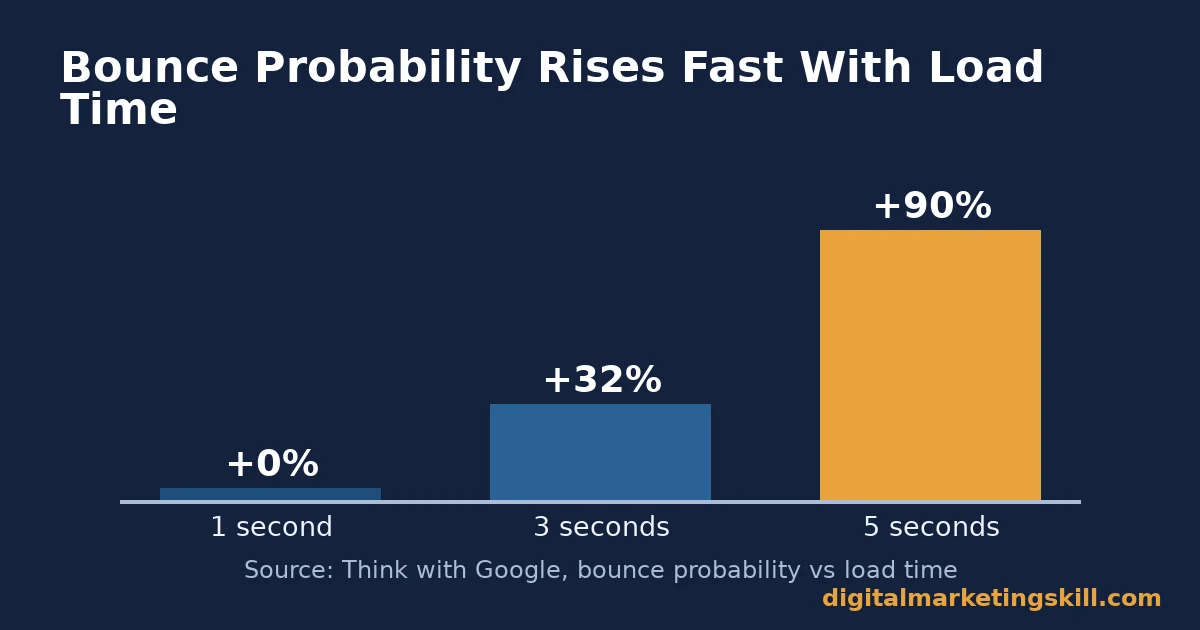
- Bounce probability rises 32% as load time goes from 1 to 3 seconds, and 90% at 5 seconds (Think with Google).
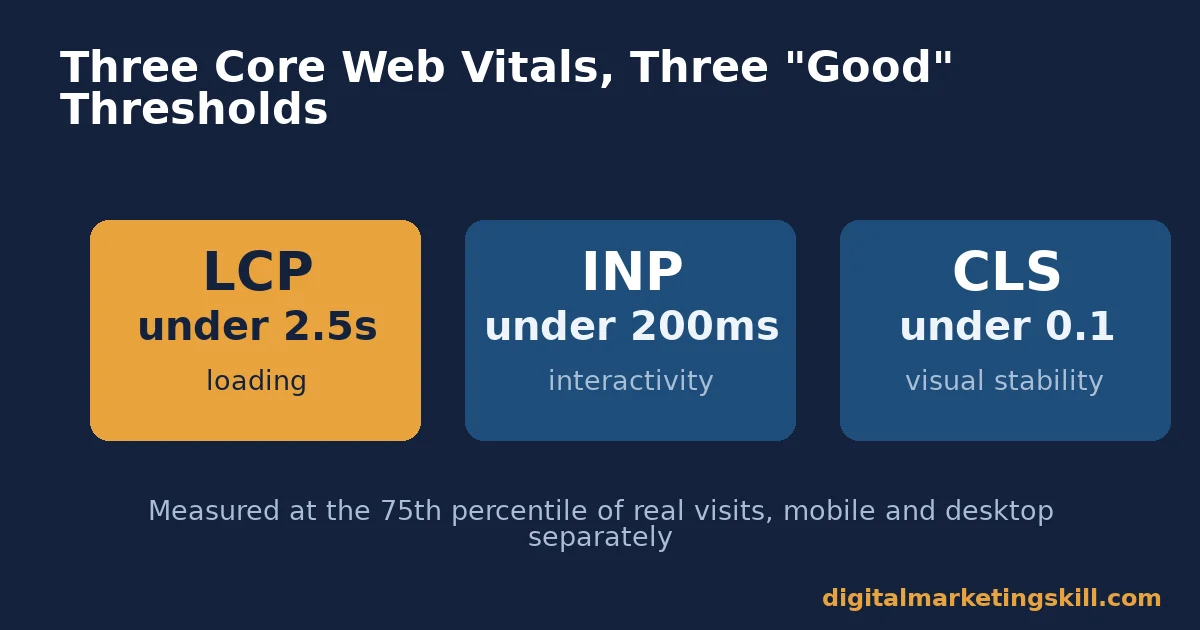
- Google’s “good” thresholds are a Largest Contentful Paint under 2.5 seconds, an Interaction to Next Paint under 200 milliseconds, and a Cumulative Layout Shift under 0.1, measured at the 75th percentile of visits (web.dev).
- Only 48% of mobile pages and 56% of desktop pages pass all three Core Web Vitals thresholds (HTTP Archive Web Almanac).
- Images make up roughly 42-44% of a median page’s total weight, more than any other resource type (HTTP Archive Web Almanac).
- A 2.2-second cut in load time lifted download conversions by 15.4% in Mozilla’s own Firefox landing page experiment.
In this guide
- The Gap: Why Website Page Speed Still Gets Ignored
- How Website Page Speed Gets Measured
- What Differs By the Cause of Slow Website Page Speed
- How to Fix Each Cause of Slow Website Page Speed
- Measuring Whether Your Website Page Speed Fix Worked
- The One Decision Rule: Fix the Biggest Byte First
- A Quick Website Page Speed Checklist
- Real Case: What a 2.2-Second Cut Did to Conversions
- Frequently Asked Questions About Website Page Speed
- Put This Into Practice
The Gap: Why Website Page Speed Still Gets Ignored
Here is an informed inference, not a settled fact. Most site owners treat website page speed as a one-time checklist. They fix it once, then forget it.
That is the gap. A theme update, a new plugin, or one uncompressed hero image can quietly undo months of work. Nobody notices until rankings or conversions slip.
One ground rule before we go further: website page speed is one ranking and conversion factor among many, not a silver bullet. A highly relevant, well-written page can still outrank a faster but thinner competitor. Treat every percentage below as a snapshot from the study that measured it, not a universal law. Your own numbers will vary by hosting, theme and audience.
There is also no finish line. A site that passes every Core Web Vital today can fail next month, after one new plugin or one unoptimized banner image. Website page speed is closer to a budget you manage continuously than a project you complete once and forget.
How Website Page Speed Gets Measured
Website page speed is not one number. Google measures it with three Core Web Vitals, and each one covers a different part of the experience.
Largest Contentful Paint, or LCP, times how long the biggest visible element takes to render. That is usually a hero image or a heading. Interaction to Next Paint, or INP, times how quickly the page responds the moment someone taps or clicks. Cumulative Layout Shift, or CLS, scores how much content jumps around while the page is still loading.
Google’s own documentation sets “good” at an LCP under 2.5 seconds, an INP under 200 milliseconds, and a CLS under 0.1. Each one gets measured at the 75th percentile of real visits, split by mobile and desktop. That detail matters. A page only passes if three-quarters of real visits hit the target, not just your own fast test connection.
Yet most sites fail. The HTTP Archive’s Web Almanac found only 48% of mobile pages and 56% of desktop pages pass all three thresholds. The single biggest culprit, by weight, is images. They make up roughly 42-44% of a median page’s total bytes, according to the same Web Almanac page weight data.
Why Mobile Makes Website Page Speed Harder
Mobile connections are slower and less consistent than desktop broadband. That is one reason mobile Core Web Vitals pass rates trail desktop in almost every study. A page that feels instant on your office laptop can feel sluggish on a train, on a phone, over patchy data.
Design for the slower case, not the fast one. If your website page speed passes on mobile, it almost certainly passes on desktop too.
Testing on your own phone, over office wifi, will not catch this. Use a testing tool that simulates a real-world mobile connection, not your fastest available one, so the numbers you see match what a typical visitor actually experiences.
What Differs By the Cause of Slow Website Page Speed
Three causes explain most slow website page speed problems. Each one needs a different fix. Misdiagnose the cause, and you can spend weeks pulling the wrong lever.
Heavy Images: Built For Visual Impact, Not Speed
Uncompressed, oversized images are the single most common cause of a slow LCP. A single unoptimized hero image can weigh more than the rest of the page combined. It is usually the exact element Google is timing.
This usually happens by accident, not carelessness. A designer uploads a photo straight from a camera or a stock library, at full resolution, because it looks sharp in the editor. Nobody resizes it to the 1,200-pixel width it will actually render at, so the browser downloads several megabytes to display an image that needed a fraction of that.
Render-Blocking Code: Built For Flexibility, Not Speed
Bloated themes, unused plugins and uncombined CSS or JavaScript files force the browser to download and parse extra code before it can show anything at all. Flexibility and a slow first paint are the direct trade-off of a feature-heavy theme.
Page builders make this worse by default. Every drag-and-drop widget, slider and animation effect ships its own stylesheet and script, whether or not a given page actually uses it. A page with three widgets can end up loading the code for thirty.
No Caching or CDN: Built For Simplicity, Not Speed
A site with no caching plugin and no content delivery network rebuilds every page from scratch, on one server, for every single visitor. It is the simplest possible setup. It is also the slowest one, once traffic or geographic distance grows.
This cause is the easiest to miss, because a freshly installed WordPress site often feels fast enough on a local test. The problem only shows up once real visitors, spread across different regions and connection speeds, start hitting the server at the same time.
How to Fix Each Cause of Slow Website Page Speed
Each cause above has a specific, mechanical fix. Apply the fix that matches your actual bottleneck, not the one you read about most recently.
Heavy Images: Lead With Compression and Sizing
Compress every image before upload. Serve a modern format. Size images to the dimensions they actually render at, not your camera’s native resolution. A hero image at the right size, compressed well, can drop from several megabytes to well under 200 kilobytes with no visible quality loss.
Render-Blocking Code: Lead With a Lean Theme and Fewer Plugins
Choose a lightweight, well-coded theme. Combine and minify CSS and JavaScript wherever your caching tool supports it. Remove any plugin you cannot name a current use for. Diagnose which plugin is actually slow before you remove anything, since profiling tools exist precisely so you stop guessing.
No Caching or CDN: Lead With a Caching Plugin and a CDN
Install a caching solution that serves static, pre-built pages instead of rebuilding them per visitor. Pair it with a content delivery network, so visitors load files from a server near them, not across an ocean. Together, these two changes typically do more for website page speed than any single image or plugin fix.
Confirm the caching plugin is actually working, not just installed. Load your homepage twice in a row, logged out, and check that the second load returns a cached response rather than rebuilding the page again. Many site owners install a caching plugin once and never verify it is still active after a later update.
Measuring Whether Your Website Page Speed Fix Worked
Four numbers tell you whether a website page speed fix actually worked. Each one isolates a different part of the experience, so read them together.
- LCP measures how long the biggest visible element takes to render. Google’s good threshold is under 2.5 seconds, at the 75th percentile.
- INP measures how quickly the page responds to a tap or click. The good threshold is under 200 milliseconds.
- CLS measures how much the layout jumps around while loading. The good threshold is under 0.1.
- Total page weight is the simplest number of all: the total kilobytes a visitor’s browser has to download. The median page sits at roughly 2,100-2,400 kilobytes. A falling number is a good sign, even before Core Web Vitals catch up.
Check these after every theme, plugin or image change, not just once a year. A single new plugin can silently undo a month of careful work. The only way to catch that quickly is to measure right after the change, not months later when rankings have already slipped.
Nielsen Norman Group’s research on response times offers a useful mental model here. A page that responds within 0.1 seconds feels instantaneous. One second still feels like the user is in control. Past ten seconds, attention drifts elsewhere entirely. Website page speed work is really an exercise in staying as close to that first threshold as your content allows.
Time to First Byte Matters Too
Core Web Vitals measure what happens after the browser starts receiving the page. Time to First Byte, or TTFB, measures the wait before that even begins: the time your server takes to respond to the very first request.
A slow TTFB caps every other metric. No amount of image compression fixes a server that takes two full seconds just to say hello. Cheap, oversold shared hosting is the most common cause; a caching layer or a better hosting plan is usually the fix, not a front-end change at all.
Check TTFB first, before you spend hours compressing images. A website page speed problem rooted in hosting will not improve much from front-end work alone, no matter how carefully it is done.
The One Decision Rule: Fix the Biggest Byte First
If you remember one rule from this guide, make it this one. Before touching anything else, find the single largest resource on your page, by file size. Fix that one first.
Why this order? Website page speed fixes have diminishing returns. Shaving 20 kilobytes off a 2-megabyte hero image barely moves the needle. Replacing that same image with a properly compressed, correctly sized version can cut total page weight dramatically, in one single change.
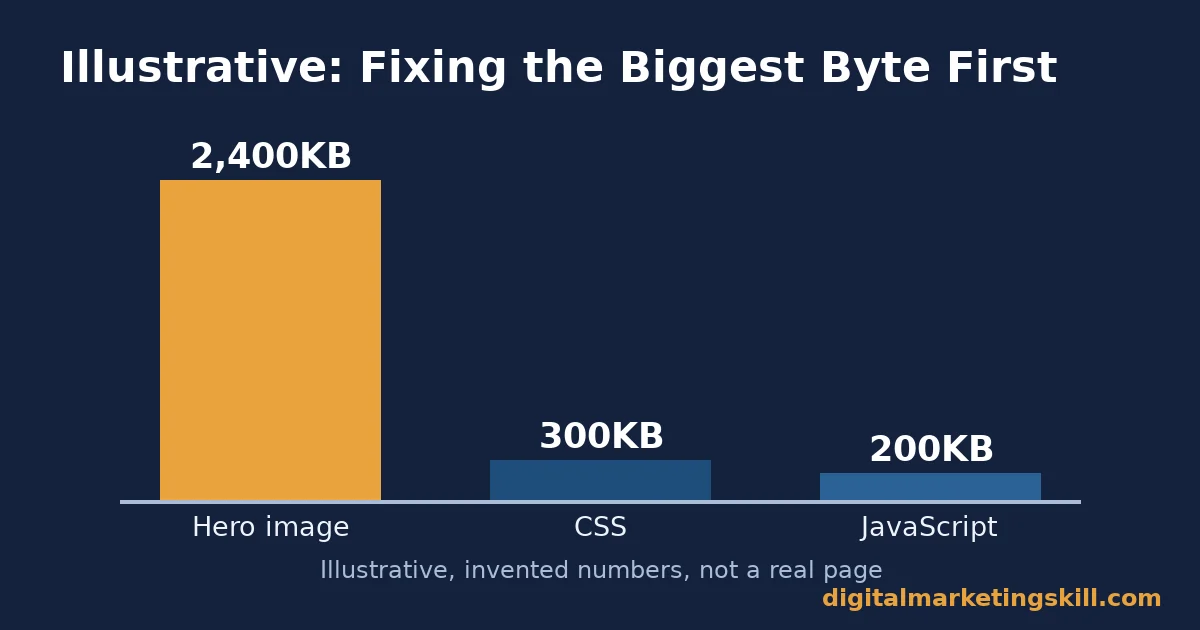
Here is an illustrative example, with invented numbers, not a real study. Imagine a page with a 2,400 kilobyte hero image, 300 kilobytes of CSS, and 200 kilobytes of JavaScript. Fixing the CSS and JavaScript first might save 150 kilobytes combined. Fixing the hero image first, by compressing and resizing it, could plausibly cut 2,000 kilobytes in one step.
In this illustrative scenario, the image fix alone would move total page weight further than every other fix combined. That is the logic behind “fix the biggest byte first,” and it holds regardless of which specific resource turns out to be the biggest one on your own site.
Find your biggest byte with a free tool such as GTmetrix, WebPageTest or Google’s own PageSpeed tools. Fix it. Then re-measure before moving to the next-biggest resource.
Repeat this loop, one resource at a time, rather than attempting every fix in a single session. Each round of fix-then-measure tells you whether that specific change actually mattered, which is information a big-bang rewrite never gives you.
A Quick Website Page Speed Checklist
Run through this short list before and after any change to your site:
- Find the single largest resource on the page, by file size, and fix that one first.
- Compress and correctly size every image before upload.
- Remove any plugin you cannot name a current use for.
- Confirm a caching plugin is active and actually serving cached pages.
- Check Time to First Byte, not just Core Web Vitals, if everything else looks fine.
- Re-measure immediately after every theme, plugin or image change, not months later.
None of these steps takes long on its own. Together, they are usually enough to move a slow site back into Google’s “good” range on all three Core Web Vitals.
Real Case: What a 2.2-Second Cut Did to Conversions
Mozilla published its own Firefox download landing page experiment on its official metrics blog. An optimized version of the page, built by combining JavaScript files and inlining CSS, cut 2.2 seconds off the average load time. Download conversions rose by 15.4%, a result the team reported as statistically significant.
Mozilla’s own write-up states the limits clearly. The result came from a single English-language landing page. It had not yet been replicated across every other landing page at the time of publication. Any projection to total downloads assumed a similar boost elsewhere, which the team had not yet confirmed. Treat this as strong evidence that website page speed fixes can move real conversion numbers, not as a guaranteed percentage for your own site.
What makes the case useful is not the exact 15.4% figure. It is the mechanism: two unglamorous, purely technical fixes (combining script files, inlining a stylesheet) produced a measurable business result, with no change to the page’s design, copy or offer. The same mechanism applies to a slow WordPress blog as much as it applied to a single Firefox download page.
Frequently Asked Questions About Website Page Speed
What is a good website page speed?
There is no single “good” number, because website page speed is measured across three separate metrics. Aim for an LCP under 2.5 seconds, an INP under 200 milliseconds, and a CLS under 0.1. Each one gets measured at the 75th percentile of real visits, split between mobile and desktop.
Does website page speed really affect SEO rankings?
Core Web Vitals are confirmed as part of Google’s core ranking systems, alongside other page experience signals. Passing scores alone, though, do not guarantee a top ranking. Relevance and content quality still matter more. Website page speed is one input among many, not an override.
What usually causes slow website page speed?
Three causes explain most cases: oversized, uncompressed images; bloated themes or plugins that block rendering; and a lack of caching or a content delivery network. Diagnose which one applies to your site with a free testing tool before changing anything.
How often should I check my website page speed?
Check after every theme update, new plugin install, or major image upload, not on a fixed yearly schedule. Any one of those changes can quietly undo weeks of prior optimization work, with no visible warning at all.
Do I need a content delivery network for a small website?
It depends on your audience’s location and your current hosting. A site whose visitors sit near its server sees a smaller CDN benefit than a site with a global audience. A caching plugin alone, though, is worth implementing regardless of your CDN decision.
Will compressing images hurt visual quality?
Not at sensible settings. Modern compression tools and formats remove data a human eye cannot perceive at normal viewing sizes, long before quality visibly degrades. The quality loss people notice usually comes from over-compressing, not from compressing at all.
Can fixing website page speed increase sales on its own?
It can contribute, as the real case in this guide shows, but it rarely acts alone. Treat it as removing friction that was silently costing you visitors and sales, alongside your other conversion work, not as a single lever that guarantees a specific revenue increase.
What tool should I use to test website page speed?
Any of GTmetrix, WebPageTest or Google’s own PageSpeed tools will show you the three Core Web Vitals and a breakdown of every resource on the page, ranked by size. Pick one and track the same metrics over time, rather than switching tools and comparing numbers that were never meant to match exactly.
Why did my website page speed get worse after a WordPress update?
A theme, plugin or WordPress core update can change default settings, add new scripts, or disable a caching rule without any warning in the changelog. Re-run your speed test after every update, and compare the new largest resource against your last known-good result before assuming nothing changed.
Should I worry about website page speed on a brand-new site with no traffic yet?
Yes, because fixing website page speed is far easier before a site has years of uploaded images and installed plugins to clean up. Set a caching plugin, a compression workflow and a lightweight theme as defaults from day one, and you will rarely need the bigger cleanup this guide describes.
Put This Into Practice
Fixing website page speed is rarely one big project. It is a short list of mechanical fixes, applied in the right order, then checked again after every future change to the site.
If you want to build this skill properly, alongside the wider toolkit of technical SEO and website optimization, look at the Digital Marketing Skill Institute’s Master Diploma in Digital & AI Marketing. It includes an AI-Powered WordPress and SEO Specialist track among its four AI-powered tracks, built from ten execution-first courses in total, with a Full Stack option for completing all four.
What the Program Includes
The program pairs unlimited 1-on-1 coaching and mentoring with a U.S. Project Internship and a verified U.S. Work Reference Letter. It is dual US and UK accredited, and recognised in more than 100 countries. Because it runs 100% online, you can study and apply what you learn anywhere in your country.
A fast site also depends on the layout decisions covered in our guide to responsive web design, and on the on-page basics covered in our guide to website SEO tips. Read more real outcomes on the reviews page, browse the digital marketing blog for more practical guides, or go straight to the application page to see if the program fits. Wherever you live, a faster site helps the same way the next time a visitor opens it. Learn more at digitalmarketingskill.com, or start your application at digitalmarketingskill.com today.
Every figure in this guide was checked against its original source before publication. Figures marked as illustrative are invented examples, not real results.
![9 Amazing Digital Marketing Skills to Make Money Online [With Proof]](https://digitalmarketingskill.com/wp-content/uploads/2019/07/9-Amazing-Digital-Marketing-Skills-to-Make-Money-Online-With-Proof-17.png)






