
Email marketing is the practice of sending messages to people who opted in, so you can inform, nurture or sell to them directly in their inbox. Done well, it is one of the highest-return channels available. Done carelessly, it lands in spam. It then teaches inboxes to ignore you. This guide covers both halves in plain, practical terms.
Key Takeaways
- Opens can lie. Apple’s Mail Privacy Protection auto-loads images in the background. Mailchimp’s own benchmark page warns this can inflate open-rate data. Read its all-industry average open rate of 35.63% with that caveat in mind.
- Clicks are the honest signal. Mailchimp’s benchmark data puts the all-industry average click rate at 2.62% and the unsubscribe rate at 0.22%. Neither number is distorted by automatic image loading.
- Deliverability has a hard line. Google requires bulk senders to keep spam complaints below 0.30% in Postmaster Tools. Full SPF, DKIM and DMARC authentication is required too, or mail risks rejection or filtering.
- Opt-outs are a legal deadline, not a courtesy. The FTC’s CAN-SPAM Act requires a working unsubscribe link to be honoured within 10 business days. Penalties can reach tens of thousands of dollars per violating message.
- Segmentation changes the math. HubSpot’s State of Marketing research found segmented campaigns earn about 30% more opens than unsegmented sends. Clicks rise by about 50% too, on the same list.
In this guide
- What Most Email Marketing Advice Skips
- How Email Marketing Actually Works
- Building a List vs Buying or Renting One
- How to Start Email Marketing the Right Way
- How to Measure Whether Email Marketing Is Working
- The One Rule: Protect Deliverability Before You Chase Opens
- A Real Case: Why Gmail and Yahoo Now Reject Unauthenticated Bulk Mail
- A Four-Week Plan for Your First Real Campaign
- Frequently Asked Questions About Email Marketing
- Start With One List, One Welcome Email, One Metric
What Most Email Marketing Advice Skips
Most introductions to email marketing jump straight to subject lines and send times. That advice is not wrong. But it assumes the email already reaches the inbox and that the list already exists. Neither assumption holds for most beginners.
This guide starts one step earlier. First, how a list gets built. Then, how a message earns inbox placement. Only after that does it cover writing and measurement. Treat every statistic here as a snapshot from the source named beside it, not a permanent industry constant. Treat the three-part model used later as an informed way to organise decisions, not a settled law of marketing.
One ground rule matters most. Mailchimp’s own benchmark page admits that Apple’s privacy changes affect the accuracy of open-rate data. That single caveat should change how you read almost every “average open rate” statistic you meet. That includes the ones in this guide.
How Email Marketing Actually Works
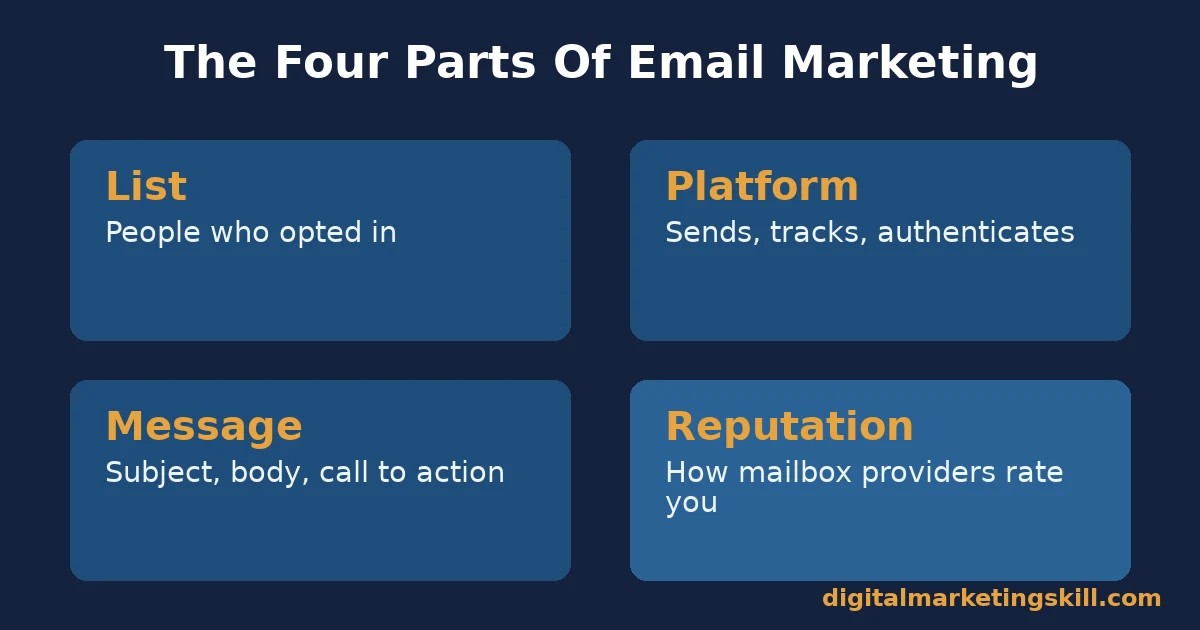
Underneath the subject lines and templates, email marketing runs on four connected parts. You need a list of people who agreed to hear from you. You also need a sending platform, the message itself, and your sender reputation with mailbox providers. Weakness in any one part limits what the other three can achieve.
The Four Parts Email Marketing Is Built From
The list represents consent, not just an address. A real opt-in means the person expects to hear from you. That expectation is the only situation where email marketing performs well. The sending platform handles authentication, formatting and compliance features such as one-click unsubscribe. Choose one built for marketing mail rather than personal email.
The message itself combines the subject line, preview text, body and call to action. All four need to work together rather than being written separately. Sender reputation is the score mailbox providers quietly keep on your sending domain and IP address. They build it from how recipients react to you over time.
Most beginners skip reputation entirely, yet it decides whether the other three parts ever get seen. Gmail, Yahoo and Outlook never promise to deliver everything you send. They only promise to deliver what their filters have learned to trust.
Reputation builds slowly, through consistent sends that recipients actually want. It can fall quickly after one careless list purchase or one badly timed burst of volume. Treat it as the foundation the other three parts stand on, not as a side detail you fix once something already looks broken.
Why Open Rate Can Mislead You
Open rate tracking relies on a small invisible image that loads when someone views a message. Apple’s Mail Privacy Protection pre-fetches that image for many users, whether or not they ever actually look at the email. That mechanism is exactly why Mailchimp flags the accuracy problem on its own benchmarks page.
Click rate behaves differently, because a click still requires a real action from a real person. For that reason, this guide treats click rate as the more honest day-to-day signal. It uses open rate only as a rough directional trend over months. Our deeper guide on email open rates covers what else moves that number beyond Apple’s privacy settings.
Apple’s own share of that picture is large. Litmus’s email client market share tracker puts Apple Mail, including iPhone and iPad, at roughly 76.56% of tracked opens. That single number is a strong argument for designing every email mobile-first by default, rather than treating a phone layout as an afterthought you test once the desktop version looks right.
Building a List vs Buying or Renting One
New senders usually face this choice early, often without realising it is a choice at all. A purchased or rented list looks like a shortcut to volume. A built list looks painfully slow by comparison. The two paths lead to very different outcomes for email marketing. Inbox placement depends on how recipients behave, not on how many addresses you hold.
A Built List: Slower, But It Converts
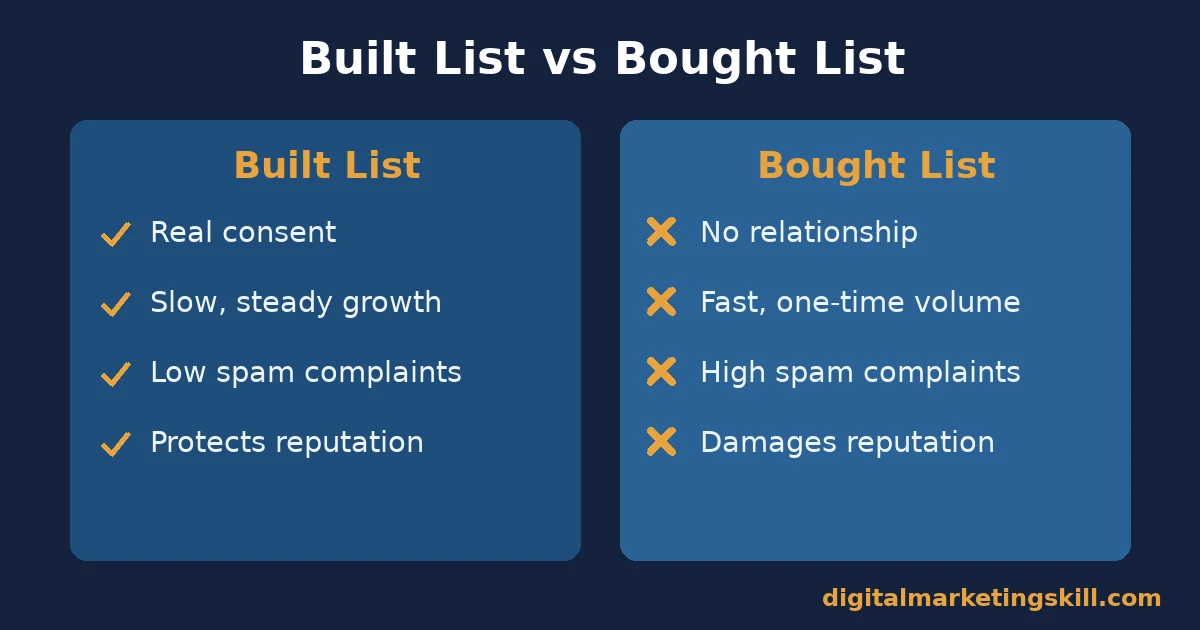
Every address on a built list came from a real action: a signup form, a checkout, a content download. That history means recipients already recognise your name. Recognition is the single biggest driver of whether someone opens, clicks or marks a message as spam. Growth stays slower, because you earn each address one signup at a time rather than acquiring thousands at once.
A built list also protects your sender reputation, since recognised senders collect far fewer spam complaints. That protected reputation then helps every future send, not only the current campaign. Our guide on how to grow your email list walks through the channels worth prioritising while you build.
A Bought or Rented List: Fast, But It Breaks Deliverability
A purchased list carries no relationship with your name attached to it. Recipients never asked to hear from you, so a meaningful share will mark the message as spam the first time it lands. Mailbox providers read that reaction as a reliable signal. They then start filtering your other mail too, including mail to the people who did opt in properly.
The FTC’s CAN-SPAM Act does not ban cold commercial email outright. It does require accurate sender information, a working opt-out and a real physical address in every message. These are rules that purchased-list senders often struggle to follow carefully at scale. The practical outcome tends to repeat itself. A short-lived volume spike follows, then a damaged sending domain that takes months to repair.
How to Start Email Marketing the Right Way
Whichever stage you are at, this sequence protects deliverability while you build. Each half mirrors the choice above. Lead with consent while you build the list, then lead with trust once you start sending.
Start Your List: Lead With a Clear Opt-In
Use a visible opt-in that states exactly what someone will receive and how often. Avoid a vague “join our newsletter” box. Double opt-in asks a new subscriber to confirm by clicking a link in a confirmation email. It costs you a few signups along the way. In exchange, it removes fake and mistyped addresses before they ever damage your sending reputation.
Keep your first sending-platform choice simple. Most platforms handle SPF and DKIM setup for you. Still, confirm both show as verified inside your account before your first real campaign, not after a problem already appears in your reports.
Start Sending: Lead With a Welcome Sequence
The first message after signup gets read more than almost anything else you will send later. The recipient just took an action and still remembers it clearly. Use that message to confirm what they signed up for. Then deliver one genuinely useful thing immediately, rather than opening with a sales pitch.
From that point on, send consistently. Long gaps of many weeks between messages make recipients forget why they subscribed in the first place. That forgetting raises the odds of a spam complaint on your next send. A steady, modest schedule beats one burst of five emails followed by silence.
How to Measure Whether Email Marketing Is Working
Good measurement separates deliverability health from message performance. A clever subject line cannot fix a damaged sending reputation. Strong deliverability, in turn, cannot fix a message nobody wants to click. Our email marketing checklist covers the pre-send checks worth running alongside the five metrics below.
Five Metrics That Actually Matter
- Click rate. The share of delivered emails that earned at least one click. Mailchimp’s all-industry average sits at 2.62%, and unlike open rate, it is not distorted by automatic image loading.
- Spam complaint rate. The share of recipients who mark a message as spam. Google tells bulk senders to keep this below 0.30% in Postmaster Tools. Crossing that line gives Google grounds to filter your future mail.
- Unsubscribe rate. The share of recipients who opt out from a single send. Mailchimp’s average sits at 0.22%. A rate noticeably above your own history usually signals a mismatch between what you promised and what you actually sent.
- List growth rate. New confirmed subscribers, minus unsubscribes and bounces, measured against your total list size. A list that only grows through new signups while quietly losing engaged subscribers is not actually healthy.
- Bounce rate. The share of sends that fail to deliver at all. A rising bounce rate is often the earliest warning of an ageing or poorly collected list. It usually appears long before reputation damage shows up anywhere else.
How to Read These Numbers Together
Check spam complaints and bounce rate first, because both threaten deliverability for every subscriber, not just the one who complained. When either number rises, pause growth tactics and fix list hygiene before you touch anything else.
Once deliverability looks stable, compare click rate against your own history rather than against an industry average. Your best benchmark is always your own previous campaigns to the same list. Treat open rate only as a loose trend line, given the Apple Mail Privacy Protection caveat explained earlier.
The One Rule: Protect Deliverability Before You Chase Opens
If you take one decision rule from this guide, make it this one. Before you test a new subject line, send time or design, pause. First confirm your spam complaint rate is under control and your authentication is fully set up. A better subject line cannot rescue a sending domain that mailbox providers have already learned to distrust.
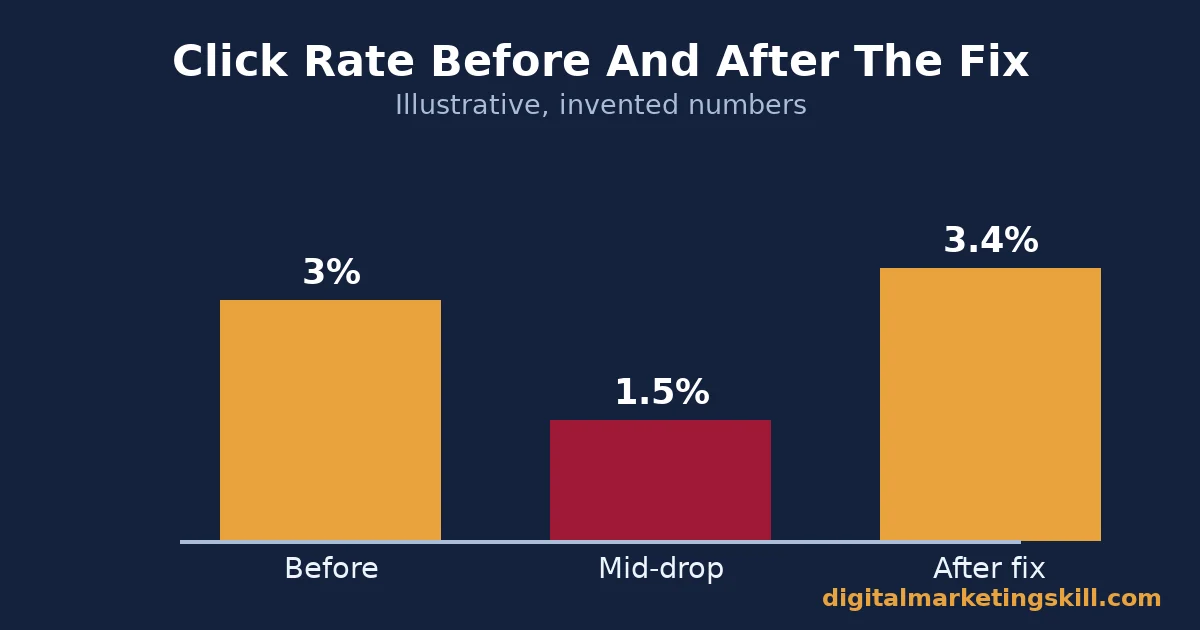
Here is an illustrative example, with invented numbers. A small online store sends to 20,000 subscribers. Its click rate slides from 3% to 1.5% over two months. Rather than rewriting subject lines first, the team checks Postmaster Tools. They find spam complaints near 0.4%, above Google’s guidance.
They pause a recently purchased list segment and tighten their opt-in form. Then they resend only to engaged subscribers. Complaints drop under 0.2% within a few weeks. Click rate recovers past its earlier level, without a single new subject line test.
The lesson generalises well beyond this example. Reputation problems often masquerade as content problems. Fix the foundation first, because every later optimisation otherwise sits on unstable ground.
A Real Case: Why Gmail and Yahoo Now Reject Unauthenticated Bulk Mail
Google’s own guidance for bulk senders makes a useful real-world case. It shows what happens when an entire industry’s deliverability rules get enforced at once, rather than left as optional best practice.
Gmail’s documented requirements cover SPF and DKIM on the sending domain, a DMARC record, and valid forward and reverse DNS. Anyone sending more than 5,000 messages a day to Gmail addresses must also keep a spam rate below 0.30% in Postmaster Tools.
Senders who skip authentication are not quietly deprioritised. Google’s own documentation states plainly that such messages can be rejected outright or routed straight to spam. One-click unsubscribe is mandatory on marketing mail too. It needs a clearly visible link in the message body, never buried in fine print at the bottom of a page.
The limit on this case is straightforward. Google does not publish exactly how senders responded in aggregate, only the rules it enforces. Read it as a model of what mailbox providers now expect industry-wide. It is not a measured before-and-after result from one company.
A Four-Week Plan for Your First Real Campaign
This plan covers manual sending, which is where every beginner should start. Email marketing automation, triggered sends like a welcome series or an abandoned-cart message, is worth adding only once manual campaigns are already clean, your metrics look healthy, and deliverability is genuinely stable.
You do not need every piece in place before you start. This plan spreads the work over a month, in a sensible order, so deliverability stays protected while you learn. Each week builds on the one before it, rather than asking you to launch everything on day one.
- Week one: set up the list and the platform. Create a single, clear opt-in. Confirm SPF and DKIM show as verified inside your sending platform before anything else.
- Week two: write the welcome sequence. Draft two or three short emails. Deliver one useful thing in the first message, before any sales content appears.
- Week three: send to a small, engaged group first. Pick your most active subscribers. A clean early send protects your reputation while the rest of the list grows.
- Week four: check the five metrics. Review click rate, spam complaints, unsubscribes, list growth and bounce rate together. Fix whichever one looks weakest before you scale volume.
Repeat the cycle with a slightly larger send each month. Deliverability built this way tends to hold, because every step earns trust before it asks for more volume. A slower first month is a small cost against months of repair work if reputation breaks early instead.
Frequently Asked Questions About Email Marketing
What is email marketing used for?
Email marketing nurtures leads, sells to existing customers, retains subscribers with useful content, and drives repeat visits to a website. It does all of that directly through a channel the recipient chose to join, rather than one you have to buy access to each time.
Is email marketing still effective?
Yes. The UK’s Data & Marketing Association‘s annual Marketer Email Tracker survey has repeatedly found email returning more than £35 for every £1 spent. That figure is UK-specific. Still, it has stayed consistently high across several editions of the same survey.
How often should I send marketing emails?
Often enough that subscribers remember subscribing, and no more often than you can keep genuinely useful. There is no universal number here. Watch your unsubscribe and spam complaint rates closely after any frequency change, and adjust based on what they tell you.
What is a good email open rate?
There is no single good figure, and Mailchimp’s own data warns that Apple’s privacy features can inflate open-rate readings. Compare your own campaigns to each other over time instead of chasing a published industry average.
Do I need SPF, DKIM and DMARC for email marketing?
Yes. Google’s bulk sender guidance requires all three for anyone sending meaningful volume to Gmail addresses. Most sending platforms can walk you through setting them up directly inside your domain’s DNS records.
Can I buy an email list to start faster?
You can, but it usually backfires quickly. Recipients who never opted in are far more likely to mark messages as spam. That reaction damages the sending reputation every future email depends on, including mail to the subscribers who did opt in.
How quickly must I honour an unsubscribe request?
The FTC’s CAN-SPAM Act requires commercial senders to honour an opt-out request within 10 business days. The opt-out mechanism itself must keep working for at least 30 days after a message goes out to recipients.
Does list size matter more than engagement?
No. A smaller, engaged list that opens and clicks consistently protects your sender reputation far better than a large list full of inactive addresses. Mailbox providers watch engagement patterns closely, so a list padded with people who never interact quietly works against every message you send. If you have not emailed part of your list in many months, a short re-engagement send is usually safer than silence.
Start With One List, One Welcome Email, One Metric
Email marketing rewards patience with the list and discipline with deliverability more than it rewards clever subject lines. Start with one clean opt-in and one honest welcome email. Track one metric, click rate, against your own past sends rather than an industry benchmark.
If you want structured, hands-on practice, Digital Marketing Skill Institute teaches email marketing inside the Master Diploma in Digital & AI Marketing. The programme is built from ten courses across four AI-powered tracks. These are AI-Powered Social Media Management and Advertising, AI-Powered Lead Generation and Email Automation, AI-Powered Google Specialist, and AI-Powered WordPress and SEO Specialist, with a Full Stack option for completing all four.
The diploma includes unlimited 1-on-1 coaching and mentoring, plus a U.S. Project Internship with a verified U.S. Work Reference Letter. It is dual US and UK accredited, and it is recognised in more than 100 countries.
Studying is 100% online. You can build these skills from anywhere in your country. For deliverability specifics once your list is running, see our guide to email deliverability. For scaling your sends later, see our guide to email marketing automation.
You can browse more guides on the Digital Marketing Skill Institute blog, and read real outcomes on our reviews page. When you are ready, apply for the Master Diploma directly from the Digital Marketing Skill Institute homepage.
Every figure in this guide was checked against its original source before publication. Figures marked as illustrative are invented examples, not real results.
![9 Amazing Digital Marketing Skills to Make Money Online [With Proof]](https://digitalmarketingskill.com/wp-content/uploads/2019/07/9-Amazing-Digital-Marketing-Skills-to-Make-Money-Online-With-Proof-17.png)






