
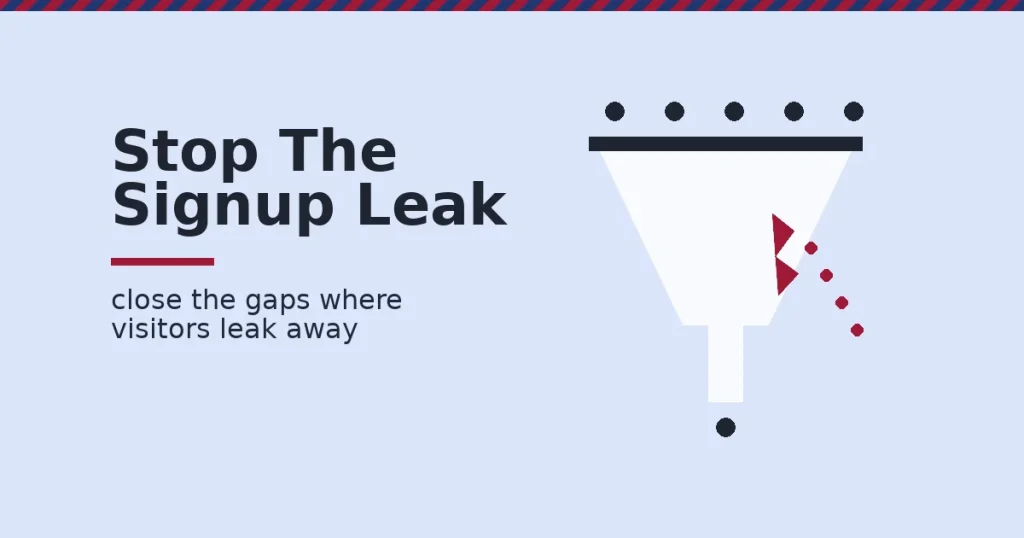
A visitor who never submits an email address never becomes a lead. That is why the email signup conversion rate is one of the few numbers that predicts future revenue. It measures the share of visitors who hand over an email address. Most forms convert far below what is possible, often for simple, fixable reasons.
This guide shows the gap, the mechanism behind it, and one decision rule for closing it.
Key Takeaways
- Most popups underperform the ceiling. Omnisend’s analysis of 1.24 billion popup displays found an average email signup conversion rate of 2.1%. Anything under 1.5% is below average, and 5%+ is considered excellent.
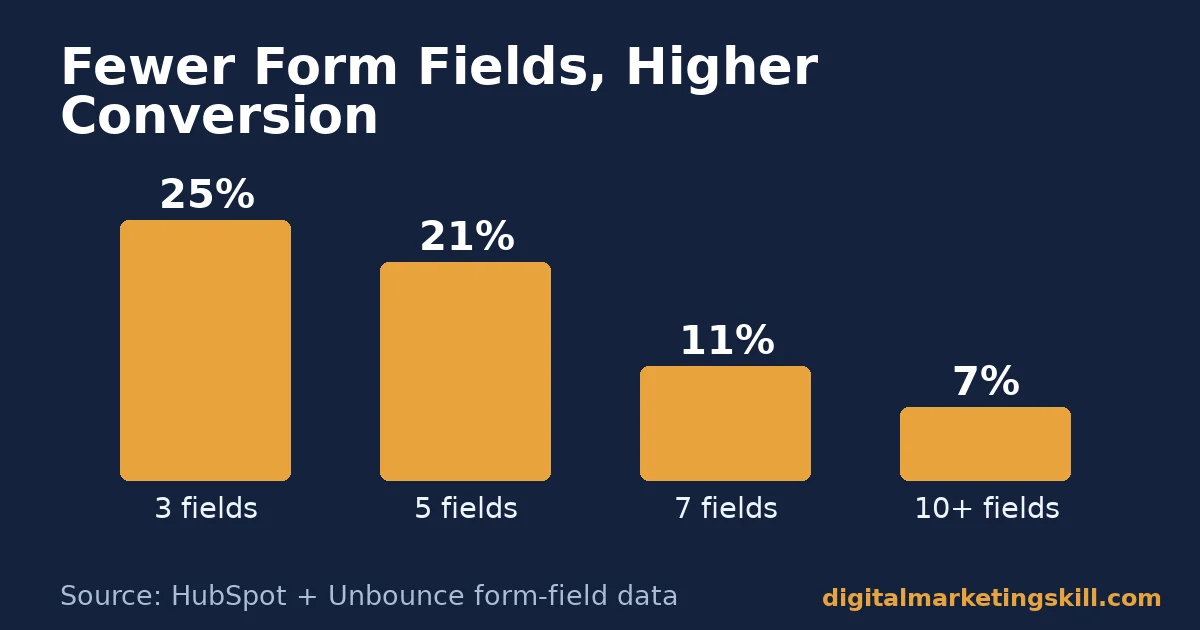
- Form length is the biggest lever. HubSpot’s form-design research found three-field forms converting above 25%, versus roughly 21% at five fields. Unbounce’s landing-page data shows the same pattern: conversion falls as fields are added.
- Format choice matters more than copy. Unbounce’s benchmark report, built from 41,000 landing pages and 464 million pageviews, found a 6.6% median conversion rate overall. Email-driven traffic converted at 19.3%, the highest of any channel.
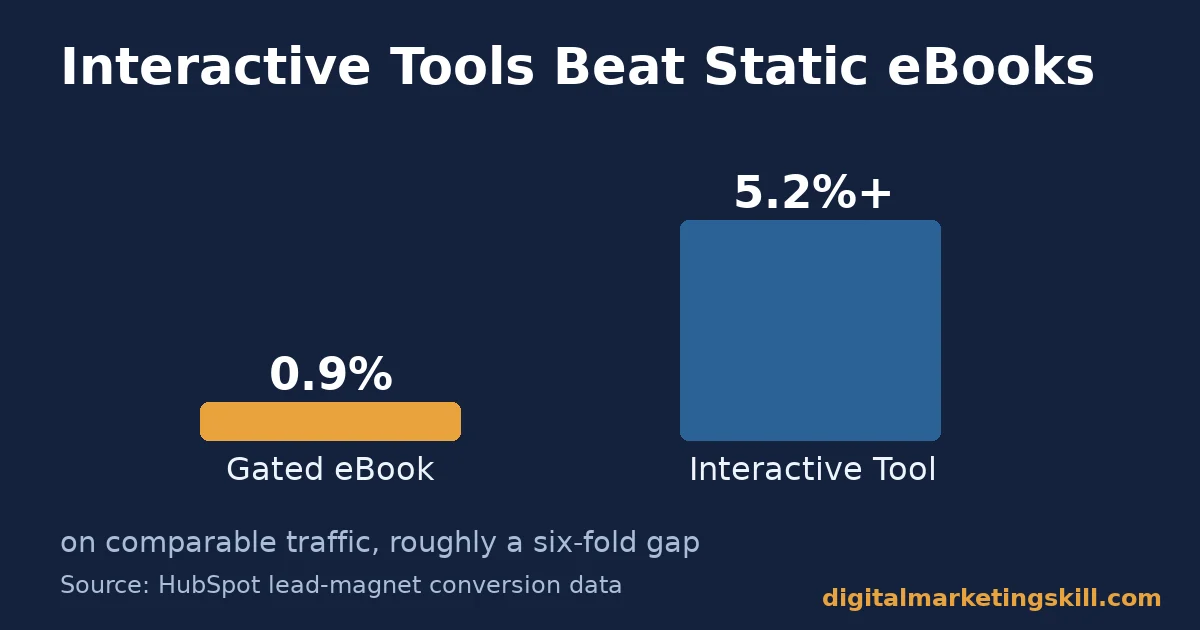
- The content type behind the form changes the number. Gated eBooks convert under 0.9%. Interactive tools such as quizzes and templates convert at 5.2% or higher on comparable traffic, a nearly six-fold gap.
- The first email decides what happens next. GetResponse reports welcome emails opening at roughly double the rate of a standard campaign. They also earn more revenue per send than any other automated message, so the signup is only step one.
In this guide
- Why Most Signup Forms Convert Below Their Ceiling
- How an Email Signup Conversion Rate Actually Forms
- What Differs By Signup Format
- How To Lead With Each Format
- How To Measure Your Email Signup Conversion Rate
- The One Decision Rule for Email Signup Conversion Rate
- Why the Email Signup Conversion Rate Is Only Step One
- A Real Case: What One Exit-Intent Offer Changed
- Common Mistakes That Quietly Lower Conversion
- Frequently Asked Questions About Email Signup Conversion Rate
- Turn Signups Into a Real Marketing Skill
Why Most Signup Forms Convert Below Their Ceiling
Most sites treat the signup form as a finished task. It asks for an email address, it has a submit button, and traffic arrives. Yet the email signup conversion rate still lands near the bottom of the realistic range. Usually that happens because the form was never tested against a harder question. Why would this particular visitor, at this exact moment, hand over their email address?
Three ground rules keep this guide honest. First, every benchmark below is a snapshot from one dataset at one point in time. It is not a permanent ranking your site will match automatically.
Second, several figures are US-weighted or skewed toward ecommerce traffic. Treat them as a reference point, not an exact target. Third, where a number is illustrative rather than measured, it is labelled as such, because inventing a precise figure would be worse than admitting an estimate.
The gap is rarely one broken element. It is usually a stack of small frictions. A form asks for too many fields. The value exchange is vague. A popup interrupts before trust exists. The form never says what arrives next. Each friction point taxes the conversion rate a little further.
How an Email Signup Conversion Rate Actually Forms
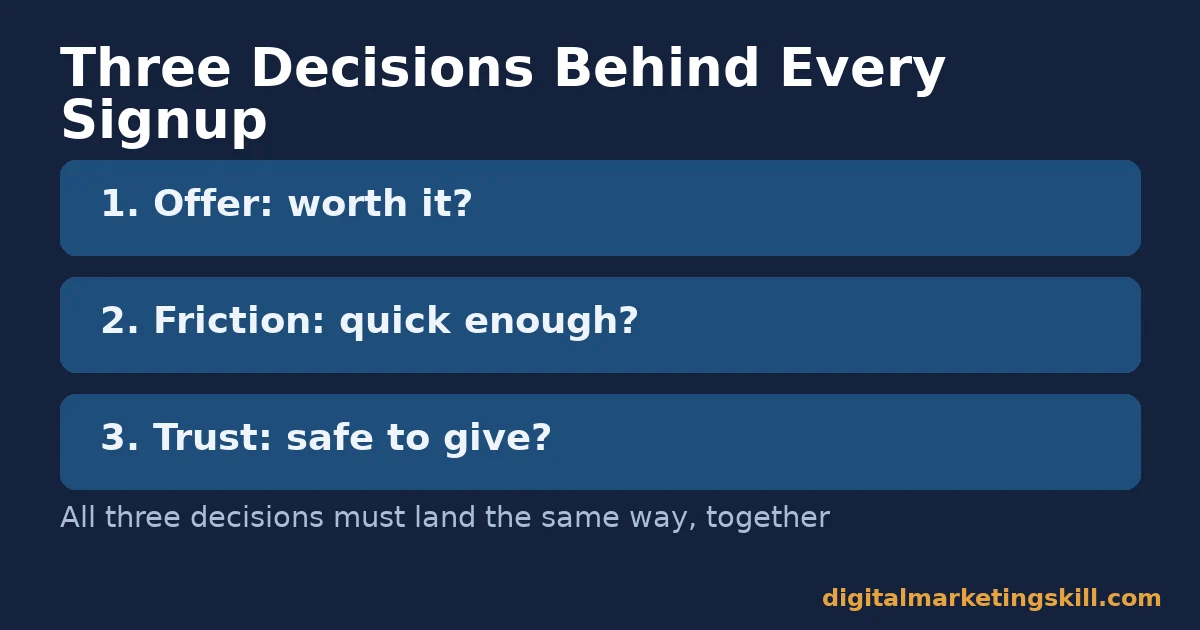
A visitor completes a signup form through three decisions, not one. First, they decide the offer is worth something. Second, they decide the form is quick enough to finish. Third, they decide the sender is safe enough to trust with their inbox. A form only converts when all three decisions land the same way, within the same few seconds.
Three Decisions, Three Different Barriers
The offer decision depends on specificity. “Subscribe to our newsletter” asks for a cost, an email address and future inbox space, without naming a benefit. A specific incentive gives the visitor something to weigh that cost against: a short guide, a tool, a discount, a checklist. This is the main reason lead magnet formats convert so differently from a plain newsletter signup, covered in our lead magnet examples guide.
The friction decision depends on the form itself. Field count matters, and so does the number of clicks to submit. So does whether the visitor can see how long it will take. HubSpot’s research, drawn from tens of thousands of customer landing pages, found conversion highest at three fields. Conversion fell steadily as fields were added, a pattern Unbounce’s own field-count data confirms on live landing pages.
The trust decision depends on timing and context. A form that appears before the visitor has read anything is asking for trust it has not earned yet. A form that appears after a visitor has scrolled through useful content, or is about to leave, asks at a moment when the visitor already has evidence to judge by.
What Differs By Signup Format
Not every signup format solves the same problem. Three formats cover most of what a blog or marketing site uses. Each one is built for a different moment in the visit.
Embedded Forms: Built For Low-Friction Browsing
An embedded form sits inline or in a sidebar. It stays visible but never blocks the page, which keeps bounce rate low. It also gets seen by fewer visitors and competes with everything else on the page for attention. Embedded forms tend to convert lowest of the three formats. They ask the least of the visitor’s attention, so they get the least back.
Exit-Intent Popups: Built For Last-Chance Recovery
An exit-intent popup fires when the visitor’s cursor or scroll behaviour signals they are about to leave. It stops competing with the content, because the visitor has effectively already decided to go. Multiple studies put well-optimised exit-intent recovery at roughly 10-15% of abandoning visitors. The strongest documented case, OptinMonster’s published case study with the watch brand Fastrack, recovered 53% of abandoning visitors with one targeted offer.
Gated Lead Magnets: Built For High-Intent Capture
A gated lead magnet trades a specific resource for an email address: a template, a calculator, a checklist, or a short course. It usually sits behind its own landing page rather than a popup. Because the visitor already searched for or clicked toward that exact resource, intent starts higher. Content type inside the gate matters too. Interactive tools convert several times higher than a static eBook pulling the same traffic.
How To Lead With Each Format
Fixing the email signup conversion rate means matching the fix to the format. One generic rule will not work everywhere.
Embedded Forms: Lead With Fewer Fields
Cut the embedded form to the minimum. Usually that means one email field and one specific-benefit submit button. Every extra field, name, company, phone number, should justify itself against the cost. HubSpot’s data attaches a few percentage points of conversion to each added field. If a field is not needed to send the first email, remove it. Collect it later instead.
Exit-Intent Popups: Lead With Timing, Not Interruption
Fire the popup on exit intent, or after a meaningful delay, never on page load. Omnisend’s data found a six-to-ten second delay consistently outperformed an immediate popup. The visitor has had time to judge the page before being asked for anything.
Offer something narrower than the embedded form’s generic pitch. A specific discount works. So does a relevant checklist. Best of all is a direct answer tied to the content they were reading when they tried to leave.
Gated Lead Magnets: Lead With a Tool, Not a PDF
Where budget allows, build the lead magnet as something the visitor does, not something they read: a short quiz, a calculator, a template they fill in. The conversion gap between interactive formats and static documents runs several times over. That means the lead magnet’s format usually matters more than its headline.
Keep the landing page short, with one offer and one form, following the same friction rules as the embedded form above. Our landing page optimization guide covers the layout choices that affect this most.
How To Measure Your Email Signup Conversion Rate
Five numbers tell you whether a signup program is working. Each one measures a different stage of the funnel.
- Email signup conversion rate. Signups divided by sessions that saw the form. Read it against the format benchmarks above, not one universal target.
- List growth rate. New signups minus unsubscribes and hard bounces, divided by list size, over a fixed period. A shrinking growth rate usually means acquisition is slowing, so check the signup rate first.
- Welcome email open rate. The share of new subscribers who open the first automated email, sent at peak trust. A weak rate here, well below GetResponse’s roughly two-times lift, points to a mismatch between the form’s promise and the email itself.
- Unsubscribe rate on the welcome series. Unsubscribes during the first few emails, as a percentage of new signups. A spike here, not spread across later sends too, signals a targeting problem rather than a content one.
- Bounce rate on the signup page. Visitors who leave without interacting, divided by total visitors. A high bounce rate beside a low signup rate usually points to a page-level problem, covered in our guide to reducing bounce rate, not a form-level one.
Setting Up Tracking Before You Change Anything
None of these five numbers help if they are not tracked separately by format. Tag each form, embedded, popup and gated landing page, with its own goal or event in analytics before you change anything. Otherwise a win on one format can hide a loss on another, and you will not know which change actually moved the email signup conversion rate.
The One Decision Rule for Email Signup Conversion Rate
Decision rule: match the format to the visitor’s current intent, then cut friction inside that format before testing anything else. A visitor casually reading a blog post is not the same visitor who just searched for a named solution. A format built for one will underperform for the other, no matter how well it is written.
Worked example, illustrative, invented numbers: a site sends 10,000 monthly visitors to a blog post. It pairs a low-friction embedded form, converting at 1.5% of 10,000, or 150 signups, with an exit-intent popup.
The popup targets visitors who scroll past 75% of the article before trying to leave, roughly 2,500 of those visitors, converting at 4%, for another 100 signups. The embedded form alone would have produced 150 signups. Pairing it with a second format, matched to a different moment in the visit, roughly doubles the outcome without adding traffic.
Why the Email Signup Conversion Rate Is Only Step One
A high email signup conversion rate means nothing on its own. It only matters if the subscribers it produces go on to open emails, click through, and eventually buy. A form that captures a flood of low-intent addresses, people who wanted a discount and nothing else, can post an impressive conversion number while quietly hurting deliverability and revenue.
That is why the welcome series and ongoing segmentation matter as much as the form itself. Our guide to email marketing ROI walks through how segmentation changes what a subscriber is actually worth once they are on the list. Treat the signup form as the start of that relationship, not the finish line, and the conversion rate becomes a much more useful number to optimise.
This also changes how you should react to a sudden jump in signups. A spike after a new lead magnet launch looks like good news on a dashboard. If the welcome email open rate or the list growth rate drops in the weeks after, the spike brought in the wrong audience, and the email signup conversion rate alone, taken by itself, would never have shown you that story.
A Real Case: What One Exit-Intent Offer Changed
OptinMonster’s published case study with the Indian watch brand Fastrack is one of the more extreme documented outcomes in this space. A targeted exit-intent offer recovered 53% of visitors who were about to abandon the site. Most studies place the broader range at 10-15% for well-optimised campaigns.
That gap is the limit worth reading carefully here. It is a single vendor-published case study, for one brand, in one market, using one specific offer. It shows what is possible under ideal conditions, not what any site should expect by default. Treat it as a ceiling worth aiming toward, not a baseline to plan a budget around.
Common Mistakes That Quietly Lower Conversion
Beyond format and field count, a handful of smaller mistakes drag down the email signup conversion rate on otherwise reasonable forms. None of them are hard to fix once you know to look for them.
Vague Button Copy
A button that says “Submit” tells the visitor nothing about what happens next. A button that says “Send me the checklist” restates the offer at the exact moment of decision. Restating the benefit on the button, not just above the form, consistently reduces hesitation at the last step.
Treating Mobile As an Afterthought
Omnisend’s data found mobile-optimised popups converting at 2.2%, against 1.4% for desktop-only designs. Most traffic to a typical blog post now arrives on a phone. A form that was designed on a desktop screen and merely shrunk to fit, rather than redesigned for a thumb and a small keyboard, loses signups it should have kept.
Slow Pages Before the Form Ever Loads
A visitor who leaves before the page finishes loading never sees the form at all, so no amount of form optimization can recover that loss. Page speed is a signup problem before it is anything else. Google’s own Core Web Vitals guidance is a reasonable place to check it first, especially on the landing pages built specifically for a gated lead magnet.
One Form for Every Visitor
A visitor reading a beginner guide and a visitor reading an advanced comparison page want different things from a signup form. Running the same generic offer across every page ignores that difference. Matching the offer to the page’s topic, even roughly, tends to lift the email signup conversion rate more than any single copy tweak.
Frequently Asked Questions About Email Signup Conversion Rate
What is a good email signup conversion rate?
Based on Omnisend’s analysis of 1.24 billion popup displays, under 1.5% is below average, 1.5-3% is typical, and 5% or higher counts as excellent for a popup-style form. Embedded forms and gated lead magnets run on different scales. Compare your result against the same format, never across formats.
How many fields should a signup form have?
As few as the first email genuinely requires. HubSpot’s landing page data found three-field forms converting highest, with conversion falling as fields were added. Unbounce’s benchmark data shows the same pattern on live landing pages. Ask for a name or company only if the first message depends on it.
When should an exit-intent popup appear?
On exit intent itself, or after a delay long enough for the visitor to judge the page. Omnisend’s data found a six-to-ten second delay outperforming an immediate popup. The visitor has had time to form an opinion of the content before being asked for anything.
Does the type of lead magnet affect conversion rate?
Yes, substantially. Reported figures put gated eBooks under 0.9%, while interactive formats such as quizzes and templates convert at 5.2% or higher on comparable traffic. That gap is large enough that format is often worth testing before headline or design.
What should happen immediately after someone signs up?
Send a welcome email that delivers exactly what the form promised, right away. GetResponse’s benchmark data shows welcome emails opening at roughly double the rate of a standard send. A weak or late welcome email wastes the trust the form just earned.
Does traffic source change the signup conversion rate?
Yes. Unbounce’s benchmark report found email-driven traffic converting at 19.3% on average, well above other channels. Those visitors already chose to click a message from a known sender. Judge cold traffic from paid or social channels against a separate, lower baseline.
Is a high unsubscribe rate after signup a bad sign?
It depends on timing. A steady, low unsubscribe rate across all sends is normal list hygiene. A spike concentrated in the first few welcome emails usually means the lead magnet attracted visitors who wanted the resource but not an ongoing relationship. That is a targeting problem more than a content one.
Which signup format should a small site build first?
Start with one well-written embedded form on the pages that already get the most traffic. It is the cheapest format to test and the easiest to measure cleanly. Add an exit-intent popup only once that baseline email signup conversion rate is tracked and stable.
How long should a signup form test run before trusting the result?
Run it until each version has enough visitors and signups for the difference to be meaningful, not until a convenient deadline arrives. As a rough floor, wait for at least a few hundred signups per version before comparing rates.
A test stopped after only a handful of conversions on each side can easily point the wrong way. A change made on that thin evidence can quietly lower the email signup conversion rate instead of lifting it, and it can take weeks of traffic before anyone notices the mistake.
Turn Signups Into a Real Marketing Skill
Email signup conversion rate is one small, measurable piece of a much larger skill set. That skill set includes planning offers, writing for trust, and reading data honestly enough to know what to fix next.
Digital Marketing Skill Institute’s Master Diploma in Digital & AI Marketing builds that skill set through nine practical courses, including conversion-focused email and content marketing. It is backed by unlimited one-on-one coaching and mentoring, plus real project work inside a U.S. company. The program is dual US and UK accredited and recognised in more than 100 countries, 100% online, so you can study and apply it anywhere in your country.
Wherever you live, the fastest way to see how the courses connect to work like this is to look at the curriculum yourself. Browse more practical breakdowns on the digital marketing blog, read outcomes on reviews, and when you are ready, apply through https://digitalmarketingskill.com/. The Institute keeps its full program details current at https://digitalmarketingskill.com/.
Every figure in this guide was checked against its original source before publication. Figures marked as illustrative are invented examples, not real results.
![9 Amazing Digital Marketing Skills to Make Money Online [With Proof]](https://digitalmarketingskill.com/wp-content/uploads/2019/07/9-Amazing-Digital-Marketing-Skills-to-Make-Money-Online-With-Proof-17.png)






