
Email marketing ROI averages $36 to $42 for every dollar spent, according to Litmus research. That average hides a wide gap: some senders earn far more, others barely break even. This guide covers what actually moves that number, starting with list segmentation and list health.
Key Takeaways
- The average return is high, but uneven. Litmus State of Email research, cited by Omnisend, puts average email marketing ROI at $36 to $42 per dollar spent, a 3,600% to 4,200% return.
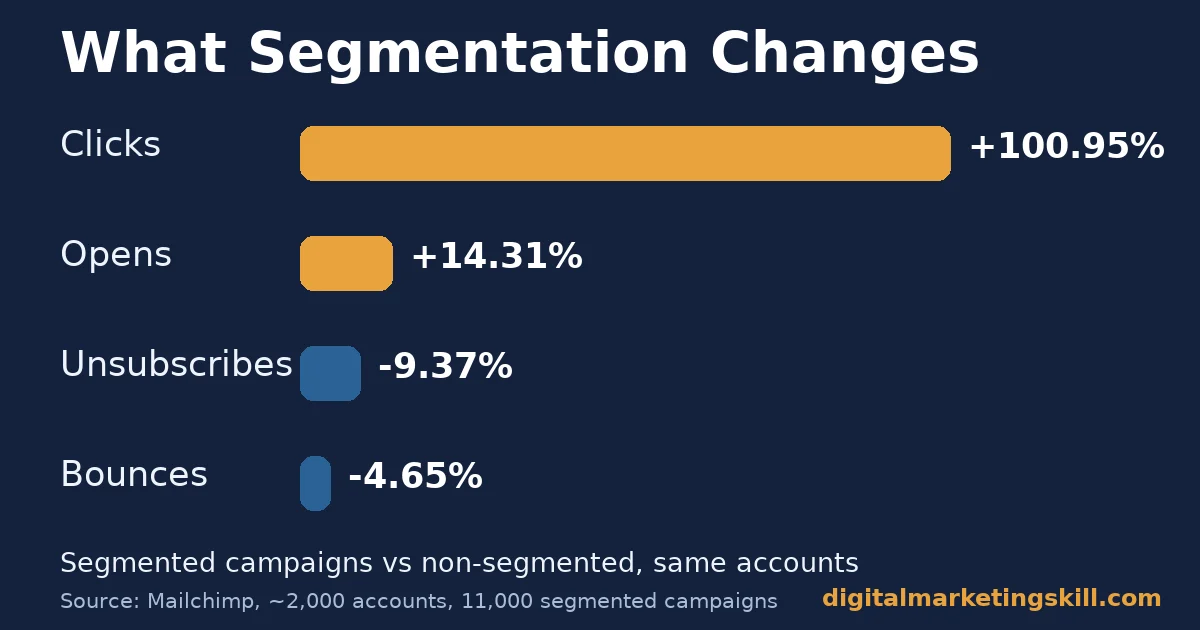
- Segmentation is the single biggest lever. Mailchimp’s analysis covered about 2,000 accounts sending 11,000 segmented campaigns. Opens were 14.31% higher and clicks were 100.95% higher than non-segmented sends.
- Segmentation also protects the list. The same Mailchimp research found segmented campaigns produced 4.65% fewer bounces and 9.37% fewer unsubscribes.
- Open rate alone is an unreliable measure. Mailchimp’s own benchmarks report a 35.63% average open rate. Mailchimp itself warns that Apple’s Mail Privacy Protection can inflate opens that were never actually read.
- Click rate is harder to fake. The same benchmark data puts the average click rate at 2.62%, a more reliable signal of real engagement than opens.
In this guide
- What the Average Email Marketing ROI Figure Hides
- Why Segmentation Changes Email Marketing ROI
- What Differs by Segmentation Type
- How to Lead With Each Segmentation Type
- How to Measure Your Own Email Marketing ROI
- Which Segment to Build First
- The One Rule: Segment Before You Spend More on Volume
- A Simple Checklist for Setting Up Segmentation
- Common Mistakes That Quietly Cap Email Marketing ROI
- A Real Case: What a Structured Email Flow Did for One Student
- Frequently Asked Questions About Email Marketing ROI
- Build the Skill Behind the Send
What the Average Email Marketing ROI Figure Hides
A single average, like $36 to $42 per dollar, makes email sound uniformly profitable. It is not. Some senders using little or no segmentation earn far less. Others using it well pull far ahead of the average.
This guide treats email marketing ROI as something you build. It comes from list structure and measurement, not from sending more email. The figures below come from Mailchimp’s own aggregated account data and Litmus’s industry survey work. Treat each one as a general benchmark, not your exact number.
A useful way to separate what you control from what you measure: you control the segments, the trigger rules and when you clean the list. You only measure the result afterward. No amount of watching a dashboard changes a send that was never segmented in the first place.
Why Segmentation Changes Email Marketing ROI
A segmented list sends each message to a smaller, more relevant group instead of everyone at once. That relevance is what the numbers above actually measure: not a trick, just a message that fits the person reading it.
This is also why email marketing ROI varies so widely between senders using the exact same platform and the exact same subject-line tactics. The platform and the tactics matter less than whether the list underneath them is organized at all.
Why Opens and Clicks Rise Together
Mailchimp’s research found segmentation lifted opens by 14.31% and clicks by more than double, at 100.95%. The gap between those two numbers matters. A relevant subject line earns the open. Relevant content inside the email is what earns the click, and clicks are closer to revenue than opens are.
Why Fewer Bounces and Unsubscribes Also Count
The same research found segmented sends produced 4.65% fewer bounces and 9.37% fewer unsubscribes. A smaller, healthier list is cheaper to maintain. It is also less likely to trigger spam filters. That protects the sender’s ability to reach the inbox on future campaigns.
What Differs by Segmentation Type
Not all segmentation delivers the same lift. The headings below name three common approaches, then show how to lead with each one.
Interest Groups: Built for the Strongest Click Lift
Segmenting by stated interest or past purchase category produced the strongest click performance in Mailchimp’s data. The lift was well above the average for segmentation generally. People click more when the content matches something they already said they wanted.
Signup Date: Built for the Strongest Open Lift
Segmenting by when someone joined the list produced the largest jump in opens. A new subscriber is paying closer attention. Someone who joined long ago has often grown used to ignoring your sender name.
Behavior Triggers: Built for Timing, Not Just Content
Sending based on an action reaches someone at the exact moment the topic is relevant. That action might be a cart left behind, a page visited, or a course started, rather than whenever your sending calendar happens to land.
How to Lead With Each Segmentation Type
The headings below mirror the three above. Start with whichever your current email platform already tracks, since that is the fastest lift to capture first.
Interest Groups: Lead With a Simple Preference Question
Ask new subscribers one question about what they want to hear about, even a single dropdown, and use the answer to route future sends. Our guide to writing email copy that converts covers how to match content to that stated interest.
Signup Date: Lead With a Structured Welcome Series
Build a short sequence of emails that triggers automatically when someone joins. Do not wait for them to appear in your next regular send. New subscribers are already paying attention. Campaign Monitor’s own data puts welcome email open rates at roughly four times a standard campaign, and click rates at roughly five times, so a welcome series uses that attention while it is still high.
Behavior Triggers: Lead With Your Highest-Value Action
Pick the one action that matters most to your business. It might be a cart abandonment, a course enquiry, or a free resource download. Build a trigger around it before trying to automate everything at once. Our guide to turning email leads into paying customers covers what to send after that first trigger fires.
How to Measure Your Own Email Marketing ROI
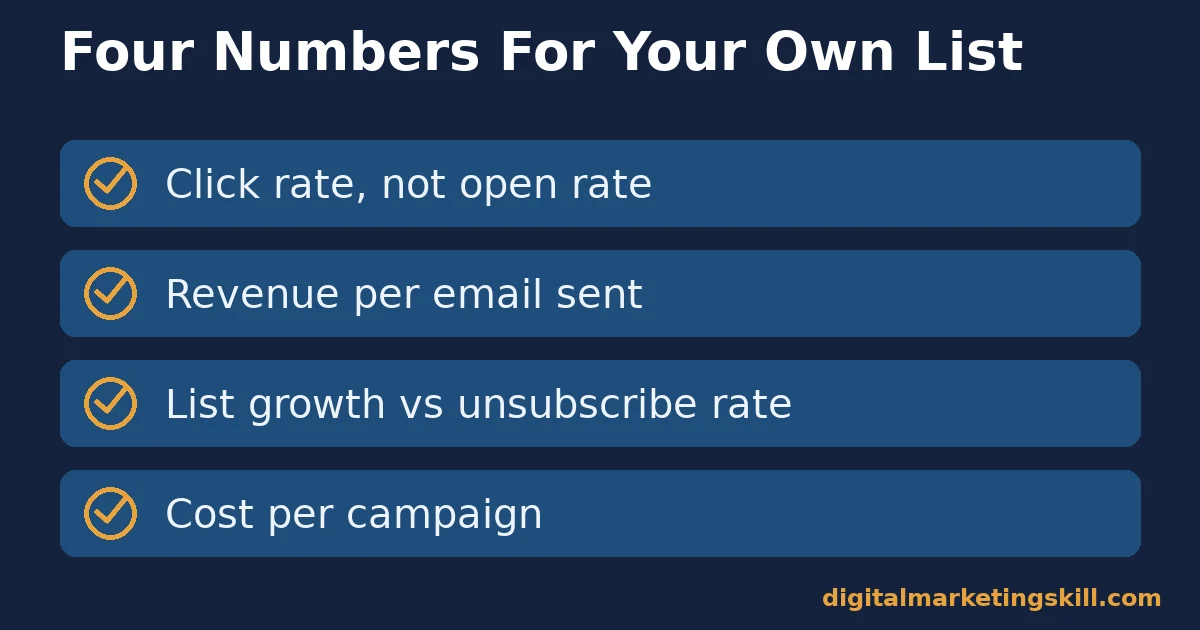
Benchmarks are a starting point, not your answer. Review these four numbers for your own list before comparing yourself to any published average.
Four Numbers That Show Your Real Return
- Click rate, not open rate: open rate can be inflated by privacy features that auto-load images. Mailchimp itself recommends weighing it carefully, since clicks require an actual action.
- Revenue per email sent: total campaign revenue divided by emails delivered. This ties the campaign to outcome, not just engagement. Our guide to reading Google Analytics reports with intent covers where to pull this number from.
- List growth rate versus unsubscribe rate: a list growing slower than it churns is shrinking in practice. Total subscriber count can look stable while this happens.
- Cost per campaign: platform fees, design time and copywriting time. Including these means your ROI calculation reflects the full cost to produce the campaign, not just the subscription price.
Which Segment to Build First
Most lists have several possible ways to segment, by interest, by signup date, by behavior, by purchase history. Trying to build all of them at once usually means finishing none of them.
Start With What Your Platform Already Tracks
Most email platforms already record signup date and basic engagement automatically, with no extra setup required. Building your first segment from data you already have is faster. Waiting on a new survey or a new tracking integration only delays the first result.
Then Move to Your Highest-Value Action
Identify the one action most closely tied to revenue. It could be a purchase, a demo request, or a course enquiry. Build a segment or trigger around people who have taken it versus people who have not. GetResponse’s own benchmark research found automated, triggered emails substantially outperform standard batch sends, which is why this action-based segment is usually worth building early.
Set a Review Date Before You Move On
Pick a date a few months out to check the new segment’s results. Confirm it is actually producing a better result than the unsegmented send it replaced. Without a planned check-in, segments tend to be built once and never revisited, even as the audience behind them changes.
The One Rule: Segment Before You Spend More on Volume
If your list is not segmented at all, fix that before buying a bigger list or sending more often. Mailchimp’s research shows segmentation alone can roughly double click performance. Sending more unsegmented email to more people multiplies a weak result rather than fixing it.
Illustrative, invented numbers: imagine two lists of 10,000 subscribers each, sending the same monthly campaign. The unsegmented list converts at 0.5%, producing 50 sales. The segmented list is split into three interest groups with tailored content. It converts at roughly double that rate, producing close to 100 sales from the same list size and send frequency.
A Simple Checklist for Setting Up Segmentation
Most of the email marketing ROI gap between senders traces back to skipping one of these steps, not to a lack of clever subject lines. Work through this list once, then review it every few months.
At Signup
- Ask one preference question, even a single dropdown or checkbox. This lets new subscribers be routed by interest from their first message.
- Tag the signup date automatically, so a welcome series can target recent joiners differently from long-time subscribers.
- Confirm the welcome series actually triggers correctly by signing up as a test subscriber yourself.
Ongoing
- Track at least one behavior signal, such as a click, a purchase or a page visit. Use it to separate engaged subscribers from inactive ones.
- Review your unsubscribe and bounce rate by segment, not just for the list as a whole. One poorly matched segment can hide inside an otherwise healthy average.
- Remove or re-engage subscribers who have not opened or clicked in a long stretch. A large inactive segment drags down deliverability for everyone else on the list.
Every Few Months
- Recheck whether your interest groups still match what you actually send. Offers and content often drift away from the original signup categories over time.
- Compare revenue per email across segments, not just click rate, to confirm the segments that click the most are also the ones that buy.
Common Mistakes That Quietly Cap Email Marketing ROI
Most lists do not fail because of one bad campaign. They lose their return slowly, through habits that feel harmless at the time. Watching for these five patterns is often a faster way to lift email marketing ROI than testing another subject line.
Treating the Whole List as One Audience
Sending the same message to everyone is the most common mistake behind a weak email marketing ROI number. As the data in this guide shows, even basic segmentation roughly doubles click performance, so a single undifferentiated list leaves significant return on the table.
Optimizing Subject Lines While Ignoring the Body
A clever subject line can lift opens without lifting revenue. That happens when the email itself does not deliver on what the subject promised. Since open rate can be artificially inflated, a rising open rate with flat revenue is a signal to look at the email content, not the subject line.
Never Removing Inactive Subscribers
Keeping every subscriber who ever signed up inflates list size while dragging down engagement rates. This includes people who have not opened an email in years. A larger, stale list also raises the chance of being flagged as spam.
A smaller, more engaged list usually produces a better email marketing ROI than a larger, stale one. Our guide to email deliverability covers what inboxes actually check before deciding whether your message reaches the inbox at all.
Ignoring Bounce and Unsubscribe Trends
A rising bounce rate often signals a list that needs cleaning, not a platform problem. Left unaddressed, it can damage sender reputation. That damage can affect delivery for every future campaign, well beyond the one email that triggered the bounces.
Sending at the Same Time Regardless of Segment
Different segments often have different active hours, especially across time zones or between weekday and weekend audiences. Sending every segment at one fixed time optimized for the average subscriber can quietly underperform for whichever group is actually least active at that hour.
A Real Case: What a Structured Email Flow Did for One Student
Among the published outcomes on Digital Marketing Skill Institute’s reviews page, one student reports spending $500 to set up email marketing flows and scaling the related business to $5,000 a month. This is a single, self-reported result tied to one business, not a guarantee of similar results for any other list or industry. See our earnings disclaimer for how to read results like this one.
Frequently Asked Questions About Email Marketing ROI
What is a good email marketing ROI?
Industry research puts the average around $36 to $42 per dollar spent, but your own number depends on your list quality, segmentation and offer. Track your own trend over time rather than chasing a published average from a different industry.
Does list segmentation really make that much difference?
Mailchimp’s analysis of about 2,000 accounts found segmented campaigns produced over double the click rate of non-segmented ones. It also found fewer bounces and fewer unsubscribes. The effect is large enough that segmentation is usually the first fix worth making.
Why is my open rate high but my sales low?
Open rate can be inflated by email clients that automatically load images without a person actually reading the message. Check click rate and revenue per email instead, since both require a real action from the recipient.
How often should I email my list?
There is no single right frequency. A smaller, well-segmented list can often be emailed more often without a drop in engagement. A large, unsegmented list may see rising unsubscribes at that same frequency. Watch your own unsubscribe trend as the signal to slow down.
Should I segment by demographics or by behavior?
Behavior is usually a stronger signal than demographics alone. What someone clicked, bought or browsed reflects actual interest, rather than an assumption based on who someone is. Use both together where your platform allows it.
What should a new list do first before worrying about advanced segmentation?
Build a basic welcome series and ask one preference question at signup. Those two steps capture most of the signup-date and interest-group lift described in this guide before you need any advanced automation.
Is the $36 to $42 ROI figure realistic for a small list?
It is an industry average across senders of very different sizes, so treat it as a benchmark rather than a promise. Omnisend’s research notes some senders earn far more than this average and others far less, mainly based on list quality and segmentation rather than list size alone.
How long does it take to see a return from segmentation?
Many senders see a difference within one or two campaigns, since the comparison between a segmented and unsegmented send is immediate. Building a complete set of segments and a welcome series takes longer, often a few weeks, but the first simple segment usually shows a result right away.
Can over-segmenting a list hurt email marketing ROI?
Yes. Splitting a small list into too many narrow segments can leave each one too small to send to effectively, and it adds management overhead without a matching lift in results. Start with two or three broad segments and add more only once each one is clearly earning its place.
Build the Skill Behind the Send
Email marketing ROI improves fastest when the person running campaigns also understands segmentation, automation and analytics, not just subject lines. Digital Marketing Skill Institute’s Master Diploma in Digital & AI Marketing includes a dedicated AI-powered email marketing and automation course alongside the rest of the curriculum.
The program comes with unlimited one-on-one mentoring and real project-based work experience with a U.S. partner company. It is dual US and UK accredited, recognised in more than 100 countries, and 100% online, so you can study from anywhere in your country.
Explore the full curriculum on the Master Diploma in Digital & AI Marketing page, read more outcomes on our reviews page, or browse more guides on the digital marketing blog. When you are ready, apply here. This works wherever you live, since the whole program runs online. Learn more at https://digitalmarketingskill.com/, or start your application today at https://digitalmarketingskill.com/.
Every figure in this guide was checked against its original source before publication. Figures marked as illustrative are invented examples, not real results.
![9 Amazing Digital Marketing Skills to Make Money Online [With Proof]](https://digitalmarketingskill.com/wp-content/uploads/2019/07/9-Amazing-Digital-Marketing-Skills-to-Make-Money-Online-With-Proof-17.png)






