
Kit (ConvertKit) is an email marketing platform for creators that helps you grow a list, send newsletters, automate emails and sell digital products. It was called ConvertKit until the company renamed itself Kit and moved to kit.com. So if you see either name in a job post, it means the same tool. As a result, knowing how it works helps you run email for coaches, writers, course sellers and small brands.
Key Takeaways
- Kit is the new name for ConvertKit, an email platform built for creators.
- It covers forms, landing pages, broadcasts, sequences and automations in one place.
- Tags and segments let you sort subscribers by what they do and what they want.
- Visual Automations use entry points, actions, events and conditions to move people along a path.
- Kit has a free plan, while paid plans add features such as automations and sequences.
What Is Kit (ConvertKit)?
Kit is software for email marketing. You use it to collect email addresses, then send people useful emails over time. However, it is aimed at creators rather than large shops. For example, a podcaster, a YouTuber or a course seller might use it to talk to fans directly.
The company started as ConvertKit. Later, it changed its name to Kit and moved its website to kit.com. In its rebrand press release, the company called itself “the leading email-first operating system that empowers creators to grow and monetize their businesses.” So the focus is clear: help creators own their audience through email.
Think of Kit as a post office that you control. Social media is like a busy market where the owner decides who sees your stall. By contrast, your email list is a list of people who asked to hear from you. Then, Kit helps you send each of them the right letter at the right time.
Why It Matters
Why does this matter to you? Because many creators and small brands run their whole business on Kit. For instance, they use it to deliver a free guide, welcome new readers and sell a course. Also, the skills carry over. Once you know tags, sequences and automations in Kit, tools such as Mailchimp feel familiar too. That makes you useful to many clients, not just one.
Where Kit Fits in a Marketing Plan
Kit usually sits in the middle of a creator’s plan. First, social posts, videos and blog articles bring in new visitors. Then a Kit form turns some of those visitors into subscribers. After that, emails build trust and lead to a sale. In other words, Kit is where casual followers become loyal readers and buyers.
Kit also connects with other tools. For example, you can link it to website builders, payment tools and course platforms through apps and integrations. So a new sale in another tool can add a tag in Kit. As a result, your emails stay in step with what each person has done.
How Kit (ConvertKit) Works
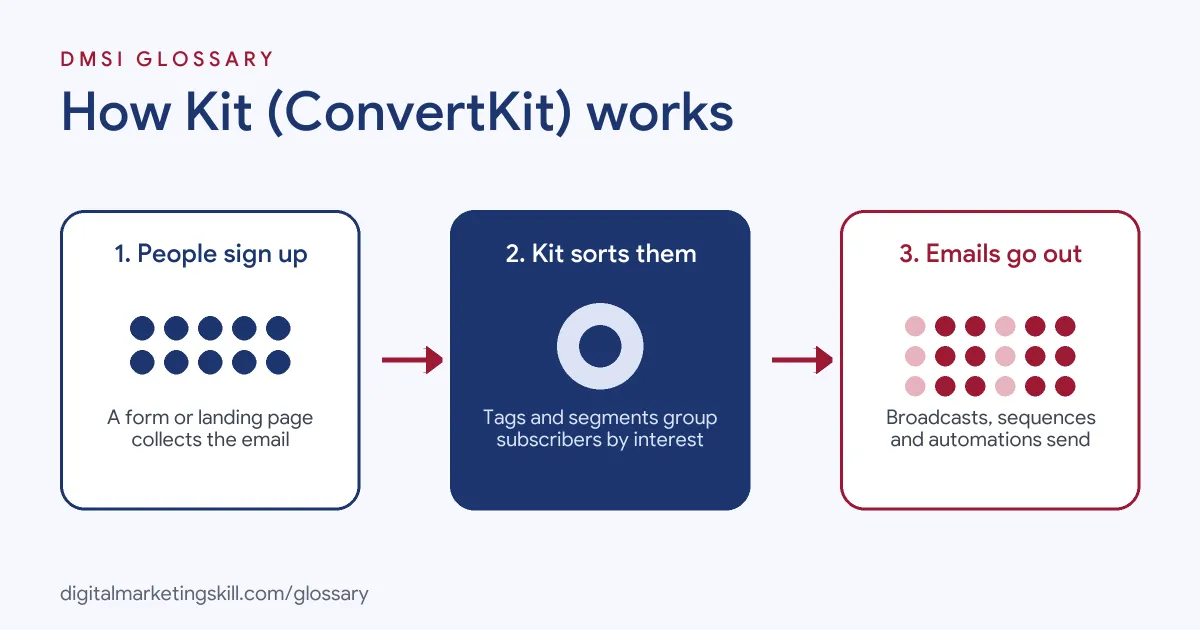
Kit works in three simple stages. First, people join your list through a form or landing page. Then, Kit sorts them with tags and segments. Finally, it sends them broadcasts or automated emails based on what they do.
Forms and Landing Pages
You start by building a sign-up form or a landing page inside Kit. Next, you place the form on your website or share the page link. Often, you offer a lead magnet, such as a checklist, in return for an email address. Kit can then deliver that free download for you.
Tags and Segments
Each subscriber can carry tags. A tag is a label, such as “bought course” or “interested in recipes”. In addition, you can group subscribers into segments based on tags, forms or other details. So you can send a message only to the people who care about it.
Broadcasts and Sequences
Kit sends two main kinds of email. A broadcast is a one-off email, like a weekly newsletter. On the other hand, a sequence is a set of emails sent in order over days or weeks. For example, a new subscriber might get a five-email welcome series.
Visual Automations
Visual Automations join everything together on one canvas. Kit’s help centre says, “Entry points are the events that trigger your Visual Automation to start running.” Then actions do the work, such as sending a sequence or adding a tag. Also, events move people forward when something happens, like a purchase. Finally, Kit calls conditions “the Visual Automation equivalent of a fork in the road.” They send people down different paths.
Examples of Kit (ConvertKit)
- A fitness coach with a free plan. The coach offers a free workout guide through a Kit landing page. After that, a welcome sequence sends tips over a week and then invites people to a paid programme.
- A food blogger with a newsletter. The blogger sends a weekly broadcast with new recipes. Also, readers who click on vegan recipes get a “vegan” tag. So later emails can feature more plant-based dishes for them.
- An online course seller. When someone buys a course, an event in a Visual Automation adds a “customer” tag. Then the automation removes them from the sales emails and starts an onboarding sequence instead.
Kit (ConvertKit) vs Mailchimp and Klaviyo
| Point | Kit (ConvertKit) | Mailchimp | Klaviyo |
|---|---|---|---|
| Main users | Creators, writers, course sellers | Small businesses of many kinds | Online shops and ecommerce brands |
| How you sort contacts | Tags and segments on one subscriber list | Audiences, tags and segments | Lists and segments built from shop data |
| Typical use | Newsletters, welcome series, selling digital products | Newsletters and general campaigns | Abandoned cart and product emails |
| Automation style | Visual Automations with entry points and conditions | Customer journeys | Flows |
In short, all three send email well. However, Kit is built around creators, while Klaviyo leans towards online shops.
How to Set Up Kit (ConvertKit)
- Create your account. Sign up on kit.com and add your sender name and address. As a result, your emails show who they come from.
- Import or start your list. Upload existing subscribers who gave consent. Otherwise, start fresh with a new form.
- Build a form or landing page. Pick a simple design and write a clear promise. Then add your free download if you have one.
- Plan your tags. Write down a short list of tags before you start. For example, use tags for interests and for customers.
- Write a welcome sequence. Draft three to five emails that introduce you and give quick value.
- Connect it in a Visual Automation. Set the form as the entry point. Next, add the sequence as an action.
- Test the flow. Sign up with your own email and check each step works.
- Send your first broadcast. Finally, send a short newsletter and check your opens and clicks.
Best Practices for Kit (ConvertKit)
- Keep tags tidy. Use a clear naming style, so you and your team know what each tag means.
- Ask for consent. Only add people who chose to join, and make your opt-in clear.
- Start with one automation. Build a simple welcome flow first. Then add more paths once it works.
- Write like a person. Creator audiences like a friendly voice. So keep emails short and personal.
- Clean your list. Remove people who never open, which helps your deliverability.
- Check results often. Look at opens, clicks and sales for each sequence, and improve the weak emails.
Common Mistakes to Avoid
- Too many tags. Hundreds of unused tags make it hard to target anyone.
- No welcome email. New subscribers forget you fast if you stay silent.
- Selling too soon. A sales pitch in the first email can push people away.
- Skipping tests. A broken link in an automation can stop the whole flow.
- Forgetting customers. If buyers keep getting sales emails, they feel ignored.
- Mixing up the names. Some clients still say ConvertKit. However, it is the same tool, so don’t let the name confuse you.
Where You’ll Use Kit (ConvertKit) at Work
Kit appears in email, marketing assistant and web roles, often next to other email tools. Many listings still use the older name. For example, real remote job listings ask for:
- “Strong expertise in email marketing platforms (Mailchimp, ConvertKit, ActiveCampaign, etc.).” (Digital Marketing Specialist).
- “Hands-on experience with email marketing platforms such as Mailchimp, ActiveCampaign, Klaviyo, ConvertKit, or HubSpot.” (Social Media Strategist).
- “Build landing pages and set up automations and system integrations, using tools such as Zapier, Make, or n8n, and email marketing platforms such as ConvertKit or Klaviyo” (Web Developer).
Learn It in the Lead Generation and Email Track
You can learn Kit and other email tools in the AI-Powered Lead Generation and Email Automation track. Every track includes a U.S. Project Internship from day one, with unlimited 1-on-1 mentoring.
Frequently Asked Questions
Is Kit the same as ConvertKit?
Yes. ConvertKit renamed itself Kit and moved to kit.com. The tool does the same job under the new name.
Is Kit free to use?
Kit has a free plan with forms, landing pages and broadcasts. However, features such as Visual Automations and sequences need a paid plan, so check the pricing page.
Who is Kit best for?
Kit is built for creators, such as writers, coaches, podcasters and course sellers. Also, small brands that sell digital products often use it.
What is the difference between a tag and a segment in Kit?
A tag is a label on one subscriber. By contrast, a segment is a group of subscribers built from tags, forms or other details.
Can I sell products with Kit?
Yes. Kit lets you sell digital products and subscriptions. Then you can use automations to send buyers the right emails.
Sources: Business Wire: ConvertKit rebrands to Kit; Kit Help Center: How to use Kit Visual Automations; Kit: Pricing; Kit: Automations; remote job listings on Himalayas, Himalayas and Himalayas.