
Live shopping is a way of selling where a host shows products in a real-time video stream and viewers can buy them without leaving the stream. It mixes the fun of a live show with the ease of an online shop. As a result, people can ask questions, see products in use and check out in a few taps. For brands, it turns social video into a direct sales channel.
Key Takeaways
- Live shopping lets viewers watch a stream and buy the products shown in it.
- Platforms such as TikTok and YouTube let you tag or pin products during a stream.
- Hosts can answer questions in real time, which builds trust quickly.
- Paid ads, such as TikTok LIVE Shopping Ads, can send more viewers to a stream.
- Good planning, product set-up and a practice run make a big difference.
What Is Live Shopping?
Live shopping is sometimes called live commerce or livestream shopping. A brand, a creator or a shop owner goes live on a social platform. Then they show products, answer questions and share offers. Meanwhile, viewers tap a product to buy it, often while the stream is still running.
Think of a TV shopping channel, but on your phone. However, there is a key difference. On a TV channel, you watch and phone in. With live shopping, you can comment, ask the host a question and get a reply in seconds. So it feels more like a chat with a friendly shop assistant.
The big platforms build this into their apps. For example, TikTok explains that “TikTok Shop allows sellers to sell products directly on TikTok through in-feed videos, LIVE videos, and the Showcase tab.” Similarly, YouTube lets eligible creators tag products in their live streams, so viewers can open a product list from the Shopping icon.
Why It Matters
Live shopping blends social media marketing and ecommerce in one place. People see the product, hear honest answers and buy in the same moment. Also, live chat adds social proof, because viewers see others asking questions and buying. For smaller brands, it is a way to stand out without a big studio budget.
How Live Shopping Works
Live shopping works by linking a product catalogue to a live video. You prepare the products, go live, feature items one by one and let viewers check out. Then you review the results to plan the next stream.
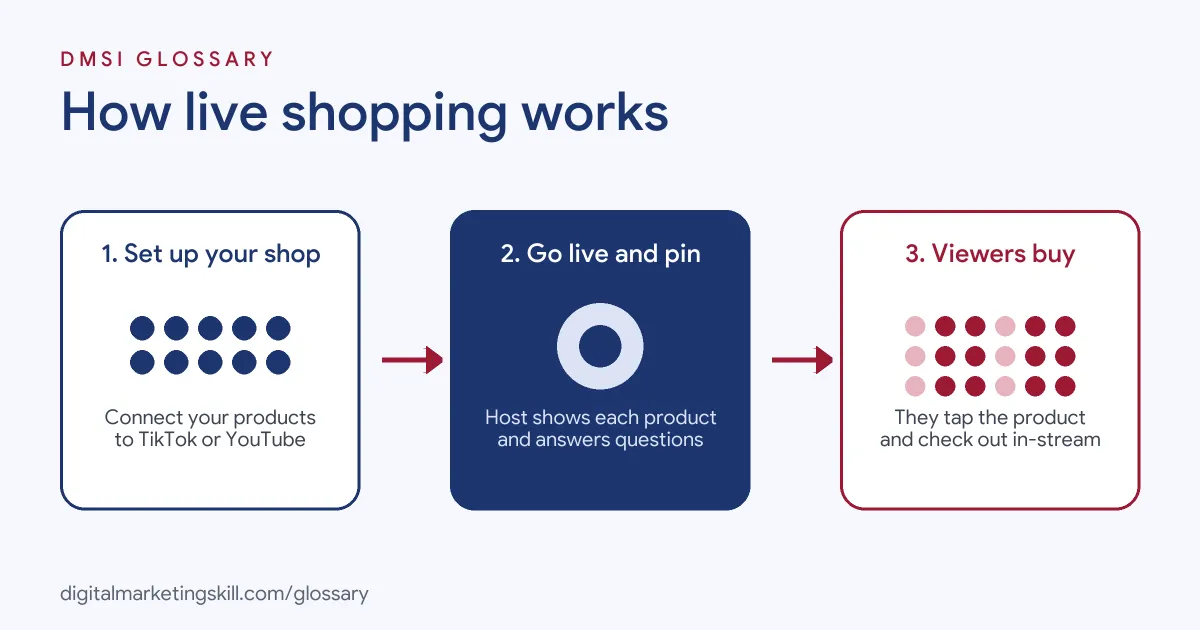
Step 1: Set Up Your Shop
First, connect your products to the platform. On TikTok, that means a TikTok Shop. On YouTube, your channel “must be eligible for YouTube Shopping” before you connect your store. Google even advises finishing store onboarding “4 weeks before your livestream.” So start early, as approvals can take time.
Step 2: Go Live and Feature Products
Next, you start the stream and show each product. On YouTube, you can tag items and pin a featured product while you talk about it. The help centre also notes that “The order shown in the product picker is the same order shown to viewers.” In other words, plan your running order before you go live.
Step 3: Talk With Viewers
Then the real magic happens. Viewers ask about sizes, colours or how a product works. The host answers live and shows the detail on camera. As a result, doubts get cleared up before they turn into lost sales.
Step 4: Drive Traffic With Ads
Finally, many brands boost their streams with paid media. TikTok says “LIVE Shopping Ads help people on TikTok discover and watch your LIVE videos, and browse and buy your products.” It adds that these ads appear “in the TikTok feed, Shopping Center, and search.” So a stream can reach people who don’t already follow you.
What Makes a Good Host
The host can make or break a stream. First, they need to know the products well, so they can answer tricky questions with confidence. Second, they should feel relaxed on camera and keep the energy up. Also, a good host reads the chat and speaks to viewers by name. For instance, they might say “Great question, Sam” before showing a close-up. That small touch makes people feel seen. Finally, the host should keep things honest. If a product isn’t right for someone, saying so builds more trust than a hard sell.
Examples of Live Shopping
- A skincare brand. The founder goes live each week and tests products on camera. Viewers ask about skin types in the chat. Then she pins the product she is using, so people can buy it at once.
- A kitchenware shop. The shop teams up with a food creator for a cooking stream. Each tool used in the recipe is tagged in the product list. In addition, a short-time discount gives viewers a reason to buy during the show.
- A fashion label launching a new range. Two hosts try on outfits and compare fits. Meanwhile, the brand runs ads to send new viewers to the stream. After the show, the replay keeps the tags, so late viewers can still shop.
Live Shopping vs Shoppable Video
| Point | Live shopping | Shoppable video |
|---|---|---|
| Timing | Real time, with a set start | Recorded and watched any time |
| Interaction | Live chat and instant answers | Comments after the fact |
| Effort | Host, set-up and planning for each stream | Made once and reused |
| Strength | Urgency, trust and live demos | Reach and scale over time |
| Best for | Launches, demos and events | Always-on product promotion |
Most brands use both. For example, they cut clips from a stream into short-form video and tag the same products.
How to Run a Live Shopping Stream
- Pick your platform. First, go where your buyers already watch, such as TikTok or YouTube.
- Get your shop approved. Connect your catalogue and fix any product issues well before the stream.
- Choose your host. Next, use a team member or a creator who knows the products and enjoys talking on camera.
- Plan a running order. List the products, key points and offers in the order you will show them.
- Do a test run. Google suggests you “run a test with an unlisted live stream 1 week prior.” Then you can fix sound, light and tagging.
- Promote the stream. Share the date in posts, stories and emails. Also, consider ads to reach new viewers.
- Go live and engage. Greet people by name, answer questions and pin each product as you show it.
- Review and repeat. After the stream, check views, clicks and sales. Then plan the next one around what worked.
Best Practices for Live Shopping
- Show, don’t just tell. Demos, close-ups and try-ons answer questions better than words alone.
- Keep a regular slot. Above all, a set day and time helps viewers build a habit.
- Work with creators. Creator marketing brings a ready audience and a trusted voice.
- Use fair offers. Real time-limited deals add urgency, but fake countdowns damage trust.
- Have a helper. A second person can watch the chat and handle tags while the host talks.
- Reuse the content. Afterwards, turn the best moments into clips for later posts.
Common Mistakes to Avoid
- Leaving set-up too late. Shop approvals and product reviews can take weeks.
- Changing products just before going live. Google advises against edits in the three days before a stream, as they can cause disapprovals.
- Ignoring the chat. Unfortunately, viewers who get no answer often leave.
- Selling too hard. In fact, constant pushing feels like an advert, not a show.
- Skipping promotion. A stream with no audience can’t sell, however good the host is.
- Not measuring results. Without data, you can’t tell which products or hosts work best.
Where You’ll Use Live Shopping at Work
Live shopping shows up in social commerce, TikTok Shop and creator roles. For example, real remote job listings ask people to:
- “Build a consistent LIVE shopping and shoppable-video engine, optimizing cadence, hosts, offers, demos, and selling mechanics based on performance.” (TikTok Shop Manager).
- “you will flex across affiliate management, UGC creator strategy, and live shopping support.” (Social Commerce Senior Coordinator (Affiliate, UGC & Live Shopping)).
- “Experience with live shopping and supporting creators who sell on Live.” (TikTok Shops Manager).
Learn It in the Social Media and Paid Social Track
You can learn live shopping, social commerce and paid social in the AI-Powered Social Media Management and Advertising track. Every track includes a U.S. Project Internship from day one, with unlimited 1-on-1 mentoring.
Frequently Asked Questions
Is live shopping the same as live commerce?
Yes, the two terms usually mean the same thing. In both cases, they describe selling products during a live video stream.
Which platforms support live shopping?
TikTok supports selling in LIVE videos through TikTok Shop. YouTube also lets eligible creators tag products in live streams.
Do I need a big following to start?
No, but it helps to have some audience. Besides that, you can also partner with creators or run ads to bring viewers in.
How long should a live shopping stream be?
There is no fixed rule. Instead, test different lengths, then check when viewers drop off and when sales happen.
Can people buy after the stream ends?
Often, yes. On YouTube, product tags stay on the replay, so viewers can still shop later.
Sources: TikTok Ads Help Center: Getting started with LIVE Shopping Ads; TikTok Ads Help Center: TikTok Shopping and Showcase; YouTube Help: Tag products in your live streams; Google Merchant Center Help: Tips for promoting your products with YouTube live shopping; remote job listings on Himalayas, Himalayas and Himalayas.