
Link retargeting lets you add a call-to-action to any page you share, even content you don’t own. Every click on that shared link becomes a chance to bring someone back to you. It needs no advertising pixel and no ad budget, just a different kind of link. This guide explains how it works, how to measure it, and when it actually pays off.
Key Takeaways
- Standard retargeting ads already beat cold display ads. Demandsage, citing Meazy, reports an average retargeting ad click-through rate around 0.7%, against about 0.07% for standard display ads, roughly a tenfold difference.
- Retargeted visitors click more often, not just view more. Demandsage, citing Invesp, reports that retargeted consumers are three times more likely to click an ad than other visitors.
- Branded links alone can lift clicks. Bitly’s own blog cites studies showing custom, branded short domains can drive almost 40% more clicks than generic shortened links.
- Link retargeting tools run at real scale. Sniply states on its own site that it has over 25,000 active users, has shortened more than 85,000,000 URLs, and has generated more than 268,000,000 clicks and redirects.
- None of this requires the content to be yours. A link retargeting overlay attaches to any URL you share, including someone else’s article, so the channel works even without a pixel on that page.
In this guide
- What Most Advice on Link Retargeting Skips
- How Link Retargeting Actually Works
- What Differs Between Link Retargeting Methods
- How to Get Results From Each Method
- How to Measure Link Retargeting Correctly
- The One Rule: Judge the Offer, Not Just the Click Rate
- How Much Time Link Retargeting Actually Takes
- A Real Example: What One Link Retargeting Tool Reports
- Where Link Retargeting Fits in a Distribution Plan
- Common Mistakes That Undercut Link Retargeting
- Frequently Asked Questions About Link Retargeting
- Turn This Into a Repeatable Channel, Not a One-Off Trick
What Most Advice on Link Retargeting Skips
Most advice treats link retargeting as a minor hack. Add a button, done. That skips the real question: when does an overlay actually earn a click, and when does it just annoy a reader?
Treat every figure here as a snapshot, not a settled fact. The retargeting click-through figures, reported by Demandsage, describe advertising in general, not link overlays specifically. The vendor numbers from Sniply’s own site describe one company’s own tracked usage, not an independent audit.
How Link Retargeting Actually Works
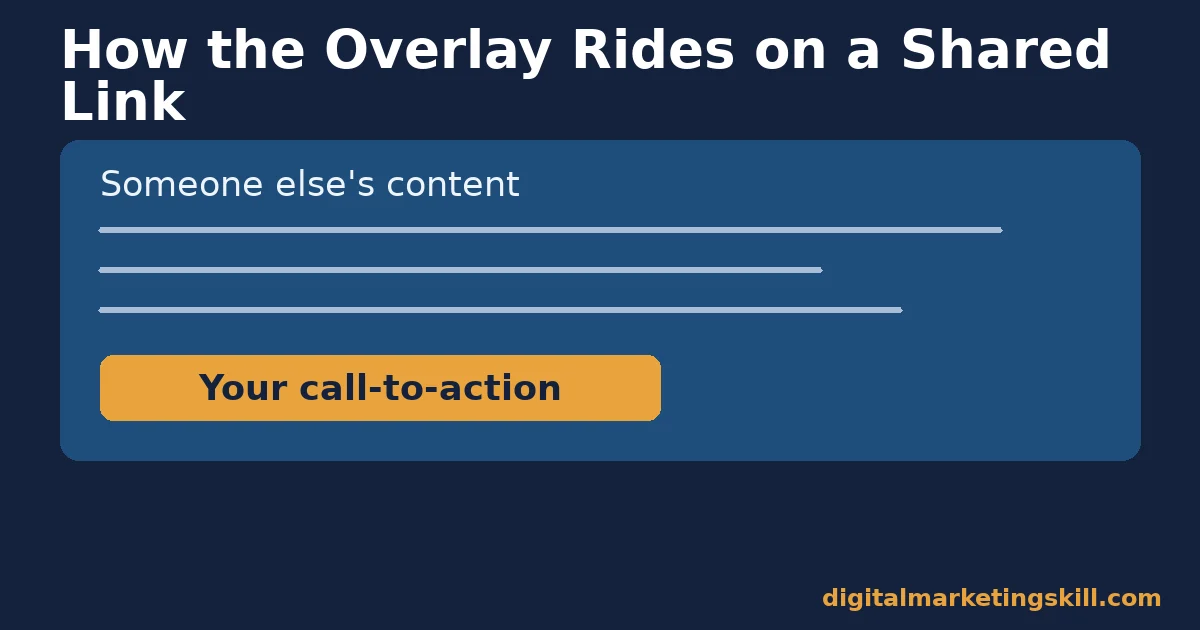
Link retargeting attaches a small banner or button to a page you share, without changing that page’s content. A reader opens your shared link, sees the article as normal, and also sees your call-to-action layered on top. One click brings them back to you.
Why It Needs No Advertising Pixel
Standard retargeting works by dropping a tracking pixel on your own site, then showing ads to people who visited, as described in Google Ads’ own remarketing documentation. That only works on pages you control. Link retargeting flips the model. The call-to-action travels with the link itself, so it works on any page you share, even one you don’t own.
That’s the core difference worth remembering. Pixel-based retargeting follows a visitor around the web after they leave your site. Link retargeting puts your offer in front of them on someone else’s page, before they ever reach yours.
Why the Click Rate Varies So Much
Three things usually explain why one shared link converts better than another. The content underneath genuinely interests your audience. The call-to-action matches what a reader of that specific content would want next. Or the overlay is placed and worded so it doesn’t fight the page for attention.
None of that shows up in a single click-through number. A low rate on one link might mean a weak call-to-action, a poor content match, or simply a smaller audience that day. Read several links together before drawing a conclusion from one.
What Differs Between Link Retargeting Methods
Most teams end up choosing between two approaches. A dedicated link retargeting tool adds an overlay to any link, even third-party content. A branded short link just makes your own links look more trustworthy, without an overlay. They solve different problems.
Overlay Tools: Built to Work on Content You Don’t Own
A link retargeting overlay, like Sniply’s, puts a message on top of someone else’s article, video or page. You never touch their content. Your call-to-action simply floats above it, visible the whole time a reader stays on the page.
This is the method’s real strength. You can share a competitor’s article, an industry report, or a customer’s case study, and still get a chance at a click back to your own page. No other common tactic does that, which makes it a cheap addition to a wider lead generation stack.
Branded Short Links: Built to Make Your Own Links More Trusted
A branded short link, by contrast, only improves links you already control. It replaces a generic shortened URL with one that shows your own domain name. Readers trust it more, so more of them click it in the first place; Bitly’s own blog cites studies showing custom, branded domains can drive almost 40% more clicks than generic ones.
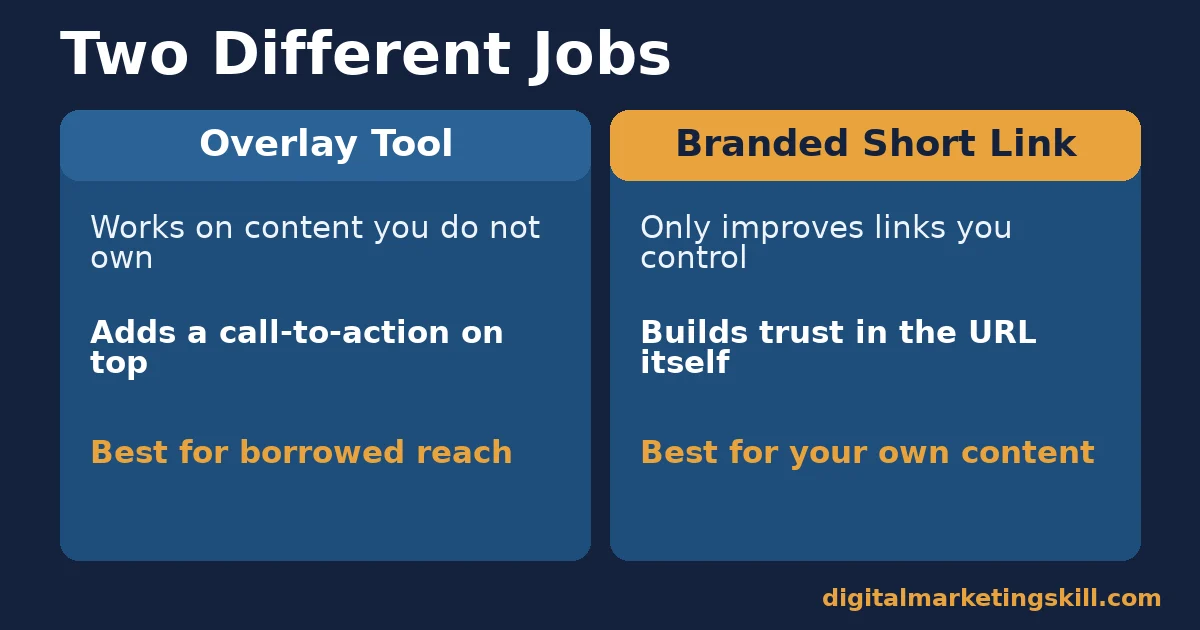
The trade-off is reach. A branded link only helps the page it points to. It cannot add a call-to-action to content that already belongs to someone else, which is exactly the gap a link retargeting overlay fills.
How to Get Results From Each Method
Overlay Tools: Match the Offer to the Content, Every Time
Fix an overlay’s performance by changing the offer per piece of content you share, not using one generic button everywhere. A reader of a beginner guide wants a different next step than a reader of an advanced case study. Match the two.
Keep the overlay small and clearly marked as yours. A call-to-action that covers too much of the shared page frustrates readers, and frustrated readers rarely click anything on purpose. The same discipline applies to any social media marketing tool you layer on top of shared content.
Branded Short Links: Keep the Domain Short and Recognisable
Fix a branded link’s performance by keeping the custom domain short, and close to your actual brand name. A long or unfamiliar custom domain can undo the trust a plain branded link is supposed to build.
Test the same destination page with both a generic shortened link and a branded one, sent to similar audiences. Compare the click-through rate. That gives you a direct read on whether branding is actually earning you anything on your specific audience.
How to Measure Link Retargeting Correctly
Four KPIs Worth Defining Before You Judge a Campaign
Each of these tells you something different. Read them together.
- Overlay click-through rate. The share of people who saw your shared link and clicked your call-to-action. This is the headline number, but it means little without the next three.
- Destination conversion rate. Of the people who clicked through, how many actually completed the action you wanted. A high click-through rate with a low conversion rate usually means a mismatched offer.
- Engagement time on the shared page. How long a reader stayed before clicking, or leaving. A very short time usually means the overlay appeared before the reader found the content worth their attention.
- Volume shared. How many links carried your overlay in a given period. A strong click-through rate on five shared links tells you far less than the same rate across five hundred.
Tag your destination links with campaign parameters before you start, using Google’s own campaign URL guidance, so clicks from link retargeting show up as their own channel in your analytics instead of blending into generic referral traffic.
The One Rule: Judge the Offer, Not Just the Click Rate
If you remember one rule from this guide, make it this one: never judge a link retargeting campaign by click-through rate alone. Judge it by what happened after the click.
Here is an illustrative, invented example to show why. Say one shared link gets a 4% overlay click-through rate, and a second gets 2%. The first link looks better on the surface. But if the first link’s clicks rarely convert on your destination page, and the second link’s clicks convert at three times the rate, the second link is actually doing more for your business.
Apply the same rule to the content you choose to share. A popular, widely shared article can carry your overlay to a huge audience and still underperform, if that audience has little interest in what you’re offering.
This is why a small, focused audience often beats a huge, mismatched one. Ten clicks from genuinely interested readers can outperform a thousand clicks from people who never wanted what you’re offering in the first place.
How Much Time Link Retargeting Actually Takes
Setting up a single overlay usually takes a few minutes: write a short message, pick a button, choose a destination page. The real time cost is not the setup. It’s deciding what to offer for each piece of content you share.
Prepare a Small Set of Offers in Advance
Instead of writing a new call-to-action every time you share a link, prepare three or four standard offers ahead of time, matched to common types of content you tend to share. A beginner guide gets one offer. An advanced report gets another. This turns a daily decision into a quick selection from a short list.
Review Performance on a Fixed Schedule
Set a monthly check-in to look at which shared links actually drove conversions, not just clicks. That cadence is slow enough to gather a meaningful sample, but frequent enough that a mismatched offer doesn’t go unnoticed for too long.
Over time, this turns link retargeting into a lightweight habit rather than a project that needs reinventing every time someone on the team shares a link.
A Real Example: What One Link Retargeting Tool Reports
Sniply publishes specific figures about its own platform. They’re a useful, concrete example of link retargeting at scale, with one clear limit: these are the vendor’s own published numbers, not an independently audited figure.
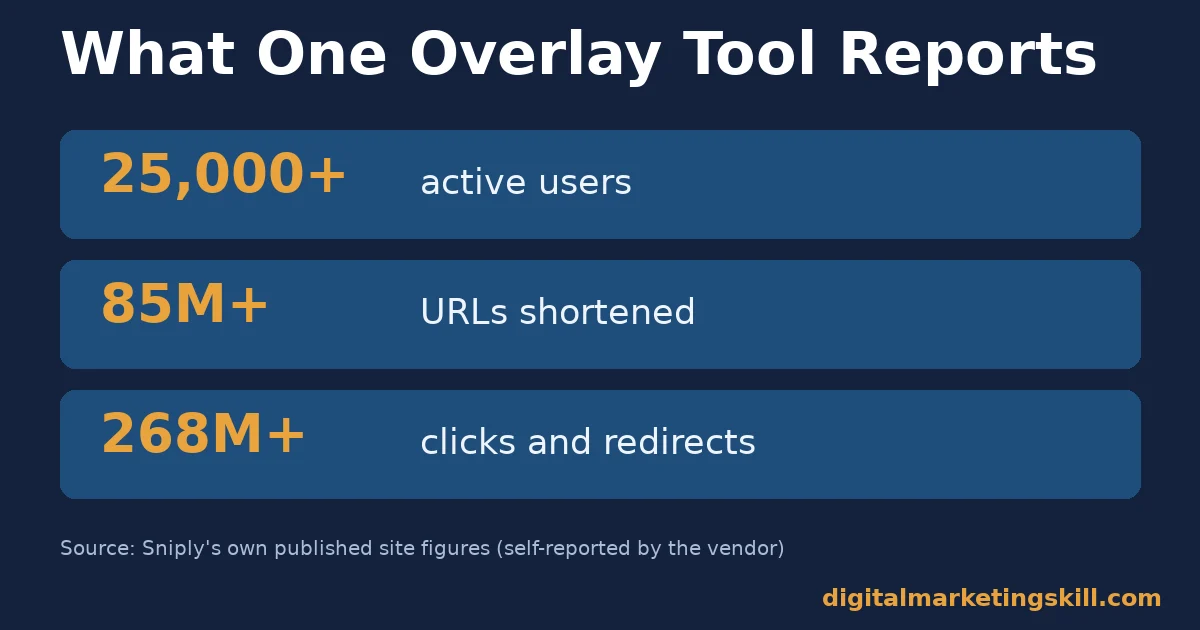
The company states on its own site that it has over 25,000 active users. It also reports having shortened more than 85,000,000 URLs, generating more than 268,000,000 clicks and redirects along the way. Those totals describe activity across every user of the platform, not any single campaign.
The lesson generalises beyond this one tool. A vendor’s platform-wide totals describe scale, not your expected result. Your own click-through rate will depend on your content, your audience and your offer, not on how many links the platform has processed for everyone else combined.
Treat a vendor’s scale numbers as proof the mechanism works at scale, not as a benchmark for your own campaign. A small newsletter sharing five links a week will never match a platform-wide total, and shouldn’t expect to. Judge your own results against your own past performance instead, checked month over month.
Where Link Retargeting Fits in a Distribution Plan
Link retargeting works best as a small, steady habit, not a one-time campaign. Every link you already share, in a newsletter, on social media, or in a community reply, can carry an overlay. You are not creating new traffic. You are making existing traffic work twice.
That framing matters because it changes what success looks like. You are not trying to beat your paid advertising numbers. You are trying to add a small, nearly free lift on top of sharing you were already going to do anyway.
Curating Other People’s Content
Many brands already share articles, reports and videos they didn’t create, as part of a regular content calendar. That’s free distribution for the original author. With link retargeting attached, it also becomes a small distribution channel back to you, at no extra cost in content production.
This works especially well for industry news, research summaries and how-to guides your audience already wants. You get credit for curating something useful, and a share of the attention it earns.
Resharing Your Own Older Content
The same approach works on your own older posts, not just third-party content. Attach a link retargeting overlay pointing to a newer, related piece, and an old post keeps earning a second job long after it stops ranking for its original purpose.
This is a low-effort way to connect your back catalogue, since you are not rewriting the old page, just changing where its traffic can go next.
Letting a Whole Team Share With One Call-to-Action
If several people on a team share links publicly, a shared link retargeting setup lets everyone carry the same consistent call-to-action. Nobody has to build their own landing page or tracking link by hand.
That consistency matters more as a team grows. A mismatched or missing call-to-action on even a few shares is traffic quietly wasted. Closing that gap with a shared setup takes little extra work.
Common Mistakes That Undercut Link Retargeting
A few repeated mistakes explain most disappointing results, and all of them are easy to fix once you know to look for them.
Using One Generic Call-to-Action Everywhere
The most common mistake is attaching the same overlay to every link, regardless of what the underlying content is about. A reader of a beginner explainer and a reader of an advanced industry report want different next steps. One generic offer undersells both.
Ignoring Where the Link Is Being Shared
A call-to-action that works well in an email newsletter can feel out of place dropped into a casual social reply. Match the tone of the overlay to the platform it will appear on, not just to the content underneath it.
Never Reviewing Which Shared Links Actually Converted
Many teams track clicks but never go back to check which specific shared links led to a real conversion. Without that review, you keep sharing the same mix of content without learning which topics actually bring people back.
Running Too Many Call-to-Actions at Once
Some teams try to test five or six different overlay messages at the same time, across different links, then struggle to tell which change actually mattered. Change one variable at a time, like the button text or the offer, so a shift in click-through rate actually means something.
A simple before-and-after comparison, on similar content shared to a similar audience, tells you more than a scattered set of unrelated tests ever will.
Frequently Asked Questions About Link Retargeting
What is link retargeting, in simple terms?
It’s a call-to-action attached to a link you share, so that anyone who opens that link also sees your message. Unlike a pixel, it needs no code installed on the page itself, since the call-to-action travels with the link.
How is link retargeting different from pixel-based retargeting?
Pixel-based retargeting shows ads to people after they leave a page you control. Link retargeting shows your offer directly on a page you shared, whether you own that page or not. They can work well together, but they solve different problems.
Does an overlay annoy readers or hurt the content it sits on?
It can, if it’s oversized or poorly matched to the content. A small, clearly branded call-to-action that doesn’t block the page tends to perform better than one that interrupts reading.
What kind of content works best for link retargeting?
Content your audience already wants to read, whether you wrote it or not. An overlay only gets a chance at a click if someone actually stays on the page long enough to notice it.
Is a branded short link enough, or do I need a dedicated overlay tool?
A branded short link only helps links you already control. A dedicated overlay tool is the only way to add a call-to-action to content someone else owns, so the two serve different goals.
How do I know if a link retargeting campaign actually worked?
Track the destination conversion rate, not just the overlay click-through rate. A campaign that gets clicks but no conversions usually has a mismatched offer, not a traffic problem. A proper campaign tracking setup makes that gap visible instead of guessed at.
Is link retargeting expensive to start?
No. Unlike paid retargeting ads, a link overlay tool typically charges a flat monthly fee rather than a per-click ad spend. The main cost is the time it takes to write a relevant call-to-action for each piece of content you share. That makes it one of the cheaper additions to a wider marketing stack, since there is no bidding and no daily budget to manage.
Can a whole team use the same link retargeting setup?
Yes, and that is usually where it pays off most. A shared setup keeps the call-to-action consistent across everyone who shares links on behalf of the brand, instead of leaving it to individual habit.
Does link retargeting work on every social platform?
It works wherever a reader can click through to an external page, which covers most major platforms. Some apps open links inside their own in-app browser, which can occasionally limit how an overlay displays. Test on each platform you actually use before relying on it heavily, and keep a plain, un-retargeted link ready as a fallback for any platform that strips the overlay.
Turn This Into a Repeatable Channel, Not a One-Off Trick
Link retargeting is one small, practical tactic inside a much bigger AI and digital marketing skill set, and it’s exactly the kind of channel thinking taught across the Digital Marketing Skill Institute’s Master Diploma in Digital & AI Marketing.
The program is built from four AI-powered tracks totalling ten courses: AI-Powered Social Media Management and Advertising, AI-Powered Lead Generation and Email Automation, AI-Powered Google Specialist, and AI-Powered WordPress and SEO Specialist. A Full Stack option covers all four.
Every track includes unlimited 1-on-1 coaching and mentoring, plus a U.S. Project Internship with a verified U.S. Work Reference Letter. The program carries dual US and UK accreditation, recognised in more than 100 countries.
It’s 100% online, so you can study and apply it anywhere in your country. Everything starts from the DMSI homepage. See the full curriculum on the Master Diploma program page, browse more practical guides on the digital marketing blog, read real outcomes on the reviews page, and when you’re ready, apply here to start, wherever you live.
Every figure in this guide was checked against its original source before publication. Figures marked as illustrative are invented examples, not real results.
![9 Amazing Digital Marketing Skills to Make Money Online [With Proof]](https://digitalmarketingskill.com/wp-content/uploads/2019/07/9-Amazing-Digital-Marketing-Skills-to-Make-Money-Online-With-Proof-17.png)





