
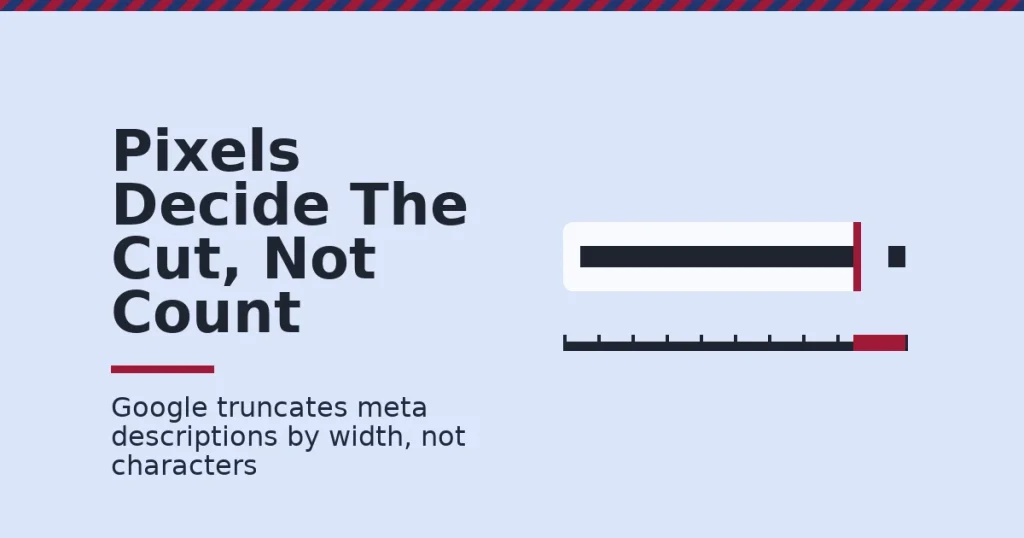
Meta description length is not a fixed number. Google truncates by pixel width, not character count, and often ignores your description entirely to write its own. This guide shows what actually controls how much text shows up in search results, and how to write descriptions that survive both outcomes.
Key Takeaways
- Google states there is “no limit” on meta description length. It truncates the snippet “as needed, typically to fit the device width,” per Google’s own Search Central documentation.
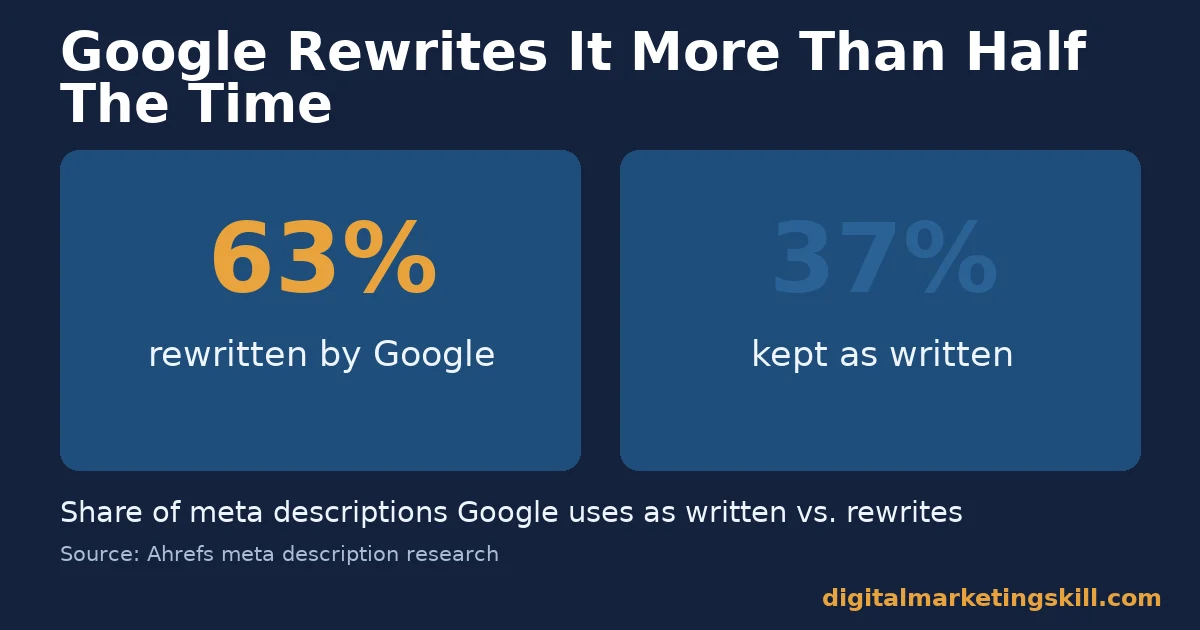
- Google rewrites meta descriptions 63% of the time, according to Ahrefs. Writing a good one still matters for the 37% of cases where Google keeps it.
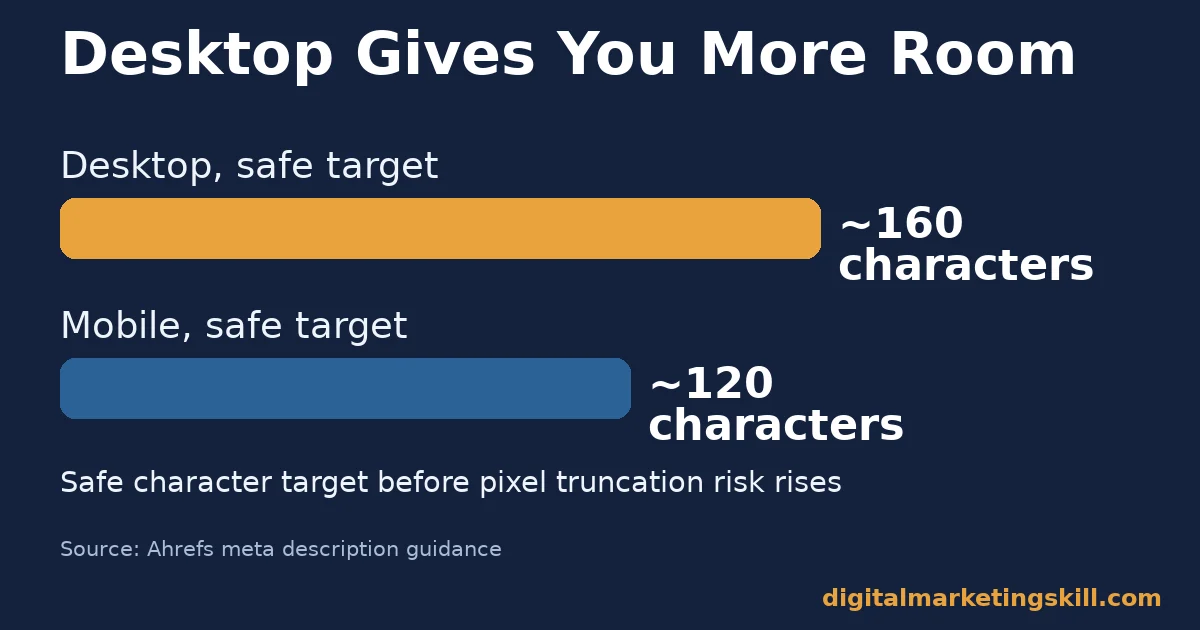
- Around 160 characters is a safe desktop target, and around 120 characters a safe mobile target, before wide letters risk pushing text past the cut-off.
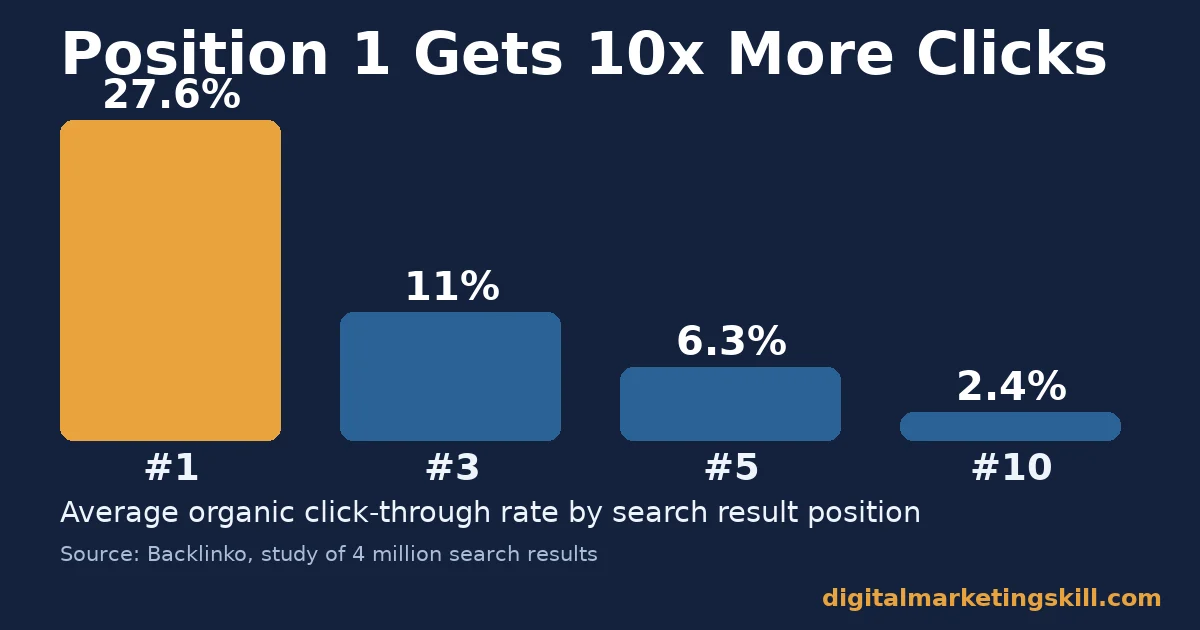
- The #1 organic result gets a 27.6% average click-through rate, 10 times the rate of the #10 result, per Backlinko’s study of 4 million search results.
- Google expanded snippets to roughly 320 characters, then reverted to about 160 a few months later, per Yoast’s documented history of the change. Chasing a fixed length is chasing a moving target.
In this guide
- What Most Meta Description Length Guides Get Wrong
- How Meta Description Length Actually Works
- What Differs By Device And Intent
- How To Write For Each Outcome, In Order
- Common Mistakes That Waste Your Meta Description Length
- How To Measure Whether It’s Working
- The One Decision Rule: Write For The Cut, Not The Count
- A Real Case: Writing For Search Snippets, Not Just Rankings
- Frequently Asked Questions About Meta Description Length
- Write For The Snippet You’ll Actually Get
What Most Meta Description Length Guides Get Wrong
Type this topic into any search engine and you will find dozens of near-identical articles. Nearly all of them repeat the same number without explaining where it comes from or why it keeps changing.
Search this topic and you get one fixed number: 155, 160, or 320 characters. Pick one and move on. That advice treats a moving target as fixed.
Google does not count characters. It measures rendered pixel width, and that width depends on which letters you use. A row of “i” and “l” fits more characters than a row of “W” and “M”. A character count is only a rough proxy for the real limit.
This guide treats meta description length as a design problem, not a counting problem. It names what actually decides truncation and what Google does when it skips your description. Then it shows how to write one that holds up either way.
None of this is a settled formula forever. Google has changed its display rules before and will likely change them again. What follows is a method for writing descriptions that stay useful even if the exact pixel budget shifts.
This also holds true no matter which country a search happens in. The pixel budget, the rewrite behaviour, and the mobile cut-off work the same way worldwide. The exact SERP layout can vary slightly by market, but the underlying mechanics do not change.
How Meta Description Length Actually Works
Think of the search result space as a container, not a ruler. The container has a fixed pixel width. Your words fill it at different rates depending on their shape. That is the entire mechanism behind meta description length.
Understanding this mechanism is what separates a writer who guesses at a number from one who writes with intent.
None of the three factors below is a character count; all three are physical or behavioural, which is why a fixed number can never fully describe them. First, whether Google uses your meta description at all. Second, how wide the available space is on that device. Third, how wide your specific characters render inside that space.
On the first point, Google’s own documentation says it “sometimes uses the meta description HTML element.” Otherwise, it builds a snippet from page content. Moz has documented this behavior for years: Google often prefers on-page text that matches the query more closely than a generic tag. Ahrefs found Google rewrites the tag 63% of the time. That means your written description is a strong candidate, not a guarantee.
On the second point, desktop search results generally allow a wider snippet than mobile. A description that reads fully on desktop can get cut mid-sentence on a phone.
On the third point, pixel width beats character count every time. A description built from short, plain words survives further into the line than one stuffed with capital letters and wide characters.
What Differs By Device And Intent
Meta description length behaves differently depending on where it is read and what Google thinks the searcher needs. Three contexts matter most: a full-width desktop result, a narrow mobile result, and the case where Google skips your tag entirely.
Each one rewards a slightly different habit for meta description length. Treating all three the same, by writing one generic description and hoping it works everywhere, is the single biggest reason good pages get weak click-through rates.
Desktop: Built For More Room, Not Unlimited Room
Desktop gives you the most room to work with, which makes it easy to get lazy. A wide container tempts writers into padding sentences. Use the extra room for a second concrete reason to click instead.
Desktop results generally show more text before truncation than mobile. Around 160 characters is a reasonable ceiling to write toward. Google does not enforce it exactly, but it keeps you safely inside the typical pixel budget regardless of which letters you use.
Writing right up to that ceiling, rather than stopping early, uses the space Google gives you to state a real reason to click.
Mobile: Lead With The Point, Not The Context
Mobile cuts off sooner, often around 120 characters. Put your strongest, most specific sentence first. If Google trims the rest, the reader still gets the part that matters.
A description written backwards, context first and the payoff last, loses its whole point on a phone screen.
Why Mobile Cuts Off Sooner Than Desktop
Phone screens are narrower. Google’s search app reduces the available pixel width to fit that smaller screen. The font size does not shrink nearly as much as the container does, so fewer characters fit before the cut-off arrives.
This is not a rule Google documents as a fixed character count. It is a side effect of screen size, which means it can shift slightly as devices and app layouts change over time.
Rewritten Snippets: Built For Matching The Query, Not Your Copy
When Google skips your meta description, it builds a snippet from page content that best matches the search query. That means the words that actually appear in your first paragraph and headings matter even when your written description does not get used.
Write your opening paragraph the way you would write a meta description: a direct, specific answer in plain words. It has a real chance of becoming the visible snippet. Pulling the right keyword into that sentence matters too; our guide to effective SEO keywords covers how to pick one worth building a page around.
How To Write For Each Outcome, In Order
Do these in sequence so you are covered whether Google uses your tag or writes its own. Skipping straight to step two, writing the meta description without first fixing the opening paragraph, leaves the 63% rewrite case completely unprotected.
Step 1: Write A Strong Opening Paragraph First
Answer the reader’s question in the first two sentences of the page itself. This becomes the fallback snippet on the 63% of pages where Google ignores your meta tag.
Step 2: Front-Load The Payoff In The Meta Description
Put the specific benefit or number in the first 120 characters. Everything after that is a bonus for desktop readers, not the core message.
Step 3: Favor Plain, Narrow Words Over Padding
Short, common words render narrower and survive further into the pixel budget than long or heavily capitalized phrases. This buys a few extra words of real message before the cut-off.
Step 4: Check It In An Actual Search Preview Tool
Character counters estimate; pixel-accurate preview tools show the real cut-off for your specific wording. Use one before publishing, not a character count alone. If you are choosing which keyword to target with that page in the first place, the Google Keyword Planner guide explains how to read the numbers.
Test the same wording on both a desktop and a mobile preview before publishing. A description that fits perfectly on desktop can still cut off mid-sentence on the narrower mobile layout, which is exactly the gap this step is meant to catch.
Step 5: Monitor Click-Through Rate After Publishing
Length only matters if it changes behavior. Track click-through rate for the page’s main query after the change, not just whether the text displays in full.
Give it a few weeks before judging the result. Search Console data on a single page can be noisy over just a few days, especially for lower-traffic queries. A short dip or spike does not always mean the description caused it. Wait for a clear, sustained trend before you decide the change worked, or revert it.
Common Mistakes That Waste Your Meta Description Length
Every mistake below shares one root cause: optimizing for a text editor instead of an actual search result.
Most pages are not missing a meta description. They are wasting the space one has. The waste is rarely obvious from reading the text alone; it shows up only when you check where the words actually land inside the real search result. Five mistakes show up again and again:
- Writing a vague opener before the real point. Starting with “In this article, we discuss…” burns the first 30 characters on words the reader already knows. That pushes the actual reason to click past the mobile cut-off, where it never gets read at all.
- Counting characters instead of previewing pixels. A description that measures fine in a text editor can still get cut mid-word in an actual search result. Capital letters and wide characters simply use more space than a character count assumes.
- Leaving the opening paragraph generic. With Google rewriting descriptions 63% of the time, a vague first paragraph throws away your best chance at a usable fallback snippet.
- Writing one description and never checking CTR. Length only matters if it changes click behavior; a description nobody measures is a guess dressed up as a tactic.
- Repeating the exact title tag in the meta description. This wastes an entire line of search real estate repeating information the reader already saw, instead of adding a new reason to click.
How To Measure Whether It’s Working
Three numbers show whether a meta description is doing its job, each defined in one sentence. Pull them from Google Search Console, filtered to the specific page and its main query, not site-wide averages that hide what one page is actually doing.
- Impressions: how many times your result appeared in search results for a query, regardless of whether anyone clicked.
- Click-through rate (CTR): clicks divided by impressions, for a given query or page. It measures how convincing your result is, not how well it ranks.
- Average position: where your result tends to sit in search rankings. Compare CTR against the typical rate for that position, since position 1 and position 8 should not be judged by the same bar.
The #1 organic result gets a 27.6% average CTR, about 10 times the rate at #10, per Backlinko’s analysis of 4 million search results. If your CTR sits well below the typical rate for your position, the description is a likely place to improve, not just the ranking.
A high CTR that does not turn into engagement is its own separate problem. Our guide to bounce rate covers what to check next.
The One Decision Rule: Write For The Cut, Not The Count
Most writers optimize for the full description reading well from start to finish. That is backwards. Optimize for the truncated version reading well instead, since that is the version more readers will actually see.
Before publishing, ask one question: if this gets cut off after 120 characters, does the sentence still make sense and still sell the click? If yes, publish it. If no, rewrite the order, not just the length.
This rule matters more than any specific character target, because Google’s own display rules have changed before and are not guaranteed to stay fixed. It also protects you against other on-page slip-ups; see our list of common SEO mistakes to avoid for the rest.
Apply the same rule to every page type on a site, not only new ones. An older page with a vague, padded description is often a faster win than a brand-new page, because it already has rankings and impressions. It just needs a description that earns more of the clicks it is already being shown for.
Illustrative, invented numbers to show the method. Take a description that reads “Learn the method our clients used to cut customer acquisition cost by 40% in three channels.” Cut after “cost by 40%,” it still delivers its core claim.
Compare that with a description that reads “In this comprehensive guide, we will explore several strategies that businesses can use to potentially improve their customer acquisition cost over time.” Cut at the same point, it delivers almost nothing.
A Real Case: Writing For Search Snippets, Not Just Rankings
Theory is one thing. A real result from a real person is another. This case shows the gap between knowing the mechanism and actually using it.
A Digital Marketing Skill Institute student, Abimbola Fafiolu, described building a functioning website that ranks in Google. The course’s SEO module was the lecture that helped most, as published on the Institute’s reviews page. The underlying skill is the same one this guide covers: writing on-page text, including descriptions and opening paragraphs, that Google can use directly in search results.
This single case does not prove every site will rank the same way. It shows the method, writing for how Google actually displays results rather than guessing at a fixed rule, applied by one real, named student.
Outcomes vary by site, competition and effort, consistent with the Institute’s earnings disclaimer. Treat the case as evidence that the method works, not as a promise of identical results.
Frequently Asked Questions About Meta Description Length
What is the ideal meta description length?
There is no single ideal number, since Google truncates by pixel width, not character count. Around 160 characters is a safe desktop target and around 120 characters a safe mobile target, with your strongest point in the first 120 characters either way.
Does meta description length affect SEO rankings?
No direct evidence supports that. Google has said the description tag is not a ranking factor. It affects click-through rate instead, which is a separate signal from ranking position.
Why does Google sometimes ignore my meta description?
Google rewrites or replaces meta descriptions 63% of the time, per Ahrefs, usually when it thinks page content matches the search query better than your written tag. A strong opening paragraph is the best insurance against this.
How long can a meta description be before Google cuts it off?
It depends on the specific letters used and the device, not a fixed count. Google’s own documentation states there is no length limit on the tag itself, only on the displayed snippet, and that truncation adapts to fit the device width.
Does Google rewrite title tags the same way it rewrites meta descriptions?
Yes. A study of nearly 81,000 title tags by Zyppy found Google rewrote 61.6% of them, with titles between 51 and 60 characters rewritten least often. The same plain-words, front-loaded approach that protects a meta description also protects a title tag.
How do I check how my meta description will actually display?
Use a pixel-accurate search preview tool rather than a plain character counter, since the real cut-off depends on rendered width, not character count.
Should every page on a site have a unique meta description?
Yes. A duplicate or missing description forces Google to build the snippet from page content every time, which removes your chance to state the specific reason that page is worth a click over a similar one.
Can a meta description that is too short hurt click-through rate?
It can. A description well under 100 characters leaves pixel space unused that a competitor’s longer, more specific description fills instead, making their result look more complete next to yours in the same search results page.
Write For The Snippet You’ll Actually Get
Meta description length is not a number to hit. It is a design constraint. Write the strongest sentence first, keep the words plain and narrow, and make sure your opening paragraph can stand in if Google writes its own snippet instead.
Getting this right, along with the rest of on-page SEO, is exactly what the Digital Marketing Skill Institute’s Master Diploma in Digital & AI Marketing is built to teach.
It runs across four AI-powered tracks, including AI-Powered WordPress and SEO Specialist, ten courses in total, with a Full Stack option to complete all four. The SEO track covers on-page writing, technical fixes, and search snippet optimization in depth, not just meta description length in isolation.
You also get unlimited 1-on-1 coaching, plus a U.S. Project Internship with a verified Work Reference Letter. The program is dual US and UK accredited, 100% online, and recognised in more than 100 countries.
Start This Week
This matters for every page type, not only blog posts. Product, service and category pages all compete for the same limited pixel space, and all benefit from the same front-loaded, plain-word approach to meta description length.
Start by rewriting one page’s opening paragraph and meta description this week. Explore the Master Diploma program, browse more guides on the blog, or go straight to apply.
Learn more at digitalmarketingskill.com, wherever you live. The program runs fully online and works the same way no matter which search engine your customers use, including anywhere in your country. Visit digitalmarketingskill.com to get started today.
Every figure in this guide was checked against its original source before publication. Figures marked as illustrative are invented examples, not real results.
![9 Amazing Digital Marketing Skills to Make Money Online [With Proof]](https://digitalmarketingskill.com/wp-content/uploads/2019/07/9-Amazing-Digital-Marketing-Skills-to-Make-Money-Online-With-Proof-17.png)






