
SEO tips for beginners work best in a fixed order. Get your pages found. Build each one around a real keyword, fix the technical basics that slow a site down, and earn the links that make Google trust it. Skip the order and the later steps waste effort. This guide walks through all four, with a worked example and a real case.
Key Takeaways
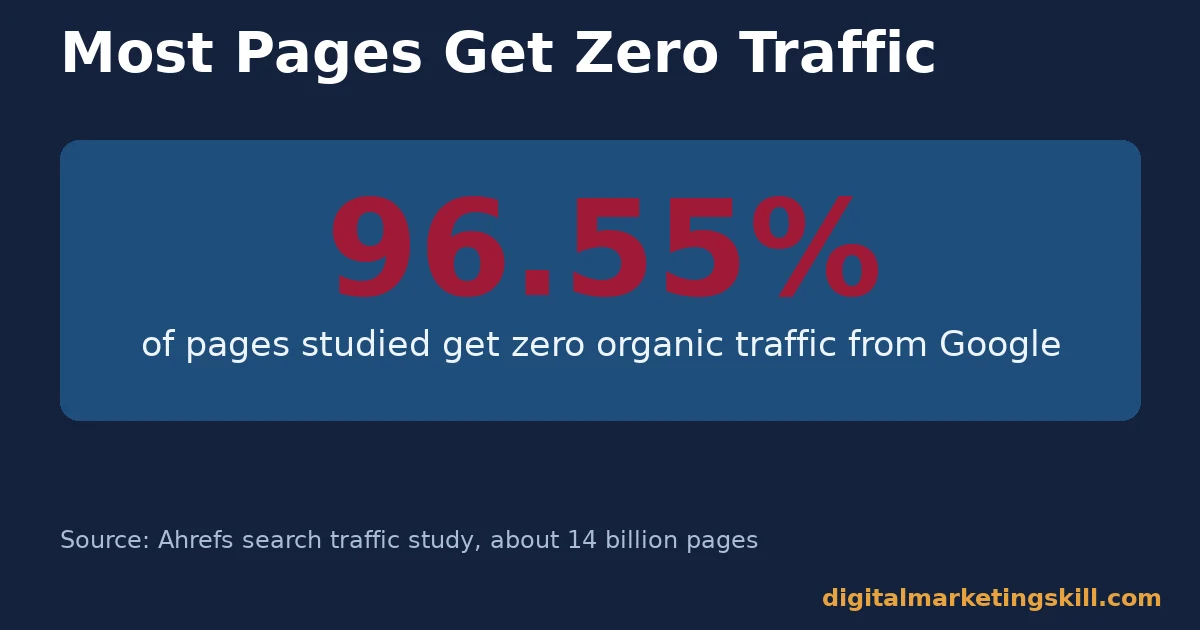
- Most pages are invisible. Ahrefs studied roughly 14 billion pages and found that 96.55% get zero organic traffic from Google.
- Position one wins big. Sistrix’s study of over 80 million keywords found the first Google result gets an average click-through rate of 28.5%, falling to 2.5% by position ten.
- Links still matter, but quality beats quantity. Backlinko’s analysis of 11.8 million search results found the number one result has 3 times more referring domains than positions two through ten.
- Speed has a real cost. Vodafone’s Italian team improved a key loading metric by 31% and saw 8% more sales, according to Google’s own web.dev case studies.
- Google rewards real experience. Google’s own guidance asks whether content shows “first-hand expertise and a depth of knowledge,” not just a passing summary of a topic.
In this guide
- Why Most SEO Tips for Beginners Fall Flat
- How Google Actually Finds and Ranks a Page
- Four Fundamentals Behind Every Beginner SEO Checklist
- How to Apply Each Fundamental as a True Beginner
- Common Mistakes That Undo Good SEO Tips for Beginners
- A Ten-Point SEO Tips for Beginners Checklist
- How to Measure Whether Your SEO Tips for Beginners Are Working
- The One Rule: Fix Discoverability Before Anything Else
- A Real Case: What a Faster Page Actually Changed
- Frequently Asked Questions About SEO Tips for Beginners
- Start With One Page, Then Repeat the Checklist
Why Most SEO Tips for Beginners Fall Flat
Most SEO tips for beginners read like a long, unordered list: write good titles, use keywords, build links, speed up your site. None of that is wrong. However, doing all of it at once leaves a beginner unsure what to fix first.
Picture a new page that gets no visitors after a month. Without an order to work through, a beginner might rewrite the whole page, when the real problem could simply be that Google never indexed it. Time gets spent on the wrong fix, and the actual cause sits untouched.
This guide fixes that by grouping SEO tips for beginners into four fundamentals, in the order they actually matter: getting found, keyword research, on-page basics, and authority. Treat the figures below as large, named studies, not universal guarantees. Search algorithms change constantly. A correlation between rankings and a factor like referring domains is not proof that one causes the other.
How Google Actually Finds and Ranks a Page
Before any SEO tips for beginners can help, Google first has to find the page. Then it has to understand the page, and decide it deserves a spot in results. That happens in three stages: crawling, indexing and ranking.
Why Submitting Your Site Still Matters
Google discovers pages by following links and reading sitemaps, but a brand-new site with few links can sit unseen for a long time. Submitting a sitemap through Google Search Console gives Google a direct list of pages to check, which speeds up discovery considerably for a new or small site.
Search Console also reports the exact reason a page is missing: not submitted, crawled but not indexed, or blocked entirely. That single report usually saves more time than any other single step in this guide, because it replaces guessing with a direct answer.
Why Most Pages Get No Traffic At All
Being indexed is not the same as ranking. Ahrefs’ search traffic study, covering roughly 14 billion pages, found that 96.55% get zero traffic from Google search. The gap is rarely a penalty; it is usually thin content, weak internal links, or a keyword nobody searches for.
That single figure is the real argument for the four fundamentals below. Publishing a page is the easy part. Earning a reason for Google, and a reader, to choose it over everything else already ranking is the actual work of SEO tips for beginners.
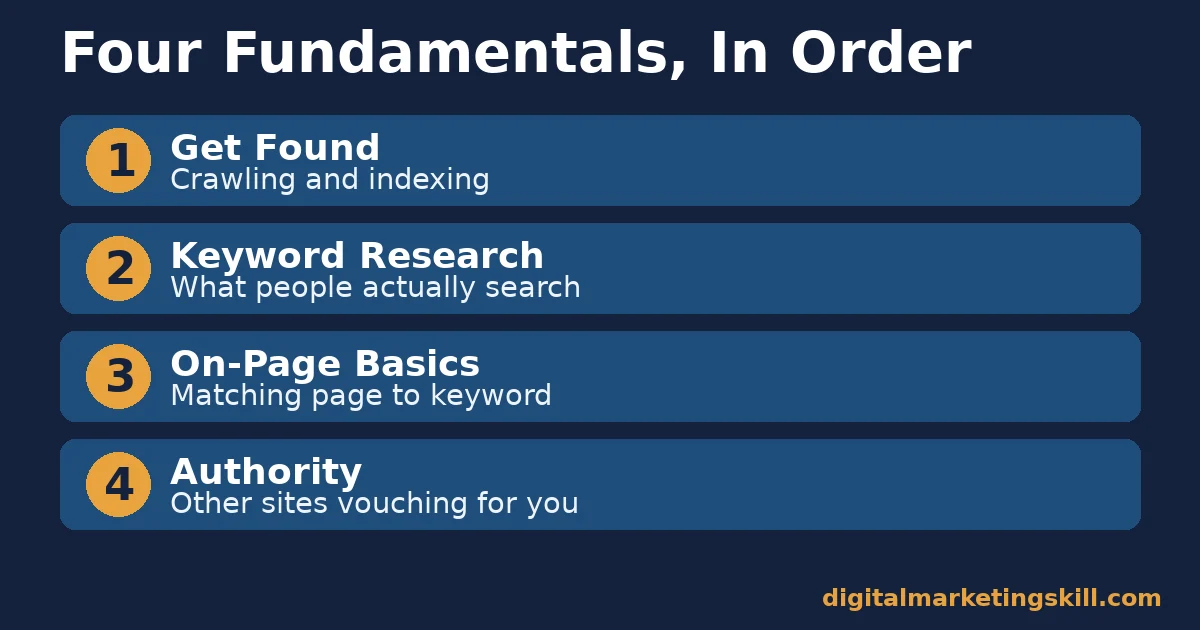
Four Fundamentals Behind Every Beginner SEO Checklist
Nearly every useful SEO tip for beginners fits under one of four fundamentals. Learn these once and most advice becomes easy to sort.
Keyword Research: Built on What People Actually Search
Keyword research means confirming that real people search for the phrase your page is about, in enough volume to be worth the effort. Writing without it means guessing, and guesses rarely match how people phrase a search.
A keyword with zero realistic competition is often a keyword nobody searches for either. The goal is a specific, searched phrase your page can genuinely answer better than what already ranks. A tool such as Google Keyword Planner or another keyword research tool can help confirm the volume.
For example, a beginner selling handmade candles might assume “candles” is the keyword to chase. In practice, a phrase like “how to choose a scented candle for a small room” is easier to rank for. It also matches a reader who is much closer to buying.
On-Page Basics: Built on Matching the Page to the Keyword
On-page SEO means making sure the keyword actually appears where Google and readers expect it: the title, the URL, a subheading or two, and naturally through the body text. A well-written page can still rank poorly. That happens when the keyword never clearly matches the words people actually search.
Keyword stuffing, repeating a phrase far more than natural language allows, is the common overcorrection. Google’s own guidance on spammy content treats stuffed keyword text as a quality violation, not a ranking boost.
A useful related post on website SEO tips covers more of these on-page checks in depth, and is worth reading once the basics in this guide feel comfortable.
Technical Basics: Built on Speed and a Clean Structure
Technical SEO covers everything that affects whether a page loads fast, renders correctly, and can be crawled without errors. A slow page can hold great content and still lose visitors before they read a word of it.
Google’s own Core Web Vitals business impact case studies show the pattern repeatedly. Vodafone’s Italian team improved a core loading metric by 31% through server-side rendering and image optimisation, and saw 8% more sales as a result.
For a beginner, the most common technical fixes are the simplest ones. Compress oversized images, remove scripts that load but never get used, and confirm the page is not accidentally blocked from being crawled. None of that requires deep coding knowledge to check.
Authority: Built on Other Sites Vouching For You
Authority is Google’s attempt to measure trust: how many independent, relevant sites link to a page, treating it as a useful reference. It is slow to build and easy to fake badly, which is why low-quality link schemes tend to backfire.
Backlinko’s study of 11.8 million Google results found that the number one result has roughly 3 times more referring domains than positions two through ten. It also found that referring domains, the number of different sites linking in, correlate with rankings more strongly than raw link count.
For a beginner, this means ten links from ten different relevant sites usually outweigh fifty links from one directory. A clear, well-organised piece of content marketing strategy work is still the most reliable way to earn that kind of varied attention over time.
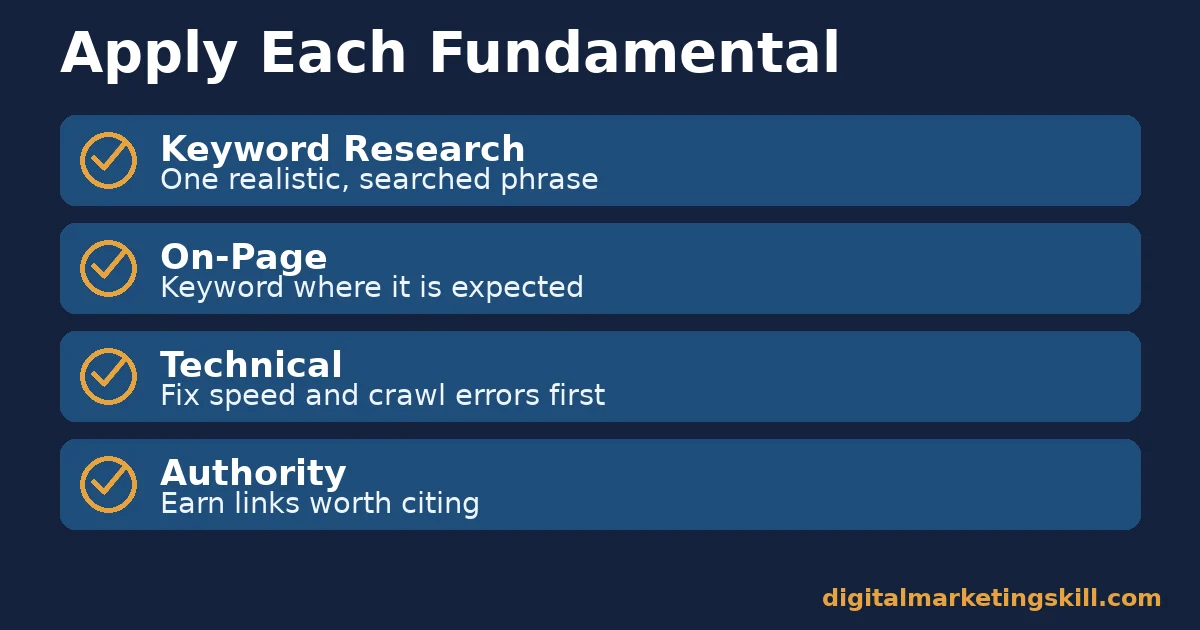
How to Apply Each Fundamental as a True Beginner
These four steps mirror the fundamentals above, in the order to actually do them.
Keyword Research: Start With One Realistic Phrase
Pick one specific phrase per page, something a real person would type, not a vague topic. Check that it gets meaningful search volume and that the pages already ranking are beatable with a clearer, more useful answer.
Resist the urge to target several unrelated keywords on one page. A page built around one clear phrase, with related terms used naturally, is far easier to understand. Both Google and readers follow it more easily than a page trying to cover everything at once.
On-Page: Place the Keyword Where It Is Expected
Put the keyword near the start of the title, in the URL slug, in at least one subheading, and a few times through the body, spoken naturally. Write the meta description like an honest two-sentence pitch for the page. It shapes whether a searcher clicks at all.
Then write for the reader first. A page that answers the question clearly, in plain language, naturally ends up using the keyword and its related terms without forcing it.
Technical: Fix Speed and Crawl Errors First
Compress images, remove unused scripts, and check Google Search Console for crawl errors or pages marked “not indexed.” These fixes are often one-time technical cleanups rather than ongoing work, so they are worth doing early.
Revisit load speed whenever you add a heavy feature, like an embedded video or a large image gallery. Those are the most common ways a fast site quietly becomes a slow one again.
Authority: Earn Links With Content Worth Citing
Create something genuinely citable: an original figure, a clear explainer, or a well-organised resource other writers would rather link to than recreate. Links built this way tend to last, because nobody has to be convinced to keep them.
Avoid paid or traded links that exist only to manipulate rankings. They violate Google’s spam policies and can do more damage than the ranking boost is worth.
Common Mistakes That Undo Good SEO Tips for Beginners
Even with the right order, a few habits quietly undo good SEO tips for beginners. Watch for these while you apply the checklist below.
Writing the Page Before Checking the Keyword
This single habit undoes more SEO tips for beginners than almost any other mistake on this list.
Writing first and optimising afterward usually produces a page built around the writer’s own phrasing rather than the reader’s. Confirm the keyword before drafting, so the title, headings and opening paragraph can be built around it from the start.
Never Opening Search Console After Publishing
Many beginners publish a page and never check how it performs. Search Console shows which queries actually bring clicks, often different from the keyword you expected. That gap is where the next round of improvements usually comes from.
It is also the fastest way to catch a mobile usability problem, since most searches now happen on a phone. A page that reads fine on a desktop screen can still have text too small to read, or buttons too close together on mobile. Search Console flags exactly that.
Copying a Competitor’s Structure Without the Depth
Matching a competing page’s headings is a reasonable starting point, but copying structure without matching or exceeding its depth rarely outranks the original. Google’s guidance on helpful content asks whether a page shows “first-hand expertise and a depth of knowledge,” language that points directly at this mistake.
In practice, that means adding something a competitor’s page does not have. A real example, a step most guides skip, or a figure you checked yourself rather than copied secondhand all work. A page that only rearranges what already exists rarely earns a reason to outrank the original.
A Ten-Point SEO Tips for Beginners Checklist
Work through this list in order on your next page, then reuse it for every page after.
Before You Publish
- Pick one keyword. A specific, searched phrase this page can answer better than what already ranks.
- Put it in the title. As close to the front of the title as it reads naturally.
- Put it in the URL. A short, hyphenated slug that matches the keyword.
- Write a real meta description. An honest, specific reason to click, with the keyword included.
- Use it in a subheading. At least one, so skimmers and Google both see the match.
After You Publish
- Submit the sitemap. So Google can find the page quickly through Search Console.
- Check page speed. Compress images and remove anything that is not pulling its weight.
- Link to it internally. From at least one other relevant page on your own site.
- Watch Search Console. For crawl errors, “not indexed” pages, and the keywords it is actually earning clicks for.
- Earn links slowly. By making the page worth citing, not by buying or trading links.
How to Measure Whether Your SEO Tips for Beginners Are Working
Track these figures for each important page, not just the site as a whole.
- Indexed status. Whether Search Console shows the page as indexed, and if not, why.
- Average position. Where the page typically ranks for its target keyword, tracked over weeks, not days.
- Click-through rate. Clicks divided by impressions in Search Console; a low rate at a decent position often means a weak title or description.
- Core Web Vitals status. Whether the page passes Google’s speed and stability thresholds, checked in Search Console.
- Referring domains. The number of distinct sites linking to the page, not just the total link count.
Read these together. Good position with a low click-through rate points to a weak title or description, not a ranking problem. Good clicks with a high bounce afterward usually means the page promised something the content did not deliver. Check all five on a fixed monthly schedule, since a one-off glance rarely shows a trend worth acting on.
The One Rule: Fix Discoverability Before Anything Else
If a page is not indexed, nothing else on this page matters yet. Perfect keyword research and flawless writing cannot rank a page Google has not found or chosen to include in its index.
Illustrative, invented numbers: suppose a new page gets zero impressions in Search Console after two weeks. Checking indexed status first, rather than rewriting the content, would reveal the real problem: a missing sitemap submission or a crawl block. That is a five-minute fix, not a content rewrite that would not have changed anything.
A Real Case: What a Faster Page Actually Changed
Vodafone’s team in Italy worked on Largest Contentful Paint, a Core Web Vitals metric that measures how quickly the main content of a page appears. Using server-side rendering and image optimisation, they improved that metric by 31%, according to Google’s own published Core Web Vitals business impact case studies.
The result was an 8% increase in sales. The lesson is not that every site will see an identical lift from a similar fix; results vary by site, audience and starting point. It shows that technical SEO tips for beginners are not just a checklist item. They can move a real, measurable business number.
Frequently Asked Questions About SEO Tips for Beginners
What is the very first SEO step a complete beginner should take?
Confirm the page is actually indexed by Google, through Search Console. Nothing else matters until Google can find and include the page in its results.
How long does it take to see results from SEO?
Often a few months for a new page, since Google needs time to crawl, index and compare the page against existing results. Technical fixes can show faster signals, like improved Core Web Vitals scores, while rankings typically move more slowly. A page competing against long-established results usually takes longer than one in a less contested topic.
Do I need to pay for backlinks to rank well?
No. Paid or traded links violate Google’s spam policies and can trigger a penalty. Earning links by publishing something genuinely worth citing is slower but far more durable.
How many keywords should one page target?
One primary phrase, supported by closely related terms used naturally. Pages trying to rank for several unrelated keywords usually rank weakly for all of them instead of strongly for one.
Does page speed really affect rankings?
Yes, both directly through Core Web Vitals and indirectly, since slow pages lose visitors before they read the content. Google’s own case studies link real speed improvements to measurable business results.
What is the difference between backlinks and referring domains?
Backlinks count every link, even several from one site. Referring domains count unique sites linking in, which research shows correlates with rankings more strongly than total backlink count.
Is keyword stuffing still a problem in search results?
Yes. Google’s guidance treats unnatural keyword repetition as a quality violation, not a ranking signal, so writing naturally for the reader remains the safer approach.
Start With One Page, Then Repeat the Checklist
Pick your single most important page. Run it through the ten-point checklist above this week: one keyword, a matching title and URL, a real meta description, a sitemap submission, and a speed check. Repeat the same process for your next page once this one is live and indexed.
If you want structured, hands-on training beyond these SEO tips for beginners, look at the Master Diploma in Digital & AI Marketing at the Digital Marketing Skill Institute. It includes an AI-Powered WordPress and SEO Specialist track, one of four AI-powered tracks across a ten-course program, with a Full Stack option covering all four.
It comes with unlimited 1-on-1 coaching and mentoring, a U.S. Project Internship with a verified U.S. Work Reference Letter, and dual US and UK accreditation recognised in more than 100 countries, 100% online, so you can learn and practise real SEO work from anywhere in your country.
Explore the Master Diploma program, browse more guides on the digital marketing blog, read real outcomes on the reviews page, or go straight to the application page when you are ready. Learn more at Digital Marketing Skill Institute, wherever you live, and start applying these SEO tips for beginners to your own pages today. Visit digitalmarketingskill.com to get started.
Every figure in this guide was checked against its original source before publication. Figures marked as illustrative are invented examples, not real results.
![9 Amazing Digital Marketing Skills to Make Money Online [With Proof]](https://digitalmarketingskill.com/wp-content/uploads/2019/07/9-Amazing-Digital-Marketing-Skills-to-Make-Money-Online-With-Proof-17.png)






