
Social media automation tools schedule posts, track mentions and report results. A small team can run several channels without living inside each app. A VerticalResponse survey, reported by Calendar, found 43% of small business owners already spend six hours a week on social media.
Automation is what keeps that number from climbing as channels multiply. This guide explains how social media automation tools work, where they differ, and how to pick and measure the right one.
Key Takeaways
- Scheduling buys back hours, not strategy. A VerticalResponse survey found 43% of small business owners spend six hours a week on social media. Social media automation tools remove the manual posting part of that time, not the planning.
- Price models differ by vendor. Buffer bills per connected channel from about $5 a month per channel. Hootsuite bills per user, starting at $99 a month. The better deal depends on your channel count, not your team size.
- Timing data is a starting point, not a rule. CoSchedule’s analysis of 12 posting-time studies found Monday and 3pm scored highest on average. Your own account’s analytics should still override a general benchmark.
- Listening tools change response speed. Teams using structured social listening respond to mentions roughly 4.3 times faster than teams checking feeds by hand, according to listening-industry research.
- Response speed affects loyalty. Industry reporting puts the share of X (Twitter) complainers expecting a reply within an hour at around 72%. Nearly half of people say a brand’s reply to criticism makes them view it more positively.
In this guide
- What Most Advice on Social Automation Misses
- How Social Media Automation Tools Actually Work
- What Differs by Type of Automation Tool
- How to Get More From Each Type of Tool
- How to Measure Whether Automation Is Working
- The Decision Rule: Match the Tool to the Problem You Actually Have
- What Choosing Well Looks Like in Practice
- Common Setup Mistakes That Waste Social Media Automation Tools
- Frequently Asked Questions About Social Media Automation Tools
- Where to Go From Here
What Most Advice on Social Automation Misses
Most articles about social media automation tools list features and stop there. Few say which category of tool solves which problem. A business often buys a scheduler when it needed a listening tool. Or it pays for an enterprise suite when a free plan would cover three channels.
This guide groups the tools by job, not by brand: scheduling and publishing, listening and reputation, and competitive analytics. It explains the mechanism behind each type. It shows what to change in how you use it, and how to measure whether it is working.
One ground rule first. Pricing and features change often, so treat every figure here as a snapshot, not a permanent ranking. Check a vendor’s current pricing page before you buy. Survey figures on time spent and response expectations are self-reported. That makes them an informed signal of behaviour, not a lab measurement.
How Social Media Automation Tools Actually Work
Every automation tool connects to a platform’s official API. An API is the programming interface a platform publishes so outside software can read and post on an account’s behalf, with permission. Once connected, the tool holds a queue of content, timestamps and target channels. It releases each post at its scheduled time without a human clicking publish.
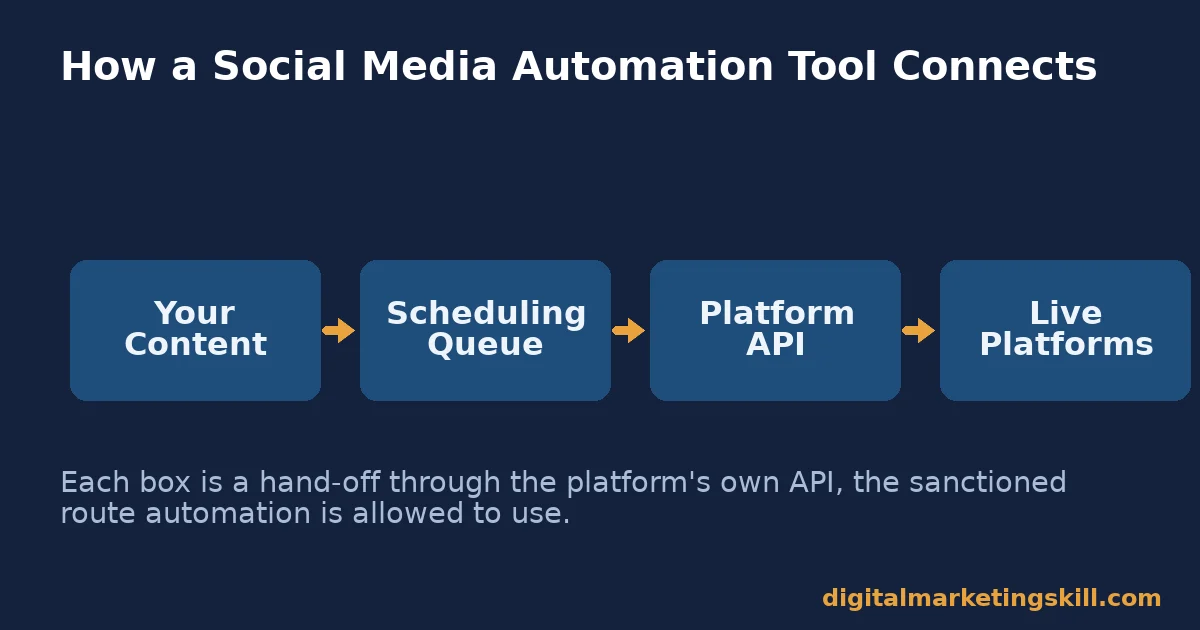
Listening tools work the other way. Instead of pushing content out, they pull data in. They scan public posts, comments and mentions for a brand name, hashtag or keyword, then route matches into one dashboard. Analytics tools do a third job. They pull historical performance data back out of each platform’s API and chart it, so a team can compare posts, accounts or competitors without opening every app.
The API connection is also the limit. A tool can only automate what a platform’s API allows. That is why some actions, such as direct messages or certain video formats, still need a human inside the native app.
What Differs by Type of Automation Tool
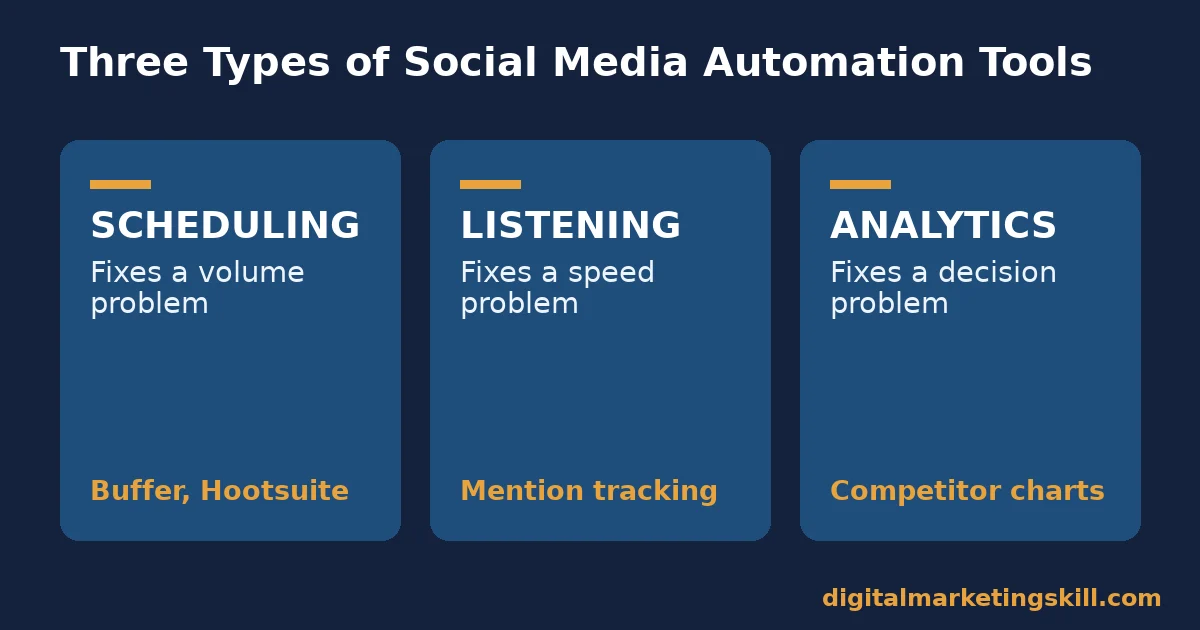
Social media automation tools split into three practical categories. Most businesses need all three eventually, just not from the same vendor or at the same time.
Scheduling and Publishing: Built for Volume
Scheduling tools such as Buffer and Hootsuite let a team queue a week or month of posts in one sitting. You choose the time each post goes out, and the tool recycles evergreen content on its own.
Buffer bills per connected social channel, with paid plans from about $5 per channel a month on annual billing, plus a free plan for up to three channels. Hootsuite bills per user instead. It starts at $99 a month with no free tier, and adds team approval workflows at higher tiers.
The practical difference is who the cost scales with. A solo marketer running five channels usually pays less on a per-channel model. A five-person team running three channels often pays less on a per-user model with unlimited channels included. Check both pricing structures against your own channel count and headcount before you choose.
Listening and Reputation: Built for Speed
Listening tools scan public mentions, comments and reviews across platforms. They flag anything matching a brand name, product or competitor term, usually within minutes of it posting. That speed matters, because expectations are tight. Industry reporting puts the share of people expecting a brand reply within an hour on X (Twitter) at around 72%.
Teams that monitor mentions through a structured listening tool, rather than checking each platform by hand, respond roughly 4.3 times faster on average than peers relying on manual checks. Tools with real-time alerts can push that advantage to roughly 5 times faster still.
Faster replies are not just about speed for its own sake. Nearly half of people say a brand’s response to criticism makes them view the brand more positively.
Competitive and Performance Analytics: Built for Decisions
Analytics tools pull a channel’s own post history, plus whatever a competitor has made public. They turn that into charts: engagement by post type, posting cadence, follower growth and share of voice against named competitors. Their value is comparison, not creation. They tell you what already worked, not what to post next.
Used well, an analytics tool answers one question at a time. Did the format change help? Is posting frequency too low or too high? Which competitor is gaining ground fastest? Used badly, it becomes a weekly report nobody acts on. Treat every chart as the start of a question, not the end of one.
How to Get More From Each Type of Tool
Owning a tool and using it well are different things. The sections below mirror the three categories above. Each names the specific change to make.
Scheduling: Lead With Your Own Data, Not a General Benchmark
General posting-time research is a reasonable starting point, not a rule. CoSchedule’s analysis of 12 separate studies found Monday and 3pm scored highest on average. Most studies agree that late morning through mid-afternoon on weekdays performs well. But that average blends every industry and audience together, so it will not match your account exactly.
Schedule your first month of posts inside that general window. Then open your own platform analytics and check when your specific followers are active. Shift your queue to match what your account shows. Test one variable, such as time of day, for several weeks before you change another.
Listening: Triage Mentions Before You Automate Replies
A listening tool surfaces volume fast. That can overwhelm a small team if every mention gets equal attention. Sort incoming mentions into three buckets as they arrive: a complaint or question that needs a human reply within the day, a neutral mention worth a quick acknowledgement, and a mention that needs no action at all.
Only automate the lowest-stakes bucket, such as a thank-you reply to a positive tag. Complaints and real questions still need a person. An automated reply to a frustrated customer usually makes the frustration worse, not better. Our guide to social media marketing risks covers other ways automation can backfire when nobody is watching the queue.
Analytics: Compare Against Your Own Past, Then Against Competitors
Before you compare your account with a competitor, build a baseline from your own last three months. Track average engagement rate, follower growth rate and posting frequency. Without that baseline, a competitor’s numbers have no context to sit against.
Once the baseline exists, add one or two named competitors and track the same three metrics side by side. If a competitor’s engagement rate rises after a format change, treat that as a hypothesis to test on your own account. It is not a result to copy blindly, because audiences differ.
How to Measure Whether Automation Is Working
Automation should change specific numbers, not just free up time. Track these alongside whatever dashboard you already use.
- Engagement rate. The share of people who saw a post and reacted, commented or shared it, usually shown as a percentage of reach or followers. A rising rate after you adjust timing or format shows the automation is pointed at the right content.
- First-response time. How long a mention or comment sits before someone replies. Compare it before and after adding a listening tool. A real tool should cut this from hours to minutes for flagged, high-priority mentions.
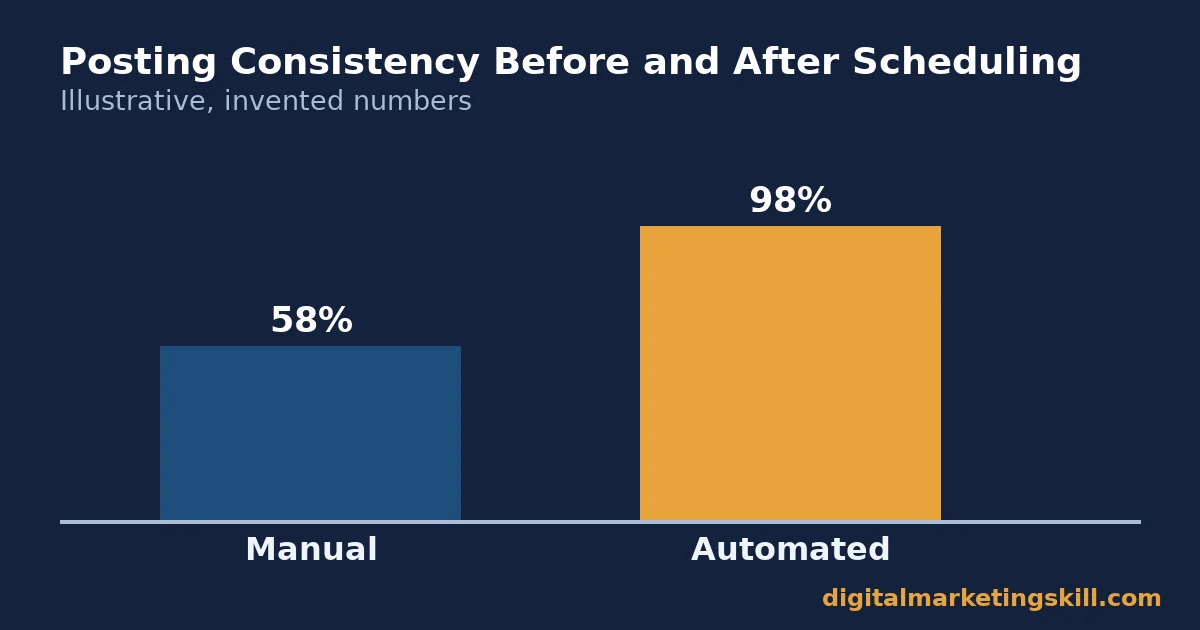
- Posting consistency. The share of planned posts that actually went out on schedule. Automation should push this close to 100%. If it does not, fix the queue or the connection before judging anything else.
- Follower growth rate. The percentage change in followers over a set period, not the raw count. It shows whether consistent posting attracts new audience or only maintains the one you already have.
- Share of voice. Your brand’s mentions as a percentage of total mentions across you and your named competitors. A rising share shows your content and response speed are winning attention relative to rivals.
Reading These Numbers Together
Start with posting consistency. A broken queue makes every other metric unreliable. Once posts go out as planned, watch engagement rate and first-response time together. A tool that improves one but not the other is only solving half the problem. Follower growth and share of voice move slowly, so judge them over a full quarter, not a single week.
The Decision Rule: Match the Tool to the Problem You Actually Have
If you remember one rule from this guide, make it this one. Buy a scheduler for a volume problem. Buy a listening tool for a speed problem. Choose an analytics tool for a decision problem. Paying for all three features in one expensive suite, before you know which problem you have, usually means paying for capacity you will not use.
Here is an illustrative example, with invented numbers. A ten-person services business posts on three channels. It spends roughly six hours a week on manual posting, matching the VerticalResponse survey average. The team adds a $15-a-month scheduler for the three channels, and manual-posting time drops to about one hour a week for queue review.
Three months later, posting consistency sits near 100%. Engagement rate has risen because posts now go out at consistent times. But mention response time has not improved, because the business never had a listening problem to begin with. The next purchase it actually needs is not a bigger suite. It is nothing, because the one tool it bought matched the one problem it had.
What Choosing Well Looks Like in Practice
A well-matched tool shows up in boring, consistent numbers rather than a dramatic before-and-after. Posting consistency holds near 100% for months. Engagement rate moves gradually as content and timing improve, instead of spiking and crashing. First-response time stays short even in a busy week, because the listening side of the stack keeps working quietly in the background.
The common failure mode is the opposite. A team buys an expensive all-in-one suite, uses the scheduling feature, and never opens the listening or analytics dashboards. Every subscription has a job description.
If a feature you pay for has gone unopened for a month, start using it on a fixed day each week, or downgrade to a plan that only covers what you actually use. The same audit habit applies across a content calendar. Our guide to content marketing challenges walks through the same diagnose-before-you-buy approach for a wider content programme.
Run a Quarterly Audit, Not Just a Purchase Decision
Set a recurring date every three months to re-run this whole process. Re-check which category you actually need, because a business that starts with a volume problem can grow into a speed or decision problem within a year. Our social media marketing checklist lists the other checks worth running at the same time, from profile completeness to posting cadence.
Keep the audit short. Pull the five metrics above, compare them with the previous quarter, and decide on one change, not five. Tools that get re-evaluated regularly stay matched to the business; tools bought once and forgotten rarely are.
Common Setup Mistakes That Waste Social Media Automation Tools
Most of the value in social media automation tools gets lost during setup, not during daily use. Good social media automation tools fail less often from a bad feature than from a bad configuration. The tool itself works; the configuration around it usually does not.
Mistake One: An Empty Queue With No Buffer Days
A scheduler only helps while it has content loaded. Teams that fill the queue a day or two ahead end up back on manual posting the moment someone is sick or busy. Keep at least two weeks of evergreen posts queued at all times, separate from timely content, so a gap in planning never becomes a gap in publishing.
Mistake Two: Listening Alerts Nobody Reads
A listening tool that sends alerts to an inbox nobody checks is the same as having no listening tool. Route high-priority mentions, such as direct complaints, to a channel a real person checks daily, like a shared chat or a phone notification. Low-priority mentions can wait for a weekly review.
Mistake Three: Tracking Vanity Numbers Instead of the Five Core Metrics
Follower counts and like totals feel satisfying but rarely explain anything. They do not say whether automation is working. Stick to the five metrics in the measurement section above, because each one maps directly to a category of tool and a specific problem it is meant to fix.
Mistake Four: One Person Owns Every Platform and Every Tool
When a single person configures the scheduler, checks the listening dashboard and reviews analytics, review stops the moment that person is away. Document the posting calendar, the response triage rules, and the monthly metrics check somewhere a second person can pick up without starting over. Social media automation tools are supposed to reduce dependence on any one person’s memory, not recreate it in a different app.
Mistake Five: One Tool Stretched Across Platforms It Was Not Built For
Not every scheduler supports every platform equally well. Some handle Instagram and Facebook cleanly but add video formats or new networks as an afterthought, with weaker preview tools and more failed posts.
Before committing to any of the social media automation tools on your shortlist, confirm it natively supports every platform you actually use, not just the main one. Test a real post on each platform before you cancel your old workflow.
Frequently Asked Questions About Social Media Automation Tools
Can a small business run social media automation tools for free?
Yes, for scheduling. Buffer’s free plan covers up to three connected channels, which suits many small businesses before they need a paid tier. Free listening and analytics tools exist too, but they usually cap how many keywords or competitors you can track.
Do automation tools replace a social media manager?
No. They remove the manual, repetitive parts of the job, such as logging into five apps to post the same update. Strategy, replies to real questions, and judgement calls about what to post still need a person.
How many posts should a business schedule per week?
There is no universal number. Survey data shows most small businesses post multiple times a week rather than daily on every channel. Start with a frequency you can sustain with quality content, then adjust based on your own engagement rate rather than a borrowed benchmark.
Will automation hurt reach because platforms penalise scheduled posts?
Usually not. Major platforms generally treat a post published through an approved API partner the same as a post published natively, because that API connection is the sanctioned route automation tools use. Reach differences usually trace back to content quality and timing, not the fact that a post was scheduled.
Is a dedicated listening tool worth it for a small team?
It depends on mention volume. A business with a handful of mentions a week can often monitor manually. Once mentions regularly go unanswered for hours, the faster response time a listening tool enables starts to justify the cost.
What is the single best social media automation tool?
There is no single best tool, because the categories solve different problems. Ask which category matches your current bottleneck instead: volume, speed, or decision-making. Then compare two or three vendors inside that category on price and the platforms you actually use.
How often should a business switch social media automation tools?
Rarely, if the current tool still matches the problem it was bought for. Switch only when your bottleneck changes category, such as moving from a volume problem to a speed problem, or when a quarterly audit shows the tool’s features are going unused.
Where to Go From Here
The best social media automation tools work when the category matches the problem: a scheduler for volume, a listening tool for speed, and an analytics tool for decisions. Pick the one tool that matches your biggest bottleneck today. Measure posting consistency and engagement rate for a full month, then decide whether a second tool is worth adding.
If you want a structured way to learn how scheduling, listening and analytics fit into a full marketing skill set, the Digital Marketing Skill Institute’s Master Diploma in Digital & AI Marketing covers social media marketing alongside SEO, content, email and analytics. It includes unlimited one-on-one coaching and mentoring, and real project work inside a U.S. company.
The diploma is dual US and UK accredited and recognised in more than 100 countries, so you can apply it anywhere in your country and complete it 100% online. Explore the course library at digitalmarketingskill.com, read graduate outcomes on the reviews page, browse more guides on the blog hub, and when you are ready, apply here wherever you live.
Every figure in this guide was checked against its original source before publication. Figures marked as illustrative are invented examples, not real results.
![9 Amazing Digital Marketing Skills to Make Money Online [With Proof]](https://digitalmarketingskill.com/wp-content/uploads/2019/07/9-Amazing-Digital-Marketing-Skills-to-Make-Money-Online-With-Proof-17.png)






