
Why customers leave comes down to a handful of repeatable moments: confusion, distrust, friction or a price that feels unfair. Most visitors never tell you why they left. They just close the tab. This guide names the moments where customers decide to go. It shows what differs between a first-time visitor and someone mid-checkout, and gives one rule for fixing the leak that costs you the most.
Key Takeaways
- Abandonment is the norm, not the exception. Baymard Institute’s analysis of 50 separate studies puts the average cart abandonment rate at 70.22%.
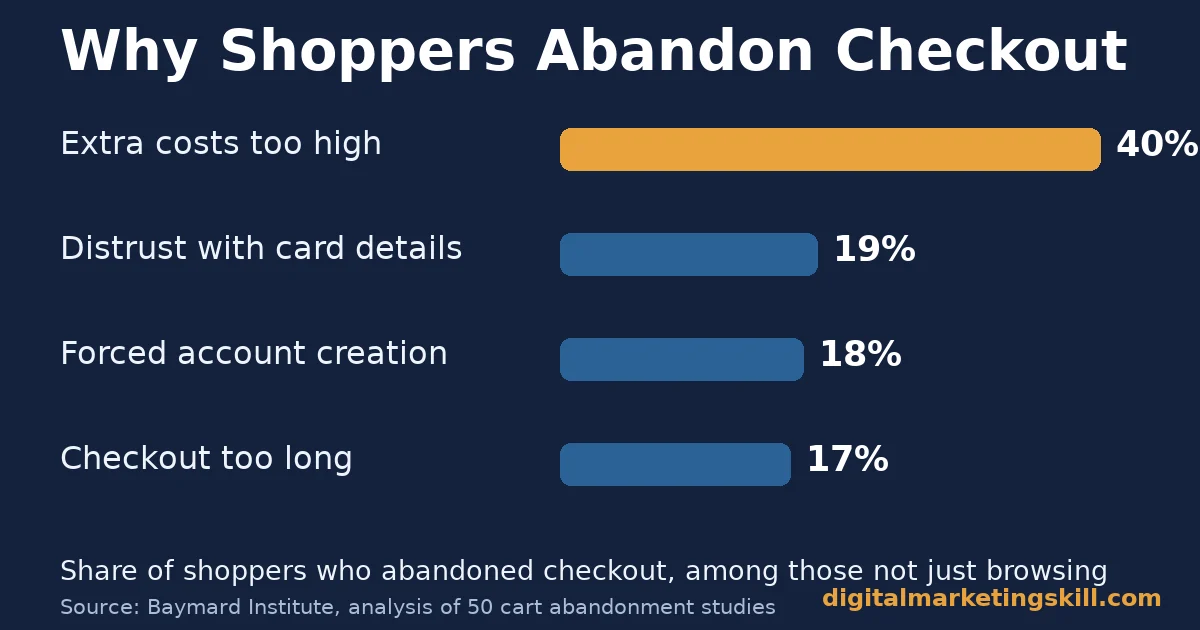
- Cost surprises are the single biggest reason. Among shoppers who were not just browsing, Baymard found 40% left because extra costs, such as shipping or fees, were too high.
- Trust and friction matter almost as much as price. The same research found 19% did not trust the site with their card details, 18% were blocked by forced account creation, and 17% found checkout too long.
- Mobile visitors leave more often than desktop visitors. Baymard’s data shows mobile abandonment runs around 80%, against about 66% on desktop, a 14-point gap.
- One bad moment can cost a customer for good. Zendesk’s CX Trends research, surveying nearly 5,100 consumers across 22 countries, found 63% would switch to a competitor after just one bad experience.
In this guide
- What Most Advice on Why Customers Leave Gets Wrong
- How a Visitor Decides to Leave
- Why Customers Leave Differs by Stage
- How to Fix Why Customers Leave at Each Stage
- How to Measure Why Customers Leave
- The One Decision Rule: Fix the Step With the Most Lost Customers, Not the Loudest Complaint
- A Real Case: Building a Site That Keeps Customers Through Checkout
- Frequently Asked Questions About Why Customers Leave
- Stop Guessing Why Customers Leave, Anywhere You Sell
What Most Advice on Why Customers Leave Gets Wrong
Most advice treats customer loss as one problem with one fix: better design, lower prices, or a faster site. None of that is wrong, but it skips a more useful question. Why customers leave changes depending on where they are in the journey. A first-time visitor leaves for different reasons than someone who has already added an item to their cart.
This guide splits the problem by stage. It shows what to fix at each one, and gives a way to measure whether the fix actually worked. Treat every figure below as a snapshot from the named study, not a universal law. Some sections describe a pattern built from that research, an informed inference rather than a settled fact.
A quick ground rule: not every departure is preventable. Baymard’s own research found 42% of shoppers who leave a cart were simply browsing, not ready to buy. That share is not a problem to fix. The sections below focus on the reasons you actually can change.
How a Visitor Decides to Leave
A visitor rarely leaves because of one giant failure. They leave because small frictions pile up faster than their patience. Each page they view either earns another few seconds of trust or spends it. Once trust runs out, they close the tab, and most never tell you why.
Three forces drive that decision almost every time: clarity, trust and cost. Clarity is whether the visitor understands what you offer and what to do next. Trust is whether they believe your site, your prices and your promises are real. Cost is whether the price, once every fee is visible, still feels fair for what they get.
Baymard’s research gives this shape numbers. Among shoppers who abandoned a cart and were not just browsing, 40% cited extra costs. Another 19% cited distrust with payment details, and 18% left because the site forced account creation before checkout. Each of those maps directly onto cost, trust and friction.
Why customers leave also depends on how long they have already invested. A visitor who has browsed for ten seconds leaves at the smallest friction. A visitor who has filled in a cart and started checkout has already invested time. It takes a sharper problem, such as a hidden fee, to push them out the door now.
Why Customers Leave Differs by Stage
The fix for an early visitor is not the fix for someone mid-checkout. Splitting the two stages is the fastest way to stop guessing.
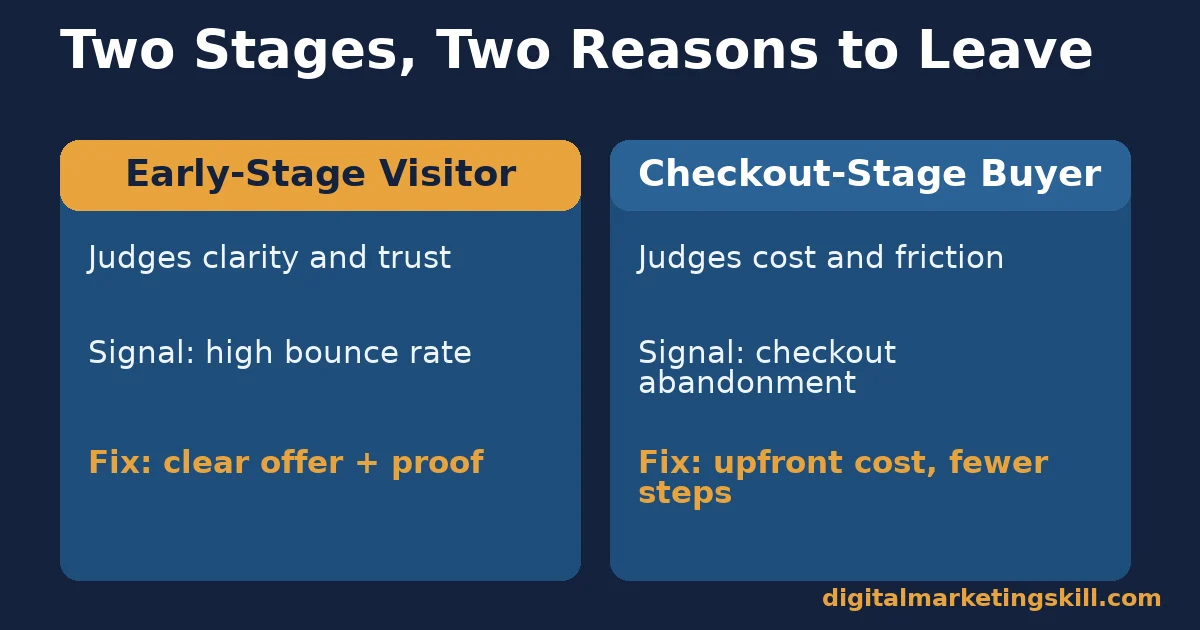
Early-Stage Visitors: Leave Over Confusion and Distrust
A visitor who just arrived is judging two things: can I understand this, and can I trust it? If your layout buries the main offer, or your design looks dated or inconsistent, they assume the business behind it is the same. They rarely dig deeper to check.
This stage is where why customers leave is hardest to measure directly, because most of these visitors never interact with anything you can track. A high bounce rate on your landing pages is usually the clearest signal something at this stage is broken.
Checkout-Stage Buyers: Leave Over Cost and Friction
A visitor who reached checkout has already decided they want the product. What pushes them out now is almost always cost or friction they did not expect. Baymard’s figures make the order clear: extra costs first, slow delivery second, distrust with payment details third.
This stage is the easiest to fix, because the problems are specific and the data is usually sitting in your own analytics. A cart abandonment rate far above the roughly 70% average, concentrated at a single step, points straight at the broken step.
How to Fix Why Customers Leave at Each Stage
The fix mirrors the stage. Start with whichever stage loses you the most visitors in absolute numbers, not percentage terms, because that is where a fix pays back fastest.
Early-Stage Visitors: Lead With Clarity and Proof
State what you offer and who it is for in the first screen, in plain words. Then back it up with something concrete: a real review, a clear price, or a specific outcome. Vague claims read as a reason to leave, not a reason to stay. In a Nielsen Norman Group comparison study, four out of five participants picked the better-designed of two similar services. Every participant also said they trusted outside reviews more than testimonials on a company’s own site.
Keep the first page simple. A visitor deciding whether to trust you is not ready to read a long pitch. One clear promise, one piece of proof and one obvious next step does more than a page full of features.
Checkout-Stage Buyers: Lead With Upfront Cost and a Short Process
Show the full price, including shipping and fees, before the final step, not after. Hidden costs discovered at the last second are the single biggest reason Baymard’s research found for abandoned carts, and they are also the easiest to fix, since the fix is simply earlier disclosure.
Shorten the checkout itself. Baymard’s own UX research found close to one in five shoppers abandon checkout when forced to create an account, so offer a guest option and cut form fields down to what the order genuinely needs. Our guide to customer relationship management covers how to keep that same buyer engaged well after checkout, once the sale closes. If a visitor already showed interest before leaving, our guide to lead conversion strategies covers how to bring them back before they forget you.
How to Measure Why Customers Leave
Three numbers show you where the leak actually sits.
Bounce rate, as Google Analytics defines it, shows the share of visitors who leave after viewing a single page. It is the clearest signal of an early-stage clarity or trust problem.
Cart or checkout abandonment rate shows the share of shoppers who start checkout but never finish. Baymard’s benchmark of about 70% is useful context, but your own step-by-step rate, measured per field or per page, matters more than the average.
Repeat purchase rate shows the share of customers who buy again. A low rate after a strong first sale usually means the experience, not the product, is pushing people away. That connects directly to Zendesk’s finding that 63% of consumers will switch to a competitor after a single bad experience. Our guide to customer retention rate covers how to calculate this number correctly and what counts as healthy.
Read all three together. A healthy bounce rate with a high checkout abandonment rate means your early pages work but checkout does not. A healthy checkout rate with a weak repeat purchase rate means the sale closes, but something after the sale is losing the customer anyway.
The One Decision Rule: Fix the Step With the Most Lost Customers, Not the Loudest Complaint
When you can only fix one thing, resist fixing whatever a few customers complained about loudest. Instead, find the single step in your funnel where the largest number of people actually leave, and fix that step first.
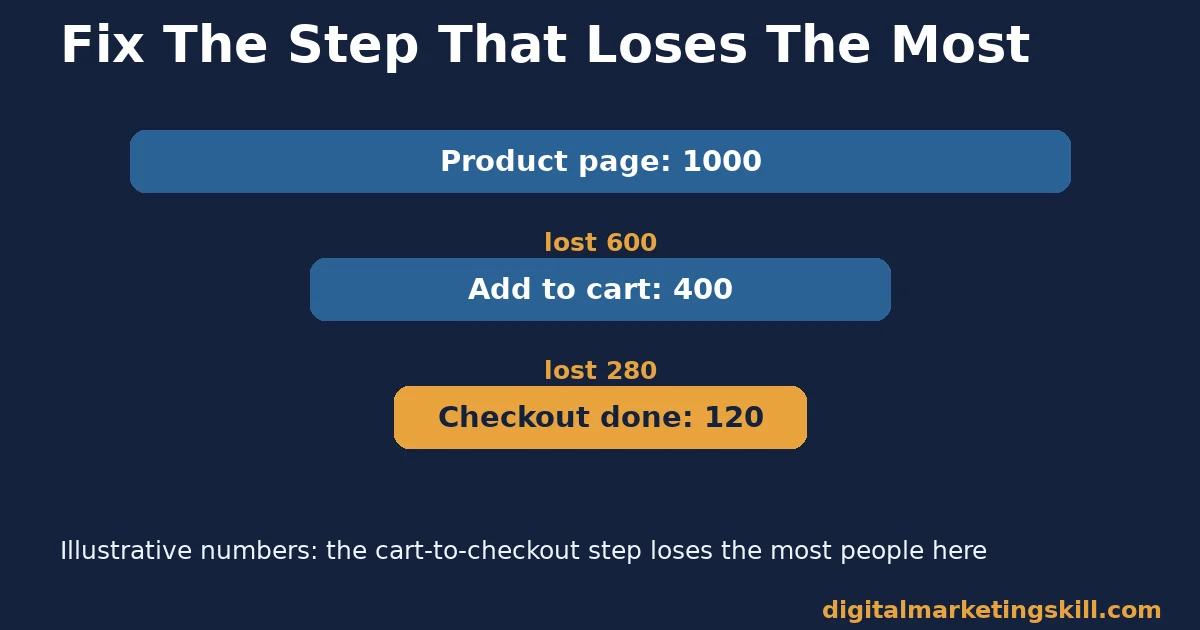
Here is an illustrative example with invented numbers to show the logic. Say 1,000 visitors reach your product page. 400 add an item to their cart, and only 120 complete checkout. The product page keeps 40% of visitors, but the cart-to-checkout step keeps only 30% of those who reach it. In raw numbers, that step loses 280 people, more than any other step. In this illustrative case, checkout is where you fix first, even if a louder complaint points somewhere else.
A Real Case: Building a Site That Keeps Customers Through Checkout
Fixing why customers leave is a skill, not a guess. On Digital Marketing Skill Institute’s reviews page, student Eunice Bolaji describes building “a full blown Ecommerce site from the scratch while still learning.” Building the site with a clear, trustworthy checkout in mind from day one avoids many of the fixes other businesses have to make after the fact.
This is one published testimonial, not a controlled study, and results depend on the market, product and effort involved. Treat it as a real example of the skill in use, not a guaranteed outcome, consistent with the Institute’s earnings disclaimer.
Frequently Asked Questions About Why Customers Leave
What is the single biggest reason customers leave during checkout?
Unexpected extra costs. Baymard Institute’s research found 40% of shoppers who abandoned a cart, and were not just browsing, cited extra costs such as shipping or fees as too high. Showing the full price earlier is the most direct fix.
Is a high bounce rate always a bad sign?
Not always, but it usually signals an early-stage clarity or trust problem worth checking. Compare it against your page’s purpose: a single informational page with a naturally high bounce rate is different from a product page losing visitors before they explore anything.
Why do mobile visitors leave more often than desktop visitors?
Baymard’s data shows mobile abandonment runs higher than desktop, partly because small screens make long forms and unclear pricing more frustrating. Shortening checkout and showing full costs early helps mobile visitors more than desktop ones.
How much does one bad experience really cost a business?
Zendesk’s CX Trends research found 63% of consumers would switch to a competitor after a single bad experience. The real cost varies by business, but that figure suggests the margin for error is thin.
Should a business chase every reason customers leave at once?
No. Use the decision rule above: find the step where you lose the most customers in absolute numbers, and fix that one first. Spreading effort across every possible reason usually fixes none of them well.
Does lowering prices stop customers from leaving?
Rarely by itself. Baymard’s research shows distrust, forced account creation and long checkouts drive abandonment nearly as much as cost. A lower price on a confusing or untrustworthy checkout still loses customers.
Stop Guessing Why Customers Leave, Anywhere You Sell
Why customers leave is rarely a mystery once you split the journey into stages and measure each one. Find your weakest stage, fix the specific friction Baymard and Zendesk’s research point to, and track whether the fix actually holds.
If you want to build this skill properly, Digital Marketing Skill Institute’s Master Diploma in Digital & AI Marketing includes an AI-Powered WordPress and SEO Specialist track, part of four AI-powered tracks totalling ten courses, with a Full Stack option for completing all four. It comes with unlimited 1-on-1 coaching and mentoring, a U.S. Project Internship with a verified U.S. Work Reference Letter, and dual US and UK accreditation recognised in more than 100 countries, 100% online, so you can study from anywhere in your country.
Wherever you live, the fundamentals here apply the same way: find the stage that loses the most customers, fix the specific friction, and measure the result. Explore the training at Digital Marketing Skill Institute, read more on the blog, or apply to get started with Digital Marketing Skill Institute today.
Every figure in this guide was checked against its original source before publication. Figures marked as illustrative are invented examples, not real results.
![9 Amazing Digital Marketing Skills to Make Money Online [With Proof]](https://digitalmarketingskill.com/wp-content/uploads/2019/07/9-Amazing-Digital-Marketing-Skills-to-Make-Money-Online-With-Proof-17.png)






