
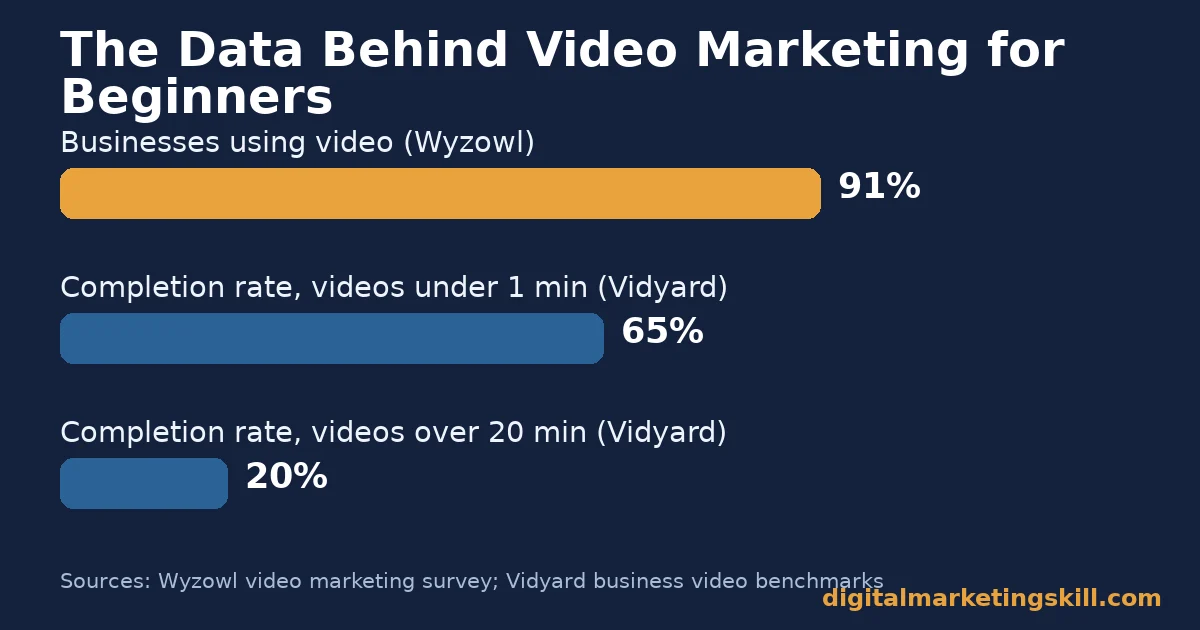
Video marketing for beginners succeeds or fails in the first few seconds, not the production budget. Wyzowl’s annual survey of marketers found 91% of businesses now use video. 82% say it gives a good return. This guide compares four realistic starting formats, the one length rule that matters most, and how to measure whether a video is actually working.
Key Takeaways
- Video is now the default, not the exception. Wyzowl’s survey of 266 marketers found 91% of businesses use video as a marketing tool. 83% say it has helped increase sales.
- Length decides whether anyone finishes watching. Vidyard’s analysis of nearly a million business videos found 65% of viewers finish a video under one minute. Only 20% finish one over twenty minutes.
- Tags matter far less than most beginners think. YouTube’s own help documentation says tags are “not important” for discovery. They exist mainly to correct common misspellings.
- Short-form video is now the preferred format. Wyzowl found 63% of people would rather watch a short video than read text to learn about a product.
- A tiny budget can still go viral. Dollar Shave Club’s launch video cost about $4,500 to make. It drew 12,000 signups in its first 48 hours, a case covered in depth below.
In this guide
- What Most Video Marketing for Beginners Guides Get Wrong
- How Video Marketing Actually Works for Beginners
- Four Video Formats for Beginners, Compared
- How to Get the First Version of Each Format Right
- How to Measure Video Marketing for Beginners
- The One Rule: Match Length to the Job, Not the Trend
- A Real Case: Dollar Shave Club’s $4,500 Launch Video
- Frequently Asked Questions About Video Marketing for Beginners
- Turn Video Marketing for Beginners Into a Lasting Skill
What Most Video Marketing for Beginners Guides Get Wrong
Most guides to video marketing for beginners start with equipment: cameras, lighting, editing software. Gear matters less than most people assume. A smartphone shoots in high enough quality for almost any first video. However, a clear message always beats a sharp picture with nothing useful to say.
The bigger gap is strategy. Many guides also repeat outdated advice about tags being essential for search ranking. YouTube’s own help documentation is direct about this. Tags are “not important” for discovery. They exist mainly to correct common misspellings, not to boost reach.
This guide skips the gear talk. Instead, it focuses on four things that actually move results: which video format to start with, how long to make it, how to measure whether it worked, and a real case that shows what is possible on a tiny budget.
By the end, you should be able to pick a realistic first video to make this week, rather than postponing until you feel fully equipped.
How Video Marketing Actually Works for Beginners
Video works because it combines two senses at once. Seeing and hearing the same message together creates a stronger impression than either alone. That is why a 90-second product demo often explains more in less time than a page of text.
For video marketing for beginners, this means the medium itself does some of the persuading before a single word of script is written. A plain demonstration can carry weight that a written description cannot, simply because the viewer watches it happen rather than imagining it. That is also why a shaky but honest demo often outperforms a polished but vague one.
That advantage only holds if people actually watch to the end. Vidyard’s analysis of nearly a million business videos found 65% of viewers finish a video under one minute long. Only 20% finish one over twenty minutes. The message in your video only works if the length matches how long people will actually stay.
Once you accept that shorter, focused videos usually beat longer, comprehensive ones, the rest of this guide shows which format to start with. It also shows how to keep it short without losing the point. Our guide to online video strategy by platform covers how these length rules shift once you add a specific channel into the mix.
Four Video Formats for Beginners, Compared
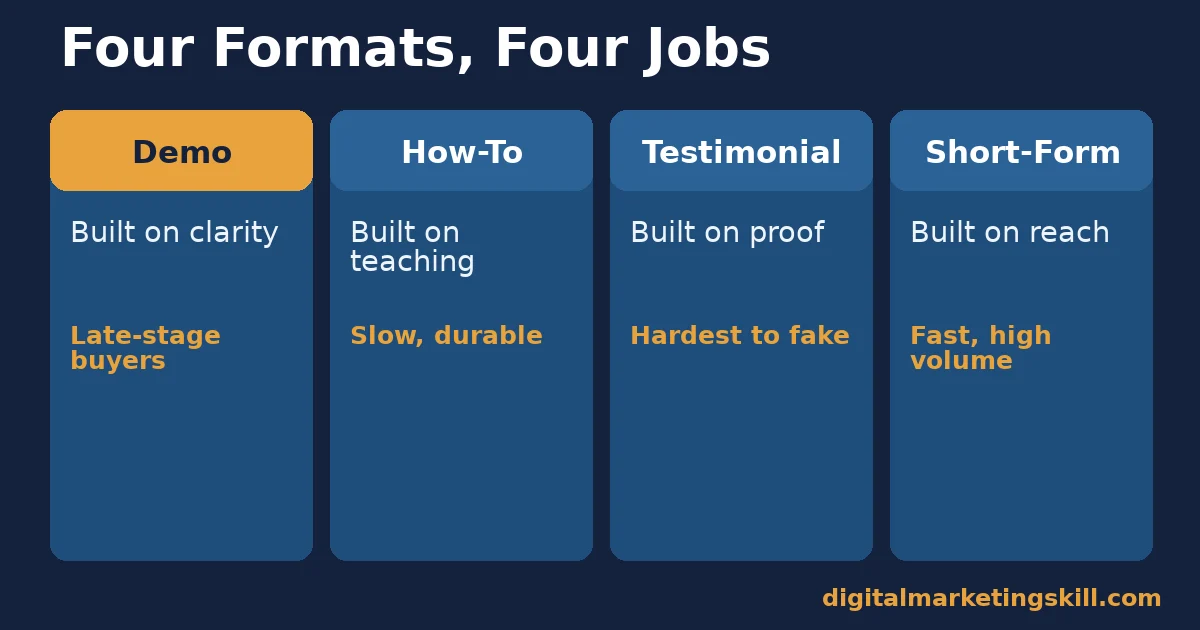
These four formats cover almost every realistic starting point for video marketing for beginners. Pick the one that matches what you are trying to prove, not the one that looks most impressive. Each one also costs a different amount of time and goodwill to make well, which is worth weighing before you commit a week to any single format.
Before filming anything, decide which resource you actually have: a product worth showing, a lesson worth teaching, a happy customer willing to talk, or a platform audience already scrolling. Most beginners pick a format because it looks impressive on other brands’ channels, not because it matches what they can realistically produce well right now.
Honesty about that starting resource saves weeks of effort spent trying to force the wrong format to work.
Demo and Product Videos: Built on Clarity
These videos show exactly how a product or service works. They are the most direct format, because they answer a buyer’s practical question. What does this actually do?
They work best late in a buyer’s decision, once someone already knows roughly what they want. A demo video rarely wins someone who has never heard of the product. But it can confirm the purchase for someone who nearly has. Our guide to types of online advertising covers where a demo video fits alongside paid promotion.
Keep the pace brisk. A demo that lingers on setup before showing the actual product loses the exact viewer it was meant to convince, since that viewer already wants to see the product work, not watch you prepare to show it.
Educational and How-To Videos: Built on Teaching
These videos teach a skill or solve a specific problem. Your product appears as part of the solution, not the entire focus. They build trust slowly, by proving you understand the viewer’s problem before you ever mention a sale.
This format is the most durable of the four. A genuinely useful how-to video keeps attracting views long after a product launch video has stopped getting shared. It also tends to rank well in search over time, since people keep searching for the same practical questions.
The trade-off is patience. A how-to video rarely spikes the way a launch video can, so judge it by its slow, compounding view count over months rather than its first-week performance. A library of a dozen how-to videos, built up over a year, often brings in more steady traffic than any single launch campaign.
Testimonial and Case-Study Videos: Built on Proof
These videos let a real customer describe their own result, in their own words. They work because viewers trust a peer’s account more than a brand’s own claims about itself. In video marketing for beginners, this format usually comes last, once a demo or how-to video has already proven the product works.
They are also the hardest to fake convincingly, which is exactly why they carry weight. A specific, checkable result from a named customer does more for credibility than a dozen generic claims. The hardest part is usually finding a willing customer, not filming the conversation itself.
Therefore, start this format by asking your most satisfied customer first, rather than waiting for the perfect candidate to volunteer. A slightly imperfect, genuine answer on camera beats a polished script that sounds rehearsed.
Short-Form and Social Videos: Built on Reach
These are the brief, vertical videos made for social feeds, typically under a minute. Wyzowl found that 63% of people would rather watch a short video than read text to learn about something new. That is exactly the audience this format reaches.
Short-form video is the easiest format to start today. It is also the hardest to make memorable, since it competes against an endless feed of other short videos for the same few seconds of attention. Our guide to types of social media content covers how short-form video fits alongside the other formats on your feed.
Volume matters more here than in any other format. A single short video rarely proves anything, so judge this format over a run of ten or twenty posts, watching which specific openings keep people watching past the first second. Treat each post as a small test of one variable, such as the opening line or the first visual, rather than changing everything at once.
How to Get the First Version of Each Format Right
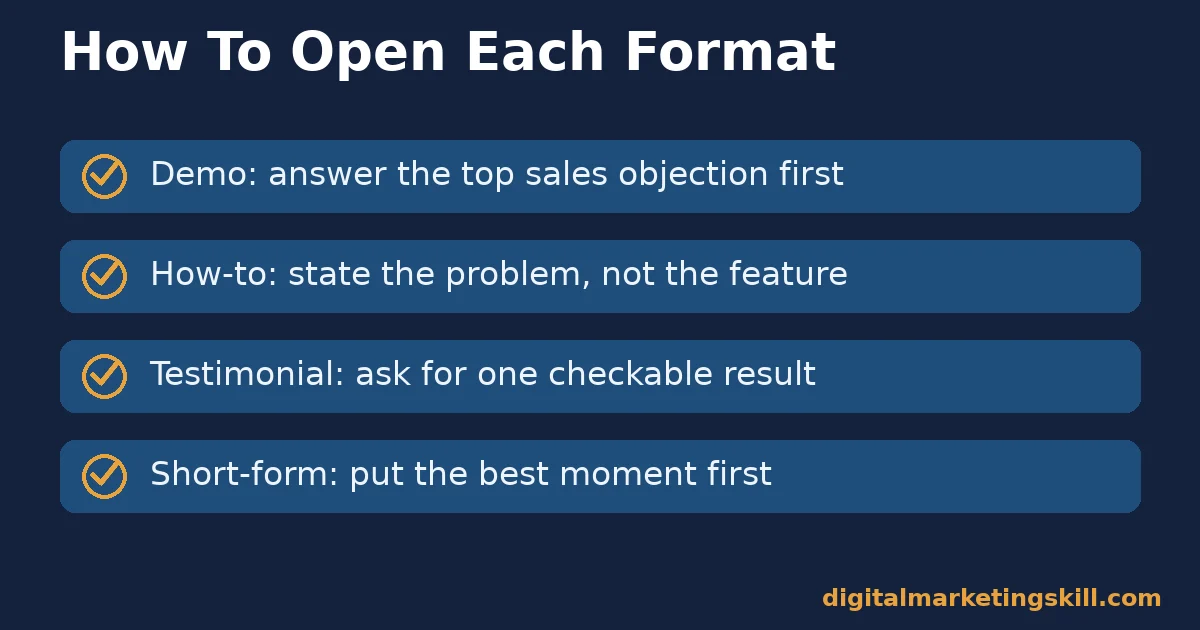
Each format above rewards a different opening move. Match the move to the format, not the other way around.
Demo Videos: Lead With the One Question Buyers Ask Most
Open by answering the single question your sales team hears most often. Skip walking through every feature in order. A demo that answers the real objection in the first ten seconds keeps far more viewers than one that opens with a company introduction.
If you are not sure which question to lead with, ask your support team which question comes up most before a sale. That answer usually belongs in the first ten seconds of the video.
How-To Videos: Lead With a Problem, Not a Feature
State the viewer’s problem before you show any solution. A how-to video that opens with “here is a feature we built” loses the viewer who has not yet decided the problem is worth solving. Naming the problem in plain, specific language in the first sentence tells the right viewer they are in the right place, before they have any reason to keep watching otherwise.
Testimonial Videos: Lead With a Specific, Checkable Result
Ask the customer for one concrete number or outcome, not a general compliment. “It cut our onboarding time in half” does more work than “it’s a great product.” A specific claim is easier to believe and easier to remember.
Short-Form Videos: Lead With the First Three Seconds
Put the most interesting moment first. Most viewers decide whether to keep watching almost immediately. Save any setup or branding for after you have already earned their attention, not before. A logo or intro slide at the very start is the single easiest way to lose a short-form viewer before they have any reason to stay.
How to Measure Video Marketing for Beginners
A video that looks good is not the same as a video that works. These four numbers separate the two.
Four Numbers That Tell You the Truth
- Completion rate. The share of viewers who watch to the end. Vidyard’s benchmark of 65% for videos under a minute, against 20% for videos over twenty minutes, is a useful comparison point for your own numbers.
- Play rate. The percentage of people who actually click play, out of everyone who saw the video thumbnail. A low play rate usually points to a weak thumbnail or title, not a weak video.
- Click-through rate. The share of viewers who click your call to action, divided by the number who saw it. This shows whether the video actually moved people to act, not just watch.
- Conversion rate. The share of people who completed the action you wanted, divided by the number who clicked through. This is the number that connects video marketing for beginners to actual revenue.
Reading the Numbers Together
Read these four in order, not in isolation. A high play rate with a low completion rate means the thumbnail oversold the video. A high completion rate with a low click-through rate means people enjoyed watching but saw no clear reason to act next.
Here is a worked, illustrative example of why order matters. A video with a 40% play rate and an 80% completion rate is working well, since people who click play tend to finish it. However, the same video with only a 2% click-through rate on its call to action suggests the ending needs a clearer, more specific next step, not a longer or flashier video.
In other words, each number isolates a different point of failure. Fixing the wrong one, such as reshooting the whole video when only the ending needs a sharper call to action, wastes the effort that measurement was supposed to save. Check each number before you change anything, and change one variable at a time so you know which fix actually worked.
The One Rule: Match Length to the Job, Not the Trend
Here is the single most useful rule in this guide. Choose your video’s length based on what the viewer needs to decide. Do not base it on what is trending on a given platform this month.
As an illustrative, invented example: a 15-second video can sell a snack, because the decision is low-risk and nearly instant. A software purchase usually needs more than fifteen seconds of explanation, because the decision carries more risk and more questions. Forcing a complex product into a trend-length video often loses the information a buyer actually needed.
This is the core discipline behind effective video marketing for beginners: resist copying a competitor’s length just because it performed well for their product. Their decision may be simpler or riskier than yours, which changes how much explanation a viewer actually needs before they feel ready to act.
A Real Case: Dollar Shave Club’s $4,500 Launch Video
Dollar Shave Club launched with a single 90-second video featuring its founder, made on a reported budget of about $4,500. The video answered one clear question. Why pay more for razors than you need to?
The results were immediate and well documented. According to Inc. magazine, the company signed up roughly 12,000 new subscribers in the first 48 hours. The surge in traffic crashed its own server. The video went on to accumulate tens of millions of views over time.
Treat this case as evidence that a clear message can outperform a large budget. It is not a guarantee that any single video will go viral. Dollar Shave Club succeeded because the video answered one sharp question in plain language, a lesson that applies at any budget.
Notice, too, that the format was simple: one person, one location, one joke running through the whole script. Video marketing for beginners does not need elaborate production to work; it needs a message worth watching, delivered without wasted time. The simplicity was a feature, not a limitation forced by the small budget.
Frequently Asked Questions About Video Marketing for Beginners
Do I need expensive equipment to start video marketing for beginners?
No. A modern smartphone shoots in high enough quality for most first videos. Good lighting and clear audio matter more than camera resolution. Both can be achieved cheaply with natural light and a basic microphone. Viewers forgive a shaky frame far more readily than they forgive audio they cannot hear clearly.
How long should my first marketing video be?
Shorter is usually safer when starting out. Vidyard’s data shows 65% of viewers finish videos under one minute, compared with 20% for videos over twenty minutes. Match the length to what the viewer actually needs to decide, as covered in the decision rule above.
Which video format should a complete beginner start with?
A short how-to or demo video is usually the easiest first project. It needs no actors beyond yourself and answers a question you already know how to answer. Save testimonial videos for once you have a customer willing to speak on camera. Most successful video marketing for beginners starts with exactly this kind of small, low-pressure first project.
Do YouTube tags actually help my video get found?
Barely. YouTube’s own help documentation says tags are not important for discovery and mainly exist to correct common misspellings. Titles, thumbnails, and descriptions carry far more weight in how a video gets recommended. Our dedicated YouTube SEO for beginners guide covers titles and descriptions in more depth.
What is a good video completion rate?
There is no single universal number, since it depends heavily on video length and topic. Vidyard’s benchmarks, 65% for under a minute and 20% for over twenty minutes, are a reasonable comparison point. Judge your own videos against similar lengths, not against a different format entirely.
Can a low-budget video still work for video marketing for beginners?
Yes. Dollar Shave Club’s launch video, covered above, cost about $4,500 and still drove thousands of signups in two days. Budget matters less than a clear, specific message that answers a real question the viewer has. A bigger budget can polish a weak message, but it rarely rescues one.
How many videos should a beginner make before expecting results?
Treat your first few videos as a learning set rather than a single bet. A consistent run of five to ten short videos, each measured against the four numbers above, teaches you far more about what your audience responds to than one expensive production ever will.
Should I hire a professional or film my own first video?
For most people starting out, filming it yourself is the better first move. It costs almost nothing, and the lessons from your first attempt, what worked, what felt awkward, what viewers actually commented on, make any later professional production far more effective. Save the professional budget for a format you have already tested yourself.
Turn Video Marketing for Beginners Into a Lasting Skill
Every format covered above, from demos to testimonials to short-form clips, is a skill that gets easier and faster with practice, wherever in your country you are building your audience.
The Digital Marketing Skill Institute’s Master Diploma in Digital & AI Marketing builds exactly these skills, including AI-powered content creation for graphics and video, AI-powered social media marketing, and AI-powered social media advertising, with unlimited one-on-one mentoring and real project work inside a U.S. partner company from day one. The programme is dual US and UK accredited, recognised in more than 100 countries, and entirely online.
See real outcomes on the student reviews page, explore the Master Diploma programme in full, or browse more guides on the digital marketing blog. Visit digitalmarketingskill.com to see the full range of courses, and when you are ready, apply here to get started from digitalmarketingskill.com.
Every figure in this guide was checked against its original source before publication. Figures marked as illustrative are invented examples, not real results.





