
An AI agent is a software system that uses an AI model to work towards a goal by planning steps, using tools and checking its own progress. Unlike a chatbot that simply answers you, an AI agent decides what to do next until the task is done or it hits a limit. As a result, it can take on multi-step marketing work, such as auditing an ad account, while you stay in charge of the final call.
Key Takeaways
- At heart, an agent is a large language model (LLM) that uses tools in a loop, based on feedback from each step.
- Humans still set the goal, the rules and the tools the agent can use.
- Agents suit open-ended tasks where you can’t predict every step in advance.
- They cost more to run than a single prompt, and small errors can build up.
- Good practice includes activity logs, stopping limits and human approval for big actions.
What Is an AI Agent?
Think of it as a junior assistant who can use software for you. You give it a task, such as “find the five campaigns that wasted the most budget in the last 30 days and suggest fixes.” It then works out the steps, pulls the data, reads it and drafts an answer.
The word “agent” is used loosely, though. Anthropic, the company behind Claude, notes that some people use it for fully autonomous systems, while others use it for systems that follow fixed steps. So Anthropic calls both “agentic systems.” However, it draws a clear line between them. In workflows, LLMs and tools follow “predefined code paths.” By contrast, agents are systems where LLMs “dynamically direct their own processes and tool usage.”
In other words, a workflow follows a script, while an agent writes its own plan as it goes. That freedom is what makes agents useful. It is also what makes them risky.
How an AI Agent Works
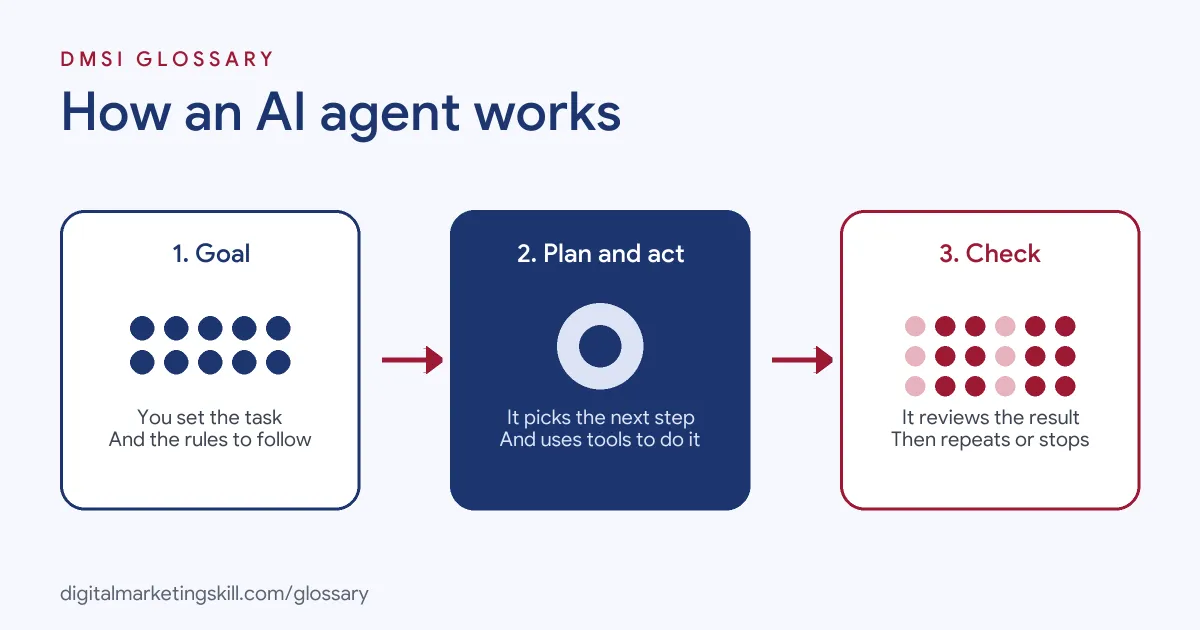
Every agent runs through the same basic loop. First, it receives a goal. Next, it plans and takes an action with a tool. Then it checks the result and decides whether to continue, ask for help or stop.
The Building Blocks
Anthropic describes the basic building block as an “augmented LLM.” This is a language model with extra abilities, such as retrieval, tools and memory. For example, it can write its own search queries, choose which tool to use and decide what to remember.
Tools are the key part here. A tool might be a web search, a spreadsheet, a reporting API or an ad platform connection. Without tools, the model can only talk. With tools, it can look things up and take actions.
Goals, Plans and Feedback
IBM explains that an agent works in three stages. It starts with goal setting and planning. Then it reasons with the tools it has. Finally, it learns and reflects, using feedback from people or other agents to improve its answers.
Feedback from the real world matters most. According to Anthropic, agents need “ground truth” from the environment at each step, such as the result of a tool call. That way, the agent can judge its progress rather than guess. It can also pause for human feedback at checkpoints or when it gets stuck.
Limits and Stopping Rules
An agent shouldn’t run forever. That’s why builders add stopping conditions, such as a maximum number of steps. IBM also warns that an agent which can’t plan well may call the same tools again and again. This creates what IBM calls an “infinite feedback loop,” which wastes time and money.
AI Agent Examples
Here are three ways marketing teams use an AI agent:
- Ad account audit: An agent connects to an ad platform and an analytics tool. It then pulls campaign data, spots wasted spend and drafts a list of fixes for a specialist to review.
- Reporting: NVIDIA gives an example of an agent that uses APIs to fetch raw sales data, machine learning to find trends and a code tool to build a graph. In the same way, a marketing agent can turn weekly numbers into a short report.
- Content research: An agent searches the web for questions people ask about a topic. Next, it groups them and drafts an outline. After that, a writer checks the facts and adds real expertise.
In each case, the agent does the repetitive steps. Meanwhile, a person sets the goal and approves the result.
AI Agent vs Chatbot vs Automated Workflow
These three are often mixed up, so here is a simple comparison:
| Option | Who decides the steps | Best for |
|---|---|---|
| Chatbot (single prompt) | You ask, it answers once | Quick drafts, ideas and questions |
| Automated workflow | A fixed path set in advance | Repeatable tasks with clear steps, such as a welcome email series |
| AI agent | The model chooses its next step | Open-ended tasks with many possible paths |
Anthropic’s advice is to start simple. For many tasks, a single well-built prompt is “usually enough.” Workflows offer more predictability for well-defined tasks. So you should only reach for an agent when you need flexibility.
How to Use an AI Agent Safely at Work
Whatever tool you use, the same steps keep an agent useful and safe:
- Define one clear goal. For example, “List the ten search terms with the highest cost and no conversions.”
- Give it only the tools it needs. Read-only access is a good start.
- Set limits. Cap the number of steps, the time it can run and the budget it can touch.
- Test in a safe space first. Anthropic recommends “extensive testing in sandboxed environments” with guardrails.
- Check the activity log. See which tools it used and why.
- Approve big actions yourself. IBM calls it best practice to require human approval before an agent takes high-impact actions.
After that, compare the agent’s output with what you would have done by hand. If it saves time without losing quality, widen its role step by step.
Best Practices for an AI Agent
- Write clear tool descriptions. Anthropic stresses that toolsets and their documentation should be designed “clearly and thoughtfully.”
- Keep a human in the loop. Above all, let the agent draft and recommend, while you decide.
- Allow interruption. IBM recommends that people can stop a sequence of actions at any time.
- Start small. Give it one narrow job before you add more.
- Protect data. Never connect customer data unless your company’s rules allow it.
Common Mistakes to Avoid
Beginners often make the same few errors. First, they use an agent where a simple prompt or fixed workflow would do. Second, they give it write access to live accounts too soon. Third, they trust the output without checking it. Finally, they forget about cost. Anthropic notes that the freedom of agents means “higher costs, and the potential for compounding errors.” In short, more steps mean more chances for one mistake to spread.
Where You’ll Use an AI Agent at Work
Employers already expect marketers to work alongside AI agents. For example, recent remote job listings ask candidates to:
- Be “someone who can direct AI agents effectively, critically assess their outputs and apply sound judgement before taking action” (Google Ads Specialist).
- Spend part of each day “Using AI agents to audit advertising accounts” (Google Ads Specialist).
- “Co-own a design system built for humans and AI agents” (Staff Product Designer).
So the skill employers want isn’t building an agent from scratch. Instead, they want people who can brief one, check its work and know when to say no. That is true in paid ads, email marketing, SEO and social media.
Learn It in the Lead Generation Track
AI fundamentals, including strategy and planning, are part of every DMSI track. To apply AI to automated marketing tasks, choose the AI-Powered Lead Generation and Email Automation track. There, you build a lead magnet and an automated email sequence that converts. You also join a U.S. Project Internship from day one, with unlimited 1-on-1 mentoring.
To go further, read our guide to AI marketing tools and our explainer on marketing automation. You can also read our glossary entry on generative AI.
Frequently Asked Questions
What is an AI agent in simple terms?
It is an AI system that works towards a goal on its own by planning steps and using tools, such as search or a spreadsheet. It checks each result, then decides what to do next.
What is the difference between an AI agent and a chatbot?
A chatbot answers one message at a time. An AI agent can take several actions in a row, use tools and adjust its plan based on what it finds.
Can an AI agent replace a marketer?
No. An agent can speed up research, reporting and audits. However, people still set goals, check accuracy and approve important actions.
Are AI agents safe to use?
They can be, with the right limits. Use read-only access at first, set stopping rules, review activity logs and approve any high-impact action yourself.
Do I need to code to use an AI agent?
Not always. Many tools now let you brief an agent in plain language. Even so, you need to understand the task well enough to judge the result.
Sources: Anthropic: Building effective agents; IBM: What are AI agents?; NVIDIA: What are autonomous AI agents?; remote job listings on Himalayas.