
An email sequence is a set of emails that send automatically, in a fixed order and on a schedule, after someone takes an action such as signing up. Each email builds on the one before, so the series guides the reader towards one goal. It matters because it lets you welcome, teach and follow up with every new contact at the right time, without writing each message by hand.
Key Takeaways
- A sequence starts with a trigger, such as a sign-up, a download or an abandoned basket.
- Time delays control when each email goes out after the one before.
- Good sequences stop or change when the person acts, for example by replying or buying.
- Common types include welcome, abandoned cart, post-purchase, win-back and sales follow-up.
- Consent rules still apply. In the UK, you generally need consent or a valid soft opt-in to send marketing emails to individuals.
What Is an Email Sequence?
Think of it as a conversation you plan in advance. Instead of sending one big newsletter to everyone, you send a short run of emails to each person, based on when they joined and what they did.
Different tools use different names. Klaviyo calls them flows and describes a flow as “a sequence of automated actions (e.g., sending messages) triggered by a behavior or event.” HubSpot uses the word sequences and says they “send a series of targeted, timed email templates to nurture contacts over time.” Other tools call them drips, journeys or automations. The idea is the same.
A sequence is a core tool in lead nurturing. It turns a new contact into someone who knows you, trusts you and is ready to buy.
How an Email Sequence Works
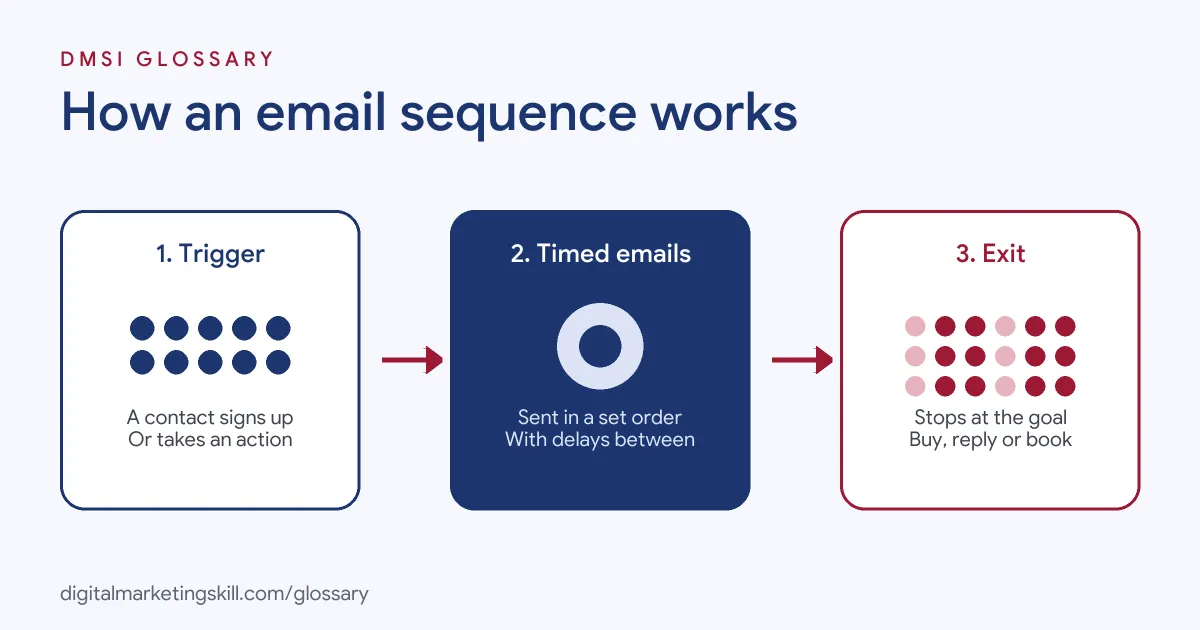
Every series has three parts. First, a trigger enrols the person. Next, timed emails go out one by one. Finally, an exit rule removes the person when they reach the goal or the series ends.
The Trigger
The trigger decides who enters. Klaviyo notes that a flow “might start when someone joins a list or starts checkout, when an order is fulfilled, or as a date approaches.” For example, someone who downloads your lead magnet could enter a five-email welcome series.
Delays and Branches
Next, you set the gap between emails. In HubSpot, you can delay an email “for up to 90 business days,” and you can choose to send only on business days. Klaviyo also lets you split a flow into “multiple paths — up to 20 — based on conditions.” So a buyer and a browser can get different follow-ups.
Exit Rules
Then you decide when the series stops. HubSpot lets contacts unenrol “when they reply to an email or book a meeting.” That rule matters. Otherwise, someone who just booked a call might still get an email asking them to book a call.
Email Sequence Examples
Here are three made-up examples that show the main types:
- Welcome series (example): A skincare brand sends a thank-you email on day 0, a best-sellers guide on day 2 and a first-order offer on day 5.
- Abandoned basket (example): An online shop emails a reminder an hour after checkout stops, then follows up a day later with reviews of the product.
- Course enquiry (example): A training school sends a course outline, then a student story, then an invitation to book a call. The series stops as soon as someone books.
In each case, every email has one job and leads to the next one.
A Sample Welcome Plan
Here is a made-up four-email plan for a small online bakery. It shows how each message hands over to the next:
- Welcome, day 0: Thank the reader, deliver the promised recipe and say what emails will follow.
- Story, day 2: Share how the bakery started and what makes its bread different.
- Proof, day 4: Show three customer reviews and a photo of the best-selling loaf.
- Offer, day 7: Give a first-order discount with a clear end point.
Anyone who orders after email two skips the rest and moves into a post-purchase series instead.
Types of Email Sequence
Here is how the most common types compare:
| Type | Trigger | Main goal |
|---|---|---|
| Welcome series | Joins a list | Introduce the brand and win a first sale |
| Abandoned cart | Starts checkout but doesn’t finish | Recover the sale |
| Post-purchase | Places an order | Say thanks and suggest related products |
| Win-back | No purchase for a set time | Re-engage past customers |
| Sales follow-up | A rep enrols a prospect | Book a meeting |
Klaviyo lists welcome, abandoned cart, post-purchase and win-back flows among its common types. Sales teams, meanwhile, use one-to-one sequences from a CRM such as HubSpot.
How to Build an Email Sequence
The steps below work in most email tools:
- Pick one goal. For instance, a first purchase or a booked call.
- Choose the trigger. Decide exactly which action enrols a contact.
- Map the emails. Write a one-line purpose for each email before you write any copy.
- Set the delays. Space emails so they feel helpful, not pushy.
- Add exit rules. Remove people when they buy, reply or book.
- Write and test. Send test emails, check links and preview on mobile.
- Turn it on and review. Check opens, clicks, conversions and unsubscribes for each email.
Best Practices for an Email Sequence
- Get permission first. The UK ICO says you “must not send marketing emails or texts to individuals without specific consent,” with a limited exception for existing customers, known as the soft opt-in. A double opt-in can also help keep your list clean.
- Make leaving easy. Google requires bulk senders of more than 5,000 messages a day to Gmail to support one-click unsubscribe for marketing messages.
- Watch spam complaints. Google asks senders to keep spam rates in Postmaster Tools below 0.3%.
- Give each email one call to action. One clear next step beats three competing ones.
- Personalise with care. Use names and past actions, but only data you collected fairly.
Common Mistakes to Avoid
A frequent mistake is sending too many emails too fast. As a result, people unsubscribe before the series can help. Another is forgetting exit rules, so buyers keep getting sales emails. Some teams write the series once and never look at it again, even when prices or offers change. Finally, many judge success on opens alone. Instead, measure the goal you set, such as sales or booked calls.
How to Measure an Email Sequence
Look at the series as a whole and at each email in it. For the whole series, track how many people reached the goal. Then, for each email, track clicks and unsubscribes. If one email causes a spike in unsubscribes, rewrite it or move it later. Likewise, if almost nobody clicks in email three, the series may need a stronger reason to keep reading.
Where You’ll Use an Email Sequence at Work
Sequences appear in marketing and sales roles alike. For example, real remote job listings ask candidates to:
- “Set up and optimise CRM workflows, audience segmentation, lead scoring, and automated email sequences” (Marketing Lead).
- “Build, format, and stage email outreach sequences in tools like SalesLoft, Apollo, or HubSpot” (Business Development Representative).
- Create campaign assets, “including landing pages, email sequences, advertisements, webinar materials” (Demand Generation Manager).
So if you aim to become an Email Marketing Specialist or Marketing Automation Specialist, you will need to plan, build and report on sequences. Employers will also want to see one you have built.
Learn It in the Lead Generation Track
You can learn to plan and build an automated series in the AI-Powered Lead Generation and Email Automation track. It covers AI fundamentals, lead generation, and email marketing and automation. Your portfolio project is a lead magnet and an automated email sequence that converts. You also get unlimited 1-on-1 mentoring and a U.S. Project Internship from day one.
Next, read our guide to an effective email marketing strategy and see how to turn email leads into paying customers.
Frequently Asked Questions
What is an email sequence in simple terms?
It is a short series of automated emails that send in order after someone takes an action, such as signing up. Each email moves them a step closer to one goal.
How many emails should a sequence have?
There is no fixed rule. A simple welcome series might use three to five emails. However, the right number is the smallest one that reaches your goal.
Is a drip campaign the same thing?
Mostly, yes. Drip campaign, flow, journey and sequence all describe timed, automated emails. The name depends on the tool.
What is the difference between a sequence and a newsletter?
A newsletter goes to the whole list at once. By contrast, a sequence goes to each person individually, based on when they joined or what they did.
When should someone leave a sequence?
Remove them when they reach the goal, such as buying, replying or booking a call. Also remove anyone who unsubscribes.
Sources: HubSpot Knowledge Base: Create and edit sequences; Klaviyo Help Center: Getting started with flows; ICO: Electronic mail marketing; Google: Email sender guidelines; remote job listings on Himalayas.