
Google Gemini is Google’s family of AI models and the AI assistant app built on them, which can work with text, images, audio and other types of content. You can use it as a chat app, inside Google Workspace tools such as Gmail and Docs, or through an API for developers. As a result, marketers use Gemini to draft content, summarise research and speed up daily tasks. It also connects with many Google products you may already use.
Key Takeaways
- Gemini is both a family of Google AI models and the name of Google’s AI assistant app.
- It is multimodal, so it can handle text, images, audio and more.
- You can use it in the Gemini app, inside Google Workspace or through the Gemini API.
- Marketers use it for drafts, summaries, ideas and data tasks.
- Google warns that Gemini can make mistakes, so you should check its answers.
What Is Google Gemini?
Gemini is Google’s main generative AI brand. In simple terms, it is a large language model that can read your request and write a reply. However, the name covers several things at once.
First, Gemini is a family of models. Google offers different sizes, such as Pro, Flash and Flash-Lite. For example, Google describes one Flash-Lite model as “The fastest and most budget-friendly multimodal model” in its family. So developers can pick the model that fits their speed and cost needs.
Second, Gemini is an app. Google’s own page calls it “an interface to a multimodal LLM (handling text, audio, images and more).” In other words, you can type a question, upload a file or share an image and get a helpful answer.
Think of Gemini as a smart assistant sitting beside your desk. You can ask it to draft an email, explain a report or brainstorm campaign ideas. Then you review its work and decide what to keep, just as you would with a new team member.
Why It Matters
Many marketing teams already work in Google tools every day. So an AI assistant built into Gmail, Docs and Sheets can save time without new software. In addition, Gemini powers features across other Google products. Because of this, understanding how it works helps you use it well and spot its limits.
How Google Gemini Works
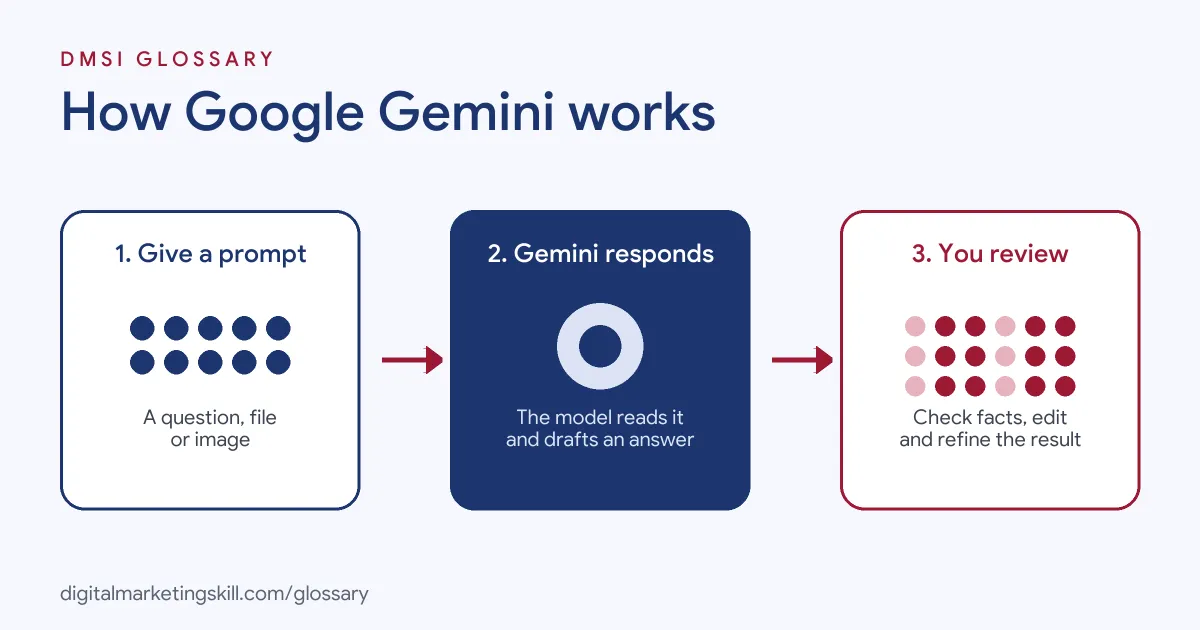
Gemini works in three simple steps. First, you give it a prompt, such as a question, a file or an image. Next, the model processes your input and predicts a useful response. Then you review the answer and refine it with follow-up prompts.
Multimodal input
Gemini is a form of multimodal AI. That means it can understand more than one type of content. For instance, you can upload a screenshot of an ad and ask for feedback. Also, Google says that if you have a long document, “Gemini lets you upload it and gives you a useful synthesis.”
The Gemini app
The Gemini app runs on the web and on mobile. According to Google’s help pages, it can help you “Brainstorm ideas, develop a plan, or find different ways to get things done.” In addition, it can “Create first drafts of outlines, emails, blog posts, poems, and much more.” So it suits everyday writing and planning tasks.
Gemini in Google Workspace
Next, Gemini appears inside Google’s work tools. For example, Google says you can “Summarize threads, find key details, and draft professional emails with Gemini in Gmail.” In Docs, it can help with first drafts. In Meet, it can take notes. Therefore, teams can use AI without leaving the apps they already use.
Gemini also works in Sheets and Slides. For example, Google says it can help you “auto-populate tables with new data” in Sheets. Similarly, in Slides it can “add fully editable, visually appealing slides to your existing decks.” So a marketer can turn campaign notes into a simple report much faster.
The Gemini API
Finally, developers can build Gemini into their own tools through the Gemini API. For instance, a company might add Gemini to a website chatbot or a content workflow. In that case, they choose a model based on speed, quality and cost.
Where Gemini fits in your workflow
Gemini is one of several AI assistants, alongside tools such as ChatGPT. So the skill that matters most is knowing where AI helps and where it doesn’t. For example, it is good at first drafts, summaries and lists of ideas. On the other hand, it needs your help with strategy, brand judgement and final checks.
A simple way to think about it is “AI drafts, you decide.” First, let Gemini do the slow, repetitive part of a task. Then use your own knowledge to choose, cut and improve. As a result, you save time without losing quality.
Limits to keep in mind
Like any AI model, Gemini has limits. For instance, it can sound confident even when it is wrong. Also, it may not know about very recent events unless it can search the web. In addition, it only knows what you tell it about your brand, audience and goals. Therefore, the more context you give in your prompt, the better the result tends to be. Finally, Google asks users to “double-check responses” before relying on them.
Examples of Google Gemini in Marketing
- A small agency. The team uses the Gemini app to brainstorm ten headline ideas for a client’s landing page. Then a copywriter picks the best ones and edits them.
- An online shop. The marketing manager uses Gemini in Gmail to summarise a long email thread with a supplier. As a result, she sees the key decisions in seconds.
- A B2B software company. The content team uploads a long research report to Gemini. After that, they ask for a short summary and a list of quotes to check for a blog post.
Gemini App vs Gemini in Workspace vs Gemini API
| Option | What it is | Who uses it |
|---|---|---|
| Gemini app | A chat assistant on the web and mobile | Anyone who wants help with ideas, drafts and questions |
| Gemini in Workspace | AI features inside Gmail, Docs, Sheets, Slides and Meet | Teams that work in Google Workspace |
| Gemini API | Access to Gemini models for building apps | Developers and technical marketers |
How to Use Google Gemini for Marketing
- Pick your entry point. Use the Gemini app for general tasks, or Gemini in Workspace if your team works in Google tools.
- Write a clear prompt. Say who the content is for, what you want and the tone. Good prompt engineering leads to better first drafts.
- Add context. Upload a brief, a brand guide or past examples so Gemini can match your style.
- Ask for options. Request several versions, such as three subject lines or five ad headlines.
- Refine with follow-ups. Tell Gemini what to change, for example “make it shorter” or “use UK spelling”.
- Check facts. Verify any numbers, names and claims before you publish.
- Edit in your own voice. Finally, polish the draft so it sounds like your brand.
Best Practices for Using Google Gemini
- Be specific. Clear, detailed prompts get more useful answers than short, vague ones.
- Give examples. Show Gemini a sample of the style or format you want.
- Keep a human in the loop. Always review AI output before it reaches customers.
- Protect private data. Follow your company’s rules on what you can share with AI tools.
- Save good prompts. Reuse prompts that work well so your team gets consistent results.
- Check your settings. Review the privacy and activity settings in your Google account.
Common Mistakes to Avoid
- Trusting every answer. Google itself says “Gemini Apps can make mistakes.” So check facts, especially numbers.
- Publishing raw drafts. Unedited AI text can sound generic and miss your brand voice.
- Using vague prompts. A one-line request usually gives a bland, one-size-fits-all answer.
- Sharing sensitive data. Don’t paste customer details or private plans without approval.
- Ignoring made-up details. Watch for an AI hallucination, where the model invents facts or sources.
- Relying on it for expert advice. Google advises not to rely on Gemini “for professional advice.”
Where You’ll Use Google Gemini at Work
Gemini skills show up in marketing, operations and AI platform roles, often next to Google Workspace. For example, real remote job listings ask for:
- “Define and drive the AI roadmap, integrating Google Gemini across functional teams (Marketing, Curriculum, HR, etc.).” (Gemini Core Enablement Lead).
- “take end-to-end ownership of Google Workspace and Google Gemini Enterprise across Transcom.” (Google Workspace & Enterprise AI Platform Owner).
- “The engineers will take ownership of one strategic platform, whether Claude, Microsoft Copilot/Copilot Studio, or Google Gemini” (AI Platform Engineer).
Learn It in the Full Stack Programme
Every DMSI track teaches you to use AI tools such as Gemini in real marketing work, and the Full Stack option covers all four tracks. Every track includes a U.S. Project Internship from day one, with unlimited 1-on-1 mentoring.
Frequently Asked Questions
Is Google Gemini free?
Google offers a free version of the Gemini app. In addition, there are paid plans and business options with more features.
What can Gemini do for marketers?
It can draft copy, summarise documents, brainstorm ideas and help with spreadsheets. However, you still need to edit and check its work.
Is Gemini the same as Google Search?
No. Gemini is an AI assistant and model family. Still, Google uses AI models in many products, including some Search features.
Can Gemini read images and files?
Yes. Gemini is multimodal, so it can work with uploaded files and images as well as text.
Can Gemini make mistakes?
Yes. Google says Gemini can make mistakes. So always double-check important facts before you use them.
Sources: Google: Gemini app overview; Gemini Apps Help: What Gemini Apps can do; Google Workspace: AI tools for business; Google AI for Developers: Gemini models; remote job listings on Himalayas, Himalayas and Himalayas.