
Midjourney is a generative AI service that turns text descriptions, called prompts, into images and short videos. You type what you want to see, and it creates several options in a few moments. So marketers use it to sketch ideas, test ad concepts and make visuals for social posts. Also, knowing how it works helps you use it safely, with clear rules on rights and brand style.
Key Takeaways
- Midjourney creates images and videos from text prompts.
- Each request returns a set of four images that you can upscale or vary.
- Parameters such as
--archange settings like the aspect ratio. - You need a paid plan to create images, and content is public by default.
- Its terms say you own the assets you create, subject to the agreement and other people’s rights.
What Is Midjourney?
Midjourney is a tool for AI image generation. Its own guide welcomes users to “your portal to transforming text into amazing images and videos!” In short, you describe a scene in words, and the AI draws it.
Think of briefing an illustrator. You might say, “A cosy coffee shop on a rainy morning, warm light, watercolour style.” Then the illustrator sketches some ideas. Midjourney does the same job, but in moments. However, it has no idea about your brand unless you tell it, so your words matter a lot.
You can use Midjourney through its website. There, you type your request into the Imagine bar on the Create page. It also has a Discord community for support and discussion. Overall, it sits within the wider field of generative AI, next to text and video tools.
Why It Matters
Why should marketers care? First, visuals take time and money to make. So a fast way to test ideas can save both. For example, you can show a client three moods for a campaign before any photo shoot. In addition, social teams need a steady flow of fresh images. On the other hand, AI images bring questions about rights, accuracy and brand fit. As a result, you need clear rules for how your team uses them.
What Marketers Use It For
Marketers mostly use Midjourney early in the creative process. For example, it helps with mood boards, storyboards and concept art. Also, it can create backgrounds, textures and scenes for social posts. In addition, teams use it to test several AI ad creative ideas before they spend money on production. Still, many brands use real photos for final product images. That way, customers see exactly what they will get.
How Midjourney Works
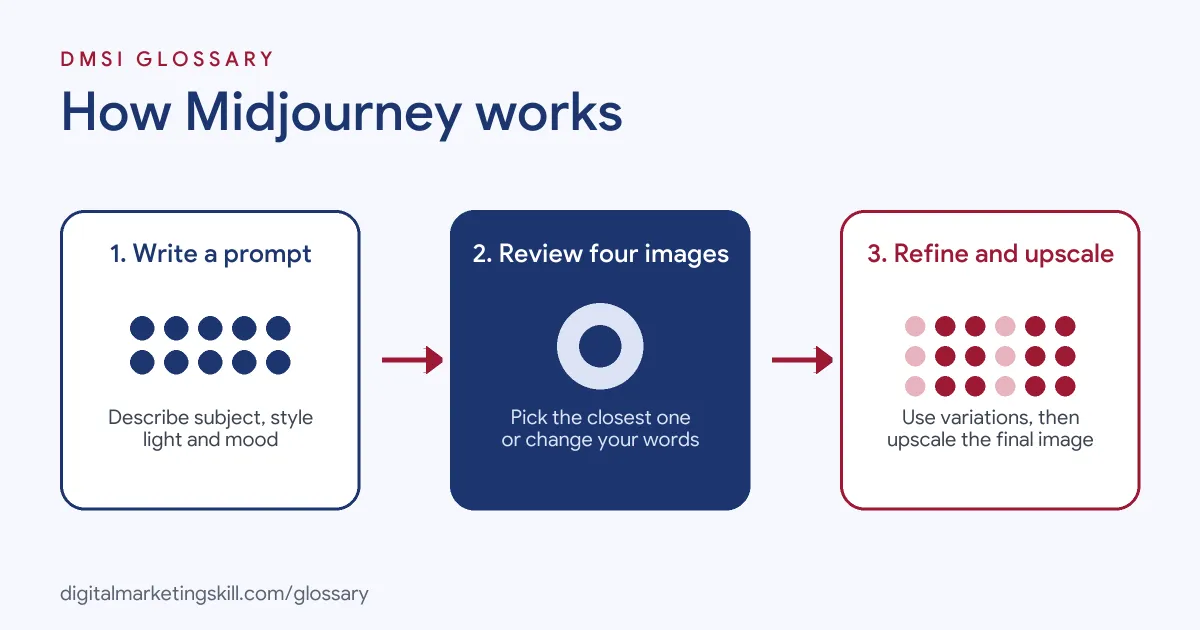
Midjourney works in a simple loop. You write a prompt, review the results and then refine them. Each step gives you more control over the final image.
Step 1: Write a Prompt
Your prompt is the text that describes what you want. Good prompts name the subject, setting, style, light and mood. Midjourney’s guide admits that “Writing and crafting prompts can be an art in and of itself.” So expect to try a few versions before you get it right.
Step 2: Review Four Options
Next, Midjourney returns a grid. In its own words, “Midjourney creates a set of four images.” Then you pick the one closest to your idea. If none fit, you can run the prompt again or change your words.
Step 3: Refine and Upscale
After that, you can improve your chosen image. The guide says you can “enhance and refine your creations using upscalers, variations” and other tools. For example, a variation keeps the main idea but changes details. Meanwhile, an upscale gives you a larger, sharper version.
Step 4: Adjust Settings With Parameters
Finally, parameters change how Midjourney makes the image. For instance, aspect ratio sets the shape. Midjourney says, “By default Midjourney images are square.” To change it, you “Add --ar #:# to the end of your prompt.” So --ar 9:16 gives a tall image for mobile Stories, while --ar 16:9 suits widescreen video.
Writing Better Prompts
Prompts improve with practice. So start with the subject, then add the setting and the style. For example, “a red running shoe on a wet city street at night, neon light, close-up photo” is far clearer than “a cool shoe”. Also, change one part at a time, so you can see what each word does. In the same way, keep notes on words that give results you like. Over time, this becomes a simple form of prompt engineering for images.
Rights and Privacy
Before you use images in marketing, check the rules. Midjourney’s terms state, “You own all Assets You create with the Services to the fullest extent possible under applicable law.” However, that is subject to the agreement and to other people’s rights. Also, the terms say larger companies need a higher-tier plan to own their assets. In addition, your images are public by default, unless you use Stealth mode on a plan that offers it.
Examples of Midjourney in Marketing
- A café planning a seasonal menu. The owner creates mood images for a winter campaign. Then the designer uses the best one as a reference for the real photo shoot.
- An agency pitching a new client. The team makes three visual routes for a product launch. As a result, the client can react to real pictures, not just words.
- An online shop testing ad ideas. The marketer builds background scenes for social ads in tall and square formats. Still, she checks every image for odd details before it runs.
Midjourney vs Other Ways to Get Visuals
| Point | Midjourney | Stock photos | Custom photo shoot |
|---|---|---|---|
| Speed | Moments per set of images | Fast to search | Days or weeks |
| Uniqueness | New images from your prompt | Others may use the same image | Fully unique |
| Control | Guided by words and settings | Limited to what exists | Full control on the day |
| Real products and people | Not reliable for exact likeness | Real but generic | Shows your real product |
| Main checks | Rights, accuracy, odd details | Licence terms | Model and location releases |
How to Use Midjourney
- Choose a plan. Midjourney says “you’ll need to subscribe to one of our plans” before you create.
- Open the Create page. Go to the website and find the Imagine bar.
- Write a clear prompt. Name the subject, setting, style, light and mood in plain words.
- Set the shape. Add an aspect ratio, such as
--ar 4:5, to match where the image will appear. - Review the four images. Pick the closest one, or change your prompt and try again.
- Refine it. Use variations to explore, then upscale your final choice.
- Check before use. Look for odd hands, text errors and anything that clashes with your brand.
- Save your prompts. Finally, keep a library of prompts that work, so your team can reuse them.
Best Practices for Midjourney
- Be specific. Clear details about style and light give more useful results.
- Match the platform. Set the aspect ratio for the channel, such as tall for Stories.
- Protect your brand. Check images against your brand guidelines before they go live.
- Don’t fake reality. Avoid images that could mislead people about real products, results or people.
- Read the terms. Check ownership and privacy rules for your plan and company size.
- Keep a human in the loop. A designer or editor should approve every image, in line with good AI ethics.
Common Mistakes to Avoid
- Vague prompts. “A nice office” gives generic results. Instead, describe the scene in detail.
- Forgetting the shape. Otherwise, platforms often crop square images badly on Stories or banners.
- Using it for real product shots. AI can’t promise an exact copy of your product, so use real photos there.
- Ignoring privacy. Content is public by default, so don’t put secret launch ideas into prompts on a public plan.
- Skipping the check. Small errors, such as extra fingers or garbled text, can hurt trust.
- Copying other people’s work. Don’t prompt for images that copy a living artist or a rival brand.
Where You’ll Use Midjourney at Work
Midjourney appears in design, video and creative roles, often next to other AI tools. For example, real remote job listings mention:
- “tools like MidJourney and Veo3 to push creative boundaries and accelerate design processes.” (Head of Design).
- “Generative AI tools such as Runway, Higgsfield, Kling, Midjourney, or similar.” (Video Content Lead).
- “Hands-on use of generative image and video tools like Sora, Veo, Midjourney, Runway, Kling.” (Character Animation Specialist).
Learn It in the Social Media and Paid Social Track
You can learn to make AI visuals for ads and posts in the AI-Powered Social Media Management and Advertising track. Every track includes a U.S. Project Internship from day one, with unlimited 1-on-1 mentoring.
Frequently Asked Questions
Is Midjourney free?
No. Midjourney’s guide says you need to subscribe to one of its plans before you can create images.
Can I use Midjourney images in ads?
Its terms say you own the assets you create, subject to the agreement and other people’s rights. So read the terms for your plan, and check each image before use.
Are my Midjourney images private?
Not by default. Content is public unless you use Stealth mode on a plan that includes it.
How do I change the image size?
Add an aspect ratio parameter, such as --ar 16:9, to the end of your prompt. Otherwise, images are square by default.
Do I need Discord to use Midjourney?
No. You can create images on the Midjourney website. Also, Midjourney uses Discord for its community and support.
Sources: Midjourney: Getting Started Guide; Midjourney: Aspect Ratio; Midjourney: Terms of Service; remote job listings on Himalayas, Himalayas and Himalayas.