
Business website essentials decide whether a visitor buys, calls or leaves within seconds. A 500-person US consumer survey found that 76% check a company’s online presence before visiting in person. Worldwide traffic data shows mobile phones now carry more than half of all page views. This guide names the features that turn that attention into leads, wherever your customers browse from.
Key Takeaways
- 76% of US consumers look up a business online before visiting it in person, according to a 500-person Visual Objects consumer survey. A thin or outdated site costs foot traffic before anyone walks in.
- Mobile devices carry 58.99% of worldwide web traffic, per StatCounter Global Stats. A site that is not fully responsive loses most of its visitors by default.
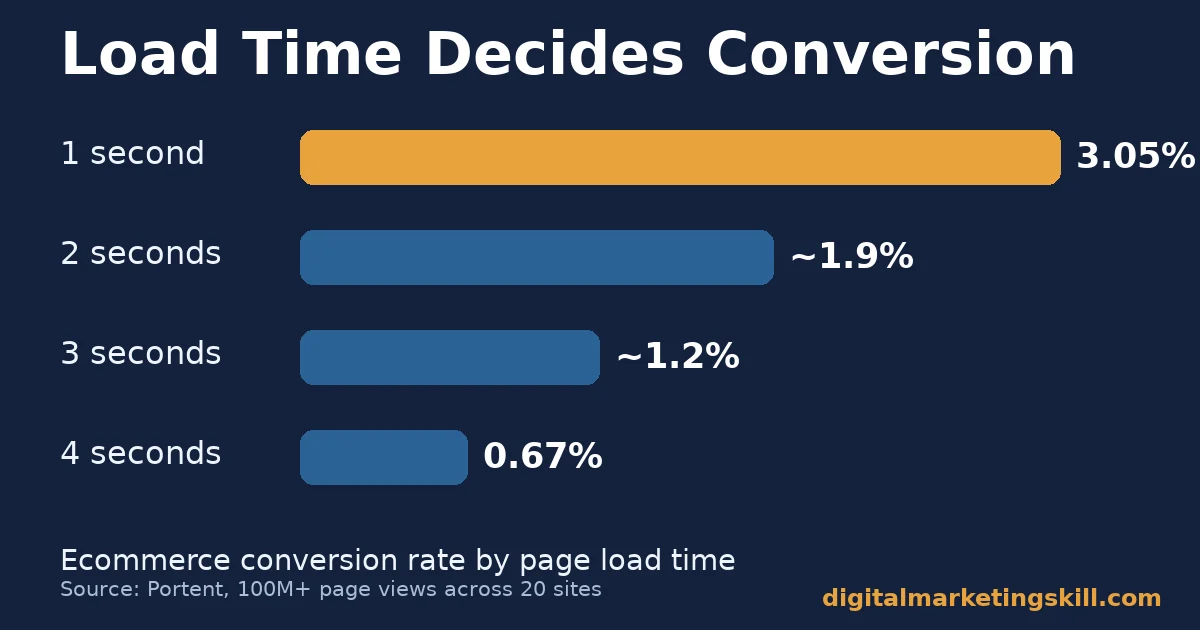
- Ecommerce pages that load in one second convert at 3.05%, against 0.67% at four seconds. Portent measured this across more than 100 million page views on 20 sites. Speed is a revenue lever, not a technical nicety.
- 85% of US consumers say positive reviews make them more likely to use a business. BrightLocal’s Local Consumer Review Survey of 1,002 US adults found this. Review visibility earns a place on the homepage itself.
- HubSpot’s analysis of more than 330,000 calls to action found personalised CTAs convert 202% better than generic ones. A single, well-written button is worth more than a page of choices.
In this guide
- The Business Website Essentials Checklist Gap
- How a Website Actually Turns a Visit Into a Customer
- The Seven Business Website Essentials, Defined
- Who This Business Website Essentials Guide Is For
- What Changes by Business Type
- What To Lead With For Each Business Type
- How to Measure Whether Your Site Is Working
- The One Rule: Fix Speed and Security Before Design
- Common Mistakes That Undo Business Website Essentials
- What a Properly Built Site Looks Like in Practice
- Frequently Asked Questions About Business Website Essentials
- Your Next Step
The Business Website Essentials Checklist Gap
Most “things your website needs” lists hand you a stack of features with no reason attached. Have a blog, a CTA, good hosting, done. What they skip is which business website essentials actually move a visitor toward a purchase. They also skip how much each one is worth, and how to tell whether yours are working at all.
Browser rules, search algorithms and mobile habits shift constantly. Treat the figures below as a current snapshot, not a permanent ranking. Re-check your own analytics against them on a regular basis instead of trusting one audit forever.
This guide assumes you already have a live site. If you are choosing a host or builder for the first time, read the Institute’s guide to responsive web design alongside this one first. The two decisions affect each other.
How a Website Actually Turns a Visit Into a Customer
A visitor arrives from search, a social link or a direct type-in. Within the first few seconds, they decide whether the page looks trustworthy and loads fast enough to bother with. If it passes that test, they scan for proof the business is legitimate: reviews, clear contact details, a secure address bar, a design that looks maintained rather than abandoned. Only after clearing both tests do they look for what to do next. That is why one obvious call to action matters more than a page full of competing options.
Each stage can fail on its own. A fast, secure site with no clear next step still loses the visitor at the final hurdle. A beautifully designed page that takes eight seconds to load never gets the chance to prove any of that, because most people never see past the loading spinner.
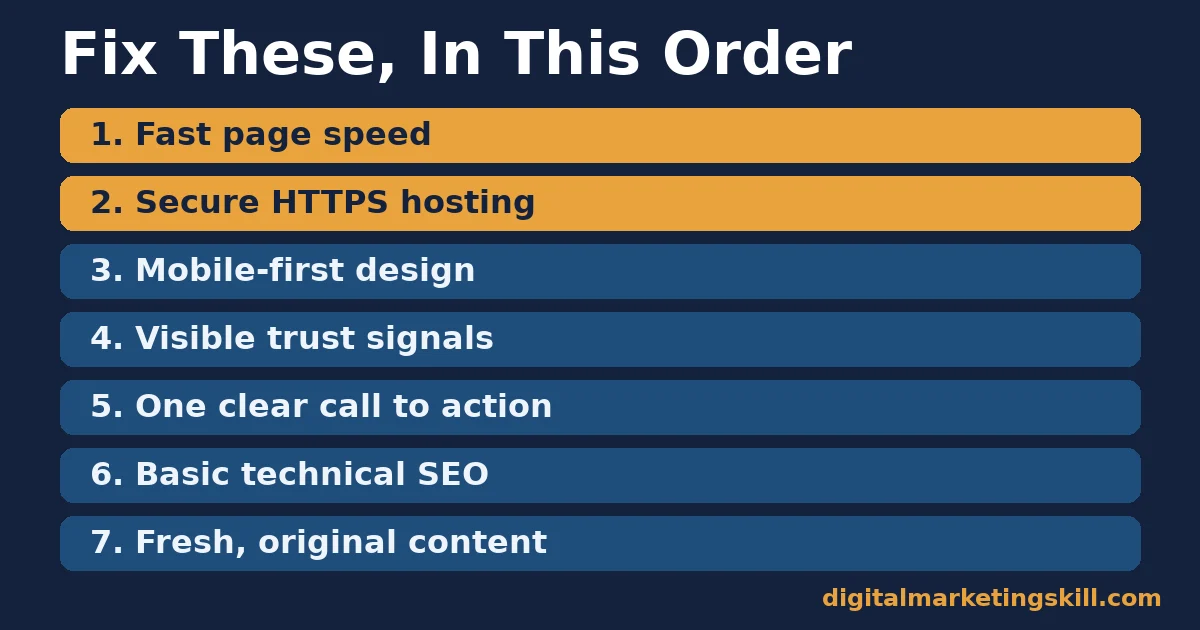
That is why the business website essentials below are listed in the order worth fixing. Speed and security come first, because they gate everything else. Trust signals come second, because they decide whether the visitor believes what they see. A single call to action comes last, because it only works once the first two are already solid. Skipping the order, rather than skipping a step, is usually the real mistake behind a site that appears to “have everything” and still underperforms. Each essential multiplies the ones before it instead of simply adding to them.
The Seven Business Website Essentials, Defined
Before splitting by business type, here is each essential in one plain sentence. The rest of this guide refers back to all seven.
- One clear call to action: a single, specific next step (call, book, buy, message), repeated consistently instead of buried among several competing buttons.
- Basic technical SEO: correct page titles, one organised heading structure, working internal links and no blocked or broken pages, so search engines can read and rank the site at all.
- Fresh, original content: text written for the specific business, kept accurate as facts change, instead of copied boilerplate nobody ever revisits.
- Secure HTTPS hosting: an encrypted connection with a valid, auto-renewing certificate, plus a host that patches its software and backs up the site on a schedule.
- Mobile-first responsive design: a layout built for a small touchscreen first, then scaled up, instead of a desktop design forced onto a phone.
- Visible trust signals: real reviews, a verifiable address or contact method, and evidence a real business is behind the page.
- Fast page speed: a load time under roughly two seconds on a typical connection. Every extra second drains the conversion rate every other essential feeds into.
Who This Business Website Essentials Guide Is For
This guide works for three kinds of site owner. One has an old site that was built years ago and never touched again. The second is launching a first site and wants to skip avoidable mistakes. A third already runs a decent site but cannot explain why conversion has stalled.
All three share the same blind spot. They judge their site by how it looks, not by what it measures. A page can look polished and still fail every one of the seven essentials defined above, because looks and function are graded on different scales entirely. A plain page that loads fast, uses HTTPS and has one clear button will often out-convert a flashier one that is missing those basics.
If you only have time to fix one thing today, re-read the decision rule later in this guide before touching anything else. It names the single highest-leverage fix for most sites, backed by the Portent data above.
What Changes by Business Type
The same seven business website essentials apply everywhere. Which one to prioritise first depends on what the site is actually asking the visitor to do.
Local Service Businesses: Built For Trust Before Contact
A plumber, clinic or consultancy site is rarely the final step in a purchase. It is the background check before a phone call. The 76% figure above is highest for exactly this category. The visitor is deciding whether to trust a stranger with their home, health or money, not comparing a spec sheet. Reviews, a real address and a named contact point do more work here than design polish. A site that buries its phone number below three scrolls is working against its own goal.
For this category, a clean on-page SEO checklist matters more for local search visibility than almost anything else, because most of these searches carry location intent.
Online Stores: Built For Checkout Speed
Ecommerce visitors compare prices across several open tabs. Every extra second of load time is a chance for them to leave for a competitor instead of waiting. The Portent data above, drawn from over 100 million page views across 20 sites, shows this directly. Conversion drops by more than half between a one-second and a four-second load, and the decline is steady, not sudden. There is no safe “slow” threshold to hide behind. Security badges and a visible HTTPS lock matter most at the exact moment a card number is typed in, since that is when hesitation is most expensive.
Course and Content Sites: Built For Authority
Blogs, training pages and resource hubs are judged on whether the content itself looks current, specific and written by someone who knows the subject. That is the product being evaluated before any purchase happens. Thin, generic pages lose to competitors with named sources, real numbers and clear structure, which is also what search engines reward under a standard website SEO optimization approach. A content site that never revisits its older pages slowly loses ground, even without losing traffic in the short term, because competitors keep updating theirs.
What To Lead With For Each Business Type
Knowing which business website essentials come first only helps if it changes what you build first. Here is the lead fix for each category above, matched one-to-one against the sections before it.
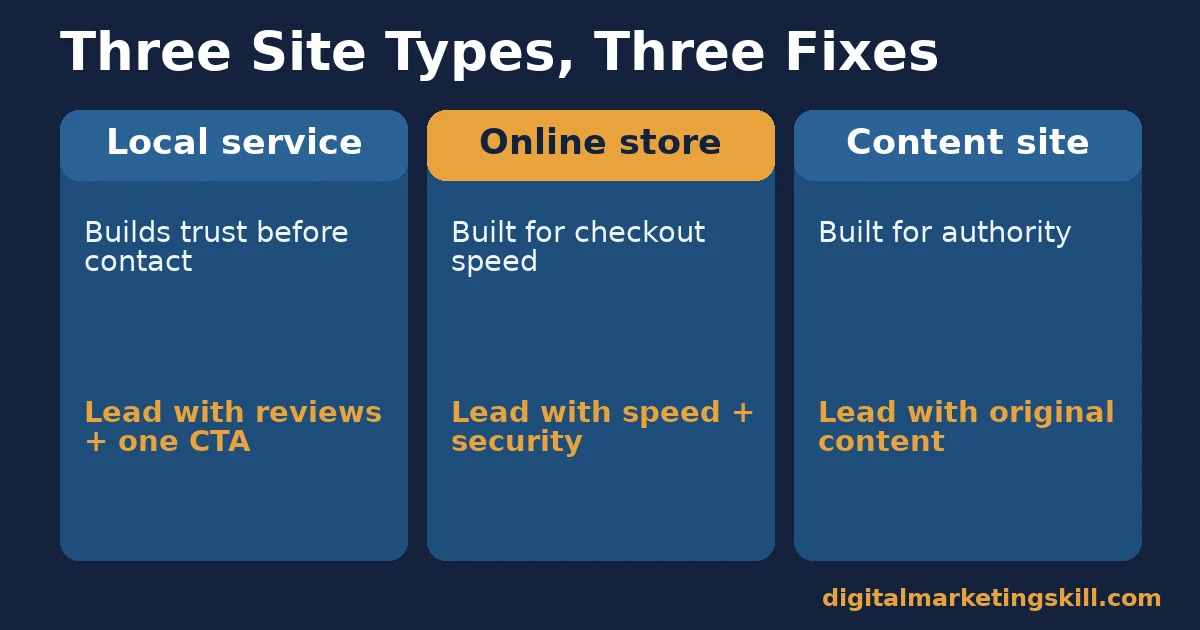
Local Service Businesses: Lead With Reviews and One CTA
Put your strongest, most specific reviews above the fold on the homepage itself, not buried on a separate testimonials page most visitors never reach. Give the visitor exactly one next action: call, book or message. Removing competing buttons from a page is a simple change that increases clicks on the one that remains. Every extra choice is a chance to hesitate and leave. Pair this with a working WordPress SEO setup, so the reviews and contact details you add are actually indexed and findable.
Online Stores: Lead With Page Speed and Security
Compress product images before uploading them. Use a content delivery network to serve files from a server closer to the visitor. Follow web.dev’s own performance guidance for what to fix first on a slow page. Confirm your HTTPS certificate renews automatically, rather than lapsing without warning. A store that fixes load time first often sees the lift in its own analytics within weeks. Speed affects every page at once, not just the one page a new button sits on.
Course and Content Sites: Lead With Original, Updated Content
Replace generic advice with named sources, real figures and dated-feeling claims rewritten as evergreen fact. A content hub that updates and re-sources its older pages keeps earning search visibility long after a new post’s traffic spike fades. The baseline of indexed, accurate pages keeps compounding instead of slowly decaying. This is also where mobile conversion rate work pays off fastest, since most organic content traffic now arrives on a phone.
How to Measure Whether Your Site Is Working
Four numbers tell you more than a design opinion ever will. Each one maps back to one of the seven business website essentials defined earlier.
- Bounce rate: the share of visitors who leave after viewing only one page. A rising bounce rate usually points to a speed, relevance or trust problem, not a content problem. Check load time and above-the-fold trust signals first.
- Conversion rate: the share of visitors who complete your main goal, whether that is a purchase, a call or a form submission. Track it before and after each change, rather than judging a redesign on looks alone.
- Average load time: how long the page takes to become usable, measured from your hosting dashboard or a free page-speed checker. Compare your number against the Portent benchmarks above, not a vague sense that the site “feels slow” on your own fast connection.
- Organic sessions: visits arriving from unpaid search. A flat or falling trend despite new content usually means the content is not answering a real question better than competitors. That is a research gap, not a volume problem.
Pull all four from your analytics dashboard on the same day each month, so the comparison stays consistent. Note any change you made to the site next to the numbers, so you can tell which fix actually moved which metric.
The One Rule: Fix Speed and Security Before Design
If you can only fix one of the business website essentials this month, fix speed and security. Every other essential on this list depends on the visitor still being on the page long enough to see it.
Worked example, illustrative and using invented numbers: a service business spends a week on a cosmetic redesign that changes nothing about load time. A competitor spends a single day compressing images and installing a certificate instead. If a four-second load drops to one second, the Portent benchmarks above suggest conversion could roughly triple. More of the same visitors simply stay long enough to see the page that was already there. The redesign might still be worth doing eventually, but it should not go first.
Common Mistakes That Undo Business Website Essentials
Most sites do not fail because they are missing a feature outright. They fail because one mistake quietly cancels out the work put into another essential.
- Stacking multiple calls to action on one page. A homepage with “Buy Now”, “Learn More” and “Contact Us” all competing for attention undoes the 202% personalisation lift HubSpot found. The visitor has to choose instead of act.
- Treating mobile as an afterthought. A site tested only on a desktop monitor often has text that overlaps or buttons too small to tap. That matters for the 58.99% of visitors arriving on mobile, according to StatCounter.
- Letting the certificate lapse. An HTTPS certificate that is not set to auto-renew can quietly expire. A secure site can switch back to a “not secure” warning overnight without anyone noticing until traffic drops.
- Hiding reviews instead of featuring them. Burying genuine praise on a separate page wastes the trust signal that 85% of consumers in BrightLocal’s survey say they look for.
- Publishing once and never revisiting. A page written and then left untouched drifts out of date even if nothing on it was ever wrong. The competitive and factual landscape around it keeps moving.
Fixing one essential while leaving one of these mistakes in place is why some site owners report doing “everything right” and still seeing flat conversion. Check the business website essentials and the mistakes together, not as two separate projects.
What a Properly Built Site Looks Like in Practice
Eunice Bolaji, a published Digital Marketing Skill Institute student, describes building “a full blown Ecommerce site from the scratch while still learning.” She says she “got back more than the course fees from just one client within weeks” of finishing. The review does not disclose exact currency figures. One published result is not a guarantee of what any other site owner will earn; read the Institute’s earnings disclaimer before treating any single outcome as typical.
What the case does show is the business website essentials in this guide working in order. A functioning, secure site came first. The paying client followed once the site was live and findable in search, not before.
Frequently Asked Questions About Business Website Essentials
What is the single most important business website essential?
Speed and security come first, because they gate every other feature on this list. A visitor who leaves before the page loads never sees your reviews, your call to action or your content.
How fast should a business website load?
Aim for under two seconds where possible. Portent’s data across more than 100 million page views shows conversion dropping steadily as load time rises past one second, with the sharpest losses by the four-second mark.
Does a small business really need HTTPS?
Yes. Chrome has flagged every unencrypted page as “not secure” since version 68, as Google’s own announcement confirms. That warning damages trust the moment a visitor sees it, and search engines treat HTTPS as a baseline ranking signal, not a bonus reserved for stores handling payments.
Where should reviews appear on a business website?
On the homepage itself, not only on a separate testimonials page. 85% of consumers in BrightLocal’s survey say positive reviews make them more likely to use a business, and most visitors never click through to find a dedicated page.
How many calls to action should one page have?
One primary call to action per page, repeated if the page is long. Competing buttons split attention, and HubSpot’s analysis of CTA data found personalised, singular prompts convert far better than generic, multiple-option ones.
How often does website content need updating?
Refresh older pages whenever the facts, sources or competitive landscape move, rather than on a fixed calendar schedule. A page that stays accurate keeps earning search visibility long after it was first published.
Is mobile design optional for a business website?
No. Mobile devices carry 58.99% of worldwide traffic, according to StatCounter. A site that is not fully responsive fails the majority of its own visitors by default, no matter how well it performs on a desktop screen.
Do I need all seven essentials before launching a new site?
No. Launch with speed, security and a working call to action in place, since those three gate everything else. Add trust signals and expand the content over the following weeks. Waiting for perfect usually costs more in lost time than it saves in polish.
Your Next Step
Pick the one business website essential from this guide that your current site handles worst. Fix it this week, then measure the four numbers above before moving to the next one.
Want structured, hands-on training in exactly this kind of work? The Digital Marketing Skill Institute’s Master Diploma in Digital & AI Marketing includes an AI-Powered WordPress and SEO Specialist track. It is built around building, securing and ranking sites like the one this guide describes, alongside unlimited 1-on-1 coaching and mentoring and a U.S. Project Internship that puts the skills to work on a real budget from day one. The program is dual US and UK accredited and recognised in more than 100 countries, delivered entirely online so you can study from anywhere in your country or beyond it.
See the full Master Diploma program details, read more student reviews, or browse the digital marketing blog for more guides like this one. Go straight to the application page to start wherever you live. Learn more at Digital Marketing Skill Institute, a training provider built for students anywhere in your country or elsewhere. Turn a website skill into client work, then come back to digitalmarketingskill.com for the next guide in this business website essentials series.
Every figure in this guide was checked against its original source before publication. Figures marked as illustrative are invented examples, not real results.
![9 Amazing Digital Marketing Skills to Make Money Online [With Proof]](https://digitalmarketingskill.com/wp-content/uploads/2019/07/9-Amazing-Digital-Marketing-Skills-to-Make-Money-Online-With-Proof-17.png)






