
Free web analytics tools now cover far more than visitor counts. The right one depends on what you need: Google’s own ecosystem, visual behaviour, privacy by default, or full data ownership. Picking the wrong one wastes weeks of setup before you discover its limits.
This guide compares four free web analytics tools side by side, with sourced usage share, real feature limits, and a decision rule for which one fits your business first.
Key Takeaways
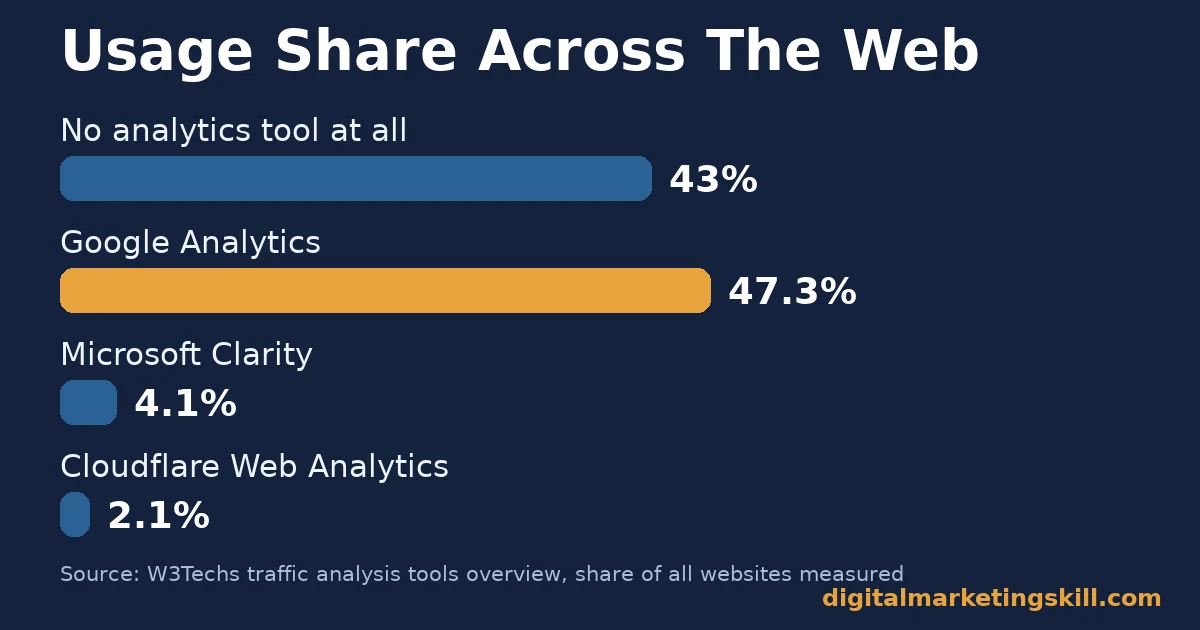
- No single free tool wins every case. W3Techs reports 43.0% of all websites run no traffic-analysis tool at all, so even “install one” still beats most sites.
- Google Analytics still dominates by scale. It runs on 47.3% of all websites and 82.6% of sites that use any analytics tool, according to W3Techs. That is why it stays the default choice for most businesses.
- Microsoft Clarity is free with no traffic cap. Its own site claims use on more than 2 million sites and apps, with heatmaps and session recordings included at no cost.
- Privacy-first tools skip cookie banners entirely. Cloudflare Web Analytics and Matomo both avoid client-side cookies, so your site may need a different consent process under data protection law.
- Free often means a retention or feature ceiling, not a missing price tag. Google Analytics 4’s standard free tier caps most event data retention at 14 months. Only a paid upgrade removes that limit.
In this guide
- Most Tool Lists Rank Features. Few Explain Which Free Tool Fits Which Business
- How Free Web Analytics Tools Actually Collect Your Data
- Four Free Web Analytics Tools, And What Each One Is Built For
- How To Lead With Each Free Web Analytics Tool
- What To Actually Measure With A Free Web Analytics Tool
- Common Mistakes That Waste A Free Web Analytics Tool
- The One Decision Rule For Picking A Free Web Analytics Tool
- When A Free Web Analytics Tool Stops Being Enough
- What Choosing The Right Tool Looks Like In Practice
- Frequently Asked Questions About Free Web Analytics Tools
- Learn To Read Analytics Data, Not Just Install The Tool
Most Tool Lists Rank Features. Few Explain Which Free Tool Fits Which Business
Search for free web analytics tools and you get a ranked list. Google Analytics comes first, then a handful of alternatives with a feature table. That list skips the actual decision: do you need Google’s ad integration, a visual record of what visitors click, a tool with no cookie banner, or full ownership of your raw data?
This guide treats each free web analytics tool as a different bet for a different business. Every claim below is named and sourced, drawn from each vendor and from W3Techs’ independent usage data.
A vendor’s claim about its own product is stated as such, not as independent fact. If you already run a tool and want to combine it with paid options later, our guide to web analytics tools and choosing the right stack covers that next step.
How Free Web Analytics Tools Actually Collect Your Data
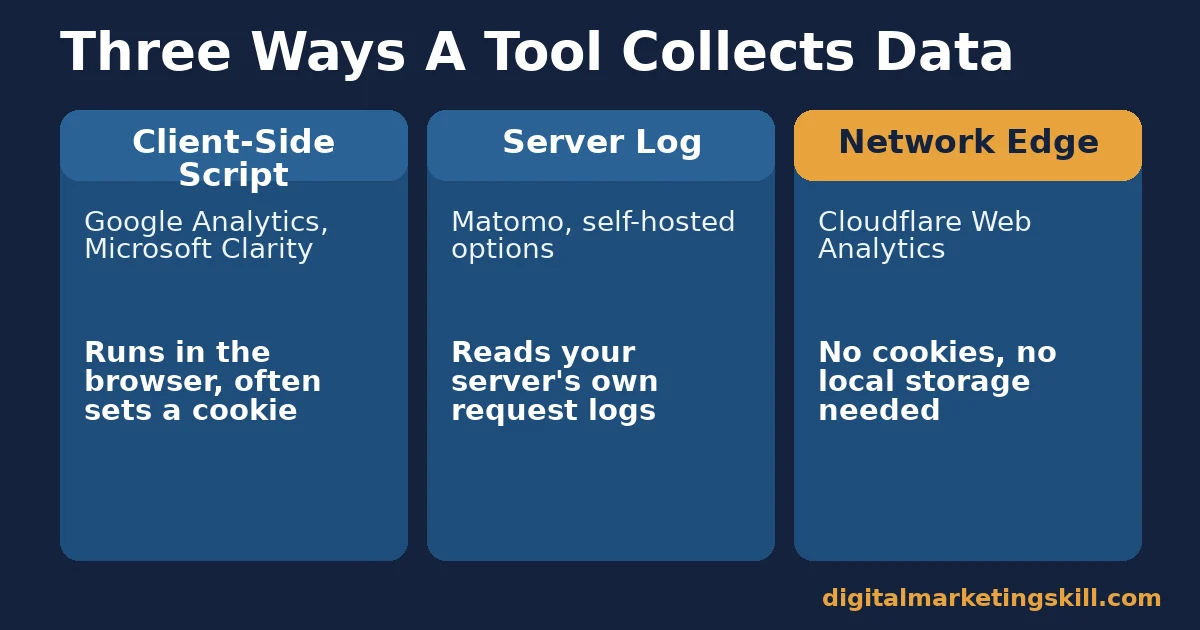
Among free web analytics tools, every one uses one of three collection methods, and the method decides its privacy profile. Client-side JavaScript tools, like Google Analytics and Microsoft Clarity, run a script in the visitor’s browser. That script often sets a cookie to track return visits.
Server-log tools, like a self-hosted option, read your web server’s own request logs instead, so they skip the script entirely. This matters beyond privacy, too. A server-log tool still records a visit even when an ad blocker or a strict browser setting silently drops the JavaScript tag that client-side tools depend on.
A third method sits at the network edge. Cloudflare Web Analytics, for instance, states it collects metrics “from our server logs” without client-side cookies or local storage. That means it never needs a consent banner for analytics purposes. This single design choice is why some free web analytics tools need a cookie banner, and others do not.
Four Free Web Analytics Tools, And What Each One Is Built For
These four tools cover almost every free option a small or growing business actually uses today. That includes the tools taught at Digital Marketing Skill Institute. Each one centres on one core strength and one real limitation.
Google Analytics 4: Built For Scale And Ad Integration
Google Analytics 4, or GA4, is Google’s event-based analytics platform. It fully replaced the older Universal Analytics model. Its core strength is integration: GA4 connects directly to Google Ads, Google Search Console and Google’s own advertising signals, so a business already buying Google Ads gets the most value from it.
The free tier has real ceilings. Google’s own help documentation caps free properties at 100,000 events per user per day, and 10,000 conversions per user per day. Most event-level data retention tops out at 14 months, unless you upgrade to the paid Analytics 360 tier.
Microsoft Clarity: Built For Visual Behaviour
Microsoft Clarity shows you what GA4 cannot: heatmaps and full session recordings of real visitors moving through your pages. Microsoft’s own site states Clarity is “free forever” with no traffic limits, and claims use on more than 2 million sites and apps.
W3Techs’ independent measurement puts Clarity on 4.1% of all websites, far behind Google Analytics but well ahead of most named competitors it tracks. The trade-off is scope. Clarity shows behaviour, not conversion funnels or ad attribution, so most sites run it alongside another tool, not instead of one.
Cloudflare Web Analytics: Built For Privacy By Default
Cloudflare Web Analytics is built around one promise: accurate numbers without tracking individual visitors. Cloudflare states its tool “does not use any client-side state, such as cookies or localStorage, to collect usage metrics.” It also avoids fingerprinting by IP address or user agent.
W3Techs measures Cloudflare Web Analytics at 2.1% of all websites, the smallest share of the four tools here. That smaller footprint reflects its narrower job. It gives basic traffic and performance numbers with no behavioural detail, aimed at sites that want simplicity over deep reporting.
Matomo: Built For Full Data Ownership
Matomo is the modern successor to the open-source tool once called Piwik. It is self-hosted analytics software you run on your own server. Matomo’s own on-premise page claims “100% data ownership,” meaning visitor data never reaches a third-party server. The platform also holds ISO 27001 information-security certification for its hosted option.
The free download costs nothing, but self-hosting does not. You still need server space, setup time and ongoing maintenance, which is the real price most “free” self-hosted tools carry. That trade-off suits a business with technical staff and a genuine reason to keep every data point in-house.
How To Lead With Each Free Web Analytics Tool
Knowing what each tool is built for is only half the decision. Here is how to actually get value from each one, not just install it.
Google Analytics 4: Lead With Key Events, Not Raw Pageviews
GA4 renamed “conversions” to “key events”, specifically to cut confusion with Google Ads’ own conversion tracking. The underlying data collection did not change, only the label.
A business that leads with GA4 sets up key events for its actual goals in the first week, such as a form submission or a purchase. That beats staring at pageview totals that explain nothing about revenue. Our guide to reading Google Analytics reports with intent covers how to turn those key events into a weekly routine.
Microsoft Clarity: Lead With Session Recordings On Your Worst Page
Most businesses install Clarity everywhere and never watch a single recording. A business that leads with this tool does something different instead. It picks its highest-traffic page with the lowest conversion rate. Then it watches ten real sessions on that page, and fixes the one friction point that shows up repeatedly.
Cloudflare Web Analytics: Lead With It As A Second Opinion
Cloudflare Web Analytics reads server-level requests rather than a client-side script, so it often counts differently to Google Analytics. It catches visitors who block JavaScript or trackers.
A business that leads with this tool runs it alongside a primary tool. It then treats a large gap between the two numbers as a signal of ad blockers or bot traffic, not as a tracking error to panic over. See our guide to Google Analytics traffic sources for what each channel in that comparison actually means.
Matomo: Lead With One Imported Year Of History
Matomo can import historical data from existing log files. That matters because a newly installed tool otherwise starts with zero history and no year-over-year comparison. A business that leads with Matomo imports what log history it has on day one, instead of waiting another full year before any trend report means anything.
What To Actually Measure With A Free Web Analytics Tool
Installing a tool is not the same as reading it correctly. Use this as a quick reference for what matters in each one.
- Google Analytics 4: engagement rate, defined as the share of sessions lasting over 10 seconds, with a key event, or with two or more page views.
- Microsoft Clarity: rage clicks and dead clicks on your highest-traffic pages. These flag where visitors expect something to happen and it does not.
- Cloudflare Web Analytics: the gap between its visitor count and your primary tool’s count, as a rough proxy for ad-blocker and bot traffic.
- Matomo: goal conversion tracking alongside visit log detail, since self-hosting only pays off if you use the granular data it preserves.
Common Mistakes That Waste A Free Web Analytics Tool
Installing any free web analytics tool is the easy part. Most of the value gets lost in setup mistakes that quietly skew every report after. The same five mistakes repeat across almost every tool covered here.
- Never excluding your own visits. Staff and testers browsing the live site inflate traffic numbers, so filter your own IP address or use a staging environment for testing.
- Leaving no goal or key event defined. A tool full of pageviews with no named key event cannot tell you whether the business is actually working.
- Ignoring bot and crawler traffic. Search engine bots and scrapers inflate raw visitor counts, so check whether your tool filters known bots before you trust a spike.
- Comparing two tools without reading their methodology first. A client-side tool and a server-log tool will never match exactly, because they count differently by design, not because one is broken.
- Setting it up once and never returning. A free web analytics tool only earns its place if someone reads it on a schedule, weekly at minimum, not only when something breaks.
None of these mistakes require a paid upgrade to fix. They cost time, not money, which is exactly why they are worth fixing before you decide a free web analytics tool is not working for your business.
The One Decision Rule For Picking A Free Web Analytics Tool
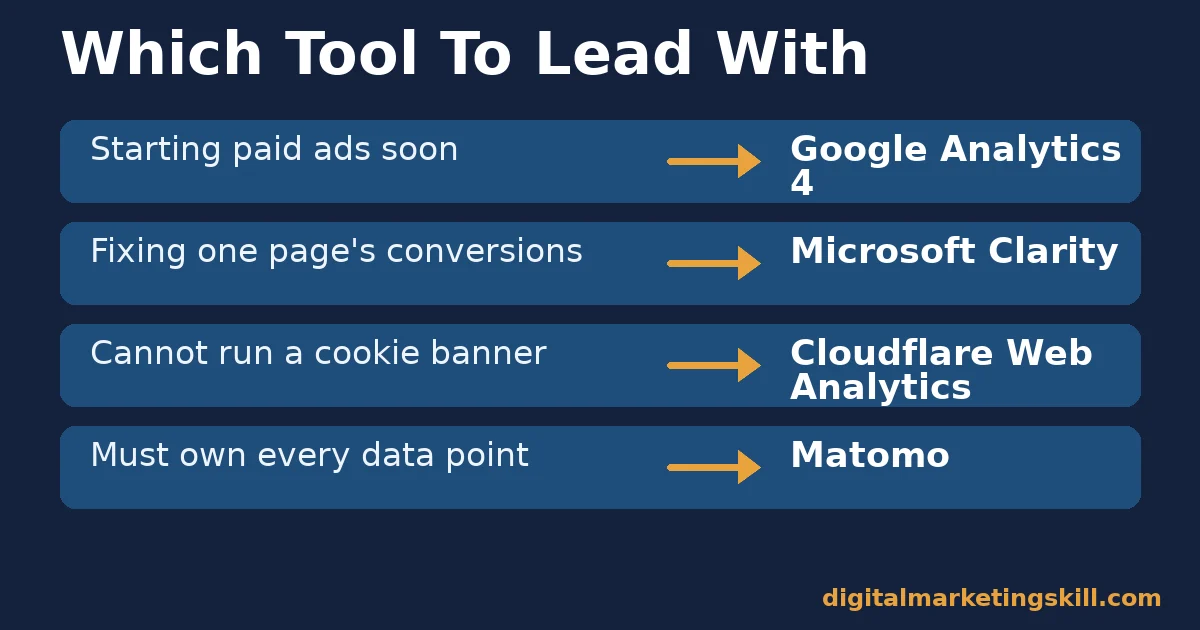
If you only have time to install one free web analytics tool, match it to your next six months, not your current page count. A business about to start paid advertising should lead with Google Analytics 4, because its ad integration pays for the GA4 learning curve.
A business focused on fixing one page’s conversion rate should lead with Microsoft Clarity instead, because watching real behaviour beats guessing from numbers alone. When a cookie banner is not an option, for legal or audience reasons, Cloudflare Web Analytics should come first regardless of the other two factors, since the privacy requirement rules out the alternatives.
Here is an illustrative example, with invented numbers. A small online store installs GA4 first, and sees a 62% cart abandonment rate on checkout, a number with no explanation attached.
Adding Microsoft Clarity for two weeks reveals visitors repeatedly clicking a shipping cost field that does not update. That is a specific, fixable cause the raw percentage never showed on its own. Our guide to landing page conversion covers how to fix friction like that once you find it.
When A Free Web Analytics Tool Stops Being Enough
Every free web analytics tool here has a ceiling, and most businesses never hit it. But a few signals mean it is time to look at a paid option.
Google Analytics 4’s event and conversion caps, listed above, rarely bind for a small site. They start to matter once a business runs high-volume apps, or needs guaranteed, unsampled data for board reporting. That is when Analytics 360 becomes worth its cost.
For privacy-first teams that outgrow Cloudflare Web Analytics’ basic numbers, a paid tool like Plausible, which states its plans start at $9 a month, adds goal tracking and custom events while keeping the same no-cookie approach.
Self-hosted Matomo scales differently. Its ceiling is not a data cap but your own server’s capacity. The signal to act is a slowing dashboard, or a server bill that no longer makes sense next to a managed alternative.
In every case, the fix is to upgrade the one tool doing the most work for your business, not to switch everything at once. Among free web analytics tools, the upgrade decision should follow the same logic as the first choice. Match the paid feature to the specific limit you actually hit, not to a longer feature list in general.
What Choosing The Right Tool Looks Like In Practice
Digital Marketing Skill Institute teaches analytics tool selection as part of its curriculum, because picking the wrong tool wastes a student’s limited practice time. Graduate Eunice Bolaji built a full e-commerce site from scratch while still learning. That real, published outcome depended on reading the right data from day one, not just installing a tool and hoping.
That account is self-reported by the Institute, not independently audited. Treat it as one graduate’s documented outcome, not a guaranteed result for every learner.
The lesson generalises beyond one graduate. A free web analytics tool only pays off once someone reads it with a specific question in mind, not as a box to tick during setup week. The tool choice matters less than the habit of checking it on a fixed schedule and acting on what it shows.
Frequently Asked Questions About Free Web Analytics Tools
Which free web analytics tool is best for beginners?
Google Analytics 4 is the most widely documented option, with the largest base of tutorials and community answers. That makes early mistakes easier to debug. Its event-based model still has a learning curve, so budget a few hours to set up key events correctly.
Do free web analytics tools require a cookie consent banner?
It depends on the tool. Google Analytics and Microsoft Clarity use client-side cookies or similar storage, which generally needs consent under data protection law. Cloudflare Web Analytics and server-log tools like Matomo, configured without cookies, typically avoid that requirement.
Can I use more than one free web analytics tool at once?
Yes, and it often helps. Running Google Analytics 4 alongside Microsoft Clarity is common. One explains what happened, and the other shows why, without any conflict between the two scripts.
Is self-hosted analytics software really free?
The software itself is free to download, but self-hosting still costs server space, setup time and ongoing maintenance. Treat that as a real cost before choosing a self-hosted option purely because its license is free.
How long does free web analytics data stay available?
It varies by tool. Google Analytics 4’s standard free tier retains most event-level data for up to 14 months before it ages out. Self-hosted tools like Matomo can keep data indefinitely, limited only by your own server storage.
Will a free web analytics tool slow down my website?
Lightweight options exist. Cloudflare Web Analytics describes its script as a lightweight JavaScript beacon. Tools that read server logs add no client-side script weight at all, so the impact depends on which collection method you choose.
Which free web analytics tool protects visitor privacy best?
Cloudflare Web Analytics and Matomo, configured without cookies, collect the least personal data by design. Neither needs to set a tracking cookie to produce basic traffic numbers.
Can I switch free web analytics tools without losing my history?
Mostly no, for client-side tools. Google Analytics and Microsoft Clarity do not export their raw history into a competitor’s format, so switching usually means starting a fresh history. Server-log tools like Matomo are the exception, since they can import past log files if you kept them.
Do I need a free web analytics tool if I only use social media?
Yes, if you ever send traffic to a website from it. Social platforms show engagement on their own posts, not what happens after someone clicks through, so a web analytics tool is still the only way to see whether that traffic converts.
Learn To Read Analytics Data, Not Just Install The Tool
Among free web analytics tools, picking the right one only matters if you know what to do with what it shows you.
Digital Marketing Skill Institute’s Master Diploma in Digital & AI Marketing includes AI-powered Google Analytics as one of its core courses. It sits alongside AI-powered search engine optimisation and content marketing, AI-powered Google advertising, and AI-powered social media marketing and analytics. The program also covers AI-powered email marketing and automation.
The program includes unlimited one-on-one mentoring. It carries dual US and UK accreditation, recognised in more than 100 countries, and it runs 100% online, so you can learn to read real data anywhere in your country. Explore the full Master Diploma in Digital & AI Marketing curriculum. Read more outcomes on the reviews page, or browse more guides on the digital marketing blog.
Wherever you live, the rule above still holds across free web analytics tools: start with one, set up one key event, and read it for two full weeks before adding a second tool. When you are ready to go deeper, apply to the Master Diploma program at Digital Marketing Skill Institute.
Every figure in this guide was checked against its original source before publication. Figures marked as illustrative are invented examples, not real results.
![9 Amazing Digital Marketing Skills to Make Money Online [With Proof]](https://digitalmarketingskill.com/wp-content/uploads/2019/07/9-Amazing-Digital-Marketing-Skills-to-Make-Money-Online-With-Proof-17.png)






