
A free WordPress theme can look identical to a paid one in a screenshot. It can still cost you traffic, security, and sales. The gap shows up later: in page speed, in how fast a vulnerability gets patched, and in whether the theme works for every visitor. This guide gives you three tests to run before you install any free WordPress theme, with sourced numbers for why each one matters and what to check in each case.
Key Takeaways
- WordPress now powers 40% of all websites and 58.5% of sites with a known content management system, per W3Techs, which is exactly why theme quality varies so widely.
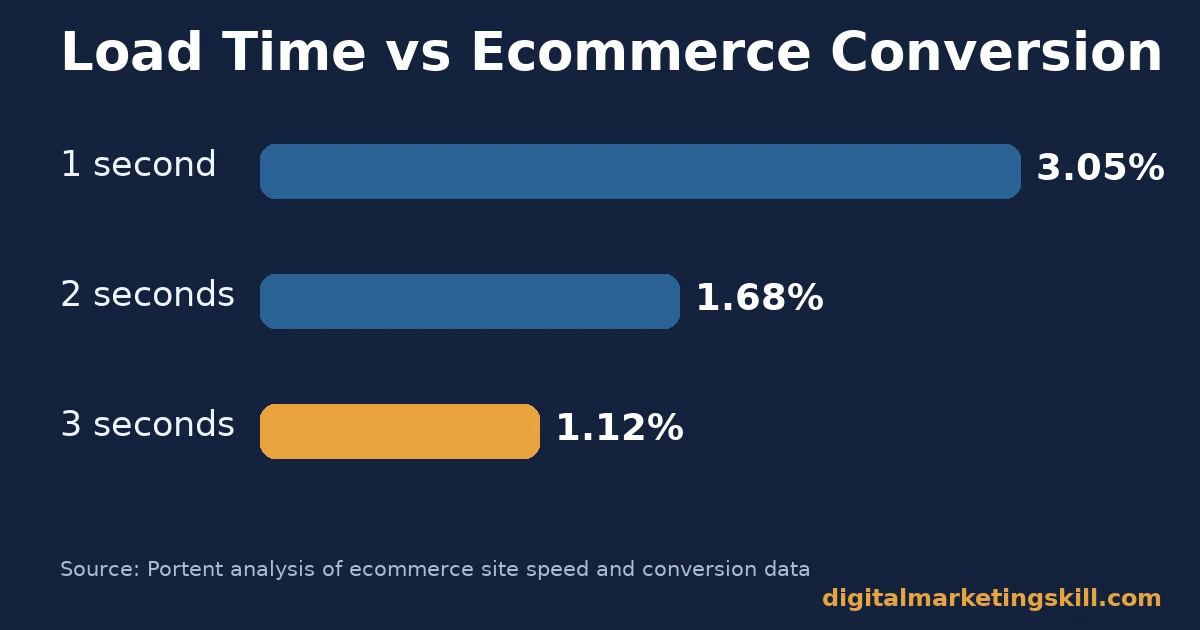
- Ecommerce sites that load in 1 second convert at roughly 3.05%, against about 1.12% at 3 seconds, per Portent’s analysis of real site data.
- Google reports that 53% of mobile visits are abandoned if a page takes longer than 3 seconds to load.
- 96% of newly disclosed WordPress vulnerabilities in a recent 12-month period were found in plugins, and 4% in themes, per Patchstack’s State of WordPress Security report.
- 95.9% of home pages carry at least one detectable accessibility failure, averaging 56.1 errors per page, per the WebAIM Million study.
In this guide
- Most “Best Themes” Lists Go Stale Fast
- What a Free WordPress Theme Actually Controls
- What Differs by Priority
- How to Vet Each Priority Before You Install
- How to Measure a Free WordPress Theme After You Install It
- Common Mistakes When Picking a Free WordPress Theme
- The One Decision Rule: Check the Update Date Before Anything Else
- What to Do If You Already Installed a Risky Theme
- What Choosing the Right Tools Looks Like With Real Numbers
- Frequently Asked Questions About Choosing a Free WordPress Theme
- Your Next Step
Most “Best Themes” Lists Go Stale Fast
Search for a free WordPress theme and you get ranked lists of specific theme names. Those lists age out fast. Developers abandon themes. Update cadence slows down. A theme quietly stops matching the current WordPress release.
A checklist does not go stale the same way. This guide gives you three tests: speed, security, and accessibility. They work on any free WordPress theme you are considering, whenever you read this.
Treat the benchmarks below as a snapshot of what published studies report today, not a permanent ranking of any one theme. Re-run the three tests yourself before you commit. A theme that passed a check a while back may not pass it now.
These three tests also save you time. Instead of reading ten separate “best theme” roundups and cross-checking their claims, you run three short checks yourself. You end up with an answer you can trust, because you tested it, not because a blog post told you to trust it.
What a Free WordPress Theme Actually Controls
A WordPress theme controls the front-end presentation layer of your WordPress website. That means layout, typography, colors, and the markup your browser renders. It does not control your content, your plugins, or your hosting.
But it directly affects three things that decide whether visitors stay. How fast your pages load. How exposed you are to known vulnerabilities. Whether visitors using assistive technology can actually use your site.
This matters more than most buyers assume. WordPress runs 40% of all websites and 58.5% of sites with a known content management system, according to W3Techs’ usage survey. That scale is also why theme quality varies so much. Anyone can publish a free theme to the directory, and not every author keeps maintaining it after release.
For a small business, freelancer, or student building a first client site, the theme is often the biggest technical decision made before launch. Get it right and the site stays out of the way. Get it wrong and you spend months fighting symptoms: slow pages, odd layout bugs, confusing navigation. You never trace them back to the real cause.
What Differs by Priority
Three qualities decide whether a free WordPress theme helps or hurts your site. Each one fails differently, so each needs its own test. A theme can pass one test and fail another, which is exactly why a single “is this theme good” impression is not enough.
Speed-First: Built for Page Load
A speed-first theme ships minimal CSS and JavaScript. It avoids heavy page builders baked into the theme itself, and it loads images efficiently by default. The payoff is measurable, not cosmetic.
Portent’s analysis of site speed and revenue found ecommerce conversion rates around 3.05% at a 1-second load time. That fell to roughly 1.12% at 3 seconds. Mobile makes the penalty worse: Google reports that 53% of mobile visits are abandoned once a page passes 3 seconds to load, and responsive design quality affects that number directly. A slow free WordPress theme can quietly cut your mobile traffic in half before a visitor reads a single word.
Security-First: Built for Patch Cadence
A security-first theme has a developer who updates it on a visible, regular cadence. Themes carry less overall risk than plugins, but the gap between them is not small.
Patchstack’s State of WordPress Security report found that 96% of newly disclosed WordPress vulnerabilities in a recent 12-month period came from plugins, with 4% from themes. A theme is lower-risk by default. But an abandoned one with no updates in years is still a real exposure, especially once it falls out of step with current WordPress core releases.
Patch cadence matters because WordPress core, PHP, and browser standards all keep moving. A theme that once worked perfectly can develop gaps simply by standing still while everything around it changes. The fix is not complicated: favor a theme whose changelog shows regular, recent entries over one with a long gap and no explanation.
Accessibility-First: Built for Every Visitor
An accessibility-first theme ships with sufficient color contrast, keyboard-navigable menus, and proper heading structure out of the box. This is not a niche concern.
The WebAIM Million study of one million home pages found that 95.9% had at least one detectable accessibility failure, averaging 56.1 errors per page. A free WordPress theme that starts clean saves you from inheriting that baseline problem on day one.
How to Vet Each Priority Before You Install
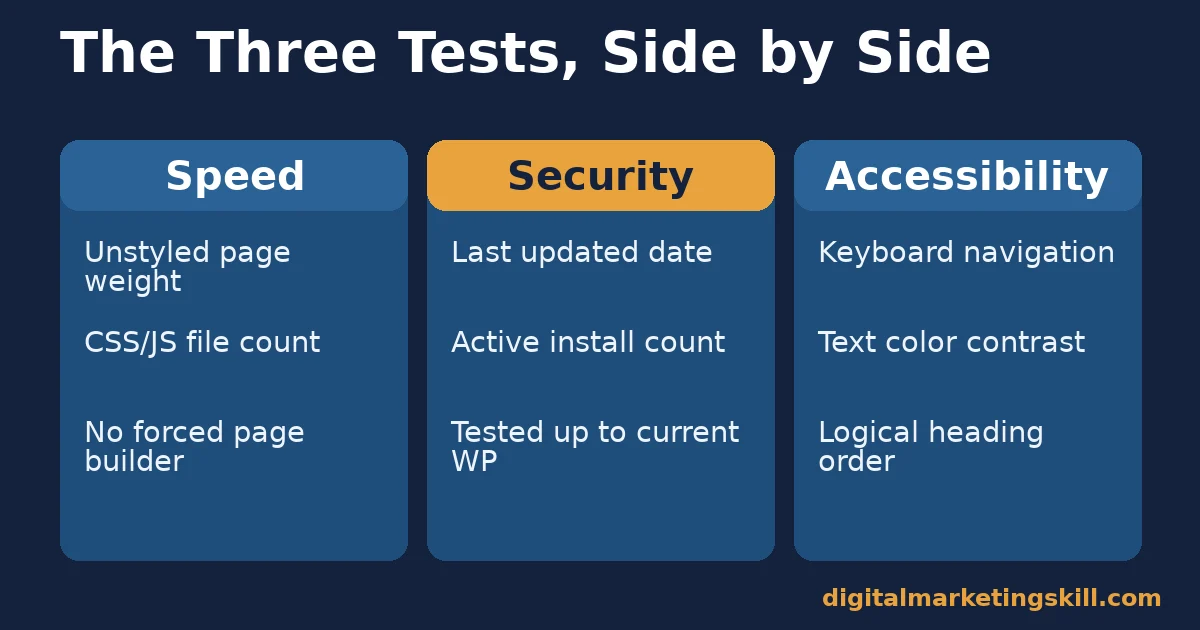
Each priority above pairs with a short, specific check. Run all three before you activate a theme. Do this before your content is already built on top of it, not after.
Speed: Check These Three Things First
Install a free WordPress theme on a staging site. Run it through a speed-testing tool before adding any content. Check the unstyled page weight in kilobytes. Check the number of separate CSS and JavaScript files it loads. Note whether it depends on a bundled page builder you did not choose yourself.
Write the three numbers down before you add a single image or paragraph. That baseline is what you compare against later. It tells you whether a slowdown came from the theme or from something you added.
Security: Check These Three Things First
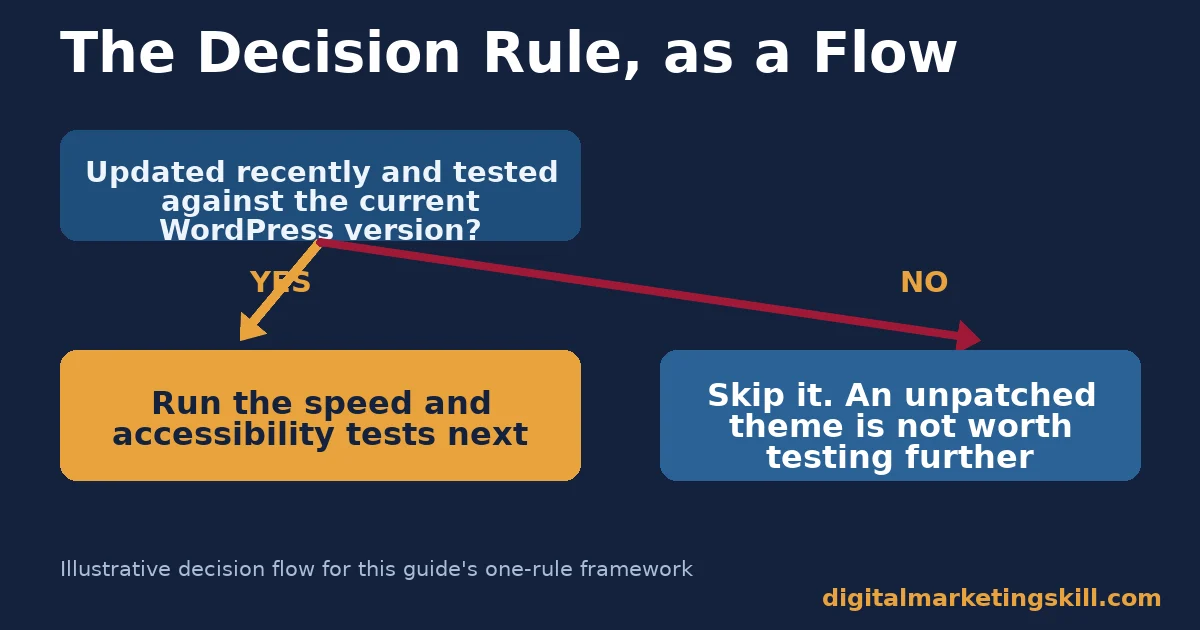
Open the theme’s page in the official WordPress theme directory. Check the “last updated” date, the number of active installs, and whether it is explicitly marked as tested against the current WordPress version. A theme nobody has touched for a long stretch is a theme nobody is patching.
Read the last two or three entries in the support forum while you are there. A developer who replies within a few days behaves very differently from one who has gone quiet. That gap tells you more than the star rating does.
Accessibility: Check These Three Things First
Activate the default demo content and tab through the homepage using only your keyboard. Confirm you can reach every menu item and button in a logical order. Check that body text has enough contrast against its background to read easily. Confirm headings follow a logical order, H1 then H2 then H3, instead of skipping levels for visual size alone. This lines up with the W3C’s accessibility guidelines.
This check takes less time than it sounds like it should. Most keyboard-navigation and contrast problems show up within the first minute of tabbing through a homepage, well before you need any specialist tool.
How to Measure a Free WordPress Theme After You Install It
A free WordPress theme is only as good as what you measure after it goes live. Each KPI below answers one specific question. Track them before and after any major content addition, because new content changes the numbers. A theme that passed every test on an empty staging site can still slip once real images, real copy, and real plugins stack on top of it.
- Page load time: the time from request to visually complete render, tested with the theme’s demo content removed. Compare it against the 1-to-3-second range where the sharpest conversion drop-off happens.
- Core Web Vitals pass rate: the share of your pages meeting Google’s Core Web Vitals thresholds for loading, interactivity, and visual stability. A theme that fails these on a near-empty page will not improve once you add real content.
- Time since last theme update: the gap between now and the developer’s last release. Treat a long gap as a rising risk, not an automatic disqualifier.
- Accessibility error count: the number of automated accessibility issues a scanner flags on your homepage. Compare your result against the 56.1-error average the WebAIM Million study found, as a rough benchmark, not a pass mark.
- Mobile abandonment rate: the share of mobile sessions that leave without interacting. A rate that climbs after a theme change is one of the clearest signs the new theme is slower on real devices than it looked in testing.
Common Mistakes When Picking a Free WordPress Theme
Most bad theme choices trace back to a handful of repeated habits. None of them require technical expertise to spot. Each one is easy to fix once you see it.
- Trusting the demo over your own content. A demo loads curated images and short text blocks. Your real content is longer, heavier, and less tidy, so it stresses the theme differently.
- Picking the theme with the most built-in features. Every extra feature is extra code your browser has to load, whether or not you ever use it. A lean theme plus the plugins you actually need usually beats a loaded one.
- Ignoring the support forum. The theme’s own support thread on the directory tells you how fast (or whether) the developer answers real problems. A pile of unanswered questions is a signal, not noise.
- Skipping a staging test. Installing directly on a live site means any conflict with your existing plugins becomes a visitor-facing problem instead of a private one.
- Assuming a high install count means a safe theme. Popularity makes a theme a bigger target for attackers, not a smaller one. Popularity is not a substitute for the three tests in this guide.
The One Decision Rule: Check the Update Date Before Anything Else
If you can only check one thing before installing a free WordPress theme, check when it was last updated and whether it is tested against your current WordPress version. Speed and accessibility problems are fixable with configuration and content changes. An abandoned theme is not fixable at all. Nobody is patching it, and every month that passes raises the odds a known vulnerability goes unaddressed.
Illustrative, invented numbers: picture two near-identical free themes, both scoring well on an initial speed test. Theme A’s developer updates it on a regular, visible cadence and lists compatibility with the current WordPress release. Theme B’s developer stopped releasing updates a long stretch ago.
Many months later, Theme A has received several security patches with no incidents. Theme B’s site owner discovers a known, unpatched vulnerability during a routine scan. The speed scores told them nothing about which theme would still be safe down the road. Neither owner could have predicted the outcome from a speed test alone, which is exactly why this guide treats the update check as the first filter, not an afterthought.
What to Do If You Already Installed a Risky Theme
Plenty of sites are already running on a free WordPress theme that fails one or more of the three tests. That is fixable without a full rebuild.
- When it fails the speed test: disable any bundled features you do not use, remove unused widgets, and re-run the speed test after each change to see which one actually moved the number.
- If it fails the security test: check whether the developer has released any update at all recently. Without one, plan a migration to an actively maintained theme rather than waiting for a patch that may never arrive.
- If it fails the accessibility test: start with the two highest-impact fixes, color contrast and keyboard navigation, since both are usually solvable with CSS and menu configuration rather than a full theme change.
None of these fixes require starting from zero. They require running the same three tests again after each change, so you know whether it actually worked instead of assuming it did. A theme swap is always an option too, but it is usually the last step, not the first one.
What Choosing the Right Tools Looks Like With Real Numbers
A Digital Marketing Skill Institute graduate, Olajire Jacob, built a client services business on a lean, well-maintained tool stack. Work started around $500 per engagement and scaled to $5,000 a month, as published on the Institute’s own reviews page. Scaling that far required every client-facing asset, including the website itself, to hold up without constant firefighting.
That result reflects the full training program, not a theme choice alone. But it illustrates the pattern this guide argues for: picking tools and foundations that hold up under real client work, including the website that anchors your marketing. A client site that loads slowly or breaks on mobile undermines every other part of a service, no matter how good the underlying work is. Read the Institute’s earnings disclaimer before treating any single result as typical.
Frequently Asked Questions About Choosing a Free WordPress Theme
Is a free WordPress theme actually safe to use?
It can be. Themes account for a small share of disclosed WordPress vulnerabilities compared with plugins, but an abandoned free theme with no recent updates still carries real risk. Check the last-updated date before you decide, and treat a long gap since the last release as a reason to look closer, not a reason to panic.
Why does a free WordPress theme load slower than expected?
Many free themes bundle extra CSS, JavaScript, and demo-content features that most sites never use. That unused code still loads. This is why testing an unstyled, empty install matters more than trusting the demo preview.
How do I check if a free WordPress theme is accessible?
Tab through the homepage with only your keyboard. Run an automated accessibility scanner on the default demo. Check text contrast against the background. A clean result on all three is a reasonable baseline.
Should I avoid every WordPress theme that has not been updated in a while?
Not automatically, but treat it as a rising risk rather than a fixed rule. A theme untouched for a long stretch deserves closer scrutiny before you build real content on top of it.
Do premium WordPress themes avoid all these problems?
No. A paid theme can be just as slow, insecure, or inaccessible as a free one if it is poorly coded or abandoned after purchase. Price is not one of the three tests in this guide, and that is deliberate.
What is the single biggest mistake people make when picking a free WordPress theme?
Judging it only by the demo screenshot. A demo with placeholder images and curated content tells you almost nothing about real-world load time, update history, or accessibility once your own content is in place. The fix is simple: judge the theme on your own content, on a staging site, not on someone else’s polished example.
How often should I re-check my current theme against these tests?
At minimum once a year, and again any time you notice slower load times, a drop in mobile engagement, or a WordPress core update that changes compatibility requirements. Set a recurring reminder rather than relying on noticing a problem organically, because a slow decline is easy to miss from the inside.
Does switching to a faster free WordPress theme guarantee more sales?
No single change guarantees a result. Faster load time removes one measurable barrier between a visitor and a purchase, which the conversion-rate data above supports, but your offer, pricing, and traffic quality still carry most of the weight.
Is a theme marketed as “lightweight” automatically fast?
Not automatically. “Lightweight” describes intent, not a measured result. Run the same speed test described in this guide on any theme, lightweight or not, before you trust the label. Marketing copy on a theme’s sales page is not a substitute for a number you measured yourself.
Your Next Step
Pick one free WordPress theme you are considering. Run the three tests in this guide before you install it: check the update date, test the unstyled load time, and tab through the demo with your keyboard. A theme that passes all three is a far safer bet than one that simply looks good in a screenshot. Keep the three numbers somewhere you can find them later.
The Digital Marketing Skill Institute’s Master Diploma in Digital & AI Marketing covers the practical side of building and marketing a website, including the platform and tool choices that hold up under real client work. It packs in ten practical courses, unlimited 1-on-1 coaching and mentoring, and real project work inside a U.S. partner company from day one. It is dual US and UK accredited and recognized in more than 100 countries, 100% online, so you can build on solid foundations from anywhere in your country.
Visit digitalmarketingskill.com to start with the Institute’s blog, or go straight to the application page to see if the program fits where your business is right now. Wherever you live, the same three tests apply before you install a free WordPress theme. Speed, security, and accessibility, checked in that order, before you build anything on top of it. Learn more at digitalmarketingskill.com.
Every figure in this guide was checked against its original source before publication. Figures marked as illustrative are invented examples, not real results.
![9 Amazing Digital Marketing Skills to Make Money Online [With Proof]](https://digitalmarketingskill.com/wp-content/uploads/2019/07/9-Amazing-Digital-Marketing-Skills-to-Make-Money-Online-With-Proof-17.png)






