
AI sentiment analysis is the use of artificial intelligence to read text, such as reviews, comments or social posts, and judge whether the feeling behind it is positive, negative, neutral or mixed. It can score thousands of messages in minutes and show how opinion shifts over time. It matters because marketers can spot unhappy customers, praise worth sharing and changes in brand reputation long before they would notice by reading everything by hand.
Key Takeaways
- Tools label text as positive, negative, neutral or mixed, often with a score or confidence level.
- Google’s Natural Language API gives a score from -1.0 to 1.0 and a separate magnitude for emotional strength.
- Opinion mining looks at what each feeling is about, such as price or delivery.
- Most tools show whether a feeling is positive or negative, not the exact emotion, such as anger or sadness.
- You should set and test your own thresholds, because “clearly positive” differs between use cases.
What Is AI Sentiment Analysis?
People share opinions everywhere: in reviews, social comments, survey answers and support chats. Reading all of it is impossible for a busy team. AI sentiment analysis reads it for you and sorts it by feeling.
Google describes sentiment analysis as an attempt “to determine the overall attitude (positive or negative) expressed within the text”. Amazon Comprehend returns one of four labels: Positive, Negative, Mixed or Neutral. Microsoft’s Azure service says these tools “help you discover what people think about your brand or topic”.
For example, a coffee chain might analyse 5,000 app reviews. The tool shows that most are positive. However, negative reviews spike after an app update. As a result, the team knows exactly when and where a problem started.
How AI Sentiment Analysis Works
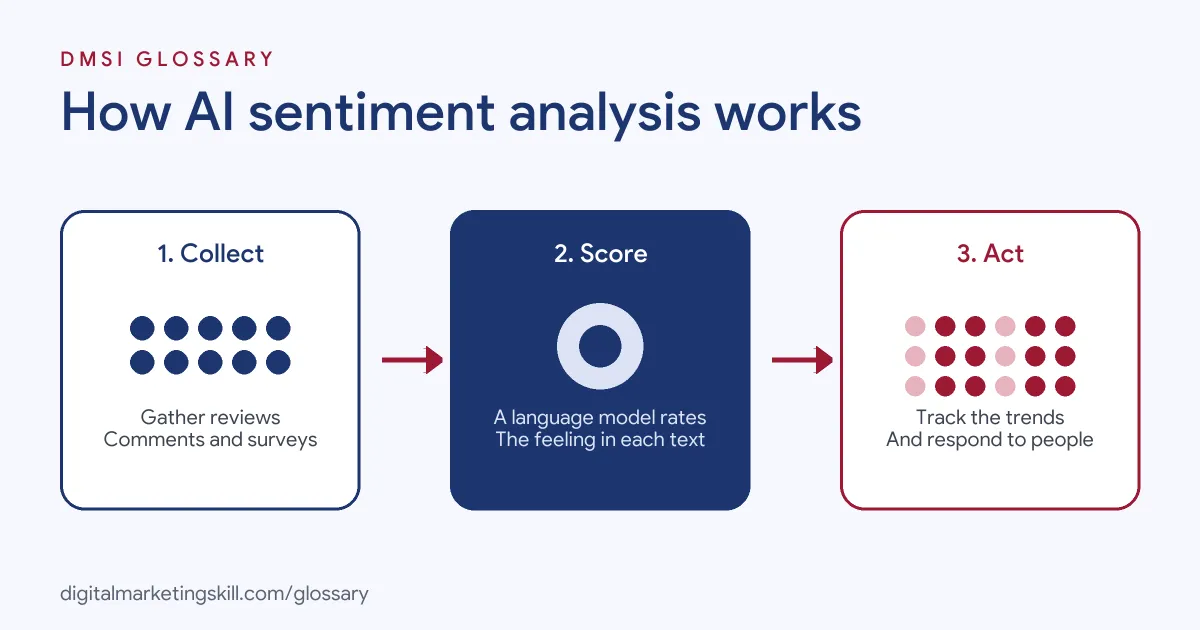
The process has three steps. First, you collect text from reviews, comments or surveys. Next, a language model scores each document or sentence for sentiment. Finally, you group and track the results to find patterns and act on them.
Scores and Labels
Each tool reports results differently. In Google’s API, the score “ranges between -1.0 (negative) and 1.0 (positive)”. Amazon Comprehend gives a score for each label, which “represents the likelihood that the sentiment was correctly detected”. Azure assigns labels such as “negative”, “neutral” and “positive”, with confidence scores between 0 and 1.
Score vs Magnitude
Google adds a second number called magnitude. It “indicates the overall strength of emotion” in the text. This helps with a tricky case. A neutral score near 0.0 may mean a low-emotion text, or a mixed one where positive and negative cancel out. Google says truly neutral texts have low magnitude, while mixed texts have higher magnitude.
Opinion Mining
Sometimes you need more detail. Azure describes opinion mining as “aspect-based sentiment analysis”. It ties each opinion to one part of a product or service. For instance, a review might be positive about taste but negative about price.
AI Sentiment Analysis Examples
Here are three made-up examples of sentiment analysis in marketing:
- Product reviews: An online shop scores reviews each week. When negative sentiment about sizing rises, it updates the size guide.
- Social listening: A brand tracks comments on its posts. A sudden drop in sentiment alerts the team to a delivery problem.
- Survey answers: A software firm checks the free-text answers in its survey. The tool shows that users love the features but find the first steps hard.
In each case, the analysis points to a specific action. That is the real value, rather than the score itself.
Sentiment Analysis Tools Compared
Here is how three well-known services report sentiment:
| Service | What it returns | Useful detail |
|---|---|---|
| Google Cloud Natural Language | Score from -1.0 to 1.0, plus magnitude | Magnitude helps separate neutral from mixed text |
| Amazon Comprehend | Positive, Negative, Mixed or Neutral, with a score for each | Scores show how likely each label is correct |
| Azure AI Language | Positive, neutral or negative labels, with confidence from 0 to 1 | Opinion mining links sentiment to specific aspects |
Many social listening and review tools use similar models behind the scenes. So the same ideas apply even if you never touch an API.
How to Use AI Sentiment Analysis
Follow these steps to get useful results:
- Pick a clear question. For example, “How do customers feel about our delivery?”
- Collect the right text. Gather reviews, comments or survey answers from a set period.
- Keep languages separate. Amazon Comprehend, for instance, needs all documents in one job to be in the same language.
- Run the analysis. Use a tool or API to score each item.
- Set your thresholds. Google suggests starting with a threshold, such as 0.25 for clearly positive, then adjusting it after you review results.
- Read a sample yourself. Check that the labels match what a person would say.
- Act on the findings. Share themes with product, support and marketing teams.
Best Practices for AI Sentiment Analysis
- Track trends, not single scores. A change over time tells you more than one number.
- Use magnitude or confidence. They show how strong or reliable a result is.
- Look at aspects. Opinion mining shows which feature drives the feeling.
- Check sarcasm and slang by hand. Read samples, since models can misread tone.
- Respond to people, not scores. Use the analysis to find comments that need a reply.
Common Mistakes to Avoid
A common mistake is treating the score as the full truth. Google notes that its API does not identify specific emotions, so “angry” and “sad” both appear as negative. Another mistake is comparing long and short texts without care. Google says magnitude is often proportional to length, so use it to calibrate scores. Some teams also mix languages in one batch. Finally, many never check the results by hand, so errors go unnoticed.
How to Read the Results
Google gives a helpful set of sample values. For example, a clearly positive text might score 0.8 with a magnitude of 3.0. Clearly negative text might score -0.6 with a magnitude of 4.0. Then a neutral text might score 0.1 with a magnitude of 0.0, while a mixed one might score 0.0 with a magnitude of 4.0. In other words, look at both numbers together. A score of zero on its own does not tell you whether people felt nothing or felt strongly both ways.
A Simple Way to Start
You do not need code to try this. Some social and review tools can show a mood score for you. So start small. Pick one place, such as your last 100 reviews. Read ten of them first, so you know what people say. Then run the tool and see if it agrees with you. Look at the worst ones and the best ones. What do they have in common? Is it the price, the staff or the wait? Write down the top three themes. Share them with your team, and pick one thing to fix. Then check again next month to see if the mood has changed.
Where You’ll Use AI Sentiment Analysis at Work
Sentiment analysis appears in community, social and PR job ads. For example, remote listings mention:
- Reporting “covering community engagement, sentiment analysis, and key trends” (Community Manager).
- Using “AI-powered tools for drafting, monitoring, and sentiment analysis” to “sharpen strategic decision-making” (Global Media Relations Director).
- “Media Monitoring & Sentiment Analysis: Track media mentions across telecom and technology outlets” (Public Relations Specialist).
So if you want to work as a Social Media Manager or Content Creator, you will use sentiment data to report on community health and to guide what you post next.
Learn It in the Social Media Track
You can learn to use AI sentiment analysis in social reporting in the AI-Powered Social Media Management and Advertising track. It covers AI fundamentals, social media marketing and analytics, and advertising. You plan, create and run a paid social campaign for a real brand. In addition, you get unlimited 1-on-1 mentoring and a U.S. Project Internship from day one.
For related reading, see our guides to social media marketing tools and digital customer engagement. You can also learn about social listening.
Frequently Asked Questions
What is AI sentiment analysis in simple terms?
It is using AI to read text and decide whether the feeling behind it is positive, negative, neutral or mixed.
What does a sentiment score mean?
In Google’s API, the score runs from -1.0 for negative to 1.0 for positive. Other tools give a label with a confidence score.
Can sentiment analysis detect specific emotions?
Not usually. Google says its API shows positive or negative sentiment, but does not say whether a text is “angry” or “sad”.
What is opinion mining?
It looks at what each opinion is about. For example, a review may like the taste but not the price.
Is AI sentiment analysis always accurate?
No. Results vary by use case, so set your own thresholds, test them and read samples by hand.
Sources: Google Cloud: Natural Language API basics; Amazon Comprehend: Sentiment; Microsoft Learn: Sentiment analysis and opinion mining; remote job listings on Himalayas.