
BIMI (Brand Indicators for Message Identification) is an email standard that lets a brand show its official logo next to its emails in supporting inboxes, once those emails pass DMARC checks. A logo helps people spot real messages from your brand at a glance. As a result, it can build trust and make your emails stand out in a busy inbox. It also rewards you for having strong email authentication in place.
Key Takeaways
- BIMI shows your brand logo beside your emails in inboxes that support it.
- Your emails must pass DMARC, and your DMARC policy must be at enforcement.
- The logo must be an SVG file in a special format, SVG Tiny PS.
- Gmail needs a Verified Mark Certificate or a Common Mark Certificate.
- You publish BIMI as a TXT record in your domain’s DNS.
What Is BIMI?
When an email lands in your inbox, you usually see a name and maybe a grey circle with a letter. However, BIMI changes that. Instead, it lets the sender’s real logo appear in that spot. So readers can tell at a glance that the email comes from the brand it claims to be.
The BIMI Group, which supports the standard, calls it “an emerging email specification that enables the use of brand-controlled logos within supporting email clients.” In other words, the brand chooses the logo, and the inbox shows it. Also, the inbox only does this when it trusts the sender.
For example, think of a uniform with a name badge. Anyone can say they work for a company. However, a checked badge gives you more reason to believe them. In the same way, BIMI only shows a logo after the email proves it is genuine.
That proof comes from DMARC. As the BIMI Group puts it, “For the brand’s logo to be displayed, the email must pass DMARC authentication checks.” So BIMI sits on top of the email security you should already have.
Why It Matters
Why does a small logo matter? Because inboxes are crowded, and fake emails often copy famous brands. So a verified logo makes your real emails easier to trust. In addition, Gmail can show a checkmark for senders verified with a Verified Mark Certificate. On top of that, getting BIMI working forces you to tidy up your SPF, DKIM and DMARC set-up. As a result, that work helps your wider email deliverability too.
BIMI is not a ranking factor for the inbox, and it can’t promise more opens. Still, a clear, trusted brand mark gives readers one more reason to open your message.
Who Uses BIMI
BIMI suits any brand that sends a lot of email. For example, shops, banks, software firms and publishers all send receipts, alerts and newsletters. Also, these brands are common targets for fake emails. So a verified logo helps their customers spot the real thing. However, smaller senders can use BIMI too. In fact, the main barrier is not size. Instead, it is getting DMARC to enforcement without blocking your own genuine mail.
How BIMI Works
BIMI works in three main steps. First your email passes authentication, then the inbox looks up your BIMI record, and finally it fetches and shows your logo. If any step fails, the inbox simply shows no logo.
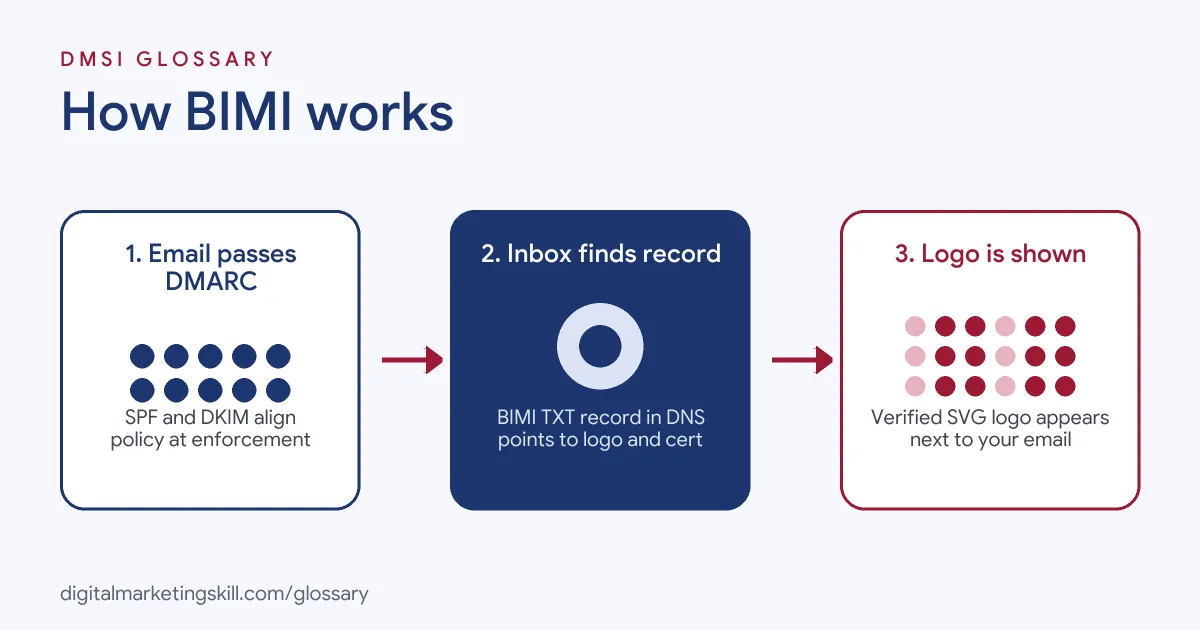
Step 1: Authentication Passes
First, your email must pass DMARC. Also, this relies on SPF and DKIM being set up correctly. In addition, your DMARC policy must be strict. The BIMI Group says, “DMARC policy MUST be at enforcement on the organizational domain and subdomains.” Google’s guide asks for a policy of quarantine or reject, with pct set to 100.
Step 2: The Inbox Finds Your BIMI Record
Next, the receiving inbox checks your domain’s DNS for a BIMI record. This is a TXT record, usually at default._bimi.yourdomain.com. The record starts with v=BIMI1. After that, the l= tag points to your logo file. Similarly, the a= tag points to your certificate.
Step 3: The Logo Is Checked and Shown
Finally, the inbox fetches your logo and certificate. Here, the logo must be an SVG file in the SVG Tiny Portable/Secure profile. Gmail also expects the file to sit on a secure HTTPS server. So if everything checks out, the logo appears. Google notes that “it can take up to 48 hours for your logo to show in recipients’ mailboxes.”
Certificates: VMC and CMC
In short, a certificate proves you have the right to use the logo. A Verified Mark Certificate (VMC) is based on a registered trademark. By contrast, a Common Mark Certificate (CMC) is for logos that are not trademarked. The BIMI Group calls certificates “Highly recommended, but Optional.” However, Gmail requires one of them before it shows your logo.
Examples of BIMI
- An online shop with lookalike scams. Customers report fake “order problem” emails. So the shop moves its DMARC policy to reject and adds BIMI. As a result, its real emails show the logo, while fakes don’t.
- A bank sending account alerts. The security team gets a VMC for its trademarked logo. After that, Gmail users see the logo and a checkmark next to genuine alerts.
- A newsletter publisher. The team has no registered trademark yet. Instead, it uses a CMC, so its logo can still appear in supporting inboxes.
BIMI vs SPF, DKIM and DMARC
| Standard | What it does | Needed for BIMI? |
|---|---|---|
| SPF | Lists the servers allowed to send for your domain | Yes, as part of passing DMARC |
| DKIM | Adds a digital signature to each email | Yes, as part of passing DMARC |
| DMARC | Tells inboxes what to do with mail that fails checks | Yes, at quarantine or reject |
| BIMI | Shows your verified logo next to your emails | It is the final layer |
How to Set Up BIMI
- Check SPF and DKIM. Make sure every service that sends your email is covered and aligned.
- Move DMARC to enforcement. Start with a monitoring policy, fix failures, then move to quarantine or reject.
- Prepare your logo. Convert it to SVG Tiny PS. Gmail also needs it to be at least 96 by 96 pixels.
- Get a certificate. Apply for a VMC if your logo is trademarked, or a CMC if it is not.
- Host your files. Upload the logo and certificate (a PEM file) to a secure HTTPS web server.
- Publish the BIMI record. Add a TXT record at
default._bimiwith yourl=anda=links. - Test and wait. Use a BIMI checker tool. Then allow up to 48 hours for logos to appear.
Best Practices for BIMI
- Fix DMARC first. BIMI won’t work until your policy is at enforcement, so start there.
- Use a simple square logo. Because inboxes often show logos small and in a circle, keep the design clean.
- Cover subdomains. Make sure subdomains that send email also pass DMARC at enforcement.
- Track certificate renewals. Also, certificates expire, so set a reminder well before the date.
- Protect your sender reputation. BIMI shows trust, but poor sending habits can still send mail to spam.
- Match your brand. Use the same logo as your website and social profiles, so readers recognise it.
Common Mistakes to Avoid
- Leaving DMARC at none. Remember that a monitor-only policy won’t work for BIMI.
- Using a normal SVG. A standard SVG export often fails. Instead, you need the SVG Tiny PS profile.
- Skipping the certificate. Without a VMC or CMC, Gmail won’t show your logo at all.
- Forgetting third-party senders. If your email tool isn’t aligned, those emails fail DMARC and show no logo.
- Expecting instant results. In practice, logos can take time to appear, and not every inbox supports BIMI.
- Treating BIMI as a deliverability fix. It shows a logo. However, it doesn’t fix spam complaints or a weak list.
Where You’ll Use BIMI at Work
BIMI comes up in email deliverability, lifecycle and CRM roles, usually in a list with other authentication standards. For example, real remote job listings ask for:
- “Strong understanding of email authentication (SPF, DKIM, DMARC, ARC, BIMI, etc), SMTP protocol, and industry best practices.” (Deliverability Consultant).
- “You own deliverability as a discipline: domain warming and authentication (SPF, DKIM, DMARC, BIMI), sending reputation, list hygiene, sunset policies” (Senior Lifecycle Specialist, CRM).
- “Working knowledge of email authentication (SPF, DKIM, DMARC, BIMI), domain and IP warming, reputation monitoring, and inbox placement testing” (Senior Manager, B2B Outbound Marketing).
Learn It in the Lead Generation and Email Track
You can learn BIMI and the full email authentication set-up in the AI-Powered Lead Generation and Email Automation track. Every track includes a U.S. Project Internship from day one, with unlimited 1-on-1 mentoring.
Frequently Asked Questions
What does BIMI stand for?
BIMI stands for Brand Indicators for Message Identification. It lets supporting inboxes show your logo next to your emails.
Do I need DMARC for BIMI?
Yes. Your emails must pass DMARC, and your policy must be set to quarantine or reject.
Do I need a trademark?
Only for a Verified Mark Certificate. If your logo is not trademarked, you can use a Common Mark Certificate instead.
Will BIMI improve my open rate?
It may help readers trust your emails. However, it can’t promise a higher open rate, because many factors affect opens.
Does every inbox support BIMI?
No. Support varies by email provider and app. So check the BIMI Group’s list of supporting inboxes for up-to-date details.
Sources: BIMI Group: Brand Indicators for Message Identification; BIMI Group: Implementation Guide; Google Workspace Admin Help: Set up BIMI; remote job listings on Himalayas, Himalayas and Himalayas.