
An exit-intent pop-up is a website pop-up that appears when a visitor shows signs of leaving the page, giving you one last chance to keep them or capture their details. Most visitors leave without buying or signing up. So an exit-intent pop-up waits until that moment and then makes a short, useful offer. As a result, it can turn some of those lost visits into email subscribers or sales, without bothering people who are still reading.
Key Takeaways
- An exit-intent pop-up shows when a visitor seems about to leave, not when they arrive.
- On desktop, it usually reacts to the cursor moving out of the page area.
- On mobile, tools use other signals, such as a quick scroll back up.
- It works best with one clear offer, such as a discount, guide or reminder.
- Pop-ups that block content can hurt user experience and search performance.
What Is an Exit-Intent Pop-up?
A pop-up is a box that appears over a web page. Many pop-ups show after a few seconds or as soon as the page loads. However, an exit-intent pop-up is different. It stays hidden while the visitor reads and only appears when they look ready to go.
For example, imagine you are about to leave a shop. Just before the door, a staff member says, “Here’s a voucher for next time.” You didn’t feel pushed while you browsed. Yet you leave with a reason to come back. An exit-intent pop-up does the same job online.
Email tools describe the trigger in plain terms. For instance, Klaviyo says these forms can trigger when a visitor shows signs of leaving the page. On desktop, that means the cursor moves outside the visible part of the page. On mobile, Klaviyo uses a fast upward scroll as the signal.
Why It Matters
Every visitor costs you something, whether from ads, content or social posts. So losing them without any contact is expensive. An exit-intent pop-up gives you a final chance to start a relationship. In addition, it doesn’t interrupt people who are still engaged. That makes it a gentler option than a pop-up that appears straight away. Finally, it is one of the simplest ways to grow an email list from the traffic you already have.
How an Exit-Intent Pop-up Works
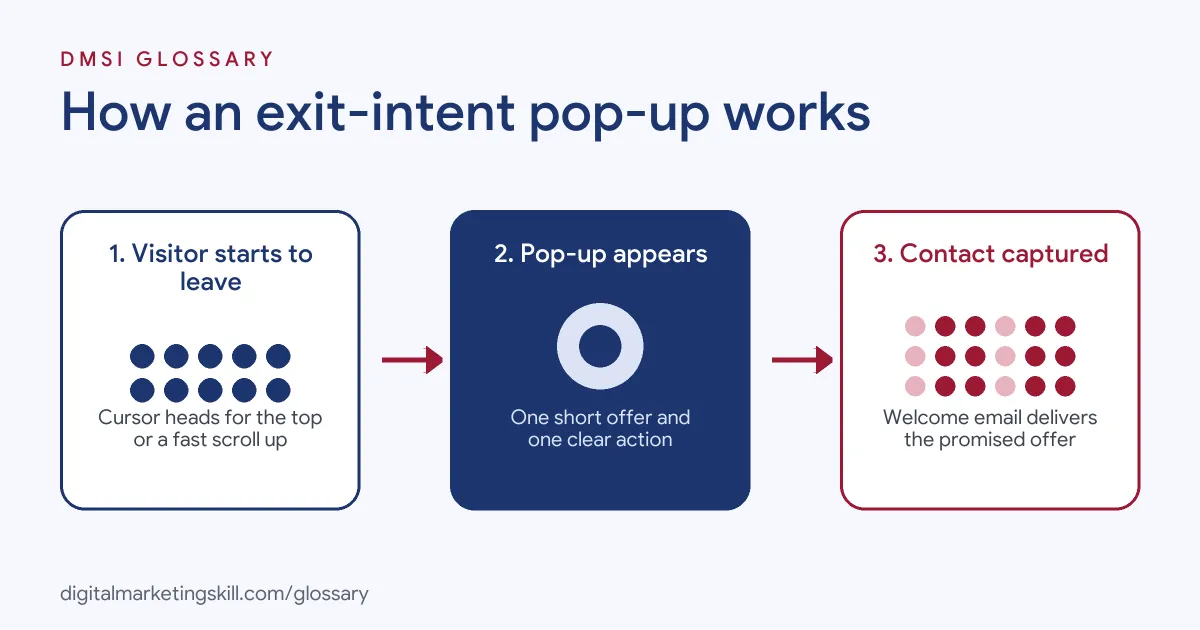
An exit-intent pop-up relies on a small script that watches what the visitor does. When it spots a leaving signal, it shows the pop-up. Then the visitor either takes the offer or closes the box.
Spotting the Signal
On a computer, the script tracks the mouse. When the cursor moves fast towards the top of the window, the visitor is often heading for the back button, a tab or the address bar. Browsers report this through mouse events. For example, MDN explains that the mouseleave event “is fired at an Element when the cursor of a pointing device (usually a mouse) is moved out of it.” So the script listens for the cursor leaving the page.
Mobile Signals
Phones have no cursor. Instead, tools look for other hints. For instance, a quick scroll back up, a tap on the back button or a period of no activity can all count. Because these signals are less exact, mobile exit pop-ups need extra care.
Showing the Offer
Once triggered, the pop-up shows a short message and one action. Often, this is a form for an email address in return for a lead magnet or discount. Next, the tool records the result. Then it sets a rule, such as “don’t show again for 30 days”, so the same person isn’t shown it on every page.
Following Up
Finally, the new contact goes into your email platform. From there, a welcome email or a short sequence can deliver the promised offer and keep the conversation going.
Examples of Exit-Intent Pop-ups
- An online clothing shop. A visitor adds a jacket to the basket and moves to close the tab. Then a pop-up offers free delivery on the first order. So the shopper has a fresh reason to finish checking out.
- A B2B software blog. A reader finishes an article and heads for the back button. As a result, a pop-up offers a free checklist on the same topic in exchange for an email address.
- A local gym. A visitor reads the prices page and starts to leave. So the pop-up offers a free trial session and asks for a name and phone number.
Exit-Intent Pop-up vs Other Pop-ups
| Point | Exit-intent pop-up | Timed or entry pop-up | Scroll pop-up |
|---|---|---|---|
| When it shows | When the visitor seems to leave | On arrival or after a delay | After the visitor scrolls a set amount |
| Interrupts reading | Rarely | Often | Sometimes |
| Best for | Last-chance offers | Big announcements | Content upgrades for engaged readers |
| Main risk | Unclear signals on mobile | Annoying new visitors | Showing too late |
How to Set Up an Exit-Intent Pop-up
- Pick one goal. Decide if you want email sign-ups, recovered baskets or bookings.
- Choose your offer. Match it to the page. For example, use a guide on blog posts and a discount on product pages.
- Write short copy. Use a clear headline, one line of detail and one call to action.
- Build the form. Use your email or pop-up tool and ask only for the details you need.
- Set the trigger. Choose the exit-intent option and check how the tool handles mobile.
- Set frequency rules. Hide the pop-up for people who already signed up, and wait before showing it again to people who closed it.
- Connect the follow-up. Link new contacts to a welcome email that delivers the offer.
- Test and measure. Run an A/B test on the headline or offer. Then track sign-ups and sales, not just views.
Measuring Results
A pop-up can look busy and still fail. So measure the right numbers from the start. First, track the sign-up rate, which is sign-ups divided by the number of times the pop-up showed. Next, follow those new contacts. For example, check how many open the welcome email and how many go on to buy. Also, watch your conversion rate for the whole page, not just the pop-up. If sign-ups rise but sales fall, the pop-up may be distracting buyers. In addition, look at the unsubscribe rate for pop-up leads. A high rate often means the offer attracted people who only wanted a freebie. Then adjust the offer, the copy or the pages where it appears, and test again.
Best Practices for Exit-Intent Pop-ups
- Make it easy to close. Use a clear close button and let people click outside the box to dismiss it.
- Offer real value. A useful guide or fair discount beats a vague “Join our newsletter”.
- Keep it short. One headline, one sentence and one form field are often enough.
- Respect mobile users. Google says that “Intrusive interstitials and dialogs are page elements that obstruct users’ view of the content.” So keep mobile versions small, or use a banner instead.
- Get consent right. Explain what people sign up for and use a clear opt-in.
- Match the page. Tailor the message to what the visitor was viewing, so the offer feels relevant.
Common Mistakes to Avoid
- Showing it on every page. Repeated pop-ups annoy people and push them away.
- Hiding the close button. Tiny or fake close links damage trust.
- Guilt-trip buttons. Lines like “No, I don’t like saving money” can feel manipulative.
- Asking for too much. Long forms cut sign-ups. Start with an email address.
- Ignoring mobile. A full-screen box on a phone can block the page. Google warns this “may lead to poor search performance.”
- Not following up. If the promised offer never arrives, new subscribers soon unsubscribe.
Where You’ll Use Exit-Intent Pop-ups at Work
Exit-intent pop-ups are part of on-site capture work in email, CRM and ecommerce roles. Listings rarely name exit intent itself. However, they often ask for pop-up skills, including the trigger rules you set for exit intent. For example, real remote job listings ask you to:
- “Build and maintain Klaviyo forms and pop-ups, including targeting rules, triggers, and integrations with email and SMS programs.” (Email Marketing Coordinator).
- “Test and validate pop-ups and forms in Klaviyo and Justuno to ensure they function correctly and align with the campaign strategy.” (Email Marketing Technical Specialist).
- “Build the forms, pop-ups and landing pages that turn visitors into subscribers” (Senior Email Marketing Specialist).
Learn It in the Lead Generation and Email Track
You can learn exit-intent pop-ups and wider list-building in the AI-Powered Lead Generation and Email Automation track. Every track includes a U.S. Project Internship from day one, with unlimited 1-on-1 mentoring.
Frequently Asked Questions
Do exit-intent pop-ups work on mobile?
Yes, but differently. Phones have no cursor, so tools use signals such as a quick upward scroll. Keep the mobile design small and easy to close.
Are exit-intent pop-ups bad for SEO?
Not by default. However, Google says dialogs that block content can lead to poor search performance. So avoid full-screen boxes, especially on mobile.
What should I offer in an exit-intent pop-up?
Offer something that fits the page. For example, a guide on blog posts or free delivery on product pages works well.
How often should it show?
Show it once per visit at most. Then hide it for people who signed up, and wait before showing it to people who closed it.
Do I need a developer to add one?
Usually not. Most email platforms and pop-up tools include an exit-intent option you can switch on.
Sources: Google Search Central: Avoid intrusive interstitials and dialogs; Klaviyo Help Center: Understanding targeting and behavior settings for sign-up forms; MDN: Element: mouseleave event; remote job listings on Himalayas, Himalayas and Himalayas.