
Duplicate content is the same or very similar content that appears at more than one URL, either on your own site or across different sites. When this happens, search engines have to pick one version to show. As a result, the page you care about may not be the one that ranks. So knowing how to spot and fix duplicates is a core part of keeping a site clean for search.
Key Takeaways
- Duplicate content means the same content can be reached at more than one URL.
- Google says some duplicate content is normal and is not a spam violation.
- Google groups duplicates and picks one canonical URL to show in search.
- Redirects and the rel=”canonical” tag are strong signals, while sitemaps are weak ones.
- Copying other sites’ content without adding value can break Google’s spam policies.
What Is Duplicate Content?
Duplicate content is text or a whole page that lives at two or more web addresses. For example, the same product page might load at a normal URL and at a URL with a tracking code on the end. To you, that is one page. However, to a search engine, those are two separate URLs with the same content.
Most duplicates happen by accident. Also, they are often caused by how a website is built, not by anyone copying text. A shop that lets you sort products by price can create a new URL for every sort order. Similarly, a site that works on both HTTP and HTTPS has two copies of every page.
Think of a library that has three copies of the same book on three shelves. A visitor asks for the book, and the librarian has to choose which copy to hand over. In the same way, Google has to choose which URL to show. If you don’t guide that choice, it may not pick the one you want.
Google is calm about this. In its own words, “Some duplicate content on a site is normal and it’s not a violation of Google’s spam policies.” So the main risk is not a penalty. Instead, the risk is wasted crawling, split signals and the wrong URL in search.
Why It Matters
Why should you care if there is no penalty? First, links and other signals can be split across several copies of a page. Then, no single version gets the full benefit. In addition, Google may spend time crawling copies instead of your new pages, which hurts your crawl budget on large sites. Finally, your reports get messy, because visits for one piece of content are spread over many URLs.
How Duplicate Content Works
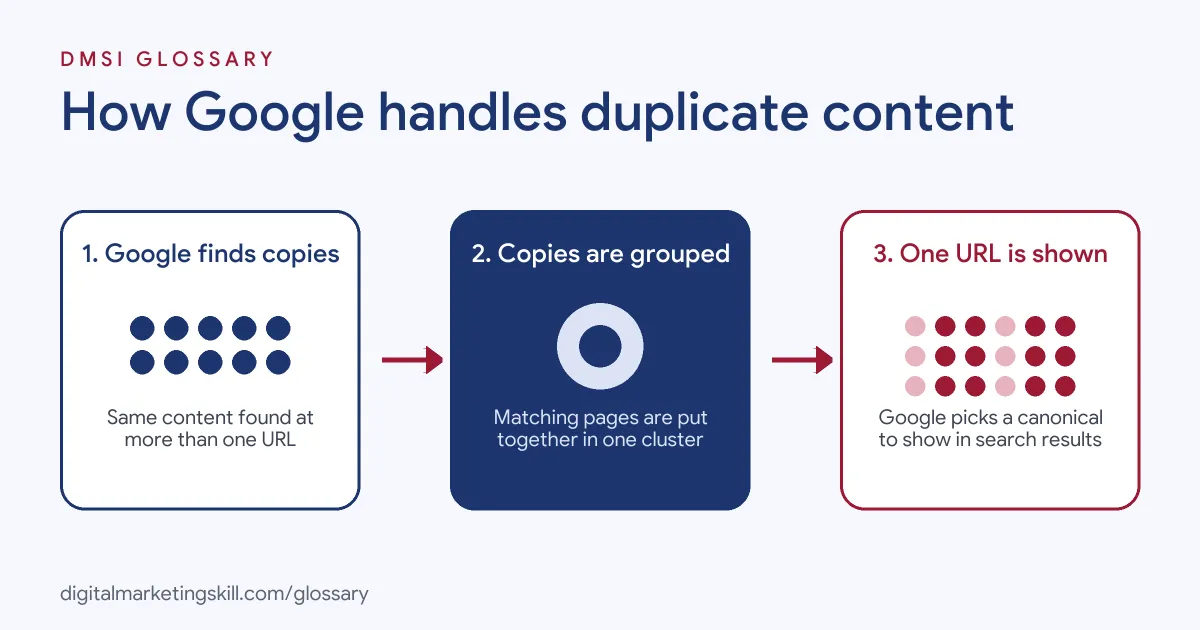
When Google finds several URLs with the same content, it groups them together. Then it picks one URL as the main, or canonical, version. Google calls this process canonicalization, and says it “helps Google show only one version of the otherwise duplicate content in its search results.”
Step 1: Google finds the copies
Google crawls your site and follows links. So if your site links to several versions of a page, Google finds them all. Google lists common causes such as region variants, device variants, protocol variants and site functions like sorting and filtering. It also lists accidental variants, for example a demo site left open to crawlers.
Step 2: Google groups them
Next, Google compares the pages and groups the ones that match. These groups can include pages that are almost the same, not just exact copies. For instance, two product pages that differ only by colour name may land in the same group.
Step 3: Google picks a canonical
After that, Google weighs signals to choose the main URL. These include HTTPS, redirects, sitemaps and rel=”canonical” tags. However, Google says “indicating a canonical preference is a hint, not a rule.” So it can still pick a different URL if your signals clash.
Step 4: The canonical gets shown
Finally, Google shows the chosen URL in search results most of the time. The other URLs in the group are treated as duplicates. As a result, they are crawled less often and rarely appear in search.
Duplicates across other sites
Duplicates can also cross domains. For example, a partner may republish your article, or a shop may use the same supplier text as fifty other shops. In these cases, Google still picks one version to show. So the original is not always the winner. That is why it helps to ask partners for a clear link back to your page. Also, it is a good reason to write your own product copy. On the other hand, sites that copy content on purpose to rank are a different problem. Google treats that as scraping, which its spam policies cover.
Examples of Duplicate Content
- An online shop with filters. Each filter adds a parameter to the URL, so one category has dozens of copies. The team adds a canonical tag that points every filtered view to the main category page.
- A site moving to HTTPS. After the move, the old HTTP pages still load. So the developer adds a 301 redirect from every HTTP URL to its HTTPS version.
- A blog that syndicates posts. A partner site republishes some articles. Then the blog asks the partner to link back to the original post, so search engines can see which version came first.
Duplicate Content vs Keyword Cannibalisation
| Point | Duplicate Content | Keyword Cannibalisation |
|---|---|---|
| What it is | The same content at more than one URL | Different pages aiming at the same search |
| Usual cause | Site set-up, parameters, copies | Content planning gaps |
| Main fix | Canonical tags or redirects | Merge, refocus or relink pages |
| Who fixes it | SEO with developers | SEO with content writers |
| Penalty risk | Low, unless content is scraped | None, but rankings can suffer |
The two often appear together. So if you fix one, check for the other. You can read more about keyword cannibalisation in its own glossary entry.
How to Fix Duplicate Content
- Find the duplicates. Run a site crawl and look for pages with the same title, description or body text. Also, check the Page indexing report in Google Search Console for duplicate warnings.
- Choose the main version. For each group, decide which URL you want people to see in search.
- Redirect retired copies. If a copy has no reason to exist, send a permanent redirect to the main URL.
- Add canonical tags. If copies must stay, add a canonical tag on each one that points to the main URL.
- Clean your sitemap. List only canonical URLs in your XML sitemap.
- Fix internal links. Then update menus and links so they point to the main URL, not the copies.
- Check the result. Finally, use URL Inspection to see which canonical Google has chosen.
Best Practices for Duplicate Content
- Pick one version of your domain. Choose HTTPS, and choose with or without www, then redirect the rest.
- Send matching signals. Your redirects, canonical tags, sitemap and internal links should all point to the same URL.
- Use canonical tags for variants. Google calls rel=”canonical” a “strong signal” and prefers it for mapping duplicates.
- Write unique copy. Give each product and location page its own text, rather than one template with a new name.
- Keep test sites private. Protect staging sites with a password so crawlers can’t find them.
- Audit on a schedule. New features and plugins can add new URL patterns, so check again after big changes.
Common Mistakes to Avoid
- Blocking copies in robots.txt. Google says, “Don’t use the robots.txt file for canonicalization purposes.”
- Using noindex to pick a canonical. Google does not recommend it, because noindex blocks the page from search completely.
- Mixed signals. A canonical tag that points to one URL while links point to another can confuse Google.
- Fearing a penalty. Normal duplicates are not spam. So fix them for clarity, not out of panic.
- Copying content from other sites. In contrast, Google’s spam policies name “Republishing content from other sites without adding any original content or value” as abusive scraping.
Where You’ll Use Duplicate Content at Work
Duplicate content work shows up in technical SEO roles. It often sits next to canonicals, redirects and indexing. For example, real remote job listings ask for:
- “Have strong technical SEO expertise, including indexing, crawling, canonicals, redirects, duplicates, sitemaps, robots.txt, and internal linking.” (TL SEO).
- “Audit and improve crawlability, indexation, rendering, canonicalization, pagination, faceted navigation, and site speed.” (Senior SEO Growth Strategist).
- “Good understanding of site structure, indexing, structured data, canonicalization, and Core Web Vitals.” (SEO & AI Search Manager).
Learn It in the WordPress and SEO Track
You can learn to find and fix duplicate content as part of technical SEO in the AI-Powered WordPress and SEO Specialist track. Every track includes a U.S. Project Internship from day one, with unlimited 1-on-1 mentoring.
Frequently Asked Questions
Does Google penalise duplicate content?
Not for normal duplicates. Google says some duplicate content is normal. However, copying other sites to game rankings can break its spam policies.
How much duplicate content is too much?
There is no set limit. Instead, focus on whether duplicates split your signals or waste crawling on important pages.
What is the best fix for duplicate content?
Use a permanent redirect when a copy is not needed. Otherwise, use a canonical tag that points to the main URL.
Can product descriptions from a supplier cause duplicates?
Yes, because many shops may use the same text. So writing your own descriptions helps your pages stand out.
How do I see which URL Google chose?
Use the URL Inspection tool in Google Search Console. It shows the canonical you declared and the one Google selected.
Sources: Google Search Central: What is canonicalization; Google Search Central: How to specify a canonical URL; Google Search Central: Spam policies for Google web search; remote job listings on Himalayas, Himalayas and Himalayas.