
Image SEO is the practice of making the images on your website easy for search engines to find, understand and show in search results. Good image SEO can bring extra visitors from Google Images and from image results on the main search page. It also makes pages faster and more accessible. As a result, it helps both your users and your rankings.
Key Takeaways
- Image SEO helps search engines find, read and rank the images on your pages.
- Alt text is the most important piece of image metadata, according to Google.
- Short, descriptive file names and nearby relevant text give images useful context.
- Smaller, modern file formats such as WebP and AVIF keep pages fast.
- Width and height attributes stop images from pushing content around as a page loads.
What Is Image SEO?
Every image on a page is a small piece of content. Search engines can’t look at a photo the way you do. Instead, they rely on clues such as the file name, the alt text and the words around the image. Image SEO is the work of giving them clear, honest clues.
For example, picture a bakery website with a photo called IMG_4021.jpg and no alt text. Google has very little to go on. Now rename it sourdough-loaf.jpg and add the alt text “Round sourdough loaf on a wooden board”. Suddenly the image tells a clear story.
Google is direct about this. In its image guidelines, it says “The most important attribute when it comes to providing more metadata for an image is the alt text”. So well-written alt text sits at the heart of image SEO.
Why It Matters
Why should you care? First, images can rank on their own and send traffic to your pages. Second, large images are often the heaviest part of a page. So poorly handled images slow your site down and can hurt Core Web Vitals. Third, alt text helps people who use screen readers. MDN describes alt text as “incredibly useful for accessibility”. In short, image SEO is a quick win that also improves the user experience.
Image SEO is part of wider on-page SEO. However, it also touches technical work, such as file sizes, formats and sitemaps. That mix is why both writers and developers play a part.
How Image SEO Works
Image SEO works in three broad steps. First, search engines need to find the image. Then they need to understand what it shows. Finally, the image needs to load fast and display well, so users stay on the page.
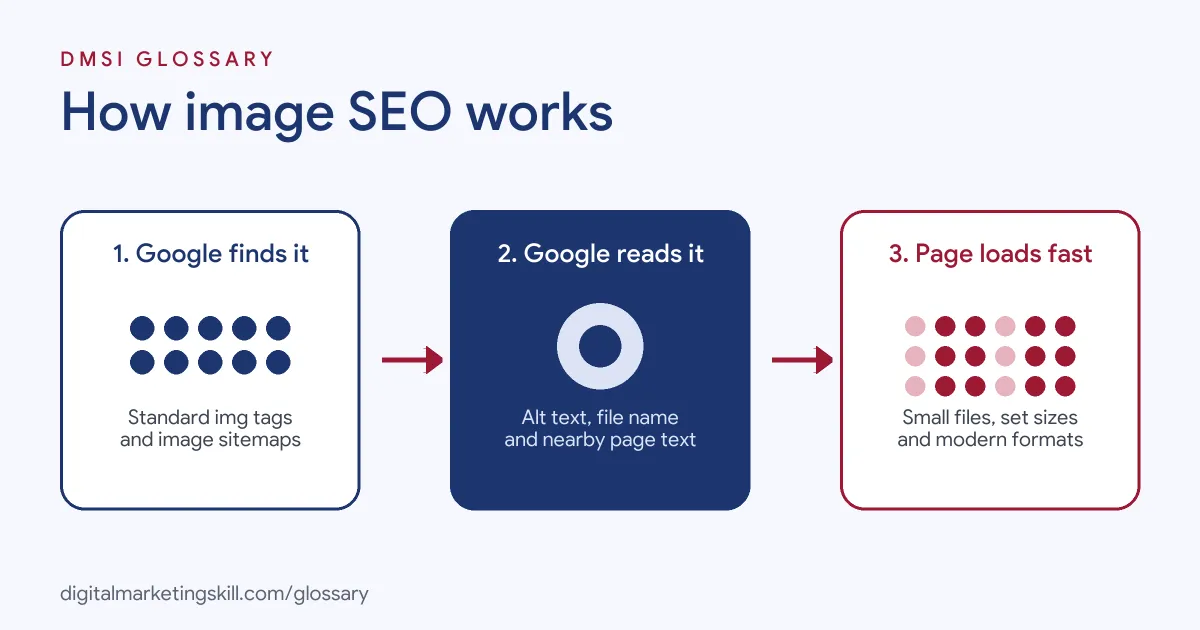
Step 1: Discovery
Search engines find images mainly through standard HTML. Google says “Using standard HTML image elements helps crawlers find and process images.” By contrast, it also states “Google doesn’t index CSS images.” So an image added only as a CSS background won’t show up in image search. In addition, you can list key images in an image sitemap. That helps Google find images it might otherwise miss.
Step 2: Understanding
Next, Google works out what the image is about. It uses alt text, the file name and the page around the image. Google also says it uses computer vision along with these signals. So the text near your image matters a lot. For example, Google advises you to place images near relevant text. Likewise, a clear page title and caption add even more context.
Step 3: Speed and Display
Then comes performance. Big files slow pages down, so you compress them and pick a modern format. Google supports “BMP, GIF, JPEG, PNG, WebP, SVG, and AVIF.” Also, the srcset attribute lets you serve smaller versions to smaller screens. Finally, you set width and height on each image. As web.dev puts it, “Always include width and height size attributes on your images and video elements.”
Rich Results
Images can also appear in rich results. Google says that with structured data it “can display your images in certain rich results”. For instance, recipe and product results often show a picture. So adding the right schema markup can give your images more space in search.
Measuring Results
So how do you know it works? In Google Search Console, the Performance report lets you filter by search type. Then you can pick “Image” to see clicks and impressions from image search. Also, page speed tools show whether large images slow down your pages. After that, you fix the worst pages first.
Examples of Image SEO
- An online clothing shop. Each product has six large photos with camera file names. The team renames them, adds alt text that names the item and colour, and converts them to WebP. As a result, product pages load faster and the images become easier to find.
- A recipe blog. The writer adds a clear photo of each finished dish near the top of the post. Then she adds Recipe structured data with an image. So the post can show a picture in recipe results.
- A local builder’s website. The gallery loads project photos as CSS backgrounds. However, Google can’t index those. So the developer switches to standard
<img>tags with alt text that describes each project.
Image SEO vs Alt Text vs Image Compression
| Point | Image SEO | Alt Text | Image Compression |
|---|---|---|---|
| What it is | The full practice of optimising images for search | A text description inside the image tag | Making image files smaller |
| Main goal | Visibility, speed and context | Context and accessibility | Faster page loads |
| Who does it | SEO, content and developers | Writers and editors | Designers and developers |
| Scope | Covers alt text, file names, formats, sitemaps and more | One part of image SEO | One part of image SEO |
How to Do Image SEO
- Pick useful images. Use original, relevant images that add value to the page. Then place them near the text they support.
- Rename the files. Use short, descriptive names with hyphens, such as
blue-running-shoes.jpg. Google advises you to avoid names likeimage1.jpg. - Write alt text. Describe what the image shows in plain words. Keep it short and natural, and only add a keyword if it fits.
- Choose the right format. Use WebP or AVIF for photos where possible. Also, use SVG for simple logos and icons.
- Compress and resize. Shrink each file to the size it is shown at. Then compress it with a tool or plugin.
- Set width and height. Add both attributes, so the browser saves space before the image loads.
- Lazy-load below the fold. Add
loading="lazy"to images further down the page. However, don’t lazy-load your main hero image. - Add structured data and sitemaps. Use schema where it fits, and list key images in your sitemap.
Best Practices for Image SEO
- Write for people first. Good alt text helps screen reader users, and that same clarity helps search engines.
- Use real img tags. Add content images with HTML, not CSS backgrounds, so Google can index them.
- Keep files light. Use image compression and modern formats such as WebP to protect page speed.
- Serve the right size. Use
srcset, so phones get smaller files than large screens. - Load smartly. Use lazy loading for images lower on the page, but load the main image straight away.
- Add captions where useful. A short caption gives readers and search engines more context.
Common Mistakes to Avoid
- Skipping alt text. Missing alt text leaves search engines and screen readers guessing.
- Keyword stuffing. Alt text packed with keywords reads badly and can look spammy.
- Uploading huge files. A 5 MB photo shown at thumbnail size wastes bandwidth and slows the page.
- Using generic file names. Names like
photo1.jpgtell Google nothing. - Missing dimensions. Without width and height, content jumps as images load, which hurts layout stability.
- Lazy-loading the hero image. The main image should load first. Otherwise, your largest element appears late.
Where You’ll Use Image SEO at Work
Image SEO shows up in SEO, content and e-commerce roles. For example, real remote job listings ask you to:
- “Optimise images, alt text, metadata, structured data, headings, and on-page presentation so content is both search-friendly and easy to read.” (SEO Content Editor).
Beyond SEO editors, image SEO is a daily task for e-commerce managers, content writers and WordPress specialists. For example, a shop manager uploads new product photos each week. Likewise, a blog editor checks alt text before each post goes live. In agencies, SEO specialists also run image audits as part of wider site reviews.
Learn It in the WordPress and SEO Track
You can learn image SEO, along with on-page and technical SEO, in the AI-Powered WordPress and SEO Specialist track. Every track includes a U.S. Project Internship from day one, with unlimited 1-on-1 mentoring.
Frequently Asked Questions
What is the most important part of image SEO?
Google says alt text is the most important attribute for image metadata. Still, file names, nearby text and page speed also matter.
Which image format is best for SEO?
Google supports several formats, including JPEG, PNG, WebP, SVG and AVIF. For photos, WebP and AVIF usually give smaller files, so pages load faster.
Does Google index CSS background images?
No. Google states that it doesn’t index CSS images. So use a standard <img> tag for any image you want to appear in search.
Should every image have alt text?
Every content image should have useful alt text. However, purely decorative images can use an empty alt attribute, so screen readers skip them.
Do I need an image sitemap?
Not always. Yet an image sitemap can help Google find images it might miss, such as those loaded by scripts.
Sources: Google Search Central: Image SEO best practices; MDN: The Image Embed element; web.dev: Optimize Cumulative Layout Shift; remote job listings on Himalayas.