

Nonprofit digital marketing is the use of websites, email, search, social media and online ads to win attention, volunteers and donations for a cause. The work looks like ordinary marketing on the surface, but the “product” is a mission, the “customer” is often a donor who receives nothing physical in return, and the budget is usually tiny. That changes which channels matter most and how you measure success.
This guide is written for the person who has just been handed the nonprofit’s marketing, often alongside three other jobs. It covers how to set goals that tie to the mission, how to map the journey from stranger to repeat donor, which channels pay back first, how to use the Google Ad Grants programme properly, and how to measure what is working without an analytics team.
Key Takeaways
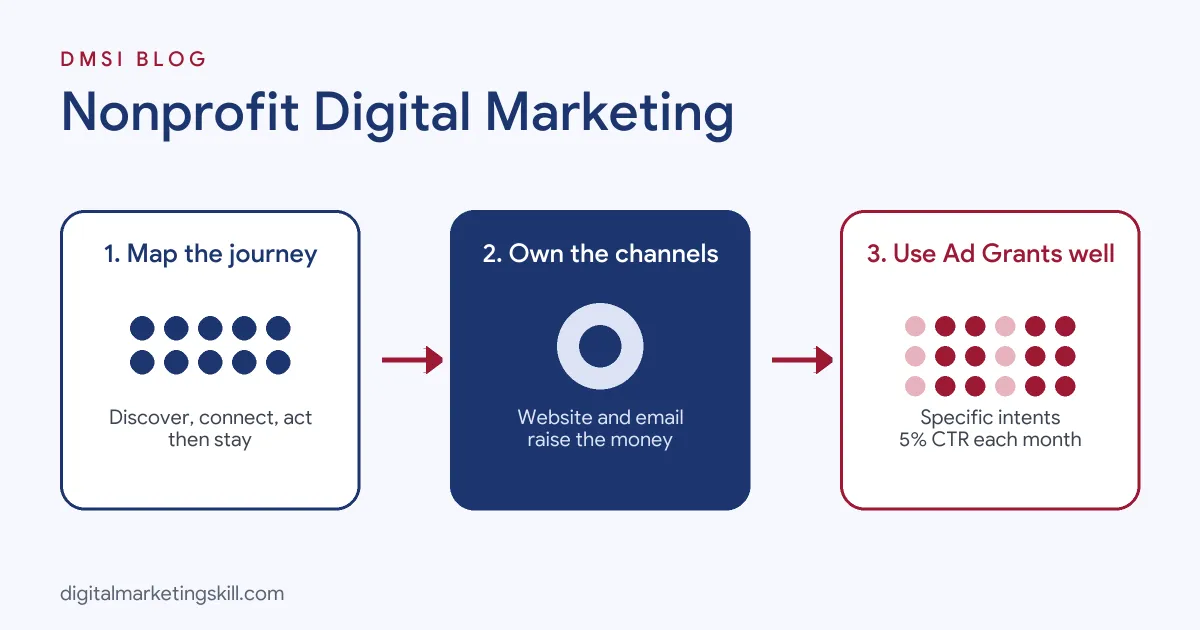
- Google says each qualifying nonprofit can access up to $10,000 per month in search ads shown on Google.com through Ad Grants (Google Ad Grants).
- Google’s account policy says Ad Grants accounts that are not only using Smart campaigns must keep a 5% click-through rate each month at account level, and two months below that leads to temporary deactivation (Google Ad Grants account management policy).
- Feathr’s nonprofit guide builds its strategy around defining goals, segmenting the audience, email automations, digital ads, social media and the website (Feathr).
- Most guides list channels. The bigger gain for a small team is choosing one donor journey and making every channel feed it.
- What Most Nonprofit Marketing Guides Miss
- How Nonprofit Marketing Differs From Business Marketing
- Set Goals That Tie to the Mission
- Map the Supporter Journey
- Make the Website Do the Heavy Lifting
- Email: The Channel That Raises the Money
- Google Ad Grants and Search
- Social Media for Causes
- Stories, Video and Supporter Content
- Paid Social and Retargeting
- Peer-to-Peer and Campaign Moments
- Measure What Matters
- A 90-Day Plan for a Small Team
- Common Mistakes
- FAQ
What Most Nonprofit Marketing Guides Miss
The top-ranking guides on this topic tend to be long lists: audience segmentation, email, mobile, content, social, user-generated content, peer-to-peer, video, public speaking, website, multi-channel, events. Every item on those lists is reasonable. The problem is that a two-person team cannot run thirteen strategies at once, and trying to do so produces thirteen half-finished efforts that never connect.
What those lists rarely say is that channels are not strategies. A strategy is a decision about which people you want to move, from where to where, and in what order. Once you know that you want, for example, to turn local event attendees into monthly donors, the channel choices make themselves: capture emails at the event, send a short welcome series, show the impact, then ask for a small monthly gift. Social media and ads become ways to fill the top of that one path, not separate projects.
The second gap is honesty about limits. Nonprofits are often told that a free ad grant or a viral post will change everything. Free ad credit is valuable, but it comes with rules, and a viral moment rarely turns into lasting giving without a follow-up system. This guide puts the follow-up system first.
How Nonprofit Marketing Differs From Business Marketing
Most marketing principles carry over, but a few differences change the work in practice.
You serve two audiences
A business usually markets to the people who pay. A nonprofit often markets to two separate groups: the people it helps (beneficiaries, service users, students, patients) and the people who fund that help (donors, grant makers, corporate partners, volunteers). The messages, channels and even the tone can be very different for each. A food bank’s message to families looking for support should be practical and dignified. Its message to donors should show impact and urgency. Mixing the two on one page usually serves neither well.
The donor gets nothing to hold
When someone buys a product, the product itself proves the purchase was worth it. A donor gets a receipt and, if you do your job, a story. That makes reporting back on impact part of marketing, not an afterthought. Supporters who never hear what their money did are much harder to ask again.
Trust carries more weight
People need to believe the organisation is real, uses money well and will not misuse their data. Clear contact details, a named team, published accounts where your country requires them, and a secure donation page all affect conversion. A trust gap on the donation page undoes good work everywhere else.
Budgets are small and time is smaller
Many nonprofits have no dedicated marketer. The person doing it may also run programmes or handle finance. Every recommendation in this guide is filtered through that reality: fewer channels, done consistently, with simple measurement.
Set Goals That Tie to the Mission
Feathr’s guide recommends starting with goals that are specific, measurable, attainable, relevant and time-based. That framework is useful, but the key word for nonprofits is “relevant”. A goal like “grow Instagram followers by 20%” is measurable but may not move the mission at all. Better goals connect directly to what the organisation needs to deliver its work.
Useful goal types for nonprofits include:
- Revenue goals: one-off online donations, new monthly donors, average gift size, campaign totals.
- Supporter goals: email subscribers, volunteer sign-ups, event registrations, petition signatures.
- Service goals: people who find and use your services, appointments booked, applications received.
- Awareness goals: branded search volume, press mentions, reach among a defined local audience.
Pick one primary goal for the next quarter and no more than two supporting ones. If the primary goal is new monthly donors, then email list growth is a supporting goal because the list is where most monthly asks will happen. Social reach is only useful to the extent that it fills that list.
Write each goal as a sentence with a number and a date: “Recruit 40 new monthly donors by the end of March.” That sentence becomes the filter for every task. If an activity does not plausibly help reach it, it waits.
Map the Supporter Journey
A supporter journey is the path a person takes from first hearing about you to becoming a committed supporter. Drawing it, even on paper, shows where people drop out and which channel should do which job.
A simple journey for many nonprofits has five stages:
- Discover: the person sees a post, a search result, a news story, a friend’s fundraiser or an event.
- Engage: they visit the website, watch a video, read a story or attend something.
- Connect: they give you a way to stay in touch, usually an email address, sometimes a phone number.
- Act: they donate, volunteer, sign up or share.
- Stay: they hear what happened, feel thanked, and act again.
Most small nonprofits put nearly all their effort into stage one (posting on social media) and stage four (the donation ask), and very little into stages three and five. That is why results feel random. The connect stage is where you turn borrowed attention into an owned relationship. The stay stage is where lifetime value comes from.
For each stage, write down the one channel that will do most of the work and the one metric you will watch. For example: Discover, Google Ad Grants and local press, watched by website visitors. Connect, a newsletter sign-up offer on key pages, watched by sign-up rate. Act, a three-email appeal, watched by donations per email. Stay, a quarterly impact email and a thank-you call for first-time donors, watched by second-gift rate.
If you segment supporters by what they have done (first-time donor, repeat donor, volunteer, event attendee, lapsed), each segment sits at a different point on this journey and needs a different next message. Our guide to segmentation explains the basics.
Make the Website Do the Heavy Lifting
Every channel sends people to the website, so a weak website taxes every other effort. Feathr lists maximising the website as one of its core strategy steps, and Correct Digital includes building a user-friendly, informative website in its list. In practice, the fixes with the biggest payback are usually simple.
Make the donate path short
Count the clicks from your home page to a completed donation. If it is more than three, cut. The donate button should be visible in the header on every page, in a contrasting colour. The donation form should ask only for what is needed and should work on a phone without zooming.
Offer suggested amounts with meaning
Suggested amounts make decisions easier. Where you can do so honestly, attach each amount to a concrete outcome based on your own costs, such as what a month of a service costs to run. Only use outcome figures your finance team can stand behind.
Make monthly giving the easy choice
If regular income matters to you, show a monthly option clearly on the form and explain in one line why it helps (it lets you plan services ahead). Do not hide it behind a second page.
Give non-donors something to do
Most visitors will not donate on a first visit. Give them a lower-commitment action: join the newsletter, download a short report, sign up to volunteer, register for an event. That is how stage two becomes stage three.
Fix the basics of search visibility
Make sure each service and each campaign has its own page with a clear title that uses the words people actually search for. A page called “Our Work” ranks for nothing. A page called “Free legal advice for tenants in Leeds” can rank for exactly the people you serve. Fast loading on mobile, readable text and descriptive page titles matter more than any advanced technique.
Email: The Channel That Raises the Money
Email is where most online relationships with supporters deepen, because you own the list and can send a message to everyone on it without paying a platform for reach. Feathr recommends email automations triggered by actions such as donations, event sign-ups and newsletter subscriptions. That is the right starting point for a small team, because automations run without daily effort.
Three automations to build first
- Welcome series for new subscribers: three to four emails over two weeks. Introduce the mission, tell one story, show one result, then make a small, specific ask.
- First-gift thank-you series: an immediate receipt and thank-you, a story about the work a week later, and an impact update a month later. Ask for a second gift only after you have reported back.
- Event follow-up: a thank-you within a day of the event, photos or a short video, and a clear next step such as monthly giving or volunteering.
Appeals that work
For campaign appeals, a short sequence usually beats a single long email. A typical pattern is a launch email that sets out the need, a story email that shows one person or place, a progress email that shares how close you are to the goal, and a final reminder. Each email should have one ask and one button.
Write like a person
Emails signed by a named person, written in plain language, tend to feel more trustworthy than polished newsletters full of logos. Keep paragraphs short. Use the supporter’s name where your data is reliable. Explain clearly how to unsubscribe and respect local data protection rules.
To see which emails are working, track opens with caution, clicks with more confidence, and donations per send as the number that matters most. Our guide to email marketing metrics explains what each figure tells you.
Google Ad Grants and Search
Search is valuable for nonprofits because people searching are already looking for something: help with a problem, a place to volunteer, a cause to support. Being visible at that moment is worth a lot.
What Ad Grants offers
Google states that each qualifying nonprofit can access up to $10,000 per month in search ads shown on Google.com. Eligibility rules, such as being a registered charity in a participating country and meeting Google’s nonprofit programme terms, are set by Google and can change, so check the current requirements on Google’s own pages before applying.
The rules that trip people up
The grant is not free money without conditions. Google’s account management policy says Ad Grants accounts that are not exclusively using Smart campaigns must keep a 5% click-through rate each month at account level, and if that is missed for two consecutive months the account is temporarily deactivated. Google’s compliance guide also covers rules such as limits on single-word keywords and pausing very low quality keywords.
The practical lesson is that an Ad Grants account needs regular care. Someone should check it at least monthly, pause keywords with poor click-through rates, and make sure each ad group points to a specific, relevant landing page rather than the home page.
How to use the grant well
- Build campaigns around intents, not your organisation: one campaign for people seeking help, one for people looking to volunteer, one for people researching the cause, one for donation-related searches.
- Use specific phrases: “volunteer at an animal shelter near me” will usually earn better click-through rates than broad terms like “animals”.
- Track conversions: newsletter sign-ups, volunteer form submissions and donations should all be set up as conversions so you know which searches lead somewhere.
- Write ads that match the page: if the ad promises volunteering shifts, the landing page should show shifts and a sign-up form.
If you are new to the platform, start with our Google Ads glossary entry and the guide to Google Ads match types, which explains how to control which searches trigger your ads.
Organic search
Alongside ads, organic search can bring steady traffic at no cost per click. Useful content for nonprofits includes practical guides related to your cause, local pages for each place you work, and clear explanations of how to access your services. These pages also give your Ad Grants campaigns better landing pages.
Social Media for Causes
Social media is where many nonprofits spend the most time and see the least measurable return. That is not because social media does not work. It is because teams post without a clear job for each platform.
Choose one or two platforms
Pick platforms based on where the people you want to reach already spend time, not on where you feel you ought to be. A youth charity may get most from short video platforms. A professional association may get most from LinkedIn. A local community group may find Facebook groups and pages do the most work. It is better to post well on one platform than poorly on five.
Give each post a job
Every post should do one of four things: show impact (a result, a person, a before and after), invite action (volunteer, sign up, donate, share), build community (thank supporters, celebrate volunteers), or educate (explain the issue). Plan a mix across the month so the feed is not only asks.
Turn followers into contacts
Followers belong to the platform. Regularly invite people to join your email list with a reason to do so: a monthly impact update, early access to event tickets, or a short guide. That moves people from stage one to stage three of the journey.
Listen as well as post
Search for mentions of your organisation, your cause and your local area. Respond to questions quickly and thank people who share your posts. If you want to go further, our roundup of social listening tools explains the options, including free ones.
Stories, Video and Supporter Content
Nonprofits have a natural advantage in content: real stories about real change. The challenge is collecting and telling them well while protecting the people involved.
Build a story bank
Ask programme staff to note one moment each week that shows the work: a quote, a result, a small turning point. Keep these in a shared document with the date, the context and whether consent has been given. When you need content for an appeal or a post, you will have material ready.
Consent and dignity come first
Always get informed consent before sharing anyone’s story, photo or name, and make it easy for people to withdraw consent later. Avoid images or language that strip people of dignity to drive donations. Show people as active participants in change, not only as recipients of help.
Use short video
Short, simple videos filmed on a phone can perform well: a volunteer explaining their shift, a staff member showing a typical day, a thank-you message after a campaign. Correct Digital includes video content in its list of strategies. If you need help structuring a clip, our guide on how to write a video script walks through the basics, and our guide on how to make a viral video covers what helps content spread.
Invite supporter content
Supporters who post about why they give or volunteer reach friends you cannot reach. Encourage this with simple prompts, a campaign hashtag, or a frame for profile pictures during a campaign. Our guide to user-generated content explains how to ask for it and reuse it with permission.
Paid Social and Retargeting
Organic reach on social platforms is limited, so small paid budgets can help at key moments. The best uses for nonprofits are usually narrow and timed.
- Retargeting website visitors: show ads to people who visited your donation page but did not give. They already know you, so the ask is warmer. Our guide to retargeting ads explains how it works.
- List growth ads: promote a free guide or newsletter to a defined local or interest-based audience, then let email do the conversion work.
- Campaign boosts: during a fixed campaign window, a modest budget behind your strongest story can extend reach beyond current followers.
- Event promotion: target people near the event location with clear details and a registration link.
Set a small test budget first, decide in advance what result would justify spending more, and stop ads that do not meet that bar. Check each platform’s rules on fundraising, social issues and special ad categories before you launch, because some cause-related ads need extra authorisation.
Peer-to-Peer and Campaign Moments
Peer-to-peer fundraising means supporters raise money from their own networks on your behalf, often through a personal fundraising page or a challenge event. It appears in Correct Digital’s list and is one of the most effective ways for a small team to reach new people, because each fundraiser brings their own audience.
To make it work:
- Give fundraisers a simple kit: suggested wording, photos, a short video and a clear target.
- Send fundraisers encouraging emails at set points: launch, halfway, final days.
- Thank every person who gave to a fundraiser and invite them onto your list, where your data rules allow it.
Campaign moments, such as giving days, awareness days relevant to your cause, and year-end appeals, give your marketing a natural rhythm. Plan two or three per year rather than trying to join every awareness day. Concentrating effort on a few moments usually produces better results than constant low-level asking.
Measure What Matters
Feathr’s guide includes a section on evaluating the strategy, and this is where many nonprofits fall short. Measurement does not need to be complicated. It needs to be regular.
A one-page monthly dashboard
Track a small set of numbers each month in a simple spreadsheet:
- Website visitors and where they came from.
- New email subscribers and the sign-up rate on key pages.
- Online donations: count, total and average gift.
- New monthly donors and monthly donor cancellations.
- Volunteer sign-ups or other key actions.
- Ad Grants click-through rate and conversions.
Look at retention, not only acquisition
Count how many first-time donors give a second time within a year. If that number is low, the problem is usually in the stay stage of the journey: thank-yous, impact reports and follow-up. Fixing retention is often cheaper than finding new donors.
Use tracking links
Add UTM parameters to links in emails and social posts so your analytics tool can show which source brought each visitor and donation. Keep a shared naming convention so reports stay readable.
Review and decide
Once a month, spend thirty minutes with the dashboard and answer three questions. What worked? What did not? What will we stop, start or continue next month? Write the answers down. Over a year, these notes become your most useful planning document.
A 90-Day Plan for a Small Team
If you are starting from scratch or restarting, this sequence focuses effort where it pays back first.
Days 1 to 30: foundations
- Write one primary goal with a number and a date.
- Draw your supporter journey and choose a channel and metric for each stage.
- Fix the donate path on the website and add a newsletter sign-up to key pages.
- Set up analytics and conversion tracking for donations and sign-ups.
- Apply for Google Ad Grants if you are eligible.
Days 31 to 60: automation and content
- Build the welcome series and first-gift thank-you series.
- Start a story bank with programme staff and set up consent forms.
- Choose one or two social platforms and plan a monthly content mix.
- Launch your first Ad Grants campaigns around specific intents.
Days 61 to 90: a campaign and review
- Run one focused campaign with a clear target, an email sequence and a small paid boost.
- Invite a few committed supporters to run peer-to-peer pages.
- Send an impact report to everyone who gave.
- Hold your first monthly review and decide what to change.
Common Mistakes
- Posting without a path: social posts that do not lead anywhere specific produce likes, not supporters.
- Asking without reporting back: supporters who never hear about impact are less likely to give again.
- Letting the Ad Grants account drift: unchecked accounts can fall below the click-through rate requirement and be deactivated.
- Sending everyone the same message: volunteers, first-time donors and long-term supporters need different next steps.
- Using stories without consent: this damages trust and can cause real harm to the people you serve.
- Measuring only reach: follower counts and impressions are not the mission. Track donations, sign-ups and retention.
- Trying every channel at once: spreading a small team across many platforms usually means none of them are done well.
One Rule to Remember
Every piece of nonprofit marketing should move a real person one step along a path you have drawn in advance. If you cannot say which step a post, email or ad is for, it is probably not worth your limited time.
Example: A small literacy charity with one part-time marketer decides its quarterly goal is 30 new monthly donors. It adds a “monthly reading report” newsletter sign-up to every story page, builds a four-email welcome series ending in a monthly giving ask, and uses its Ad Grants account for “volunteer reading tutor” and “help my child read” searches that point to dedicated pages. Social media is used only to share tutor stories that link to the sign-up page. At the end of the quarter the team reviews which source brought each monthly donor. This example is illustrative and not a real organisation.
Nonprofit Digital Marketing as a Career Skill
The skills in this guide, including email automation, search ads, analytics, content and campaign planning, are the same skills businesses hire for. Many people build experience by volunteering their marketing skills for a cause, then use that work as portfolio evidence when applying for paid roles. If you are in your country and want structured training in these skills, our programme covers them step by step, and a 65% partial scholarship is available to eligible applicants. Results depend on your effort and circumstances, and no course can promise a job.
Frequently Asked Questions
What is nonprofit digital marketing?
It is the use of online channels such as websites, email, search, social media and ads to raise awareness, recruit volunteers and supporters, and bring in donations for a cause. The aim is to move people from first contact to lasting support.
Which digital channel should a small nonprofit start with?
For most, email and the website come first, because they are owned channels that turn interest into donations. Search, including Google Ad Grants if eligible, is a strong second for reaching people already looking for your cause or services.
How much free advertising does Google give nonprofits?
Google states that qualifying nonprofits can access up to $10,000 per month in search ads shown on Google.com through Ad Grants. Eligibility is set by Google, so check its current requirements.
What is the 5% CTR rule for Google Ad Grants?
Google requires Ad Grants accounts that are not only using Smart campaigns to keep at least a 5% click-through rate each month at account level. Missing it for two consecutive months leads to temporary deactivation until the account is fixed.
How often should a nonprofit post on social media?
Consistency matters more than volume. A few useful posts a week on one or two well-chosen platforms is better than daily posting everywhere. Each post should have a clear job, such as showing impact or inviting action.
How do we measure nonprofit marketing success?
Track a small monthly set: website visitors by source, email sign-ups, online donations and average gift, new and cancelled monthly donors, volunteer sign-ups and Ad Grants performance. Retention of first-time donors is one of the most telling figures.
Is paid social advertising worth it for nonprofits?
It can be, used narrowly: retargeting donation page visitors, growing the email list, boosting a campaign during a set window or promoting an event. Start with a small test budget and a clear success measure.
How can we tell beneficiary stories ethically?
Get informed consent before sharing names, photos or details, make withdrawal easy, and show people with dignity as active participants. Avoid exaggeration and only share outcome figures your organisation can verify.
What is peer-to-peer fundraising?
It is when supporters raise money from their own networks for your organisation, usually through personal fundraising pages or challenge events. It helps small teams reach new audiences through people supporters already know.
Can volunteering in nonprofit marketing help my career?
It can give you real projects to show employers, such as email campaigns, ad accounts or content you produced. It does not guarantee a job, but documented results from volunteer work can strengthen applications for paid marketing roles.
Your Next Step
Want to run campaigns like these for causes and companies? The Master Diploma in Digital & AI Marketing at Digital Marketing Skill Institute covers AI-powered Social Media Management and Advertising, Lead Generation and Email Automation, Google, and a WordPress and SEO track where you build and rank a real website.
From day one, you work on a real U.S. company’s project through the U.S. Project Internship, so you finish with real results and a verified U.S. work reference letter. You also get unlimited one-on-one coaching. The program carries dual US and UK accreditation, is recognised in more than 100 countries, and runs 100% online over three months.
You can build those skills wherever you live, anywhere in your country. Read student reviews, then apply for the 65% partial scholarship to see if you qualify.
Sources checked November 2026: Google Ad Grants, Google Ad Grants account management policy, Feathr, Correct Digital. We have no connection with these companies.