
ActiveCampaign is a marketing platform that helps businesses send email, SMS and WhatsApp messages, automate customer journeys and manage sales contacts in a built-in CRM. It suits small and growing teams that want email and automation in one place. As a result, many lead generation and email roles ask for hands-on skill with it. Knowing how it works also helps you learn other automation tools faster.
Key Takeaways
- ActiveCampaign combines email marketing, marketing automation and a CRM in one platform.
- Automations start with a trigger, such as a form sign-up, a new tag or a link click.
- Lists, tags and custom fields help you organise contacts and send the right message.
- The platform says it connects with over 1,000 apps, so it can fit into most tool stacks.
- Good results depend on clean data, clear goals and testing, not just the tool itself.
What Is ActiveCampaign?
ActiveCampaign is software you use in your web browser. It stores your contacts, sends your messages and runs automated steps for you. On its website, the company calls itself an “autonomous marketing platform”. It also lists email, SMS and WhatsApp as its core channels.
The tool has three main parts. First, there is email marketing, where you design and send campaigns. Second, there is automation, where you build flows that react to what people do. Third, there is a CRM, where sales teams track deals.
Think of a small bakery that takes online orders. When someone joins its email list, ActiveCampaign can send a welcome email straight away. Then, if that person orders a birthday cake, the tool can add a tag and send a reminder close to next year’s date. So the bakery keeps in touch without writing each email by hand.
In addition, the platform includes AI features. For example, its website describes AI agents that help run email, SMS and WhatsApp marketing. However, as with any AI tool, you still need to check the work and set clear rules.
Why It Matters
Automation saves time and makes messages more timely. For instance, a person who just downloaded a guide is more likely to read a follow-up now than in a month. ActiveCampaign lets you send that follow-up at the right moment. Likewise, it lets sales and marketing share one view of each contact. That is why many agencies and small firms use it for lead nurturing.
The skills also travel well. Triggers, conditions, tags and goals exist in most automation tools. So once you can build a clean flow in ActiveCampaign, you can learn similar tools much faster.
How ActiveCampaign Works
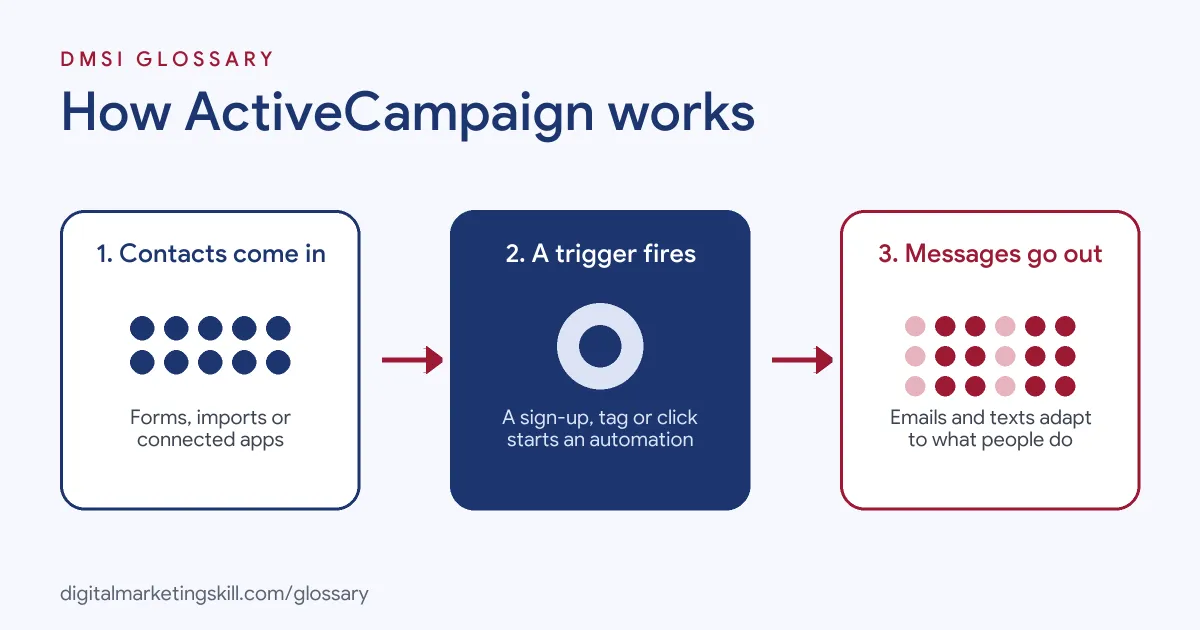
ActiveCampaign works in a simple loop. First, contacts come in through forms, imports or connected apps. Then a trigger starts an automation. Finally, the automation sends messages and updates the contact record, based on what the person does.
Contacts, Lists and Tags
Every person is a contact. You can group contacts into lists, such as “Newsletter” or “Customers”. Then you add tags for more detail. ActiveCampaign says “Tags can be thought of as sub-categories to your lists.” Also, it notes that “Your contacts cannot see the tags you apply to them.” So you can tag people by interest, source or stage without them knowing.
Triggers Start Automations
Next, an automation needs a starting point. ActiveCampaign calls this a trigger. For example, one trigger “begins an automation when a contact submits an ActiveCampaign form.” Another starts when “a tag you specify is applied to a contact.” Other triggers include link clicks, web page visits and date-based fields. However, which triggers you can use depends on your plan.
Actions and Conditions
After the trigger, you add steps. For instance, you can send an email, wait two days, then check if the person clicked. If they did, they go down one path. If they didn’t, they get a reminder. As a result, each contact gets a journey that fits their behaviour. This is the same idea as a drip campaign, but with more branches.
The CRM and Reporting
Finally, sales teams can use the CRM to track deals in a pipeline. Meanwhile, marketing teams watch reports on opens, clicks and conversions. Also, you can score contacts, so the most engaged leads stand out. That links neatly to lead scoring in a wider funnel.
Integrations and Data
ActiveCampaign rarely works alone. Its website says you can “Integrate and connect over 1,000 apps”. For example, you can link an online store, a booking tool or a webinar platform. Then data from those tools can start automations. In addition, no-code tools such as Zapier can pass data between ActiveCampaign and apps without a direct link. So a new lead from an ad form can land in the right list within minutes.
Good data makes every part of the tool work better. For instance, if your contacts have the right tags and fields, your segments stay accurate. On the other hand, messy data leads to the wrong emails reaching the wrong people. That is why setup and naming rules matter as much as the emails themselves.
Examples of ActiveCampaign in Use
- An online course creator. A visitor signs up for a free lesson through a form. Then ActiveCampaign sends a five-email series. Contacts who click the course page get a tag, and the sales email goes only to them.
- An ecommerce shop. The shop connects its store to ActiveCampaign. So when someone leaves items in their basket, an automation sends a reminder email. Later, it sends an SMS if the order is still not complete.
- A B2B consultancy. A lead books a call through the website. Next, the CRM creates a deal, and the owner gets a task. Meanwhile, the lead receives helpful case studies by email before the call.
ActiveCampaign vs Other Email and CRM Tools
| Point | ActiveCampaign | Basic email newsletter tool | Large all-in-one CRM suite |
|---|---|---|---|
| Main focus | Email, automation and a built-in CRM | Sending newsletters to a list | Sales, service and marketing for big teams |
| Automation | Visual flows with triggers and branches | Often simple autoresponders | Advanced, often across many teams |
| Channels | Email, SMS and WhatsApp | Mostly email | Many channels, often as add-ons |
| Typical users | Small and growing businesses, agencies | Creators and very small firms | Mid-size and large companies |
Other well-known tools include Mailchimp, Klaviyo and HubSpot. Each has its own strengths. So pick the one that fits your goals, budget and team.
How to Set Up ActiveCampaign
- Define your goal. Decide what you want first, such as more sales calls or repeat orders.
- Set up your sending domain. Follow the in-app steps to verify your domain. As a result, your emails are more likely to reach the inbox.
- Import your contacts. Upload only people who agreed to hear from you. Then sort them into lists.
- Plan your tags and fields. Write down a simple naming system before you add tags. So your data stays tidy.
- Add a sign-up form. Create a form and place it on your website or landing page.
- Build your first automation. Start with a welcome series triggered by the form.
- Test every path. Add yourself as a test contact and check each email and branch.
- Review results. Check opens, clicks and conversions each week. Then improve one step at a time.
Best Practices for ActiveCampaign
- Start small. Build one useful automation well before you add ten more.
- Name things clearly. Use the same format for tags, lists and automations, so your team can find them.
- Get consent first. Only email people who opted in, and make unsubscribing easy.
- Segment your messages. Use tags and fields to send relevant content, not one email to everyone.
- Clean your list. Remove contacts who never engage, so your sender reputation stays healthy.
- Use goals in automations. Set a clear goal step, so people leave a flow once they convert.
Common Mistakes to Avoid
- Too many tags. Hundreds of unplanned tags make reports and targeting confusing.
- No exit rules. Contacts keep getting sales emails after they already bought.
- Skipping tests. One broken link or wrong condition can affect every contact in the flow.
- Buying lists. Bought contacts didn’t agree to hear from you, and they can harm deliverability.
- Ignoring the CRM. If sales don’t update deals, marketing can’t see what really works.
Where You’ll Use ActiveCampaign at Work
ActiveCampaign shows up in email, outreach and sales support roles. For example, real remote job listings mention tasks such as:
- “Creating and managing email campaigns using ActiveCampaign” (Email Scraping Specialist).
- “You’ll be using ActiveCampaign to send messages, call, launch sequences, and track engagement.” (SDR).
Learn It in the Lead Generation and Email Track
You can learn email automation tools such as ActiveCampaign in the AI-Powered Lead Generation and Email Automation track. Every track includes a U.S. Project Internship from day one, with unlimited 1-on-1 mentoring.
Frequently Asked Questions
What is ActiveCampaign used for?
It is used for email marketing, marketing automation and managing sales contacts. Many teams also use it for SMS and WhatsApp messages.
Is ActiveCampaign a CRM?
Yes, it includes a CRM for tracking deals and contacts. However, most people know it first as an email and automation tool.
What is a trigger in ActiveCampaign?
A trigger is the event that starts an automation. For example, a form sign-up, a new tag or a link click.
What is the difference between lists and tags?
Lists are broad groups of contacts. Tags are smaller labels inside those groups, and contacts can’t see them.
Is ActiveCampaign hard to learn?
The basics are quick to pick up. Still, building good automations takes practice, so start with a simple welcome series.
Sources: ActiveCampaign: Official website; ActiveCampaign Help Center: Automation triggers explained; ActiveCampaign: What are tags; remote job listings on Himalayas and Himalayas.