

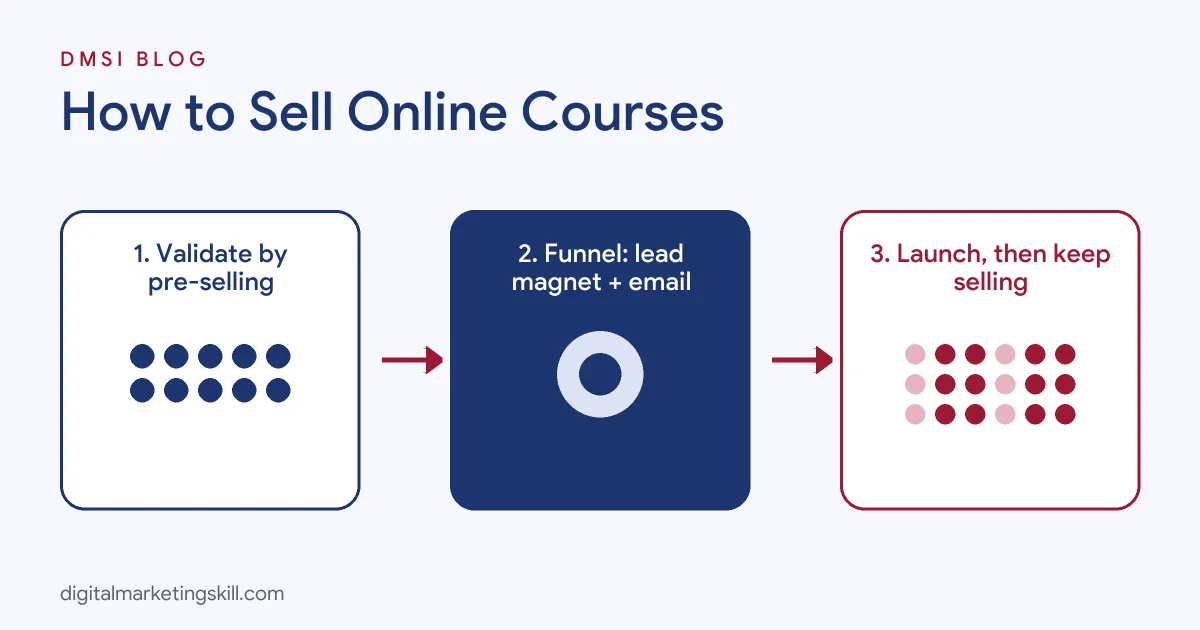
To sell online courses, start by validating that people will pay for the specific result your course delivers, ideally by pre-selling to a small group before building everything. Then choose where to sell (a marketplace such as Udemy for built-in reach, or your own platform for control and higher margins), build a simple sales funnel with a free lead magnet and email sequence, write a clear sales page, and launch with a deadline. After launch, collect testimonials, improve the course from student feedback and keep marketing consistently through content, email and partnerships.
This guide covers every step, from choosing a topic and validating demand to platforms, pricing models, funnels, launch strategies, evergreen sales and the metrics that show whether it is working.
Key Takeaways
- School Drillers recommends testing the water by pre-selling your course before building it in full (School Drillers).
- LearnStream calls your email list your most valuable asset when selling courses and recommends nurturing your audience to build trust before launching (LearnStream).
- LearnyBox sets out a seven-step system covering market understanding, the sales funnel, lead generation, email sequences and webinars, the offer and sales page, checkout and onboarding (LearnyBox).
- What Most Guides Miss
- Choose and Validate a Topic
- Build a Course People Finish
- Where to Sell
- Pricing
- Your Sales Funnel
- Launching
- Ongoing Sales
- Metrics
- Common Mistakes
- FAQ
What Most “How to Sell a Course” Guides Miss
Many guides focus on recording videos and choosing a platform, then treat marketing as an afterthought. In reality, most of the work of selling a course happens before and after it is built: finding people with a specific problem, earning their trust and showing them a clear path to a result. A brilliant course with no audience sells nothing; a simple course that solves an urgent problem for a well-defined group can sell steadily.
Guides also often promise easy passive income. Courses can become a valuable income stream, but results vary widely and depend on demand, marketing and the quality of the outcome students get. Treat a course as a product that needs ongoing marketing and improvement, not a one-time project. The rest of this guide focuses on the parts that actually drive sales.
Step 1: Choose and Validate Your Course Topic
Start with a transformation, not a subject
People do not buy information; they buy a result. “Excel for beginners” is a subject. “Build your first monthly sales dashboard in Excel in a weekend” is a transformation. Define who the course is for, the problem they have and what they will be able to do afterwards.
Check for demand
LearnStream suggests becoming a “digital detective” and checking the competition. Useful checks:
- Are people searching for this topic? Check search volumes and YouTube searches.
- Are there questions about it in online communities, forums and comments?
- Do similar courses exist and sell? Competition is often a good sign of demand.
- What do reviews of competing courses complain about? Those gaps are your opportunity.
Validate with real money
Interest is not the same as buying. School Drillers recommends pre-selling, and LearnStream suggests testing with a small offer first. Options include:
- a pre-sale landing page with an early-bird offer and a clear start date;
- a paid live workshop on the core topic;
- a beta cohort taught live, which you record and refine into the full course.
If enough people pay, build the course. If not, adjust the topic, audience or offer before investing months of work.
Establish credibility
School Drillers stresses having industry experience, expertise and credibility. You do not need to be the world’s leading expert, but you need real results and the ability to help others get them. Share your story, examples of your work and results from early students.
Step 2: Build a Course People Actually Finish
Completion matters because students who finish get results, leave testimonials and buy again.
- Outline backwards from the result. List the steps needed to reach the outcome, then turn each into a module.
- Keep lessons short and focused. One idea per lesson, ideally a few minutes long.
- Add action. Worksheets, templates, checklists, quizzes and assignments turn watching into doing.
- Show quick wins early. A small success in the first module keeps motivation high.
- Add community or support. LearnStream recommends adding a community; group calls, forums or chat groups help students stay on track.
- Keep production simple. Clear audio and useful content matter more than expensive video. A good microphone and screen recording are enough for many topics.
Step 3: Choose Where to Sell
LearnStream compares all-in-one platforms with a custom WordPress setup. There are three main routes:
| Option | Examples | Pros | Cons |
|---|---|---|---|
| Marketplaces | Udemy, Skillshare | Built-in audience and discovery | Less control over price, branding and student data |
| All-in-one course platforms | Teachable, Thinkific, Kajabi, Podia, LearnWorlds | Course hosting, checkout and email in one place | Monthly fees and platform limits |
| Your own website | WordPress with an LMS plugin | Full control, branding and data | More setup and maintenance |
Many creators use a marketplace to test demand and build reviews, then sell a premium version or related programme on their own platform. In some regions, local platforms such as Selar make it easier to accept payments in local currencies. Whatever you choose, check payment options for your audience’s countries, fees, payout methods and how easily you can export student data.
Step 4: Price Your Course
LearnStream covers choosing a pricing model and finding the right price point. Common models include:
- One-time payment: simple and common for self-paced courses.
- Payment plans: split the price into instalments to make it more accessible.
- Subscription or membership: ongoing access to a library of content, community or new lessons.
- Tiers: a basic self-paced version, a version with community or feedback, and a premium version with coaching.
- Cohort-based pricing: live programmes with set start dates, often priced higher because of more support.
Price based on the value of the result, the level of support and what your audience can afford, not just the number of videos. Check what similar courses charge, and test. Early-bird prices for beta students reward early buyers and help gather testimonials.
Step 5: Build Your Sales Funnel
LearnyBox describes the sales funnel as the system that sells an online course. A simple, effective funnel looks like this:
- Attract: publish helpful content on YouTube, social media, a blog or podcast, focused on your course topic.
- Capture: offer a free lead magnet, such as a checklist, template, mini-course or workshop, in exchange for an email address.
- Nurture: send an email sequence that teaches, shares stories and builds trust. LearnyBox suggests a five- to seven-day sequence.
- Convert: invite people to a webinar or send them to a sales page with a clear offer.
- Onboard: welcome new students quickly so they start and get an early win.
LearnStream calls your email list your most valuable asset. Unlike social media followers, you own the relationship, and email consistently drives course sales. See our guides to the sales funnel and email marketing.
Write a sales page that converts
LearnyBox includes a recommended sales page structure and offer structure. A strong course sales page usually includes:
- a headline stating the result and who it is for;
- the problem and why common solutions fail;
- what students will learn and be able to do, module by module;
- who you are and why you can help;
- real testimonials and results, used with permission;
- what is included: lessons, templates, community, support and access period;
- price, payment options and any guarantee or refund policy;
- frequently asked questions;
- a clear call to action repeated through the page.
Never invent testimonials or exaggerate results. Honest proof sells better over time and protects your reputation.
Make checkout simple
LearnyBox dedicates a step to frictionless checkout. Keep forms short, offer the payment methods your audience uses, show what they are buying and send a confirmation email immediately with login details and a first step.
Step 6: Launch Your Course
LearnStream recommends crafting a course launch playbook. A simple launch over two to three weeks works well:
- Warm-up (one to two weeks): share content about the problem your course solves, tell your story and grow your email list.
- Open cart: announce the course, send people to the sales page and host a live webinar or workshop.
- Middle of launch: answer questions, share student results from your beta and address objections.
- Close: remind people before the deadline. Real deadlines, such as an enrolment window or early-bird bonus ending, help people decide.
Webinars and live workshops
LearnyBox recommends live or evergreen webinars of 45 to 60 minutes. Teach something genuinely useful, show what is possible, then explain how the course helps people go further. Live sessions also let you answer questions directly, which builds trust.
Launch even with a small audience
If your list is small, a launch can still work with personal outreach. Message people who have engaged with your content, partner with someone who has an audience in your niche, run a small paid ad campaign to a free workshop or offer a beta cohort to a handful of students. Early sales and testimonials matter more than big numbers at first.
Step 7: Keep Selling After Launch
After the first launch, build systems that keep bringing in students.
- Evergreen funnel: an automated sequence that sends new subscribers through teaching emails to an offer.
- Content marketing and SEO: articles and videos that answer questions related to your course and bring in search traffic.
- YouTube: tutorials that demonstrate your expertise and link to your free lead magnet. See our guide to creating a YouTube channel.
- Affiliates and partners: pay commission to people who recommend your course to their audiences.
- Paid ads: once you know your funnel converts, ads can scale it.
- Repeat launches: open enrolment a few times a year with fresh content and testimonials.
- Corporate and group sales: sell licences to companies, schools or organisations.
Onboarding and Student Success
LearnyBox stresses delivery and onboarding as the experience that keeps students coming back, and LearnStream covers a welcome sequence and keeping students engaged. In practice:
- Send a welcome email within minutes, with login details and a clear first step.
- Ask students to complete a small task in the first hour.
- Send reminder emails to students who have not logged in.
- Celebrate milestones and share student wins (with permission).
- Ask for feedback at the end of each module and improve the course.
- Request testimonials from students who reach the outcome.
Happy, successful students become your best marketing.
Updating Your Course Over Time
Courses age, especially in fast-moving fields such as software, marketing and social media. Schedule a review every few months: replace outdated screenshots and tools, add answers to common student questions as new lessons, and refresh examples. Tell existing students about updates; it builds goodwill and gives you a reason to email your list. A well-maintained course earns better reviews and is easier to relaunch.
Metrics to Track
| Metric | What it tells you |
|---|---|
| Lead magnet sign-up rate | Whether your free offer attracts the right people |
| Email open and click rates | Engagement with your nurture sequence |
| Sales page conversion rate | How persuasive your offer and page are |
| Cost per lead and per sale | Efficiency of paid campaigns |
| Completion rate | Whether students get results |
| Refund rate | Whether expectations match the course |
| Testimonials and referrals | Satisfaction and word of mouth |
LearnyBox suggests testing one variable at a time, such as a headline, price or email subject line, so you know what made the difference.
Handling Objections Before They Stop a Sale
Most people who visit a course sales page leave without buying, often because of an unanswered doubt. Common objections include “I do not have time”, “I am not sure it will work for me”, “I can find this for free” and “I cannot afford it right now”. Address each one directly. Show how long lessons take and how students fit them around work. Share results from people in different situations, with permission. Explain what your course offers that free content does not, such as structure, templates, feedback and community. Offer a payment plan or a smaller starter product for people with tight budgets.
A clear refund or satisfaction policy can also reduce risk for buyers, as long as you honour it. Answer objections on the sales page, in your FAQ section, in launch emails and during live sessions. Keep a list of every question prospective students ask, and update your marketing so the next person finds the answer before they need to ask.
Objections are useful feedback. If the same doubt keeps appearing, it may point to a gap in the course itself, such as missing beginner support or too little practical work, that you can fix in the next version.
Common Mistakes
- Building the whole course before validating demand. Pre-sell or run a beta first.
- Choosing a topic that is too broad. Specific results for specific people sell better.
- No email list. Relying only on social media or a marketplace leaves you exposed.
- Overpromising income or results. It damages trust and can breach advertising rules.
- Weak onboarding. Students who never start never succeed or recommend you.
- Launching once and stopping. Courses need ongoing marketing.
- Ignoring feedback. Student questions show where the course needs improvement.
What Kinds of Online Courses Sell Best?
LearnStream addresses the question of the most profitable type of online course. In general, courses tend to sell well when they help people:
- earn or save money, such as career skills, freelancing, marketing, sales, investing basics or bookkeeping;
- get a job or promotion, through certification preparation, software skills or interview practice;
- solve an urgent problem, such as passing an exam, fixing a business issue or managing a health routine with professional guidance;
- pursue a passion, such as photography, music, cooking, crafts or languages.
The best topic is one where you have real expertise and the audience has a clear, pressing need. Narrow niches often beat broad topics because the course can speak directly to one group.
Using Marketing Skills to Sell Courses
Selling a course is essentially digital marketing: positioning, content, SEO, email, social media, paid ads, landing pages and analytics. Creators who learn these skills, or hire people who have them, usually sell far more than those who rely on a platform’s built-in audience alone. If you already teach or train people, treating your course as a marketing project with a clear funnel is one of the biggest improvements you can make.
One Rule to Remember
Validate before you build, sell a specific result to a specific audience, own your email list, and keep marketing and improving the course long after launch.
Example: a bookkeeper in Lagos wants to teach small business owners to manage their accounts. She runs a paid two-hour live workshop on simple monthly bookkeeping and sells out a small group. Their questions shape a six-module course with templates. She builds an email list with a free cash-flow template, launches to that list with a live webinar, and adds a payment plan. Testimonials from the first group help the next enrolment. This example is illustrative and not a real person.
Career Paths in Course Marketing
Online education businesses need marketers for funnels, email, ads, content and launches. Course creators often hire freelancers for these tasks. If you are in your country, learning how to build and optimise course funnels, write sales pages and run launch campaigns can lead to remote roles with education companies and freelance work with creators worldwide.
Frequently Asked Questions
How do I start selling online courses?
Choose a specific result for a specific audience, validate demand by pre-selling, pick a platform, build a simple funnel with a lead magnet and emails, and launch with a clear deadline.
Do I need a large audience to sell a course?
No. Small, engaged audiences can buy, and you can grow through partnerships, personal outreach, content and small ad budgets.
Should I sell on Udemy or my own website?
Marketplaces provide reach but less control; your own platform provides control and data but needs marketing. Many creators use both.
How much does it cost to create an online course?
Costs can be very low if you use a phone or basic microphone, free tools and a marketplace, or higher with professional video and paid platforms. Start lean and invest as sales grow.
How do I price my online course?
Base the price on the value of the result, the support included and what your audience can afford, then compare similar courses and test.
What is the best platform for selling courses?
It depends on your needs. Teachable, Thinkific, Kajabi, Podia and LearnWorlds are popular all-in-one options; WordPress with an LMS plugin offers more control; marketplaces offer reach.
Can I sell courses on Etsy?
Etsy is designed for physical and digital products such as templates and printables. Course-style content is usually better sold on course platforms, but you can sell related downloadable products there if they follow Etsy’s rules.
How long should an online course be?
As long as needed to deliver the result and no longer. Shorter, focused courses often have higher completion rates.
How do I get testimonials for a new course?
Run a beta cohort at a lower price in exchange for honest feedback and testimonials, and ask students who reach the outcome.
How much can you make selling online courses?
Results vary widely, from little or nothing to a significant income, depending on demand, marketing, pricing and results. There are no guarantees.
Your Next Step
Selling a course is a digital marketing project: funnels, email, content and ads are what bring in students. The Master Diploma in Digital & AI Marketing at Digital Marketing Skill Institute covers AI-powered Social Media Management and Advertising, Lead Generation and Email Automation, Google, and a WordPress and SEO track where you build and rank a real website.
From day one, you work on a real U.S. company’s project through the U.S. Project Internship, so you finish with real results and a verified U.S. work reference letter. You also get unlimited one-on-one coaching. The program carries dual US and UK accreditation, is recognised in more than 100 countries, and runs 100% online over three months.
You can build those skills wherever you live, anywhere in your country. Read student reviews, then apply for the 65% partial scholarship to see if you qualify.
Sources checked November 2026: School Drillers, LearnStream and LearnyBox. Platforms are mentioned as examples only. We have no connection with these companies.