
Brevo is a customer platform for email marketing, SMS, WhatsApp, chat, marketing automation and sales CRM, formerly known as Sendinblue. Small and mid-sized businesses use it to send newsletters, automated emails and order messages from one account. So if you work in email or lead generation, you will often meet it in job ads and client set-ups. Also, its free plan makes it a common first tool for new marketers.
Key Takeaways
- Brevo is a multichannel platform that began as the newsletter tool Sendinblue.
- It covers email campaigns, SMS, WhatsApp, live chat, automation and a sales CRM.
- It also sends transactional messages, such as order confirmations, through SMTP and an API.
- There is a free plan, and paid plans named Starter, Standard, Professional and Enterprise.
- Marketers use it to build lists, segment contacts and run automated email journeys.
What Is Brevo?
Brevo is software that helps a business talk to its customers. For example, you can use it to send a monthly newsletter, a welcome series or a text message about a sale. In addition, it stores your contacts, so you can see who opened, clicked or bought.
The company was founded by Armand Thiberge, with roots in India and France. It started out as Sendinblue, a newsletter service. Later, it changed its name to Brevo. In its own blog post on the change, the company explained that “our product simply outgrew our name.” It also says the name “comes from the word Bravo, a word that celebrates success.”
Today Brevo calls itself a full customer platform. Its site lists email, SMS, WhatsApp, live chat and chatbots as channels. On top of that, it offers campaign automation, transactional messaging and sales tools. So it competes with other email marketing and CRM tools rather than only newsletter senders.
Think of it like a post office, a phone line and an address book in one. You keep your contacts in one place. Then you choose how to reach them, and Brevo tracks what happens next.
Why It Matters
Why should a marketer learn Brevo? First, many small firms and agencies use it because it is easy to start. Second, skills you learn there carry over to other platforms. For instance, lists, segments, automations and sender settings work in similar ways across most tools. As a result, Brevo is a practical place to learn the basics of email and lead nurturing.
Who Uses Brevo
Brevo suits many kinds of teams. For example, a solo founder might use only the free plan for a newsletter. Meanwhile, an agency might run several client accounts with automations and SMS. In addition, an online shop might connect it to its store for receipts and abandoned basket emails. So the same tool can be simple or advanced, depending on how you set it up.
Also, Brevo often sits next to other tools. For instance, it may receive leads from a form builder or a CRM. Then it can pass results back through integrations. Because of this, marketers who know Brevo also learn how tools connect, which is a useful skill in any role.
How Brevo Works
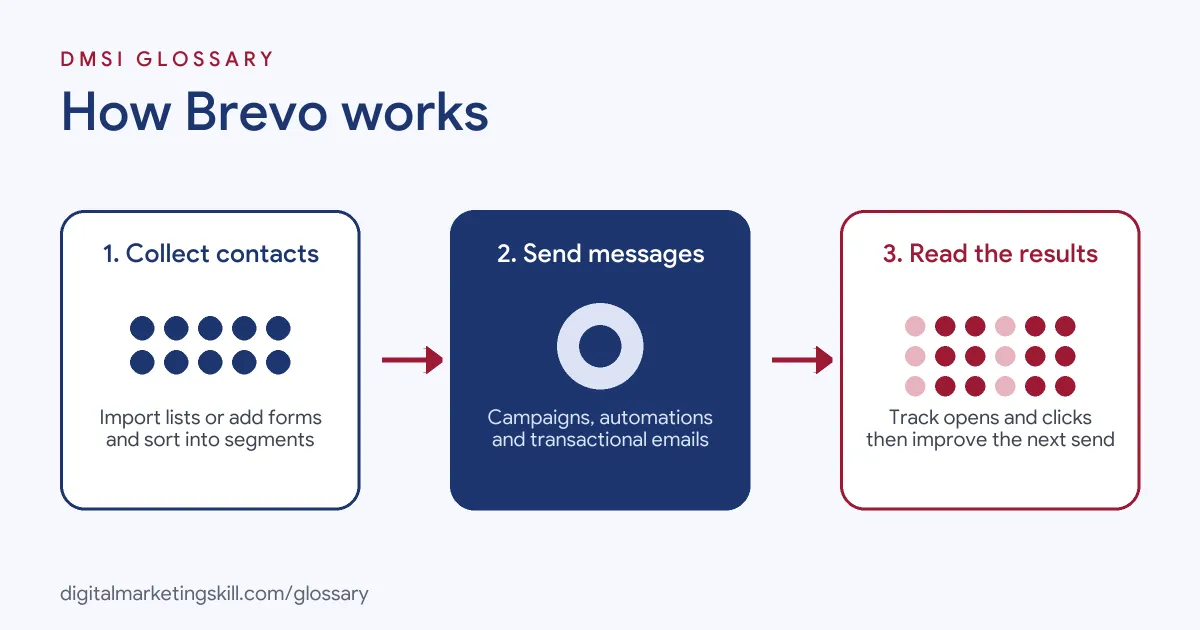
Brevo works in three broad stages. First, you collect and store contacts. Next, you send messages to them, either by hand or with automation. Finally, you read the results and improve your next send.
Contacts and lists
Every person you can message is a contact. You can import contacts from a file or collect them with sign-up forms. Then you sort them into lists and use attributes, such as country or last purchase, for segmentation. Also, you can use a double opt-in form, so people confirm their address before they join.
Campaigns and automation
A campaign is a one-off send, such as a newsletter. By contrast, an automation runs on its own when something happens. For example, a new subscriber can trigger a welcome email, and a missed purchase can trigger a reminder. Brevo describes this part as tools to “Boost conversions with automated multichannel customer journeys.” This is where Brevo acts as a marketing automation tool.
Transactional messages
Some emails are not marketing at all. Instead, they confirm an order, reset a password or share a receipt. These are transactional emails. Brevo says it can “Send real-time email, SMS, & WhatsApp messages triggered via SMTP relay and API.” So a developer can connect a website or shop to Brevo and send these messages automatically.
Sales CRM and reports
Brevo also has a sales area with deals and pipelines. In addition, every campaign has a report with opens, clicks and unsubscribes. So you can link marketing results to the people your sales team is working with.
Examples of Brevo
- A local bakery. The owner collects emails at the till with a sign-up form. Then they send a short weekly newsletter with new cakes. Also, a welcome automation sends a thank-you email to each new subscriber.
- An online shop. The developer connects the shop to Brevo’s API. As a result, order confirmations and shipping updates go out on their own. Meanwhile, the marketing team runs separate sale campaigns to a segment of past buyers.
- A small consultancy. The team uses Brevo forms on its landing page to collect leads for a free guide. Then a three-email sequence follows up. Finally, interested leads move into the sales pipeline as deals.
Brevo vs Other Email Platforms
| Point | Brevo | Typical email-only tool | Full CRM suite |
|---|---|---|---|
| Main focus | Email plus SMS, WhatsApp, chat and sales | Email campaigns and newsletters | Sales, service and marketing together |
| Transactional email | Built in, via SMTP and API | Sometimes, often as an add-on | Varies by product |
| Sales pipeline | Included as a sales area | Usually not included | Core feature |
| Good fit for | Small and mid-sized teams | Simple newsletter needs | Larger teams with complex sales |
Other tools you may meet include Mailchimp and Klaviyo. Each has its own strengths, so the best choice depends on the business and its budget.
How to Set Up Brevo
- Create an account. Sign up on the Brevo site. Brevo approves new accounts for sending before you can start.
- Verify your sender. Add the email address you will send from. Then authenticate your domain with the DNS records Brevo gives you.
- Import your contacts. Upload a file of people who agreed to hear from you. After that, map each column to a contact attribute.
- Build a sign-up form. Create a form, ideally with double opt-in, and add it to your website.
- Design your first campaign. Use the drag-and-drop editor or a template. Also, write a clear subject line.
- Send a test. Send it to yourself first and check links, images and mobile view.
- Set up a welcome automation. Trigger an email when someone joins a list.
- Review the report. Check opens, clicks and unsubscribes. Then adjust your next send.
Best Practices for Brevo
- Authenticate your domain. Set up SPF, DKIM and DMARC so inbox providers trust your emails.
- Only email people who opted in. Bought lists hurt your sender reputation and can break privacy rules.
- Segment before you send. Smaller, relevant groups usually get better engagement than one big blast.
- Keep marketing and transactional apart. Use separate senders or settings, so receipts still land if a campaign struggles.
- Clean your list. Remove hard bounces and long-term inactive contacts on a regular basis.
- Test on mobile. Many people read email on their phone, so check every design there.
Common Mistakes to Avoid
- Skipping domain set-up. Emails from an unverified domain are more likely to land in spam.
- Uploading old lists. Contacts who never agreed or forgot you can cause complaints.
- Sending too often. Too many emails can push unsubscribes up fast.
- Ignoring the free plan’s daily cap. The free plan limits how many emails you can send each day, so plan big sends around it.
- Building automations without testing. A broken trigger can send the wrong email to everyone, or to no one.
Where You’ll Use Brevo at Work
Brevo shows up in email, marketing operations, tracking and even web developer roles. For example, real remote job listings mention:
- “Setting up the email marketing in the platforms like Brevo, and Apollo, and writing marketing emails like newsletters” (HR and Admin Assistant).
- “Integrate and maintain third-party APIs, including Stripe, Square POS, Twilio, and Brevo.” (Web Developer).
- “Practical experience with PostHog, GA4, Google Tag Manager (GTM), Microsoft Clarity, and Brevo.” (Paid Media & Tracking Assistant).
Learn It in the Lead Generation and Email Track
You can learn email platforms like Brevo, plus lists, automation and deliverability, in the AI-Powered Lead Generation and Email Automation track. Every track includes a U.S. Project Internship from day one, with unlimited 1-on-1 mentoring.
Frequently Asked Questions
Is Brevo the same as Sendinblue?
Yes. Sendinblue changed its name to Brevo as the product grew beyond newsletters into a wider customer platform.
Does Brevo have a free plan?
Yes. Brevo offers a free plan. Its pricing page sets a daily sending limit for the free plan, so check the current figure before you plan a campaign.
Can Brevo send SMS and WhatsApp messages?
Yes. Brevo lists SMS and WhatsApp as channels next to email, live chat and chatbots.
What are transactional emails in Brevo?
They are automatic messages like order confirmations and password resets. Brevo sends them through SMTP relay or its API.
Do I need to code to use Brevo?
No. Campaigns, forms and automations use visual editors. However, connecting a website for transactional emails usually needs a developer or a plugin.
Sources: Brevo: About us; Brevo: From Sendinblue to Brevo: Introducing our new name & brand; Brevo: Pricing; Brevo Developers: Welcome; remote job listings on Himalayas, Himalayas and Himalayas.