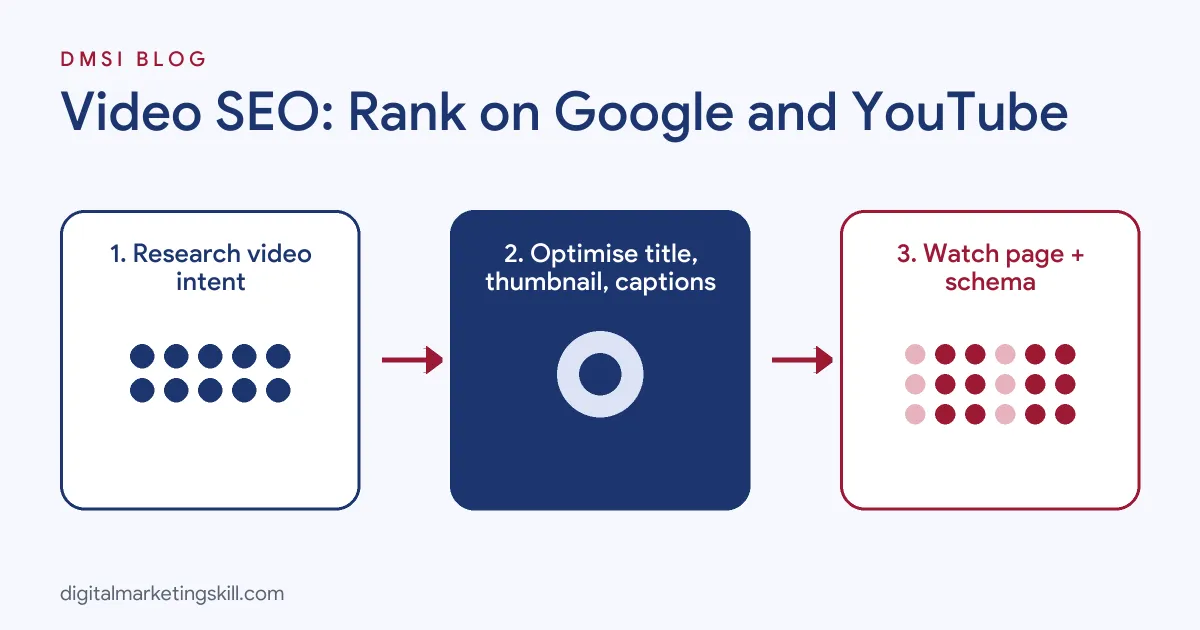
Video SEO is the practice of making videos easy to find in Google, YouTube and other search results. It covers two places: the platform where the video lives, such as YouTube, where titles, descriptions, thumbnails, chapters and watch time matter most; and your own website, where a dedicated watch page, a transcript, VideoObject structured data, a good thumbnail and a crawlable video file help Google index the video and show it with rich features such as key moments.
This guide explains how video SEO works on both, how to choose topics and keywords, how to optimise each element, the technical steps Google recommends, how to measure results and the mistakes that stop videos ranking.
Key Takeaways
- Google recommends creating a dedicated watch page for each video, where the video is the main focus, with a unique title and description (Google Search Central).
- Google supports video files such as MP4, WebM and MOV, and thumbnails in formats including JPEG, PNG, WebP and AVIF, with a minimum of 60×30 pixels and larger preferred (Google Search Central).
- Clip and SeekToAction structured data help Google show key moments, the timestamped segments that can appear in search results (Google Search Central).
- Search Console’s video indexing report shows how many indexed watch pages contain an indexed video and why others were not indexed (Google Search Central).
- What Most Video SEO Guides Miss
- Why Video SEO Matters
- Where to Host: YouTube or Your Site
- Topic and Keyword Research
- Optimise the Video Itself
- Video SEO on Your Website
- Video SEO on YouTube
- Measuring Results
- Common Mistakes
- FAQ
What Most Video SEO Guides Miss
Many video SEO articles are really YouTube SEO articles. They focus on titles, tags and thumbnails, which matter, but they ignore the website side: how Google finds and indexes videos embedded on your own pages. Other articles focus only on technical markup and ignore what makes people click and watch. Effective video SEO needs both, because search engines rank videos that are easy to understand technically and that people actually engage with.
The second gap is intent. A video only ranks if it matches what people want when they search. Search results for “how to tie a tie” are full of videos because people want to see it. Results for “best accounting software” might show articles and comparison tables. Before making a video for search, check whether Google already shows videos for that query.
Why Video SEO Matters
- More places to appear: videos can show in Google’s main results, the Videos tab, key moments, YouTube search and suggested videos.
- Longer life: a well-optimised video can keep attracting views for years, especially tutorials and explainers.
- Better engagement on your pages: a relevant video can keep visitors on a page longer and help them understand a product or process.
- Support for other content: videos can be repurposed into Shorts, social clips, blog posts and email content.
Where to Host: YouTube or Your Own Website?
The answer is often both, for different goals.
| Option | Best for | Trade-off |
|---|---|---|
| YouTube | Reach, discovery through YouTube search and recommendations, free hosting | Views and attention stay largely on YouTube |
| Your website (self-hosted or via a video platform) | Traffic and conversions on your own pages, more control over the experience | Needs technical setup for indexing and fast loading |
| YouTube embedded on your site | A mix of reach and on-site engagement | Google may treat the YouTube page as the main version; your page still needs unique content |
Many businesses publish on YouTube for reach and embed the same video on a relevant page of their own site, surrounded by useful text, a transcript and a clear call to action. Video hosting platforms such as Vimeo and Wistia offer SEO features for videos hosted on your own pages.
Topic and Keyword Research for Video
- Start with questions your audience asks. Customer emails, sales calls, comments and support tickets are full of video ideas.
- Check for video intent. Search the topic in Google and see whether videos appear in the results. If they do, video has a good chance of ranking.
- Use YouTube search suggestions. Typing a topic into YouTube’s search bar shows what people are searching for.
- Use keyword tools. Google Keyword Planner, Google Trends and YouTube-focused tools can show search interest and competition.
- Favour specific, long-tail topics. “How to set up a Google Business Profile for a restaurant” is easier to rank for than “Google Business Profile”.
- Plan content clusters. A series of related videos on one topic builds authority and keeps viewers watching.
Optimise the Video Itself
Metadata helps search engines understand a video, but the video still has to satisfy viewers. Search platforms pay close attention to whether people click and keep watching.
Match the search intent quickly
If someone searches “how to change a car tyre”, they want the steps, not a long introduction. Deliver the promise early and keep the video focused. A tight script helps; see our guide on how to write a video script.
Say your keywords naturally
Platforms can process spoken words through automatic captions. Saying the main topic early and naturally in the video helps reinforce what it is about.
Structure the video into clear sections
Clear sections make it easier to add chapters on YouTube and key moments in Google, and they help viewers jump to what they need.
Design for retention
- Open with a hook that confirms the viewer is in the right place.
- Cut dead time, long pauses and repeated points.
- Use visuals, on-screen text and examples to keep attention.
- End with a clear next step rather than a long outro.
Video SEO on Your Own Website
Google’s documentation sets out how to help Google find, index and display videos on your pages. These are the main steps.
1. Create a dedicated watch page
Google recommends a separate page for each video where the video is the main focus, with a title and description unique to that video. A page with ten videos in a gallery makes it harder for Google to understand which one matters most.
2. Make the video easy to find in the page code
Embed the video using standard HTML elements such as the video tag, an iframe or a well-supported player. Videos that only load after user interaction or through unusual scripts may not be discovered. Use stable URLs for the video file and the page.
3. Use a supported file type
Google lists supported video formats including MP4, WebM and MOV. Use a common format and compress the file so the page still loads quickly.
4. Provide a high-quality thumbnail
Google needs a valid thumbnail image at a stable URL that Googlebot can access. It supports formats such as JPEG, PNG, WebP and AVIF, with a minimum of 60×30 pixels and larger images preferred. A clear, relevant thumbnail also improves click-through from search.
5. Add VideoObject structured data
Structured data describes the video in a format search engines understand. Google asks that each video has unique values for its name, description and thumbnail URL, and that the information matches the actual content. Our glossary entries on schema markup and rich results explain the basics.
6. Enable key moments
Key moments let Google show timestamped segments of a video in results. You can use Clip markup to set the start time, end time and label for each segment, or SeekToAction markup to tell Google how timestamps work in your URLs. On YouTube, chapters in the description serve a similar purpose.
7. Add a transcript and captions
A transcript on the page gives search engines text to understand the video and helps people who prefer reading or cannot listen. Captions also improve accessibility and engagement, especially on mobile.
8. Surround the video with useful text
StudioHawk recommends making sure the rest of the page is relevant to the video. Add a short summary, key points, related resources and a call to action, so the page is valuable even for people who do not press play.
9. Consider a video sitemap
A video sitemap can help Google discover videos on your site. Google explains that the watch page URL goes in the loc tag and the video file in the video content location tag, and that video sitemaps can include thumbnail and expiry information. See our glossary entry on XML sitemaps.
10. Protect page speed
Large video files can slow pages down. Use lazy loading or a lightweight player facade, compress files and consider hosting video on a platform built for streaming. Fast pages support both user experience and Core Web Vitals.
Video SEO on YouTube
YouTube is both a search engine and a recommendation engine. Search Engine Land’s video SEO guide points out that most YouTube views come from YouTube suggesting videos to users rather than from search, so optimising for clicks and watch time matters as much as keywords. Our guide to YouTube SEO for beginners covers the platform in more depth; here are the essentials.
Titles
Put the main topic near the start, keep it clear and specific, and make it compelling enough to click. Searchbloom stresses that the title should accurately reflect what the video is about, because clever or misleading titles tend to backfire when viewers leave quickly.
Descriptions
Write a useful description that summarises the video in the first couple of lines, uses the main keyword naturally, and includes relevant links and timestamps. A longer description gives YouTube and Google more context.
Chapters
Add timestamps in the description to create chapters. They help viewers navigate and can appear as key moments in Google search.
Thumbnails
Thumbnails strongly influence click-through rate. Use a custom image with a clear subject, readable text if any, consistent branding and contrast that stands out at small sizes. Avoid misleading thumbnails; they hurt watch time and trust.
Tags and hashtags
Tags help mainly with common misspellings and variations; they play a smaller role than titles, descriptions and engagement. A few relevant hashtags in the description can help categorise the video.
Captions and language
Review automatic captions for accuracy or upload your own. Correct captions improve accessibility and help YouTube understand the video. Translated titles and captions can help reach other language audiences.
Playlists, cards and end screens
Group related videos into playlists, and use cards and end screens to point viewers to the next video. Longer viewing sessions help your channel.
Engagement
Ask a specific question to encourage comments, reply to viewers and pin a helpful comment. Engagement signals that people value the video.
Video SEO for Short-Form Video
Short videos on YouTube Shorts, TikTok and Instagram Reels are discovered mainly through feeds, but search inside these apps is growing. Use clear captions with keywords, say the topic early, add on-screen text and use a few relevant hashtags. Short clips can also point viewers to longer videos or your website. See our glossary entry on YouTube Shorts.
Video SEO for Local Businesses
Local businesses can use video to stand out in searches near them. Short videos showing the shop, the team, how a service works or answers to common questions can be embedded on location pages, shared on Google Business Profile and posted to YouTube with the town or area in the title and description where it is natural. Videos of real work, such as a renovation, a haircut or a meal being prepared, build trust and give people a reason to choose you over a competitor with only photos. Keep these videos short, film them on a phone if needed, and focus on answering the questions customers actually ask before they visit or call. Over time, a small library of local videos can support both your website and your profile in local search.
How to Measure Video SEO Results
On your website
- Search Console video indexing report: shows how many watch pages have an indexed video and lists reasons others were not indexed. See our glossary entry on Google Search Console.
- Search performance: filter by search appearance and the Videos tab to see impressions and clicks.
- Engagement: plays, watch time and conversions on the page, from your analytics or video platform.
On YouTube
- Traffic sources: how much comes from YouTube search, suggested videos, external sites and browse features.
- Search terms: what people searched before finding your video.
- Impressions click-through rate: how often people clicked after seeing your thumbnail.
- Average view duration and retention: where viewers drop off.
Use the data to improve titles, thumbnails, intros and topics. A video with good retention but low click-through may need a better thumbnail; a video with high click-through but poor retention may not deliver what the title promises.
Updating and Improving Older Videos
Video SEO is not a one-time task. Review your top videos every few months:
- Refresh titles and thumbnails on videos with high impressions but low click-through.
- Add or update chapters and descriptions.
- Add links to newer related videos.
- Fix outdated information with pinned comments, cards or a new version.
- Embed strong videos on relevant blog posts and landing pages.
Common Mistakes
- Making videos for topics without video intent. Check the search results first.
- Several videos on one page with no main focus. Give important videos their own watch page.
- No transcript or summary. Search engines and many viewers rely on text.
- Missing or duplicated structured data. Each video needs unique, accurate information.
- Misleading titles and thumbnails. They hurt retention and trust.
- Slow pages. Heavy video files can damage page performance.
- Ignoring analytics. Without data, you cannot see what to fix.
Video SEO Checklist
Use this checklist before and after publishing each video.
Before filming
- Topic matches a real question your audience searches.
- Google and YouTube already show videos for the main query.
- Script delivers the answer early and is split into clear sections.
On YouTube
- Clear, specific title with the main topic near the start.
- Custom thumbnail that is readable at small sizes.
- Useful description with links and timestamps for chapters.
- Accurate captions.
- Added to a relevant playlist, with an end screen pointing to the next video.
On your website
- Dedicated watch page with a unique title and description.
- Video embedded with standard HTML or a reliable player.
- Thumbnail at a stable, crawlable URL.
- VideoObject structured data with unique, accurate details.
- Transcript or detailed summary on the page.
- Fast loading on mobile.
- Included in a sitemap.
After publishing
- Check the Search Console video indexing report.
- Review click-through and retention after a few weeks.
- Share the video on social channels and in email.
One Rule to Remember
Make videos people are searching for, deliver the answer fast, and give search engines everything they need to understand the video: a clear title, a dedicated page, a transcript, a good thumbnail and accurate structured data.
Example: an accounting software company notices customers keep asking how to send their first invoice. It records a four-minute tutorial, publishes it on YouTube with a clear title, chapters and captions, and embeds it on a dedicated help page with a transcript, VideoObject markup and a thumbnail. Within a few weeks, the help page shows the video with key moments in Google results, and support tickets about invoicing fall. This example is illustrative and not a real business.
Video SEO and Your Marketing Career
Video SEO combines content, technical SEO and analytics, which makes it a valuable specialism. Brands need people who can plan video topics around search demand, optimise YouTube channels and make sure videos on their websites are indexed. If you are in your country, building a portfolio that shows videos you ranked, the traffic they brought and how you measured it can help you win remote SEO, content and video marketing roles worldwide.
Frequently Asked Questions
What is video SEO?
Video SEO is optimising videos and the pages they sit on so they are found in Google, YouTube and other search results.
How do I do SEO for a YouTube video?
Choose a topic people search for, write a clear title, add a useful description with chapters, design a strong thumbnail, use accurate captions and keep viewers watching with a focused video.
Do videos help website SEO?
Relevant videos can make pages more useful and engaging, and can appear in video results. They help most when the page also has strong text content and the video is properly indexed.
Should I host videos on YouTube or my website?
YouTube is best for reach; your website is best for traffic and conversions. Many businesses use both, embedding YouTube videos or self-hosting key videos on dedicated pages.
What is VideoObject schema?
It is structured data that describes a video, including its name, description, thumbnail, upload date and duration, so search engines understand it.
What are key moments in Google?
Key moments are timestamped segments of a video shown in search results. You can enable them with Clip or SeekToAction markup, or chapters on YouTube.
Do transcripts help video SEO?
Yes. Transcripts give search engines text to understand the video and help viewers who prefer reading.
Do YouTube tags still matter?
They play a small role compared with titles, descriptions, thumbnails and engagement, but can help with misspellings and variations.
What is the YouTube seven-second rule?
It is an informal idea that you have only the first few seconds to convince viewers to keep watching, so the opening should confirm the topic and hook attention immediately.
How long does video SEO take to work?
Some videos gain views within days, but many take weeks or months to build rankings. Consistent publishing and regular optimisation usually bring the best results.
Your Next Step
Video SEO blends content, technical SEO and analytics, skills that brands and agencies hire for. The Master Diploma in Digital & AI Marketing at Digital Marketing Skill Institute covers AI-powered Social Media Management and Advertising, Lead Generation and Email Automation, Google, and a WordPress and SEO track where you build and rank a real website.
From day one, you work on a real U.S. company’s project through the U.S. Project Internship, so you finish with real results and a verified U.S. work reference letter. You also get unlimited one-on-one coaching. The program carries dual US and UK accreditation, is recognised in more than 100 countries, and runs 100% online over three months.
You can build those skills wherever you live, anywhere in your country. Read student reviews, then apply for the 65% partial scholarship to see if you qualify.
Sources checked November 2026: Google Search Central: Video SEO best practices, StudioHawk, Searchbloom and Search Engine Land. We have no connection with these companies.