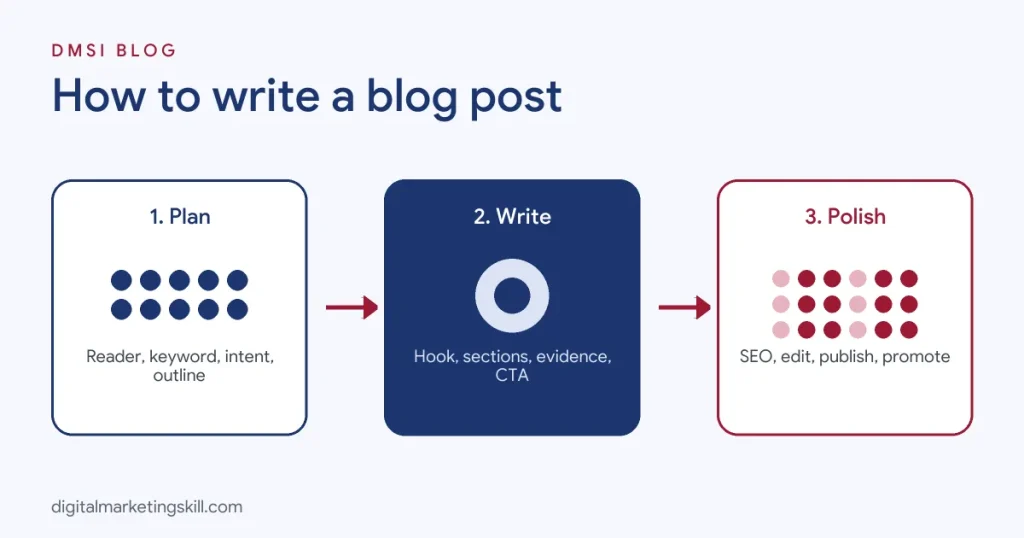
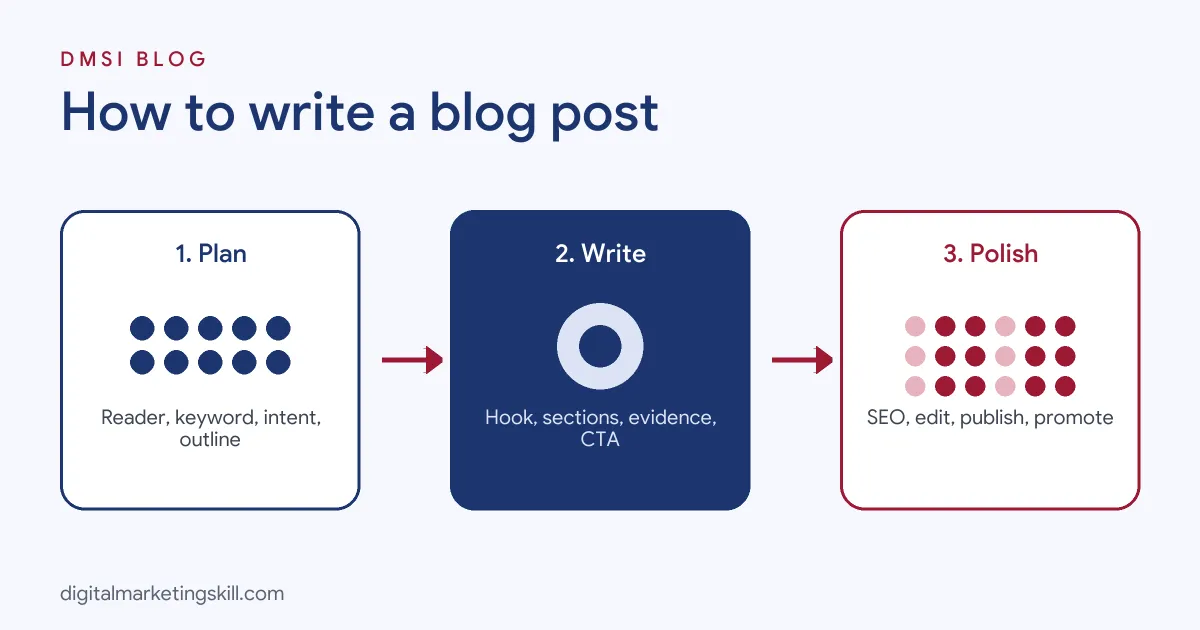
To write a blog post, pick one clear topic for a specific reader, check what already ranks for it, outline your main points, write a headline and opening that promise a clear benefit, fill the body with practical steps, examples and evidence under descriptive subheadings, then end with a summary and a call to action. Before publishing, optimise it for search with a focus keyword, title tag, meta description, internal links and image alt text, and edit it for clarity. After publishing, promote it through email, social media and communities. A good blog post answers the reader’s question better than anything else on page one, which is also what Google’s helpful content guidance rewards.
This guide walks you through the full process in 12 steps, with templates for different post types, advice on length, how to use AI responsibly, an editing checklist and the mistakes that hold beginners back. If you have not set up your blog yet, start with our guide on how to create a blog.
Key Takeaways
- Google’s guidance on helpful, reliable, people-first content says pages should be created primarily to help people, not to manipulate search rankings.
- Google says it rewards high-quality content however it is produced, including with AI, as long as it is helpful and not made mainly to game rankings.
- Matching search intent, the reason behind a search, is the first step to a post that ranks.
- Descriptive H2 and H3 subheadings make posts easier to scan for readers and easier to understand for search engines.
- Many bloggers follow an 80/20 approach: spend part of their effort writing and the larger share promoting and updating content.
In this guide
- What Most Blog Writing Guides Miss
- What Is a Blog Post?
- Before You Write: Three Decisions
- How to Write a Blog Post in 12 Steps
- Blog Post Templates by Type
- How Long Should a Blog Post Be?
- On-Page SEO Checklist for Blog Posts
- Can You Use ChatGPT or AI to Write a Blog Post?
- How to Promote Your Blog Post
- Updating and Repurposing Old Posts
- Common Blog Writing Mistakes
- Your Pre-Publish Checklist
- The One Rule for Blog Posts
- An Illustrative Case
- Frequently Asked Questions About Writing Blog Posts
- Your Next Step
What Most Blog Writing Guides Miss
Most beginner guides focus on the writing itself: write a catchy title, add subheadings, include images. That is useful, but it skips the reasons most blog posts get no readers.
- Most posts answer questions nobody is asking. Writing about what interests you is fine for a diary. A blog that wants readers starts with what people actually search for or ask about.
- Most posts ignore what already ranks. If ten excellent guides already cover a topic, a shorter, vaguer post will not compete. You need a better answer, a different angle or a more specific audience.
- Publishing is the halfway point, not the finish line. Posts grow through promotion, internal links and updates. Many bloggers spend more time on these than on writing.
What Is a Blog Post?
A blog post is an article published on a website’s blog, usually written in an informal, helpful tone and organised around a single topic or question. Blog posts can teach, inform, compare, review, entertain or share opinions.
For businesses, blog posts are a core part of content marketing. They attract visitors from search engines and social media, build trust and expertise, and move readers towards becoming subscribers or customers. For individuals, a blog can build a personal brand, support a freelance career or become an income stream.
Blog writing differs from other writing in three ways: it is written for screens and scanning, it is usually optimised for search engines, and it often aims to prompt an action, such as signing up, sharing or buying.
Before You Write: Three Decisions
Make these three decisions before you write a single sentence. They shape everything else.
- Who is the reader? Describe one specific person: a beginner who wants to start a side hustle, a small business owner who needs more customers, a marketing manager comparing tools. Write everything for them.
- What problem does this post solve? Write it as one sentence: “After reading this, the reader will be able to…” If you cannot finish that sentence, the topic is too vague.
- What should the reader do next? Subscribe, download a template, read a related post, book a call or buy. Decide now so the post builds towards it.
How to Write a Blog Post in 12 Steps
Step 1: Choose a Topic Your Reader Cares About
Good topics come from real questions. Look at:
- Questions customers, clients or followers ask you.
- Google’s autocomplete suggestions and “People also ask” boxes.
- Comments on popular posts and videos in your niche.
- Forums, Facebook groups and Quora threads.
- Keyword research tools that show search volume.
If you are still choosing a niche, our list of popular blog niche ideas can help.
Step 2: Do Keyword Research
Pick one main keyword, the phrase you most want the post to rank for, plus a few related phrases. For new blogs, long-tail keywords such as “how to start a food blog in Nigeria” are easier to rank for than broad terms such as “blogging.” Our glossary entry on keyword research explains the process, and our guide to keyword research tools compares options.
Step 3: Check Search Intent and What Already Ranks
Search your keyword on Google and study the top results. Ask:
- What format are they: how-to guides, lists, reviews, definitions or comparisons?
- What subtopics do they all cover?
- What is missing, outdated or unclear?
Match the format Google already rewards, because it reflects search intent, then aim to beat the top results on depth, clarity, examples or freshness.
Step 4: Create an Outline
List your main sections as H2 headings and supporting points as H3s. A simple structure works for most posts: introduction, the main steps or points, examples, common mistakes, FAQs and conclusion. A detailed outline, sometimes called a content brief, makes writing faster and keeps the post focused.
Step 5: Write a Working Headline
Your headline should include your keyword and promise a clear benefit. Proven formats include “How to [achieve result],” “[Number] Ways to [solve problem],” “[Topic]: The Complete Guide” and “[X] vs [Y]: Which Is Better?” Write a working version now and polish it at the end.
Step 6: Write an Opening That Hooks
The first few sentences decide whether people keep reading. Strong openings:
- Answer the main question directly, which also helps you win featured snippets.
- Name the reader’s problem and promise a solution.
- Share a surprising fact, short story or bold statement.
Avoid long introductions that delay the point. Readers came for an answer.
Step 7: Write the Body Section by Section
Work through your outline one section at a time. For each section, make one clear point, explain it simply and support it with an example, data, a screenshot or a short story. Use short paragraphs of two to four sentences, bullet points for lists and numbered steps for processes. Write in a conversational tone, as if explaining to a friend. If you get stuck, see our tips to overcome writer’s block.
Step 8: Add Evidence and Expertise
Back up claims with credible sources, real examples and your own experience. Google’s quality guidance emphasises E-E-A-T: experience, expertise, authoritativeness and trust. First-hand insights, original screenshots, case studies and expert quotes make your post more trustworthy and harder to copy.
Step 9: Add Visuals
Images, diagrams, tables, screenshots and short videos break up text and explain ideas faster. Compress images so pages load quickly and add descriptive alt text for accessibility and image search.
Step 10: Write a Strong Conclusion and Call to Action
Summarise the key takeaway in a few sentences, then tell readers what to do next. A clear call to action might invite them to download a checklist, join your newsletter, read a related guide or contact you.
Step 11: Optimise for SEO
Add your keyword to the title, first paragraph, at least one subheading, URL slug and meta description. Link to related posts on your site and to credible external sources. Our guide to blog SEO covers this in depth, and the checklist below summarises it.
Step 12: Edit, Proofread and Publish
Leave the draft for a few hours, then read it with fresh eyes. Cut unnecessary words, simplify long sentences, check facts and links, and read it aloud to catch awkward phrasing. Preview on mobile before publishing, because most readers will see it on a phone.
Blog Post Templates by Type
Different post types suit different search intents. Use these simple templates as starting points.
| Post type | Best for | Template |
|---|---|---|
| How-to guide | Teaching a process | Intro and answer, what you need, numbered steps, tips, mistakes, FAQ, CTA |
| List post | Ideas, tools, tips, examples | Intro, numbered items with short explanations, how to choose, CTA |
| Ultimate guide | Broad topics | Definition, why it matters, how it works, step-by-step, examples, tools, FAQ |
| Comparison | Choosing between options | Quick verdict, comparison table, pros and cons of each, who each suits |
| Review | Evaluating a product or service | Verdict, features, pricing, pros and cons, alternatives |
| Case study | Proving results | Challenge, approach, results with numbers, lessons |
| Opinion or trend post | Thought leadership | Clear stance, evidence, counterarguments, what it means for readers |
How Long Should a Blog Post Be?
There is no perfect length. Google does not reward word count for its own sake; it rewards content that fully answers the query. A simple definition might need 800 words, while a complete guide to a competitive topic might need 3,000 or more.
The best way to decide is to check what ranks. If the top results are detailed 2,500-word guides, a 600-word post probably will not compete. If they are short answers, a long post may frustrate readers. Aim to be as long as needed to be the most useful result, and no longer.
On-Page SEO Checklist for Blog Posts
| Element | What to do |
|---|---|
| Title tag | Include the main keyword near the start; keep it around 50 to 60 characters |
| Meta description | Summarise the benefit in about 150 characters with the keyword |
| URL slug | Short, readable and keyword-focused, such as /how-to-write-a-blog-post/ |
| Headings | One H1, descriptive H2s and H3s, keyword in at least one |
| First paragraph | Answer the main question and use the keyword naturally |
| Internal links | Link to two to five related posts on your site |
| External links | Cite credible sources for statistics and claims |
| Images | Compressed files, descriptive file names and alt text |
| FAQ section | Answer related questions from “People also ask” |
| Mobile and speed | Check the post loads quickly and reads well on phones |
If you use WordPress, an SEO plugin can help you check these elements. Our guide to WordPress SEO explains setup.
Can You Use ChatGPT or AI to Write a Blog Post?
Yes, with care. Google has said it focuses on the quality of content rather than how it is produced, and that using AI is not against its guidelines when the content is helpful and created for people. Mass-producing low-value pages to manipulate rankings, whether with AI or not, is against Google’s spam policies.
Good ways to use AI in blog writing:
- Brainstorming topics, angles and headline options.
- Creating a first outline you then improve.
- Drafting sections you then rewrite in your own voice.
- Summarising research and suggesting FAQs.
- Checking grammar and readability.
What AI cannot do for you: provide genuine experience, original examples, verified facts and a distinctive voice. Always fact-check AI output, add your own insights and edit until it sounds like you. Our guide to AI writing tools compares popular options.
How to Promote Your Blog Post
Many experienced bloggers follow an 80/20 approach: spend a smaller share of effort creating content and the larger share promoting and improving it. Ways to promote a new post:
- Email: send it to your newsletter subscribers with a short teaser.
- Social media: share it on LinkedIn, X, Facebook and Instagram, adapting the message for each platform.
- Pinterest: create vertical Pins for evergreen how-to and list posts.
- Communities: share genuinely helpful answers that link to your post where relevant and allowed.
- Internal links: link to the new post from older, related posts on your site.
- Outreach: tell people or brands you mention; they may share it.
Our guides to increasing blog traffic and content promotion share more tactics.
Updating and Repurposing Old Posts
Your best future traffic may come from posts you have already written. Every few months, review posts that rank on page two or have lost traffic. Update facts, add new sections, improve headings and refresh the publish date when the changes are substantial. You can also turn a strong post into a carousel, short video, email series or infographic, which is content repurposing. Well-maintained evergreen content can bring readers for years.
Common Blog Writing Mistakes
- Writing for yourself instead of the reader. Start with their question, not your interests.
- Long, slow introductions. Get to the point within the first few sentences.
- Walls of text. Use short paragraphs, subheadings and lists.
- Vague advice. Replace general tips with specific steps and examples.
- No keyword or intent research. Posts that nobody searches for get no search traffic.
- No call to action. Readers should know what to do next.
- Publishing without editing. Typos and errors undermine trust.
- Never promoting or updating. Even great posts need distribution and maintenance.
Your Pre-Publish Checklist
- Does the post answer one clear question for one clear reader?
- Does the opening answer the question or promise a clear benefit?
- Are the headings descriptive and logical?
- Are claims backed by sources, examples or experience?
- Are paragraphs short and easy to scan on mobile?
- Are the title, meta description, slug and alt text optimised?
- Are there internal links to related posts?
- Is there a clear call to action?
- Have you proofread it and checked every link?
- Do you have a plan to promote it this week?
The One Rule for Blog Posts
Be the most useful answer on the page. Before you publish, imagine your post next to the top three results for its keyword. If a reader would choose yours because it is clearer, more practical or more complete, you have written a blog post worth ranking.
An Illustrative Case
Imagine a freelance accountant in Manchester who starts a blog to win small business clients. Her first posts, such as “Thoughts on the new tax year,” get almost no visitors.
She changes approach. She lists the questions clients ask her most, checks which ones people search for and finds “how to register as self-employed” and “what expenses can a sole trader claim.” For each, she studies the top results, outlines a clearer step-by-step guide with real examples and checklists, opens with a direct answer and ends with an invitation to book a free consultation.
She shares each post on LinkedIn and in her newsletter, and links new posts from older ones. Six months later, two of her guides rank on Google’s first page and bring in several enquiries a month. She did not write more; she wrote for the questions people were already asking.
This example is illustrative, not a real person, but it reflects how intent-led writing turns a blog into a source of clients.
Frequently Asked Questions About Writing Blog Posts
What is blog writing?
Blog writing is creating articles for a website’s blog, usually in a helpful, conversational style, to inform, teach or persuade readers and attract traffic from search and social media.
How do I write my first blog post?
Choose a question your target reader asks, research what already ranks, outline your points, write a clear headline and opening, fill in each section with practical detail, add a call to action, edit and publish.
What is the 80/20 rule in blogging?
It is the idea of spending a smaller share of your time writing and a larger share promoting, linking and updating content, because distribution is what brings readers.
Can I use ChatGPT to write a blog?
Yes, as a helper for ideas, outlines and drafts. Google focuses on content quality, so fact-check everything, add your own experience and edit so it is genuinely helpful.
Do bloggers make money?
Many do, through ads, affiliate links, sponsored posts, digital products, services and courses. It usually takes consistent effort over months or years. See our guide to making money from blogging.
How long should a blog post be?
Long enough to fully answer the reader’s question. Check the top-ranking posts for your keyword to judge the depth needed.
How often should I publish blog posts?
Consistency matters more than frequency. One high-quality post a week or every two weeks is a realistic start for most individuals and small businesses.
What should a blog post include?
A clear headline, a strong opening, descriptive subheadings, practical content with examples, visuals, internal links, a conclusion and a call to action.
How do I make my blog post rank on Google?
Target a keyword with clear intent, match the format of top results while offering more value, optimise on-page SEO, earn links and keep the post updated.
How do I get people to read my blog?
Write on topics people search for, promote each post through email and social media, link related posts together and build an email list of readers who want more.
Your Next Step
Blog writing is a valuable skill for content writers, marketers and anyone building an online business. The Master Diploma in Digital & AI Marketing at Digital Marketing Skill Institute includes a WordPress and SEO track where you build a website and rank it with an SEO content plan, alongside AI-powered Social Media Management and Advertising, Lead Generation and Email Automation, and Google.
From day one, you work on a real U.S. company’s project through the U.S. Project Internship, so you finish with real results and a verified U.S. work reference letter. You also get unlimited one-on-one coaching. The program carries dual US and UK accreditation, is recognised in more than 100 countries, and runs 100% online over three months.
You can build those skills wherever you live, anywhere in your country. Read student reviews, then apply for the 65% partial scholarship to see if you qualify.
Every claim in this guide was checked against its source before publication: Google Search Central guidance on helpful content, AI-generated content and spam policies. The case above is an illustrative example, not a real result.